SEARCH
  • [:en]Recent Posts[:af]Onlangse bydraes

  • [:en]Categories[:af]Kategorieë

  • [:en]Archives[:af]Argiewe

Communication

[:en]Selfie: Is it worth the risk?[:af]Selfies: die risiko werd?[:]

Thursday, March 31st, 2016

[:en]

We don’t bat an eyelid anymore when someone takes a photo of themselves in a public place. Selfie-sticks, aka  Naricissticks, have become the new normal.. Estimates of daily selfie posts range from one million to as high as 93 million on Android devices alone, according to Michael Weigold of the University of Florida. (http://businesstech.co.za

Yes, it’s sometimes irritating and obtrusive, but surely it’s just a bit of harmless fun?

Quite the opposite seems to be true in some cases.

In February tourists in Argentina removed an endangered baby La Plata dolphin from the sea to take pictures of themselves with it. The animal died from sheer trauma and heat exhaustion. 

In March a tourist dragged a swan from a lake in Macedonia to take a selfie. Again the animal died.

The selfie trend not only endanger the lives of animals, but also humans. (though some of these might qualify for the Darwin awards)

In 2015 Russia launched a campaign to warn its population against the dangers of selfies, called “A cool selfie could cost you your life.” The reason? Apparently an estimated hundred Russians have died trying to take photos of themselves in dangerous situations. This includes a woman shooting herself, two men blowing themselves up with a hand grenade and people taking pictures on top of moving trains.

India also has a rising selfie problem, with more citizens dying while taking selfies than any other country in the world. Mumbai now has “no-selfie zones.”

In Seville, Spain, a Polish tourist fell of a bridge while trying to take a selfie. In May of 2014 a Cessna pilot lost control of the plane and killed himself and all his passengers.

On Tuesday an Egyptian Airline plane was hijacked and a British man used the opportunity to take a selfie with the hijacker. He reckoned he had nothing to lose at that stage. Today another Brit had to be rescued from Britain’s highest mountain, Ben Nevis. She was trying to take a selfie on the mountain and was inadequately dressed for the cold conditions. More on selfie-related deaths on CNN.

What would drive a person to risk endangering himself for the sake of a “cool”photo? 

Maybe the need to constantly prove and compare ourselves to other people? Social media provides an easy platform where almost instant feedback and possibly approval is given. 

Michael Weigold of the University of Florida published an article in The Conversation, in which he explores this question. He also mentions research done by psychologist Gwendolyn Seidman.

Dr Seidman suggests that there is a link between narcissism and selfies and she bases her statement on two studies looking specifically at Facebook selfies. Read dr Seidman’s article in Psychology Today and decide for yourself. Also let us know what you think of selfies and why you think they are so popular?

[:af]

Die selfie is so algemeen, ons merk nie eers meer op as iemand in die openbaar `n foto neem met `n selfie-stok, of te wel, `n  Naricisstick, nie. Volgens Michael Weigold, van die Universiteit van Florida, word beraam dat daagliks tussen een miljoen en 93 miljoen selfies geplaas word met Android-fone alleen. (http://businesstech.co.za

Ja, dit is soms irriterend en indringerig, maar dis tog net onskuldige pret?

Die teenoorgestelde blyk waar te wees in sommige gevalle. 

Vanjaar in Februarie is `n bedreigde La Plata babadolfyntjie in Argentinië dood as gevolg van trauma en hitte-uitputting, omdat `n groep toeriste selfies daarmee op die strand wou neem.

In Maart gryp `n toeris `n swaan uit `n meer in Macedonië vir `n selfie en kort daarna beswyk dit.

Selfs al is jy nie `n dierliefhebber nie, bedreig die selfie ook menselewens (hoewel ‘n paar van hierdie gevalle dalk kwalifiseer vir Darwin-toekennings?)

In 2015 loods Rusland `n veldtog om te waarsku teen die gevare van selfies  — “A cool selfie could cost you your life”. Inderdaad.

Blykbaar is `n honderd Russe reeds dood as gevolg van selfies. Dit sluit `n vrou in wat haarself per ongeluk geskiet het, twee mans wat hulle misgis het met `n handgranaat en ander wat waaghalsig bo-op bewegende treine poseer het.

In Seville, Spanje, het `n Poolse toeris van `n brug geval terwyl sy `n selfie wou neem. In Mei 2014 verloor `n Cessna-loods beheer oor sy vliegtuig en verongeluk homself en sy passasiers — vir `n selfie.

Dinsdag is `n Egyptian Airline-vliegtuig gekaap en `n Britse man het die geleentheid aangegryp om `n selfie saam met die kaper te neem. Hy’t gereken hy’t in elk geval niks om te verloor nie. 

Gister moes `n Britse vrou gered word vanaf Brittanje se hoogste berg, Ben Nevis, omdat sy nie behoorlik toegerus was vir die weertoestande toe sy `n selfie wou neem nie. Meer oor selfie-verwante sterftes op CNN.

Wat dryf iemand om homself in gevaar te stel om bloot `n “cool” foto te neem?

Dalk die behoefte om onsself te bewys en vergelyk met ander? Met sosiale media is dit net soveel makliker om te doen en dadelik kommentaar en reaksie te kry.

Michael Weigold van die Universiteit van Florida het `n artikel in The Conversation publiseer waar hy hierdie vraag ondersoek. Hy verwys ook na navorsing deur die sielkundige Gwendolyn Seidman.

Dr Seidman beweer dat daar `n skakel tussen narsissisme en selfies is en baseer haar navorsing op twee steekproewe wat fokus op Facebook-selfies. Lees gerus dr Seidman se artikel in Psychology Today en besluit self. Laat weet ons wat jy dink van selfies en hoekom jy dink dis so populêr?

[:]

[:en]A companion for peace of mind[:af]`n Virtuele metgesel vir jou gemoedsrus[:]

Thursday, March 31st, 2016

[:en]

companion2We can’t do much about the crime and violence in our country, but we can utilise technology to try and improve our safety.

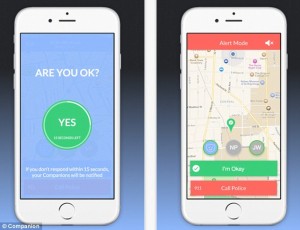
One example of this is an app created by five University of Michigan students who were concerned about safety on their campus – something we can identify with after recent incidents on our own campus. 

The Companion app tracks your route as you head home and allows you to add a virtual companion, one of your contact, whether it’s a friend, family member or boyfriend/girlfriend. The concept is that this will make you feel a bit safer and less anxious while walking alone. 

The apps allows the other person to monitor your route by GPS and also provides the means to raise an alarm if something should happen. Apart from tracking you via GPS, it also occasionally asks you whether you are ok. If you don’t reply, it will then notify your contact. The same action is executed when a trip is taking longer than the expected time, you start running or your earphones are pulled from the device. You then have 15 seconds to respond before an alert is send. 

Companion also has two alert buttons. One reading “I Feel Nervous”, which will contact your companion and “Call the Police”, which will alert emergency services. One of the biggest advantages of the app is it’s ability to show exactly where a user is, so he/she can easily be located by GPS coordinates.

Users of Companion type in the address of the destination on the app and click “Start a Trip”. You are then prompted to “Add Companions” from your contacts. The contact receives a text to download the app, but can also just click a link to track the route on a live map.

Once you are home safe, the app will send a message to your companion. 

Companion can be downloaded for free on iOS and Android.


[SOURCES: http://gadgets.ndtv.com, http://www.theguardian.com, http://fortune.com]


[:af]

companion2

Ons kan nie veel doen aan die geweld en misdaad in ons land nie. Maar ons kan wel tegnologie inspan om dit te bestuur.

Een voorbeeld hiervan is `n toepassing wat vyf studente ontwerp het, omdat hulle bekommerd was oor veiligheid op hulle die Universiteit van Michigan-kampus.

Die Companion-toepassing volg jou roete soos jy huistoe beweeg en laat jou  ʼn virtuele metgesel, jou wederhelfte, `n vriend of vriendin of ʼn familielid is, byvoeg op jou roete. Die idee is dat dit jou veiliger en minder onrustig sal laat voel wanneer jy alleen moet stap.

Die toepassing laat jou metgesel jou roete via GPS monitor volg en bied ook die platform om iemand vinnig in kennis te stel in geval van ʼn noodgeval . Behalwe vir GPS sporing, vra die toepassing ook sporadies of jy nog ok is. Indien jy nie vinnig genoeg reageer nie, word jou virtuele metgesel in kennis gestel.

Dieselfde aksie word uitgevoer wanneer die roete ongewoon langer neem, jy begin hardloop of as jou oorfone skielik uitgeruk word. Jy kry 15 sekondes om te reageer voordat die alarm aktiveer word.

Companion het twee alarmknoppies. “I Feel Nervous” kontak jou metgesel en “Call the Police” bel outomaties nooddienste. Een van die grootste voordele van die toepassing is sy vermoeë om aan te dui waar jy is, sodat jy maklik deur middel van GPS koördinate opgespoor kan word.

Om Companion te begin gebruik, tik jou eindbestemming se adres in en kliek op “Start a Trip”. Jy sal gevra word om ʼn persoon by te voeg uit jou kontaklys. Die persoon ontvang ʼn SMS waarmee die toepassing afgelaai kan word of kliek net op ʼn skakel om die roete in werklike tyd op ʼn kaart te volg.

Sodra jy veilig tuis is, sal  ʼn boodskap na jou kontakpersoon gestuur word.

Companion kan gratis afgelaai word vir iOS en Android.


[BRONNE: http://gadgets.ndtv.com, http://www.theguardian.com, http://fortune.com]

[:]

[:en]The blurry line between private and professional[:af]Die vae lyn tussen tussen privaat en professioneel[:]

Wednesday, February 17th, 2016

[:en]

Microsoft recently released a plug-in which integrates information from your social network pages, for example Facebook and LinkedIn, with your Outlook client.facebook

At face value this seems like a good idea – a handy piece of software which enables you to keep up with you friends’ doings. It can also provide valuable information on potential clients.

Unfortunately it could become problematic when your professional colleagues and contacts have access to information which could cause you potential embarrassment. 

Most Outlook users use it as a professional e-mail platform. With OSC (Outlook Social Connector) you share your personal information with your professional network, possibly without even knowing. The line between professional and personal life suddenly seems a bit blurry.

If you’ve installed OSC, your social network information will be displayed at the bottom of the Outlook window in a small People Pane. The software extracts information from your social network profiles based on the e-mail addresses you have associated with the profiles.

This information can include profile photos, status updates and your most recent posts. The information will be displayed even if your e-mail address is hidden from other users on your social network. 

Your social network information can, depending on your security settings, be seen by OSC users you send mail to, even if the OSC user isn’t necessarily a Facebook friend. The visible information displayed in the People Pane BEPAAL by the e-mail addresses you have linked to your social networks and the privacy settings on your social network accounts.

To avoid that your personal information is seen by your colleagues through OSC, remove your work address on all your social network profiles. Also make sure your privacy settings is set up so OSC can’t pick up your information. For example, set it up in such a way that your information is only visible for friends and family and not publically displayed.

Preferably use a separate address for personal e-mails and try to use your @sun address only for work related correspondence. Rather create a Gmail address.

Besides causing embarrassment, sharing personal information can also result in serious ethical and professional repercussions. Remember, any OSC user can potentially, through e-mail, see all social network information linked to that account. Without you knowing, you might share more with your colleagues than you think. 

OSC is available for Outlook 2003, Outlook 2007, and Outlook 2010 and integrates Outlook’s e-mail functions with social network applications such as Facebook, LinkedIn, Windows Live Messenger and MySpace. 

IT strongly advises users NOT to use OSC as the risk involved are much higher than the benefits it promises.


[SOURCE: http://www.primerus.com]


[:af]

facebookMicrosoft het onlangs ʼn inprop-program (plug-in) vrygestel wat inligting vanaf jou sosiale netwerkbladsye, byvoorbeeld Facebook en LinkedIn, integreer met Outlook. 

Op die oog af lyk dit na ʼn nuttige stukkie sagteware wat, op ʼn enkele platform, jou op hoogte hou van jou vriende se doen en late. Terselfdertyd kan dit handige inligting verskaf oor potensiële kliënte.

Dit mag egter problematies raak as jou professionele kollegas en kontakte toegang het tot inligting wat jou in die verleentheid kan plaas. 

Outlook is vir die meeste gebruikers ʼn professionele e-pos platform. Met OSC (Outlook Social Connector) deel jy onbewustelik jou persoonlike inligting met jou professionele netwerk. Die lyn tussen jou professionele en persoonlike lewe is skielik minder duidelik.

As jy die OSC installeer het, sal jou sosiale netwerk inligting onderaan die Outlook-venster in ʼn klein People Pane verskyn. Die sagteware kry inligting van jou sosiale netwerke profiele, gebaseer op die e-posadres(se) wat jy gekoppel het aan daardie sosiale netwerk profiel. Die inligting kan profielfotos, statusopdaterings en jou onlangse skrywes, insluit en vind plaas selfs al is jou e-posadresse versteek vir ander gebruikers op sosiale media platforms. Jou sosiale netwerk inligting kan, afhangende van jou sekuriteitsverstellings, gesien word deur OSC-gebruikers vir enigiemand vir wie jy e-pos stuur, selfs al is die OSC-gebruiker nie noodwendig ʼn Facebook vriend nie. 

Die sigbare inligting wat verskyn in die People Pane word bepaal deur die e-posse adresse wat jy gekoppel het aan jou sosiale netwerke en jou privaatheidsverstellings op jou sosiale netwerkrekeninge. 

Om te voorkom dat jou persoonlike inligting deur jou kollegas gesien word deur OSC, verwyder jou werksadres op al jou sosiale netwerk profiele. Sorg ook dat jou privaatheidverstellings so gestel is dat OSC dit nie sal kan optel nie. Byvoorbeeld stel dit dat jou inligting net sigbaar is vir jou vriende en familie, nie public nie.

Onthou om verkieslik ʼn aparte adres, byvoorbeeld Gmail, vir jou persoonlike e-posse aan te skaf en jou @sun adres te gebruik nie. 

Buiten dat die situasie jou in die verleentheid kan bring, kan dit ook ernstige etiese en professionele gevolge inhou. Onthou, enige OSC-gebruiker kan potensieel d.m.v. e-pos alle sosiale netwerk inligting wat aan daardie rekening gekoppel is, sien. Jy deel dalk meer met jou kollegas as wat jy dink. 

OSC is beskikbaar vir Outlook 2003, Outlook 2007, en Outlook 2010, en integreer Outlook se e-pos funksies met sosiale netwerktoepassings soos Facebook, LinkedIn, Windows Live Messenger, and MySpace.

IT beveel nie die gebruik van OSC aan nie aangesien die risikos daaraan verbonde veel hoër is as die voordele wat daaruit geput kan word.


[BRON: http://www.primerus.com]


[:]

[:en]Periscope: News as it happens[:af]Periscope: Nuus, soos dit gebeur[:]

Friday, February 5th, 2016

[:en]

Twitter has the reputation for being the fastest unofficial real-time news update service. But what if reading about what’s happening in the world is not enough? What if you want to witness events as they happen?

Periscope is a live video streaming app for iOS and Android developed by Kayvon Beykpour and Joe Bernstein.

periscope

“… we became fascinated by the idea of discovering the world through someone else’s eyes. What if you could see through the eyes of a protester in Ukraine? Or watch the sunrise from a hot air balloon in Cappadocia? It may sound crazy, but we wanted to build the closest thing to teleportation. While there are many ways to discover events and places, we realized there is no better way to experience a place right now than through live video. A picture may be worth a thousand words, but live video can take you someplace and show you around.”

Periscope gives ordinary people another platform to become citizen journalists. Now everyone can broadcast news and you don’t have to depend on television stations for your world-wide news update. Of course Periscope isn’t used only for news events. As with other social media platforms, the range of topics is wide and sometimes border on the ridiculous.

Scopers (Periscope’s nickname for their users) can broadcast anything they want – whether it’s a trip to the beach or making dinner. Their scope is broadcasted in real-time and remains available for 24 hours. However, you can save streams to view later – an advantage Periscope holds over their competitor, Meerkat. Viewers can comment in real-time and messages scroll on the broadcasted video, visible to other viewers. If you enjoy the broadcast, you can throw hearts at it. (yes really) Read more on The Verge.

Beykpour and Bernstein started their company in February 2014. Just over a year later, in January 2015, before it was officially launched, Twitter bought the app. On 12 January Twitter integrated Periscope into its timeline, enabling you to watch and broadcast videos via your own Twitter timeline.

In another ground-breaking move Periscope is now compatible with the GoPro hero 4. Once a GoPro is connected to your phone, Periscope automatically activates and GoPro footage is streamed directly to Periscope. 

You can either download the Periscope app from the Google Play store or browse to their TV channel, PeriscopeTV.  Watch Kayvon Beykpour explain Periscope to talk-show host Stephen Colbert below or read Socialmediaweek’s beginners guide.

[SOURCES: www.wikipedia.org, www.theverge.com]


[:af]

Twitter is alombekend as die vinnigste direkte manier om op hoogte te bly van nuus van regoor die wêreld. Maar gestel jy wil nie net lees nie, maar ook sien hoe gebeure ontvou? 

Periscope is ʼn lewendige videostroom toepassing wat ontwikkel is vir iOS en Android deur Kayvon Beykpour en Joe Bernstein.

periscope

“… we became fascinated by the idea of discovering the world through someone else’s eyes. What if you could see through the eyes of a protester in Ukraine? Or watch the sunrise from a hot air balloon in Cappadocia? It may sound crazy, but we wanted to build the closest thing to teleportation. While there are many ways to discover events and places, we realized there is no better way to experience a place right now than through live video. A picture may be worth a thousand words, but live video can take you someplace and show you around.”

Periscope gee aan gewone mense ʼn addisionele platform om nuus mee te rapporteer. Feitlik enigiemand kan nou nuus uitsaai en jy hoef nie meer op televisiestasies te vertrou vir wêreldnuus nie. Natuurlik word Periscope nie net vir nuus gebruik nie.  Net soos met ander sosiale netwerke is die verskeidenheid wyd en kan dit ook grens aan belaglik. 

Scopers (Periscope se noemnaam vir hulle gebruikers) kan enigiets uitsaai wat hulle wil – of dit ʼn uitstappie strand toe is of ʼn kosmaakdemonstrasie. Deel van die kritiek op Periscope is ook dat daar geen sensuur toegepas word nie en kopiereg het vroeg reeds kop uitgesteek as ʼn potensiële probleem. 

Die scope word lewendig uitgesaai en bly beskikbaar vir 24 uur. Uitsendings kan gebêre word sodat jy dit later kan kyk, ʼn voordeel wat Periscope bo Meerkat, sy kompetisie, het. Kykers kan tydens uitsendings kommentaar lewer en boodskappe verskyn op die skerm tydens die uitsending sodat almal dit kan sien. Die scoper kan ook met hartjies gooi word as sy uitsending populêr is. (ja regtig) Lees meer op The Verge.

Beykpour en Bernstein het hulle maatskappy in Februarie 2014 begin en skaars ʼn jaar later, in Januarie 2015 – selfs voordat dit bekendgestel is – het Twitter die toepassing gekoop. Op 12 Januarie vanjaar het Twitter Periscope integreer in sy tydlyn , sodat jy nou direk vanaf Twitter uitsendings kan maak en kyk. 

Verlede week is Periscope se baanbreker-status nog meer verstewig, toe aangekondig is dat dit nou ook versoenbaar is met die GoPro hero 4. Sodra ʼn GoPro gekoppel word aan jou foon, word Periscope outomaties aktiveer en die GoPro se beeldmateriaal word direk na Periscope versend. 

Jy kan die Periscope toepassing aflaai op die Google Play store of rondkyk op hul tv-kanaal, PeriscopeTV.  Kyk ook onder hoe Kayvon Beykpour Periscope aan kletsprogram-aanbieder Stephen Colbert verduidelik hoe dit werk of, as jy ʼn scoper wil word, bestudeer Socialmediaweek se beginnersgids.

[SOURCES: www.wikipedia.org, www.theverge.com]

[:]

[:en]IT HUB – your one-stop[:af]IT HUB – jou eenstop [:]

Wednesday, December 2nd, 2015

[:en]

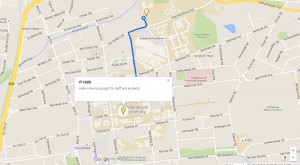
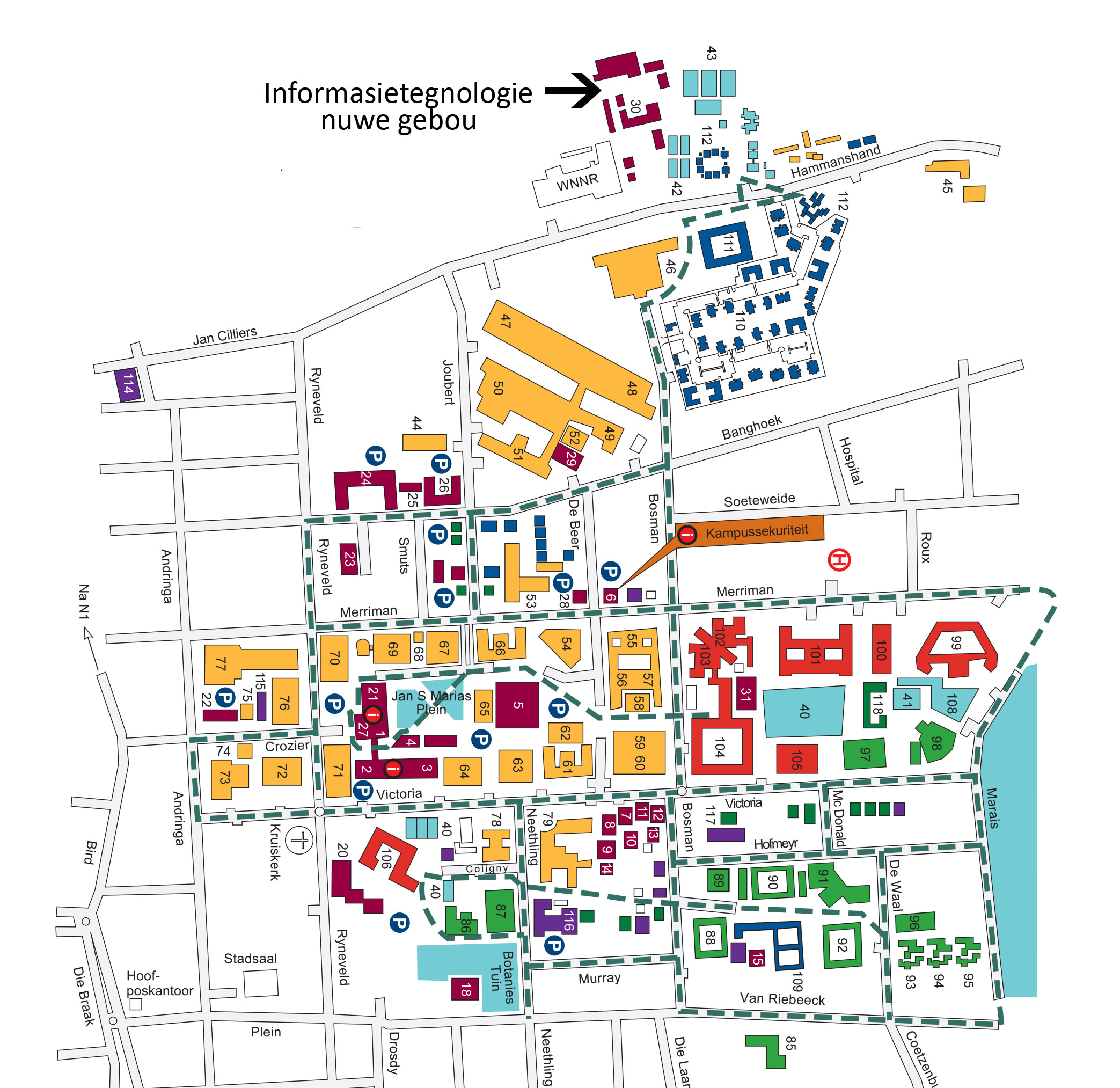
IT-mapDid you know that you can drop your PC off at the IT HUB, on central campus, instead of dragging it all the way to the main IT building?

All equipment will still be serviced at the main IT building, but minor adjustments, for example registering a personal device on the network, passwords, etc. can be done at the IT HUB.

Staff’s personal devices will be handled at the IT HUB or IT Workshop and staff can register 5 mac addresses (e.g. smart phones, tablets and laptops) on the network. These devices will receive limited support at the IT HUB.

kaartCONTACT US

Tel:  021-808 4367
Skype: ITStellenUni
E-mail: helpinfo@sun.ac.za (for general enquiries) or help@sun.ac.za (to log an error)
Twitter: @itstellenuni

Google Maps

Full instructions on how to log an error are available here. Please supply the correct information otherwise the call will not register on the system.

All our services are listed on our Service Catalogue and if you are brave enough, you can consult our Self-help wiki.

[:af]

IT-mapHet jy geweet jy kan jou rekenaar by die IT HUB, wat sentraal op kampus geleë is, afgee in plaas van om dit na die hoof IT-gebou te bring?

Personeel kan hul toerusting by die IT HUB afgee en sal bygestaan kan word met sekere funksies. Alle toerusting word steeds herstel by die hoof IT-gebou, maar kleiner funksies soos die registrasie van toestelle, wagwoorde, ens. kan onmiddellik by die IT HUB gedoen word.

Personeel se persoonlike toerusting kan hanteer word by die IT HUB of IT-werkswinkel en personeel kan 5 persoonlike toestelle (byvoorbeeld slimfone, tablette en skootrekenaars) op die netwerk registreer. Beperkte ondersteuning sal aan die toestelle gebied word. 

kaart

KONTAK ONS

Tel:  021-808 4367
Skype: ITStellenUni
E-pos: helpinfo@sun.ac.za (vir algemene navrae) of help@sun.ac.za (om ʼn fout aan te meld)
Twitter: @itstellenuni

Google-kaarte

Kliek hier vir instruksies om ʼn fout te rapporteer. Verskaf asseblief die korrekte inligting anders sal die versoek nie op die stelsel aangeteken kan word nie.  

Al ons dienste is gelys op ons Dienskatalogus en as jy braaf genoeg is, kan jy ook gebruik maak van ons  Self-help wiki


[:]