SEARCH
  • [:en]Recent Posts[:af]Onlangse bydraes

  • [:en]Categories[:af]Kategorieë

  • [:en]Archives[:af]Argiewe

Communication

Apps to feed the soccer addictionToepassings vir die sokkerverslaafdes

Friday, June 27th, 2014

If you still don’t know there’s a World Cup soccer tournament running in Brazil, I suspect you’re hibernating somewhere on the outskirts of Mongolia.

The 2014 FIFA World Cup is the 20th FIFA World Cup tournament and (obviously!) an international tournament for men’s soccer. This year the tournament kicked off on 12 June with a group phase and it will come to an end on 13 July when the final will be played.

It’s the second time Brazil hosts this spectacular event – the first was way back in 1950. It’s also the first time since 1978, when it was held in Argentina, that it’s held in South America.

The national teams of 31 countries qualified for this year’s World Cup. Unfortunately South Africa isn’t one of them, so you’ll have to pick another team. A total of 64 matches will be played in 12 cities across Brazil.

If you’ve been bitten by the soccer bug, you’ll know how important it is to keep up to date of all the latest news and match information. With the help of www.techradar.com we selected ten handy (and free!) apps to ensure you don’t suffer from soccer FOMO.

1 Official FIFA application

Price: Free
Available at:  App Store | Google Play

FIFA’s official application not only covers the World Cup, but all soccer events worldwide. This app gives you access to match schedules, but also cool extra information like team profiles. You can even choose your favourite team and keep tabs on their progress.

2 ESPN FC Soccer & World Cup

Price: Free
Available at: App Store | Google Play

Another app addressing all soccer events – ideal for avid soccer supporters. In addition to the standard information, it also supplies videos and analysis of matches.

3 World Soccer Finals

Price: Free
Available at:  App Store | Google Play

A perfect solution for the obsessive soccer enthusiast with loads of information, including yellow and red card and player information. It can also send notifications directly to your phone.

 4 World Cup 2014 Brazil

Price: Free
Available at: Google Play

This Android app will be your choice if you’re a closet statistician. It also has information on referees, historical comparisons and news on future World Cups.

5 2014 Table

Price: Free
Available at: Google Play

The name says exactly what this app does. It displays results in an easy table format and is perfect for accessing information quickly.

6 LiveSoccer World Football Cup

Price: Free
Available at: Google Play

Watch live matches with customisable alerts of results as they happen. The app has an extensive interface, but still remains user friendly.

7 Sofascore

Price: Free
Available at: Windows Phone App Store

Ideal for a Windows phone with live updates.

8 Squawka

Price: Free
Available at: App Store

Another app for the soccer fan who likes to get his facts straight.  Squawka gives you all the statistics to back up an argument when you need to.

9 TeamStream

Price: Free
Available at: App Store

TeamStream is a news and information service by The Bleacher Report which collects any relevant soccer news from across the world.

10 BBC Sport

Price: Free
Available at: App Store | Google Play

The BBC Sport app gives live text commentary on all the matches and access to Radio 5 bulletins.

If you have a lot of data at your disposal, you might want to consider the Live Soccer TV App.

So, now you have no excuse to miss out on this huge event. The only problem is finding a team to back …


[SOURCES: www.techradar.com & www.wikipedia.com]

As jy teen die tyd nog nie weet dat daar `n Wêreldbeker sokkertoernooi aan die gang is in Brasilië nie, het ek `n sterk vermoede jy hiberneer erens in die uithoeke van Mongolië.

Die 2014 FIFA Wêreldbeker, die 20ste FIFA Wêreldbeker, is `n wêreldtoernooi vir manssokker. Die jaar se toernooi het op 12 Junie afgeskop met `n groepfase en sal op 13 Julie tot `n einde kom wanneer die finaal gespeel word. 

Brasilië het reeds voorheen gasheer gespel vir die groot geleentheid – meer as 60 jaar gelede in 1950. Die laaste keer dat die geleentheid in Suid-Amerika gehou is, was in 1978 toe Argentinië die toernooi gehuisves het. 

31 lande se nasionale spanne het gekwalifiseer vir die Wêreldbeker en hulle sal in `n totaal van 64 wedstryde in 12 stede dwarsoor Brasilë meeding. Ongelukkig is Suid-Afrika natuurlik nie een van hulle nie, so jy sal maar `n ander span moet kies.

As die sokkerkoors jou gebyt het, weet jy hoe belangrik dit is om op datum te bly met al die nuus en wedstrydinligting. Ons het met die hulp van www.techradar.com vir jou tien handige (en gratis!) toepassings uitgesoek om te voorkom dat jy aan sokker-FOMO ly. 

1 Amptelike FIFA toepassing

Prys: Gratis
Beskikbaar by:  App Store | Google Play

FIFA se amptelike toepassing dek nie net die Wêreldbeker nie, maar inderdaad alle sokker.  Die toepassing bied jou toegang tot die wedstrydskedule, maar ook lekker ekstra inligting soos spanprofiele. Jy kan selfs jou gunsteling span kies en hul vordering dophou. 

2 ESPN FC Soccer & World Cup

Prys: Gratis
Beskikbaar by: App Store | Google Play

Ook `n toepassing wat alle sokker dek – dus ideaal vir sokkerliefhebbers wat nie net Wêreldbeker-kykers is nie. Buiten vir die standaardinligting, beskik dit ook oor videos en ontledings van die wedstryde.

3 World Soccer Finals

Prys: Gratis
Beskikbaar by:  App Store | Google Play

Die perfekte toepassing vir die obsessiewe sokkerkyker met massas inligting, insluitende geel- en rooikaarte, statistieke en spelerinligting. Dit kan ook kennisgewings direk na jou foon stuur.

 4 World Cup 2014 Brazil

Prys: Gratis
Beskikbaar by: Google Play

Hierdie Android-toepassing is ideaal as jy hou van statistieke. Dit bevat ook inligting oor skeidsregters, historiese vergelykings en nuus oor toekomstige Wêreldbekers.

5 2014 Table

Prys: Gratis
Beskikbaar by: Google Play

Die naam sê presies wat dié toepassing doen. Dit wys net eenvoudig die uitslae in `n maklike tabelformaat. Ideaal as jy net die basiese inligting soek. 

6 LiveSoccer World Football Cup

Prys: Gratis
Beskikbaar by: Google Play

Kyk na lewendige wedstryde met pasgemaakte kennisgewings van resultate soos dit gebeur. Die toepassing het `n deeglike koppelvlak, maar is terselfdertyd gebruikersvriendelik.

7 Sofascore

Prys: Gratis
Beskikbaar by: Windows Phone App Store

Ideaal vir `n Windows-foon met lewendige opdaterings.

8 Squawka

Price: Free
Beskikbaar by: App Store

Nog `n toepassing vir die sokker-entoesias wat hou daarvan om sy feite reg te hê. Squawka gee vir jou al die statistieke om argument te staaf indien nodig.

9 TeamStream

Prys: Gratis
Beskikbaar by: App Store

TeamStream is `n nuus- en inligtingsdiens van The Bleacher Report en versamel al die relevante sokkerinligting van regoor die wêreld vir jou op een plek.

10 BBC Sport

Prys: Gratis
Beskikbaar by: App Store | Google Play

Die BBC Sport toepassing gee lewendige tekskommentaar op al die wedstryde en toegang tot Radio 5 bulletins.

As jy baie data tot jou beskikking het, kan jy ook die Live Soccer TV App oorweeg. 

So, nou het jy geen verskoning om uit te mis op die groot geleentheid nie. Die enigste probleem is om `n span te kry om voor te skree ….


[SOURCES: www.techradar.com & www.wikipedia.com]

Skype Translate released end of 2014Skype Translate einde 2014 vrygestel

Friday, June 6th, 2014

We recently told you about Skype’s new free group video calls and now they’ve upped their game and added yet another new function. 

Last week Microsoft CEO Satya Nadella announced that Skype will soon be able to translate voice and video calls in near-real-time.  This means you can speak Afrikaans to your Russian colleague in Moscow and you will be able to understand each other without using a common language such as English. Since Skype has over 300-million users each month, Skype Translate will have a huge international reach.

Skype Translate uses ”transfer learning” – it get better at the languages it already knows each time it learns a new one. Microsoft isn’t clear on how this works, but we can safely say that its a very useful algorithm.

The software is currently still in it’s testing phase, but Microsoft officially announced a beta-test version will be available for Windows 8 by the end of this year. If you want to see how Skype Translate works, have a look at the demo video.

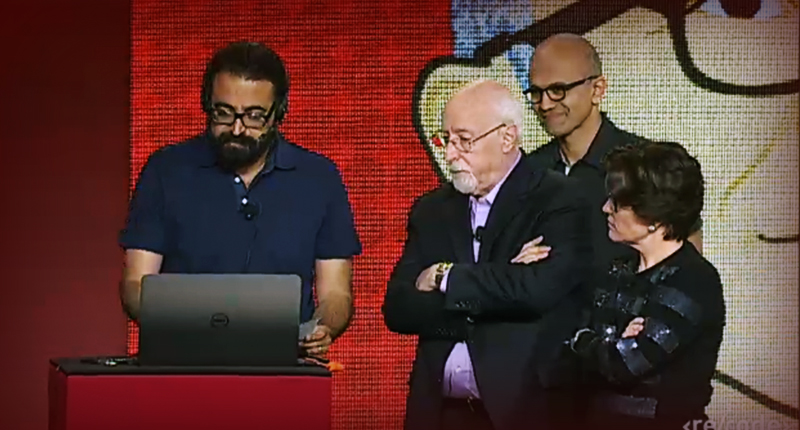
Screen shot of the Skype Translate demo at Code Conference.

[SOURCE: www.memeburn.com]

Ons het onlangs genoem dat Skype groep video -oproepe gratis beskikbaar gemaak het aan sy gebruikers en nou is hulle weer in die nuus met `n nuwe innovasie. 

Laasweek het Microsoft CEO Satya Nadella aangekondig dat Skype binnekort ook stem- en video-oproepe amper-intyds kan vertaal. Dit beteken dat jy in Afrikaans met jou Russiese kollega in Moskou kan praat en julle mekaar 100% sal kan verstaan sonder om `n gemeemskaplike taal soos Engels te gebruik. Aangesien Skype meer as 300 miljoen gebruikers per maand het, is dit vanselfsprekend dat Skype Translate `n groot internasionale bereik gaan hê.

Skype Translate brei ook sy taaldatabasis uit deur middel van “leeroordrag” – die sagteware verbeter die tale waaroor dit reeds beskik, terwyl `n nuwe een aangeleer word. Microsoft is nie duidelik oor hoe die proses werk nie, maar dis verseker `n algoritme wat handig te pas kom.

Die sagteware is tans in `n toetsfase, maar Microsoft het amptelik aangekondig dat `n beta-toets weergawe beskikbaar sal wees vir Windows 8 teen die einde van die jaar. As jy Skype Translate in aksie wil sien, kyk gerus na die demonstrasie video.

Screen shot of the Skype Translate demo at Code Conference.

[BRON: www.memeburn.com]

Toeter vs TwitterToeter vs Twitter

Friday, June 6th, 2014

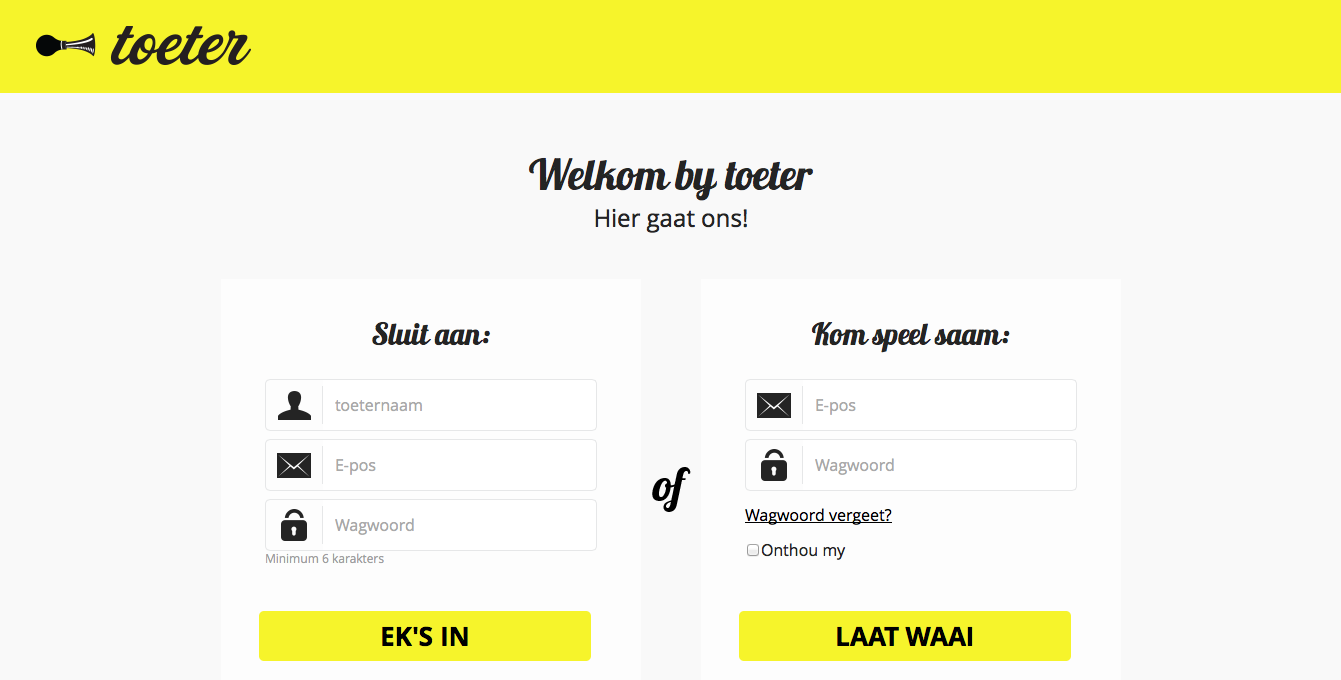
Regular KykNet viewers are by now well aware of the first, and so far only, Afrikaans social network with the quirky name,  toeter.


toeter’s claims to be “Haas Das se nuuskas”, Antie Stienie’s stoep, Nommer Asseblief’s switch board and the tannie next door gossiping over the gardencrete wall. It’s the note passed on under the desk in class and, the cat being let out of the bag and the fast spreading rumour no-one van put an end to.

There’s no lack of creative marketing, that’s for sure. According to founder,  Frans Roelofse, toeter can potentially draw one million users and has a marketing value of R450 million. Which might also explain why Afrikaans TV channel KykNet decided to support the platform and become toeter’s media partner.

toeter is a social network exclusively for everyone speaking Afrikaans – all ages, races, religions or political orientations. Just know, if you don’t adhere to their rules and misuse the platform, you will be hearing from them.

In principle toeter works exactly the same as Twitter, only in Afrikaans. It has the same functionality with a time line and also uses the @ to address other users. The well-known hash tag (#) also makes its appearance here. Users might initially have some trouble getting used to the more creative, Afrikaans terms in comparison to Twitter.

At first glance toeter presents itself as an effective social platform with all the necessary functionality. Unfortunately due to it’s exclusivity as an Afrikaans social network it’s also somewhat limiting and you won’t get as much mileage from it as with the well-established Twitter.

But try it at www.toeter.com and let us know what you think. It’s also already available for the iPhone-, Blackberry- and Android platforms.

Gereelde Kyknet-kykers weet teen die tyd al van die eerste Afrikaanse sosiale netwerk met die beskrywende naam, toeter

Volgens toeter se webwerf is dit “Haas Das se nuuskas, Antie Stienie se stoep, Nommer Asseblief se skakelbord en die nuuskierige buurvrou wat dringend fluister oor die muur. Dis die briefie wat ongesiens in die klas aangegee word, die aap wat skreeuend uit die mou gelaat word en die blitsvinnige bostelegram wat niemand kan keer nie.”

`n Tekort aan kreatiewe bemarking het toeter sekerlik nie.  Volgens Frans Roelofse, die stigter, het dit die potensiaal om een miljoen gebruikers te trek en `n bemarkingswaarde van R450 miljoen. Dis moontlik die rede hoekom Afrikaanse tv-reus Kyknet ook sy gewig by toeter ingegooi het en tans toeter se media-vennoot is.

toeter is `n sosiale netwerk spesiaal vir almal wat Afrikaans praat – alle ouderdomme, rasse, gelowe en politieke oortuigings. Weet net dat daar streng reëls is en jy jou nie daarvolgens gaan gedra nie, jy aangespreek en/of verban gaan word.

In beginsel werk toeter dieselfde as Twitter, net in Afrikaans. Dit het dieselfde funksionaliteit met `n tydlyn en gebruik ook die @-teken om ander gebruikers aan te spreek. Die alombekende hutsmerk (#) word ook deur toeter gebruik. Gebruikers mag dalk net `n tydjie neem om gewoond te raak aan hierdie meer kreatiewe, Afrikaanse terme in teenstelling met die van Twitter.

 Op die oog af lyk dit na `n effektiewe sosiale platform met al die nodige funksionaliteit. Ongelukkig, as gevolg van eksklusiwiteit as Afrikaanse sosiale netwerk is dit ook beperkend en gaan jy nie soveel waarde daaruit kan put as uit die gevestigde Twitter nie. 

Maar probeer dit gerus by www.toeter.com en laat weet ons wat jy dink. Dis ook reeds beskikbaar op die iPhone-, Blackberry- en Android-platforms.

Skype group video calls now freeSkype groep video-oproepe nou gratis

Friday, May 23rd, 2014

If you have friends and family overseas, you’ll know that Skype is a pretty convenient tool to communicate with them for free or at a relatively low cost. You’re also one of already 663 million registered Skype users.

Skype celebrates it’s eleventh birthday this year and was developed as a voice-over IP and instant messaging service by Janus Friis  from Denmark and Niklas Zennström from Sweden. Friis and Zennström came up with Skype by combining the two words – sky and peer.

Microsoft became the owners of Skype in 2011 at the significant cost of $8.5 billion. However,  the head offices aren’t located in America as one would expect, but in Luxembourg and the largest part of Skype’s development team and 44 % of it’s staff os located in Tallinn and Tartu in Estonia.

Skype enables you to communicate with anyone through earphones, via video with a webcam or by typing instant messsages. Calls to other Skype users are free, while land line and cellphone calls are debited from your account.

Other than these usual functions, it can also be used for file transfers and group video calling. Until recently group video calling has only been available at a cost  to premium users, but luckily this has changed and the service is now free to all Skype users.

Skype video calling gives you the opportunity to make group calls to a maximum of 9 people at the same time with a webcam. If you want to use this new, free function, you can read more about it on the Skype website.


As jy vriende en familie oorsee het, weet jy dat Skype `n handige middel is om gratis, of teen `n relatiewe lae koste, met hulle te kan kommunikeer. Jy is ook een van 663 miljoen geregistreerde Skype-gebruikers.

Skype vier die jaar reeds sy 11de verjaardag en is ontwikkel deur `n Deen en Sweed genaamd Janus Friis en Niklas Zennström as `n stem-oor-IP- en blitsboodskapdiens. Friis en Zennström het die applikasie se naam afgelei uit twee woorde – sky en peer. 

Sedert 2011 is Skype die eiendom van Microsoft. Dié maatskappy het Skype gekoop teen die stewige bedrag van $8.5 biljoen. Skype se hoofkantoor sit egter nie in Amerika nie, maar in Luxembourg, terwyl die grootste gedeelte van die ontwikkelingspan en 44% van Skype-werknemers hulle in Tallinn en Tartu in Estonia bevind.

Met Skype kan jy met enigiemand gesels deur middel van oorfone, via video met `n webkamera en ook deur blitsboodskappe te tik. Oproepe na ander Skype-gebruikers is gratis, maar landlynoproepe en selfoonoproepe word van jou rekening gedebiteer. 

Buiten die gewone funksionaliteit, soos bo genoem, is daar ook funksies soos leêroordrag en video-oproepe vir groepe. Laasgenoemde is onlangs eers gratis beskikbaar gestel aan alle Skypegebruikers. Voorheen was dit slegs vir premium-gebruikers. 

Skype video-oproepe gee aan jou die geleentheid om groepoproepe deur middel van `n webkamera te maak met tot `n maksimum van 9 ander mense op een slag. As jy gebruik wil maak van hierdie nuwe, gerieflike funksie, kan jy meer daaroor lees op Skype se webwerf

E-mail etiquette: do’s and don’tsE-pos etiket: moets en moenies

Friday, May 9th, 2014

If there’s one area the queen of etiquette Emsie Schoeman hasn’t commented on, it’s e-mail. But don’t think that gives you any reason to escape certain guidelines just because the electronic world seems to operate on a more informal level. Even with e-mail you can land into trouble if you don’t behave properly.

You’re probably wondering why e-mail etiquette even exists, in particular within the company milieu. There are three (very important) reasons, namely professionalism, efficiency and also protection against liability.

We consulted the internet and here are a few hints for meticulous e-mail users.

1. Be concise and to the point
Long e-mails are unnecessary and difficult to read. Avoid long sentences. Sentences should contain no more than 15 to 20 words.

2. Answer all questions and anticipate further questions
This will prevent a series of follow-up e-mails to get all the information and you won’t waste your and someone else’s time.

3. Spelling and language
Bad spelling and language create a bad impression and e-mail without capital letters or punctuation marks take effort to read.

4. Layout
Reading text on a screen is harder than written text and this makes layout in e-mails even more important. Use short paragraphs and adequate space between paragraphs.

5. Use a significant subject in the Subject line
Put the appropriate subject in the Subject line in order for the receiver to immediately know what the e-mail is about. It saves time, explaining and creates context.

6. Reply promptly
Immediately replying to an e-mail is generally expected. Don’t leave correspondence unanswered in your inbox for days when you could have answered it in a minute. Standard reply time for an e-mail is 24 hours, preferably the same working day. If you don’t have an immediate answer, just confirm you received the e-mail and will reply as soon as possible.

7. No large attachments
Don’t send unnecessary large attachments with your e-mails. Some mail servers can’t handle large e-mails.

8. Capital letters
Don’t use only capital letters. This implies that you are shouting at the recipient and can be interpreted as rude.

9. Re-read before you send
Don’t send an e-mail in haste. Other than potential spelling mistakes, it’s important to make sure if you message is clear and understandable. Remember that the recipient can easily misinterpret something when you’re not speaking face-to-face.

10. Don’t answer spam
Even if a spam e-mail claims you should reply to stop from receiving them, don’t reply. By replying to a spam e-mail, you are confirming your e-mail is active and more spam will be generated. Rather just delete the mail.

11. Don’t request delivery and read receipts
You will only irritate the receiver even before he’s read your message. Rather ask the person directly if necessary.

12. Don’t request messages to be recalled
The message has probably already been read and by recalling it, you’ll appear unprofessional. Send an e-mail explaining afterwards instead of recalling it.

13. Don’t forward chain mails or virus hoaxes
Microsoft will not send you money if you send it to 20 people – and neither will any other company. Most chain mails warning against viruses are also hoaxes. Ignore and delete them.

14. Avoid the high priority option
If you use this option to often, it will lose its efficiency. Your correspondence may also come across as pushy and aggressive. The same goes for terms like “URGENT” and “IMPORTANT”.

15. Be careful with emoticons and abbreviations
Try not to use abbreviations such as LOL and BTW. Emoticons like the smiley :) are also not appropriate in business e-mails.

SOURCE: http://www.emailreplies.com en http://www.businessemailetiquette.com


As daar een area is waarop etiket-guru Emsie Schoeman nog nie oor kommentaar gelewer het nie, is dit e-pos. Maar moenie dink dat jy etiketriglyne kan ontsnap net omdat die elektroniese wêreld meer informeel is nie. Selfs met e-pos kan jy jouself lelik vasloop as jy jou nie gedra nie.

Jy wonder waarskynlik hoekom daar enigsins iets soos e-pos etiket bestaan, spesifiek binne die maatskappy-opset. Daar is drie (baie goeie) redes, naamlik professionalisme, effektiwiteit en ook beskerming teen aanspreeklikheid vanuit `n regsoogpunt.

Ons het gaan kersopsteek by die internet en hier is net `n paar wenke vir noukeurige e-posgebruikers.

1. Wees presies en tot die punt. 
Langdradige e-posse is onnodig. Wees kort en kragtig. Vermy lang sinne. Sinne behoort `n maksumum van 15 tot 20 woorde te bevat.

2. Beantwoord alle vrae en spreek ook moontlike opvolgvrae aan
Sodoende vermy jy `n string e-posse en mors jy nie jou of iemand anders se tyd nie.

3. Spelling en taalgebruik
Slegte spelling en taal skep `n swak indruk en e-posse sonder enige hoofletters of leestekens lees moeilik. Gebruik jou speltoetser ook vir e-posse, nie  net vir amptelike dokumente nie.

4. Uitleg
Teks op skerms is moeiliker om te lees en daarom is uitleg ook belangriker. Gebruik kort paragrawe en spasies tussen paragrawe.

5. Gebruik `n veelseggende onderwerp in die Subject-reël
Sit die toepaslike onderwerp waaroor die e-pos gaan in die Subject-reël, sodat die ontvanger onmiddellik weet waaroor dit gaan. Dit spaar tyd en gee konteks.

6. Antwoord vinnig
Die verwagting is dat `n e-pos vinnig beantwoord sal word. Moenie korrespondensie vir dae in jou posbus laat lê as jy dit binne `n minuut kon beantwoord nie. Die standaard is 24 uur, verkieslik nog op dieselfde werksdag. As jy nie dadelik `n antwoord het nie, laat weet dat jy die e-pos ontvang het en so gou moontlik terugvoer sal gee.

7. Groot aanhangsels
Moenie onnodige groot aanhangsels saam met jou e-pos stuur nie. Sommige e-pos bedieners kan dit nie hanteer nie.

8. Hoofletters
Moenie slegs hoofletters hoofletters gebruik nie. Hoofletters impliseer dat jy skree op die ontvanger van die e-pos en kan interpreteer word as onhoflik.

9. Lees voor jy stuur
Moenie oorhaastig `n e-pos stuur nie. Bo en behalwe spelfoute, is dit ook belangrik om seker te maak jy dat jou boodskap duidelik en verstaanbaar is. Onthou dat die ontvanger maklik iets kan misinterpreteer as hy nie van aangesig-tot-aangesig met jou praat nie.

10. Moenie antwoord op gemorspos nie
Selfs al sê dit dat jy moet antwoord as jy dit nie meer wil ontvang nie. Deur te antwoord, bevestig jy dat jou e-pos aktief is en word nog meer e-pos gegenereer. Vee eerder dadelik die e-pos uit.

11. Moenie aflewerings- en leesversoeke aanvra nie
Die kans is goed dat jy die ontvanger gaan irriteer daardeur selfs nog voordat hy jou boodskap ontvang het. Vra eerder direk vir die persoon as jy wil weet.

12. Moenie vra dat boodskappe onttrek word nie
Die boodskap is waarskynlik reeds afgelewer en gelees. So `n versoek lyk onprofessioneel en oneerlik. Stuur eerder `n opvolg e-pos om te verduidelik.

13. Moenie ketting e-posse of valse viruswaarskuwings aanstuur nie
Microsoft gaan nie vir jou geld stuur as jy `n e-pos aanstuur vir 20 mense nie – so ook geen ander maatskappy nie. Die meeste ketting e-posse wat waarsku teen virusse is ook nie geldig nie. Vee dit liewer dadelik uit.

14. Vermy die “high priority”-funksie
Indien jy dié opsie te veel gebruik, verloor dit sy effektiwiteit. Hierbenewens mag jou e-pos ook ietwat aggressief voorkom. Dieselfde geld vir die gebruik van terme soos “DRINGEND” en “BELANGRIK”.

15. Wees versigtig met emotikons en afkortings
Probeer liewer nie om afkortings soos LOL en BTW te gebruik nie. Emotikons soos die :) is ook nie vanpas in besigheid e-posse nie.

BRON: http://www.emailreplies.com en http://www.businessemailetiquette.com