SEARCH
  • [:en]Recent Posts[:af]Onlangse bydraes

  • [:en]Categories[:af]Kategorieë

  • [:en]Archives[:af]Argiewe

Connectivity

Mobile payments making payment easierSelfoonbetalings maak die lewe nog makliker

Friday, May 29th, 2015

Just when you thought it was safe to leave your credit card at home, along came mobile payment facilities.

Snapscan, developed here in Stellenbosch, is the best-known mobile payment option at the moment. Apart from SnapScan, PocketPOS, FlickPay and Payment Pebble are also widely used in South Africa.

All these use your cell phone as Mobile POS (point of sale) so you don’t have to carry cash or a card on you. The assumption is that most people always carry their phones with them, but not their wallets. The mobile wallet is therefore an easy and convenient alternative. You also don’t have to queue or get for a waiter to notice you – just make the payment yourself.

You may think this is just another passing tech-fad, but according to research mobile transactions are higher in Africa than in America. Easier, cheaper internet access by cell phone when a computer isn’t available, being the main reason. In 2012 Africans spent more than 57.8 billion dollar just on mobile payments.

Although QR codes  (as used by SnapScan) are still used, new technology is already on the cards. Beacon technology uses your location for a different functions.

Snapscan recently developed Snapbeacon, a first in South Africa. Tap a button in the app and a transaction in the shop will be initiated via Bluetooth. If the function has been activated on your phone, it will automatically show a Pay here option.

Snapbeacon is only compatible with specific phones – iPhone 4S and higher and the latest smartphones with Android 4.3 and higher. At the start of April Snapbeacon was available at 30 SnapScan vendors in Cape Town and 20 in the rest of South Africa.

 [SOURCES: www.memeburn.comwww.ventureburn.com]

Net toe jy gedink het dis veilig om jou kredietkaart by die huis te los. Ons stel bekend – selfoonbetalings.

Snapscan, ontwikkel hier in Stellenbosch, is die mees bekende vorm van selfoonbetaling. Maar buiten SnapScan word PocketPOS, FlickPay en Payment Pebble ook tans in Suid-Afrika gebruik. 

Teen die tyd het ons almal al gehoor van Snapscan. Hoe anders, dit het sy oorsprong hier op Stellenbosch. Maar Snapscan is nie die enigste selfoon betaalmetode nie. Die ander drie bestaande platforms: PocketPOS, SnapScan, FlickPay en Payment Pebble gebruik ook jou selfoon as Mobile POS (point of sale) sodat jy nie kontant of `n kaart by jou hoef te hou nie.

Die veronderstelling is dat niemand ooit sonder `n foon is nie, maar nie altyd `n beursie saamdra nie. Daarom is die “mobile wallet” `n gemaklike alternatief. Jy hoef ook nie meer in rye te staan of te wag vir die kelner om jou raak te sien nie – hy betaal self vanaf jou foon.

Jy mag dink dat hierdie net nog `n verbygaande gril is, maar volgens navorsing is selfoontranssaksies in Afrika groter in Amerika. Maklike en goedkoop toegang tot selfone vir internet eerder as rekenaars is waarskynlik die rede vir hierdie statistieke. In 2012 het Afrikane meer as 57.8 biljoen dollar spandeer net op selfoonbetalings.

Alhoewel QR kodes  (soos die wat SnapScan gebruik) steeds algemeen is, is daar alreeds nuwer tegnologie beskikbaar. Beacon-tegnologie gebruik jou ligging vir verskeie funksies. 

SnapScan het onlangs Snapbeacon, `n eerste in Suid-Afrika, ontwikkel. Tik `n knoppie in die Snapscan-toepassing en `n transaksie word geaktiveer met Bluetooth. As die funksie op jou foon geaktiveer is, sal dit outomaties `n Pay here opsie wys. Jy kan dit ook deaktiveer as jy dit nie wil gebruik nie.

Snapbeacon is slegs versoenbaar met spesifieke fone – iPhone 4S en hoër en die nuutste slimfone met Android 4.3 en hoër. Aan die begin van April was Snapbeacon beskikbaar by 30 SnapScan-handelaars in Kaapstad en 20 in die res van Suid-Afrika.

[BRONNE: www.memeburn.comwww.ventureburn.com]

MOOCs 101MOOCs 101

Monday, April 20th, 2015

MOOCGone are the days of going to class, making notes and spending hours in a library. Today you can do almost everything online – even relive your student days. MOOCs, or “massive open online courses”, have been around for a while now, but are still extremely popular – and for a reason.

A MOOC is an online course aimed at large scale, interactive participation and open access via the internet. In addition to traditional course material such as videos, reading and problem sets, a community is created for students and academics to interact be means of user forums.

Open, online courses are a fairly recent addition to the field of long distance education and offer a free or low cost alternative to conventional tertiary education – an option previously not freely available to all. Leading universities such as Stanford, MIT, Yale and Harvard offer MOOCs as part of their curriculum and these provide anyone the opportunity to study at a prominent academic institution.

MOOCs have no formal entry requirements or limits on students and millions of eager learners make use of this open platform.  Coursera, the current forerunner of MOOCs, claims they already have more than 3 million students.

If you’re interested in expanding your knowledge – whether it’s with something as random as a course on cryptography or a more practical one such as financial planning, have a look at the available courses on the websites below. You’re sure to find something that inspires you.

Also read MOOC News and Reviews’ extensive article on MOOCs, “What is a Massive Open Online Course Anyway?” and have a look at extensive TED talks also has an extensive list of talks on MOOCS.

MOOC-COURSES

https://www.coursera.org/
http://www.saylor.org
http://www.futurelearn.com
http://www.mooc-list.com/
http://www.class-central.com/
http://www.educause.edu/library/massive-open-online-course-mooc

[SOURCE: www.wikipedia.org]

MOOCKlasloop, noukeurige notas neerpen en ure in `n biblioteek spandeer is vandag nie meer vereistes as jy jou lyf student wil hou nie. MOOCs, of te wel “massive open online courses” is reeds die afgelope vyf jaar beskikbaar, maar is steeds populer en met goeie rede. 

`n MOOC is `n aanlynkursus wat gemik is op grootskaalse, interaktiewe deelname en oop toegang deur middel van die internet. Buiten tradisionele kursusmateriaal soos videos, leeswerk en vraagstukke, word `n gemeenskap gebou vir studente en akademici met die hulp van interaktiewe gebruikerforums. 

Oop, aanlyn kursusse  is `n onlangse toevoeging tot afstandsonderrig en bied `n gratis of lae koste alternatief tot konvensionele tersiêre onderrig wat voorheen nie vrylik aan almal beskikbaar was nie. Toonaangewende universiteite soos Stanford, MIT, Yale en Harvard bied reeds MOOCs aan en  gee aan enigiemand die geleentheid om te studeer aan `n voortreflike akademiese instansie.

MOOCs het geen formele toelatingsvereistes of beperking op inskrywings nie en miljoene leergieriges maak reeds gebruik van dié oop platform. Coursera, die huidige voorloper vir MOOCs, beweer dat hulle reeds meer as 3 miljoen gebruikers het.  

As jy belangstel daarin om jou kennis te verbreed – of dit nou iets lukraak is soos `n kursus oor kriptopgrafie of meer prakties soos finansiële beplanning, loer gerus na die webwerwe onder. Daar sal sonder twyfel iets wees wat jou belangstelling aanwakker.  

Lees ook MOOC News and Reviews se gedetaileerde artikel oor MOOCs, “What is a Massive Open Online Course Anyway?”. TED talks het ook `n volledige lys praatjies beskibaar oor MOOCS.

MOOC-KURSUSSE

https://www.coursera.org/
http://www.saylor.org
http://www.futurelearn.com
http://www.mooc-list.com/
http://www.class-central.com/
http://www.educause.edu/library/massive-open-online-course-mooc

[BRON: www.wikipedia.org]

Easy file transfer with FTPMaklike leêroordrag met FTP

Friday, March 13th, 2015

You’ve probably heard the word somewhere and know it has something to do with files. But other than that you have no idea what FTP is. After all, what would you do with it?

Here’s the good news. You CAN actually use it quite easily and it might prove to be very useful when you need to share huge amounts of data with someone outside the university network. Interested yet?

Ok, let’s start by explaining what FTP means first before we get ahead of ourselves.

File Transfer Protocol or FTP is a standard network protocol used to transfer computer files from one host to another host over a TCP-based network, such as the Internet. FTP users may authenticate themselves using a username and password, but can connect anonymously if the server is configured to allow it. (If you want to get more technical, read more on Wikipedia)

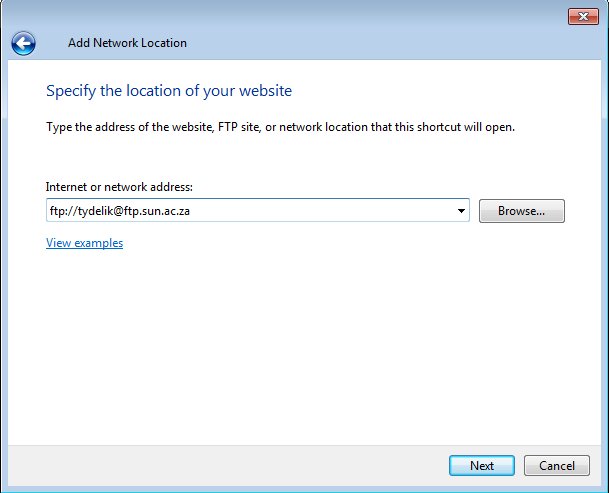
To use Stellenbosch University’s FTP server you will need the address of the server and the password:

ftp server: ftp://tydelik@ftp.sun.ac.za
password: tydelik

Keep in mind that this space is not for storing or backing up data. It’s merely a temporary spot to put files in order for someone else to easily access them. The person on the other side who needs to access the files will use the same information.

To set up FTP on your PC, just follow these step-by-step instructions on the Microsoft website.

If you need more information on FTP, here are a few sources:
https://kb.iu.edu/d/aerg
http://www.webopedia.com/TERM/F/ftp.html

As a user of the SU network there are a few other perks when it comes to free access. You can also use a few selected sites without opening your internet account. Read more about these sites on our blog – https://blogs.sun.ac.za/it/2012/04/20/free-access-to-selected-websites/ and https://blogs.sun.ac.za/it/2012/06/08/mirror-mirror/


Jy’t dalk al die woord erens gehoor en weet vaagweg dat dit iets te doen het met leêrs. Maar buiten dit het jy geen idee wat FTP is nie. Buitendien, wat sou jy tog daarmee doen?

Maar hier is die goeie nuus. Dis eintlik maklik om te gebruik en mag handig te pas kom as jy groot hoeveelhede data met iemand buite die universiteit-netwerk moet deel. Is jy nou al meer geinteresseerd?

Goed, maar voor ons in die diep kant inspring, kom ons begin eers deur te verduidelik wat FTP presies is.

File Transfer Protocol of FTP is `n standaard netwerk-protokol wat gebruik word om rekenaarleêrs van een gasheerrekenaar na `n ander oor `n TCP-gebaseerde netwerk, soos die Internet. FTP-gebruikers kan hulself staaf deur die gebruik van `n gebruikersnaam en wagwoord, maar sommige FTP-bedieners is wel so opgestel dat gebruikers anoniem kan aanteken daarsonder. (Indien jy meer tegniese inligting oor FTP soek, lees gerus op Wikipedia)

Om Universiteit Stellenbosch se FTP-bediener te gebruik, het jy die adres van die bediener en wagwoord nodig:

ftp-bediener: ftp://tydelik@ftp.sun.ac.za
wagwoord: tydelik

Hou net in gedagte dat hierdie spasie nie gebruik mag word vir die stoor of rugsteun van data nie. Dis slegs `n tydelike spasie om leêrs te sit sodat iemand anders maklik toegang daartoe kan kry. Die persoon wat die data aflaai, gebruik dieselfde aanteken-inligting. 

Om FTP op jou rekenaar op te stel, volg hierdie stap-vir-stap instruksies op Microsoft se webwerf.

As jy meer inligting oor FTP soek, hier is `n paar bronne: 

https://kb.iu.edu/d/aerg
http://www.webopedia.com/TERM/F/ftp.html

As `n gebruiker van die US-netwerk is daar ook `n paar ander voordele as dit by gratis toegang kom. Jy kan `n paar webwerwe besoek sonder om jou internetrekening daarvoor te gebruik. Lees meer oor hierdie webwerwe op ons blog –  https://blogs.sun.ac.za/it/2012/04/20/free-access-to-selected-websites/ en https://blogs.sun.ac.za/it/2012/06/08/mirror-mirror/


Reactivation: pensionersHeraktivering: pensionarisse

Wednesday, March 11th, 2015

All persons using the SU network have to reactivate for network usage (e-mail, internet, etc.) on an annual basis. Pensioners still using SU facilities also have to complete this process to ensure they still have e-mail access.

Over the past few weeks all users received an e-mail notice from helpinfo@sun.ac.za indicating that their username will soon expire. Generally three warnings are sent before the deadline date on 1 April 2015.

Since pensioners pay for access themselves and not by a department, the payment method differs somewhat. Payment can occur by credit card or cash. Credit card payment can be done securely online (see below for instructions) or at the cashiers in Admin A.

However, from February 2014 all banks made an additional 3D-authentication for credit cards being used online compulsory due to security reasons. In the meantime a grace period was given to bank clients to give them enough time to register their cards for 3D-authentication. This grace period has now expired.

Due to this new built-in check by banks, pensioners might be confronted by the following error message:

“Your payment in the amount of R284.00 could not be processed successfully. | U betaling vir die bedrag van R284.00 kon nie suksesvol verwerk word nie.”

“Reason / Rede: Transaction Failed. Restricted transaction due to 3D authentication merchant risk setting. Please return to merchant website and use an alternative payment method or card. (10205)”

Unfortunately this part of the payment process falls outside Information Technology’s jurisdiction and pensioners need to resolve the issue with their relevant bank, in particular the credit card division. Bank websites should also have information on the application procedure for 3D-authentication. More information is also available on PAYGO.

Reactivation with your credit card 

  1. Open Internet Explorer, Google Chrome or Mozilla Firefox.
  2. Go to http://my.sun.ac.za
  3. Click on Staff
  4. Click on PENSIONERS
  5. Click on Reregistration

Alle gebruikers van die US-netwerk moet jaarliks heraktiveer vir netwerkgebruik (e-pos, internet, ens.) Ook pensionarisse wat steeds van US-dienste gebruikmaak moet deur die proses gaan om te verseker dat hulle steeds e-pos toegang het.

Die afgelope paar weke het alle gebruikers e-pos kennisgewings ontvang van helpinfo@sun.ac.za wat aandui dat hul gebruikersnaam gaan verval. Drie waarskuwings e-posse word normaalweg versend voor die afsnydatum op 1 April 2015.

Omdat pensionarisse se toegang deur hulself betaal word en nie deur `n departement nie, verskil die betalingsmetodes ietwat. Betaling kan geskied deur middel van kredietkaart of kontant. Die kredietkaartbetaling kan aanlyn gedoen word (sien onder vir instruksies) of by die kassiere in Admin A.

Vanaf Februarie 2014 het alle banke dit om sekuriteitsredes verpligtend gemaak dat `n addisionele 3D-verifiëring op kredietkaarte van toepassing is indien enige aanlyn aankope gemaak word. Sedertdien is `n grasietydperk aan bankkliënte gegee om hul kredietkaarte te registreer vir 3D-verifiëring. Genoemde grasietydperk het intussen verval. 

As gevolg van hierdie nuwe reëling deur banke, mag pensionarisse onderstaande foutboodskap kry:

“Your payment in the amount of R284.00 could not be processed successfully. | U betaling vir die bedrag van R284.00 kon nie suksesvol verwerk word nie.”

“Reason / Rede: Transaction Failed. Restricted transaction due to 3D authentication merchant risk setting. Please return to merchant website and use an alternative payment method or card. (10205)”

Ongelukkig is hierdie gedeelte van die betalingsproses buite die beheer van Informasietegnologie en sal pensionarisse genoodsaak wees om dit op te neem met hulle betrokke bank, spesifiek die kredietkaartafdeling. Bankwebwerwe behoort ook meer inligting te kan verskaf oor die aansoekprosedure vir die 3D-verifiëring. Meer inligting is ook op PAYGO se webwerf beskikbaar. 

Heraktivering via kredietkaart 

  1. Maak Internet Explorer, Google Chrome of Mozilla Firefox oop.
  2. Gaan na http://my.sun.ac.za
  3. Kliek op Personeel
  4. Kliek op PENSIOENARISSE
  5. Kliek op Herregistrasie

3G at a price3G teen `n koste

Friday, February 27th, 2015

Is your cell phone’s sneaky behaviour taking a bite out of your pocket? By applying a few guidelines you can save yourself from a 4 digit cellphone bill.

1. Set data limits and limit your account with your service provider.
Practice caution when using certain providers’ 3G bundles on laptops. Some of these do not protect the user against overspending.

The risk of overspending occurs when users are under the false impression that their 3G package is safe to use until the package runs out. This is not necessarily the case. Higher costs can occur when the initial bundle’s capacity is exceeded and a much higher tariff kicks in. The user will then, without knowing, pay the higher tariff.

Users are strongly advised to limit the amount they want to spend or traffic they want to allow. (All this information can be found on your service provider’s website.) On Android your mobile data limit can be changed in the settings.

Also activate SMS and email notifications when your data bundle is close to its limit. In this instance prepaid data is a considerably safer option.

2. Don’t set your e-mail to synchronise automatically. Rather use the manual option and Send and Receive when you need to check your e-mail.

3. Also take care when using sites and apps like Facebook, Instagram Pinterest and YouTube as they use a lot of data.
Apps can be restricted not to use background data when mobile data is activated. Certain apps enable you to compress content (for example Google Chrome) Onavo is a 3rd party app you can use on your phone to do this compression.

4. Set software updates to manual.
The risk of overspending is increased by software updating automatically and therefore generating more traffic. To avoid overspending ensure that the settings of your software updates are set to manual. You’ll be able to choose when and where it’s done and how much data is being used. If you need to do software updates on your phone, only use your WiFi.

5. Another risk 3G users need to be aware of is the excessive cost of data overseas.
Wireless in hotels is usually much more affordable than the local service provider’s roaming data options.

6. Preferably switch off the 3G facility when it’s not being used.
3G users are encouraged to monitor their traffic and data usage on the 3G control programme, as well as the service provider’s website.

Is jou selfoon se onderduimse optrede besig om `n groot, onverwagse hap uit jou sak te vat? Daar is `n paar maatreëls wat jy kan tref om `n 4-syfer rekening te vermy.

1. Stel data-limiete en `n beperking op jou rekening by jou diensverskaffer.
Wees versigtig met jou 3G-databundel. Sommige pakkette van diensverskaffers se 3G-databundels beskerm nie die gebruiker teen oorspandering nie. Hierdie risiko kom veral voor by gebruikers wat ‘n besigheidskontrak met ‘n diensverskaffer gesluit het en onder die indruk is dat, indien ‘n databundel teen die kontrak gekoop is, dit veilig is om maar die datadiens te gebruik “tot dit op” is. 

Daar is egter ‘n groot risiko dat indien die databundel oorskry word, ‘n baie hoër “buite-bundel” tarief inskop en die gebruiker onvermoedelik ʼn baie hoër uitgawe verpligting aangaan.

Gebruikers word sterk aangeraai om limiete op die bedrag of verkeer te plaas (kyk na u diensverskaffer se webblad), asook om sms of epos boodskappe te aktiveer wanneer die verkeer naby die limiet van die kontrak kom. Voorafbetaalde data is in die opsig baie veiliger.

Gebruikers aangemoedig om die volume verkeer op die 3G beheerprogram self deeglik dop te hou. Die meeste verskaffers gee aan hul kliënte die opsie op datagebruik op hulle webwerf te monitor en IT raai gebruikers aan om van hierdie fasiliteit gebruik te maak.

Op Android kan jou mobile databeperking gestel word onder settings. Toepassings kan ook beperk word sodat hulle nie data op die agtergrond gebruik wanneer die mobiele data-funksie geaktiveer is nie. 

2. Moenie toelaat dat jou e-pos outomaties sinkroniseer nie. Gebruik eerder die manual opsie en Send en Receive wanneer jy e-pos wil nagaan.

3. Wees versigtig vir webwerwe en toepassings soos Facebook, Youtube, Instagram en Pinterest – hulle is geweldig data-intensief en laai meer af as wat jy dink.
Sekere toepassings kan dataverbruik verminder deur inhoud saam te pers, onder andere Google Chrome.   Onavo is `n 3de party toepassing wat data-inhoud op jou foon se toepassings kan verminder.

 4. Stel sagteware-opdaterings na manual

Die risiko word verhoog deur programmatuur wat outomaties, sonder die gebruiker se wete, opdateer en gevolglik hoë volumes verkeer genereer. Let dus veral op sagteware se verstellings en maak seker dat opdaterings eerder met die hand gedoen word i.p.v. outomaties.    

As jy sagteware-opdaterings op jou foon moet doen, gebruik slegs jou WiFi daarvoor. Sit outomatiese opdaterings af, sodoende kan jy self kan beheer wanneer en hoeveel data gebruik word. 

5. Vermy die buitensporige koste van data in die buiteland.
“Wireless” binne die hotel is gewoonlik meer bekostigbaar as plaaslike diensverskaffers se “roaming” data opsies.

6. Skakel die 3G-fasiliteit af indien dit nie benodig word nie.
Sodoende voorkom jy onverwagse opdaterings en sagteware wat outomaties aflaai sonder dat jy daarvan bewus is.