SEARCH
  • [:en]Recent Posts[:af]Onlangse bydraes

  • [:en]Categories[:af]Kategorieë

  • [:en]Archives[:af]Argiewe

Connectivity

R27 000 to spare?R27 000 wat rondlê?

Friday, August 22nd, 2014

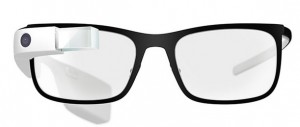
google-glassIf you see someone wandering around campus, occasionally blurting out “Ok Glass!” , don’t be too worried. He’s probably one of the lucky ones who recently acquired a pair of Google Glass.

And so can you, on Takealot,  if you have R27 000 to spare. This nifty piece of technology has been, as the name indicates, developed by information giant Google and has been available in the USA since April this year. Initially it was only made available to a select few, but in May the American public could strart buying Google Glass.

According to Google, Glass isn’t expensive to manufacture. The hefty price tag is due to engineering costs and expensive software and platform development.

Sergey Brin, co-founder of Google, says Glass was developed in order for people to meet the word heads-up, instead of hunched in front of a screen or watching a phone screen all the time.

Because we ultimately questioned whether this is the ultimate future of how you want to connect to other people in your life, how you want to connect to information. Should it be by just walking around looking down? But that was the vision behind Glass,and that’s why we’ve created this form factor. ” (Sergey Brin, TEDtalks)

Google Glass is a wearable computer, disguised as a pair of standard glasses. The only difference is an extra mounted screen on the frame, manufactured out of liquid crystal on silicon, using LED. It’s as light as your sunglasses and available in various shapes and colours.

Unfortunately Google Glass doesn’t replace your phone, even if it is in fact practically a smart phone. You need a compatible phone as well to use Glass.

As with Street View, Google once again finds themselves on the controversial side of things – also due to security an privacy issues. Using Glass in public evokes a few ethical questions. Are you allowed to take photos and make recordings of people without their knowledge? In the light of these questions Google even published a few guidelines for users. (read them here)

We’ve established that these pair of smart glasses react when being talked to, but you first have to activate it by saying “OK Glass”, otherwise it won’t listen. Then you can fire off almost any command at it, for example “Take photo”, “Give directions”, etc. For now it seems to be English speaking, but maybe one day it might react to Afrikaans and other languages as well.

You also have the option to tap a touch pad at the side of the screen to activate functions. Depending on which way you scroll it will display either weather, news, photos or phone calls.

The list of functions you can perform with Google Glass looks very impressive – too many to list here. But have a look on it’s website to see what it can do.

More Google Glass YouTube-videos.

[SOURCES: www.wikipedia.org, www.mashable.comwww.techradar.com, www.pcmag.com]

google-glassAs jy iemand met `n bril op kampus sien rondloop, terwyl hy sporadies “Ok Glass!” sê, moenie te bekommerd raak nie. Hy is dalk `n techverslaafde wat Google Glass vir homself aangeskaf het.

Jy kan ook `n paar op Takealot koop – dis nou as jy R27 000 het om rond te gooi. Dié stukkie tegnologie is, soos die naam aandui, ontwikkel deur informasie-reus Google en reeds sedert April beskikbaar in die VSA. Aanvanklik is dit slegs beskikbaar gestel aan `n gekose groepie, maar in Mei kon die Amerikaanse publiek ook hul eie Google Glass bekom.

Volgens Google is Glass nie duur om te vervaardig nie, maar die hewige prys word veroorsaak deur ingenieurskostes en duur sagteware- en platformontwikkeling.

Sergey Brin, medestigter van Google, beweer dis ontwikkel sodat mense weer die wêreld in die oë kan kyk in plaas van kop-in-die-grond rondloop met `n foon in die hand of krom getrek voor `n rekenaarskerm.

Because we ultimately questioned whether this is the ultimate future of how you want to connect to other people in your life, how you want to connect to information. Should it be by just walking around looking down? But that was the vision behind Glass,and that’s why we’ve created this form factor. ” (Sergey Brin, TEDtalks)

Google Glass is `n draagbare rekenaar vermom as `n gewone bril. Die enigste verskil is `n ekstra gemonteerde skermpie bo-aan die raam, vervaardig uit vloeibare kristal op silikon, terwyl dit ook LED gebruik. Dis so lig soos jou sonbril en is beskikbaar in verskeie style en kleure.

Ongelukkig vervang Google Glass nie jou foon nie, al het dit bykans al `n slimfoon se komponente. Jy het steeds `n versoenbare foon nodig om dit  te kan gebruik.

Soos met Streetview, neig Google weereens na die kontroversiële kant – om sekuriteit- en privaatheidsredes. Bloot om Glass in die openbaar te gebruik opper `n paar etiese kwessies. Mag jy fotos en opnames van mense neem, terwyl hulle nie bewus is daarvan nie? Google het in die die lig hiervan riglyne uitgebring vir Glass-gebruikers. (lees meer daaroor)

Ons het nou reeds vasgestel dat dié slim brille reageer as jy daarmee praat, maar jy moet eers “OK Glass” sê voordat dit vir jou gaan luister. Daarna kan jy bevele afsneller soos “Take photo”, “Give directions”, ens. Vir nou lyk dit asof Glass Engelssprekend is, maar dalk sal dit eendag ook op Afrikaans en ander tale kan reageer.

Buiten stem-aktivering het jy ook die opsie om met die tik van jou vinger op `n raakskerm teen die kant funksies te aktiveer. Afhangende van die rigting waarin  jy rol (“scroll”), wys dit die weer, nuus, vorige oproepe of fotos.

Die lys van funksies wat jy met Google Glass kan verrig lyk geweldig indrukwekkend – te veel om hier te lys. Maar gaan kyk gerus op die webwerf wat dié nuwigheid alles kan doen.

Nog Google Glass YouTube-videos.

[BRONNE: www.wikipedia.orgwww.mashable.comwww.techradar.com, www.pcmag.com]

Snap and shop!Kliek en koop!

Friday, August 8th, 2014

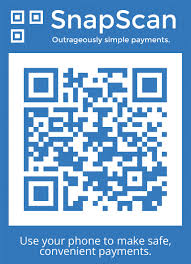
snapscan3Have you ever wondered what the cryptic image (see right) at some restaurants, coffee shops and markets is? Here’s a hint – it’s not some secret code of a society you don’t belong to. On the contrary, it’s something useful guaranteed to make your life somewhat easier.

SnapScan is a smartphone payment app developed right here in Stellenbosch by technology start-up company FireID, located in Tegnopark – Stellenbosch’s own Silicon Valley. The guys from FireID realised that a cashless society, where payments were easier and faster to make, is became a necessity.

In 2013 SnapScan won the South African App of the year and it has been featured on Business Insider’s Top 12 African Start-ups list. In May of this year it joined in partnership with Standard Bank.

SnapScan benefits both the customer and the merchant. For the customer it provides an alternative for cash and credit cards, it’s faster and is meant to be more secure.

You no longer have to wait to have a payment processed at a terminal or risk carrying a credit card with you. You simply take a picture of the merchant’s unique QR code (the cryptic image) with your phone, enter your pin and the amount you want to pay. After the transaction is completed the customer and merchant receives an SMS notification to confirm.

The merchant never handles your credit card or details. Your card details are stored securely on your phone, encrypted and protected by a pin you select yourself.

It doesn’t cost you anything, no sign-up fee, setup, installation or monthly fee. All you need to do is download the app from the Apple or Google Play store, fill in your card details and you’re good to go. The app is available for iOS, Android, and BlackBerry.

For merchants the application is easy and fast. All they need is a cell phone and they can process payments, whether it’s a coffee shop or an informal trader at a market. The Big Issue, the non-profit magazine sold at intersections, vendors have recently been enabled to use SnapScan.

Not too bad for something starting out only in a number of stores around in Stellenbosch – from 600 merchants at the end of 2013 to 12 000 at present. So what are you waiting for? Start snapping!

More info on SnapScan: 

https://www.facebook.com/SnapScanApp
http://www.getsnapscan.com/

[SOURCES: http://mybroadband.co.za, http://www.techcentral.co.za, http://www.2oceansvibe.com, http://ventureburn.com]

snapscan3Het jy al gewonder wat die kriptiese prentjie (sien regs) by sommige restaurante, koffiewinkels en markte is? Wel, dis NIE die geheime kode van een of ander organisasie waaraan jy nie behoort of `n optiese illusie nie. Inteendeel, dit eintlik iets nuttig wat gewaarborg is om jou lewe makliker te maak.

SnapScan is `n slimfoon applikasie wat net hier in Tegnopark, Stellenbosch se eie Silicon Valley, deur FireID ontwikkel is. Die ouens van FireID het besef dat `n kontantlose samelewing waar betalings vinnig en maklik gemaak kan word, binnekort `n noodsaaklikheid gaan begin word.

In 2013 het SnapScan die eerste prys gewen as Suid-Afrikaanse Toepassing van die jaar en is dit reeds gelys op Business Insider se Top 12 African Startups– lys. In Mei vanjaar het dit ook `n venootskap aangegaan met Standard Bank.

SnapScan is voordelig vir beide die kliënt en die handelaar. Vir die kliënt bied dit `n alternatief vir kontant en kredietkaarte, beloof dit om veiliger te wees en is dit vinniger as tradisionele betaalmetodes.

Jy hoef nie meer te staan en wag dat jou betaling by `n kredietkaartmasjien verwerk word of die risiko neem om `n kaart saam met jou te dra nie. Jy neem bloot `n foto van die handelaar se unieke QR-kode (die kriptiese prentjie), sleutel jou PIN-kode in en die bedrag wat jy wil betaal. Sodra die transaksie voltooi is, ontvang die handelaar en kliënt beide `n sms ter bevestiging.

Die handelaar hanteer nooit jou kredietkaart of details nie. Jou kaartinligting word veilig op jou foon gestoor, enkripteer en word beskerm deur `n PIN-nommer wat jy self gekies het.

Dit kos jou niks. Geen aansluitfooi, opstelling of maandelikse betaling nie. Jy hoef net die toepassing af te laai van die Apple of Google Play-winkel, jou kaartinligting te stoor en jy’s reg om dit te gebruik. Die toepassing is reeds beskikbaar vir iOS, Android, en BlackBerry

Vir handelaars is die aansoek vinnig en maklik. Hulle benodig slegs `n selfoon om betalings te kan verwerk – of dit nou `n koffiewinkel of `n informele handelaar by `n mark is. So gebruik verkopers van The Big Issue, `n nie-winsgewende tydskrif wat op straathoeke verkoop word, ook reeds SnapScan.

Nie sleg vir iets wat eers net in `n paar winkels in Stellenbosch gebruik is nie – van 600 handelaars aan die einde van 2013 tot die huidige 12 000.

So waarvoor wag jy? Gaan neem daai prentjie af!

Meer inligting oor SnapScan: 

https://www.facebook.com/SnapScanApp
http://www.getsnapscan.com/

[BRONNE: http://mybroadband.co.za, http://www.techcentral.co.za, http://www.2oceansvibe.com, http://ventureburn.com]

ADSL – what are the options?ADSL – wat is die opsies?

Friday, May 23rd, 2014

Asymmetric digital subscriber line – bet you didn’t know that’s what ADSL actually stands for, did you? I also bet you don’t know how many available ADSL data options we have available in South Africa and how their pricing compare?

Mygaming recently made a comparison of internet service providers to make the decision more painless for ADSL subscribers. But before you jump in and start shopping, make sure you know the basics.

This is what you’ll need:

1. A Telkom analogue (voice) line at  R157 per month.

2. Telkom ADSL line access. This comes at various speeds, from 2Mbps (R165 per month) to 40 Mbps (R952 per month). (For more detail see the mygaming article.)

3. An ADSL data account from an ISP to access the Internet.  This is the only option you have a wider choice and don’t need Telkom for. (For more detail see the mygaming article.)>

Read mygaming’s comparison here.


Asymmetric digital subscriber line – wed jou jy’t nie geweet dis waarvoor ADSL eintlik staan nie, né? Ek ‘s seker jy weet ook nie hoeveel verskillende ADSL data-opsies daar tans in Suid-Afrika beskikbaar is en hoe hul prusstrukture vergelyk nie?

Mygaming het onlangs `n vergelyking gemaak van internetdiensverskaffers en sodoende die besluit meer pynloos gemaak vir ADSL-gebruikers. Maar voordat jy aan die diepkant inspring, maar seker jy weet eers die basiese inligting.

Hier is wat jy nodig gaan hê:

1. `n Telkom analooglyn (stem) teen R157 per maand.

2. Telkom ADSL lyntoegang. Beskikbaar in verskeie spoedvlakke, vanaf 2Mbps (R165 per maand) tot 40 Mbps (R952 per maand). (Vir meer detail, sien die mygaming artikel.)

3. `n ADSL datarekening by `n ISP (internet service provider) om vir jou toegang tot die internet te gee. Hierdie is die enigste plek waar jy `n groter keuse het en jy nie Telkom voor nodig het nie. (Vir meer detail, sien die mygaming artikel.)

Lees mygaming se volledige vergelyking hier.


Skype group video calls now freeSkype groep video-oproepe nou gratis

Friday, May 23rd, 2014

If you have friends and family overseas, you’ll know that Skype is a pretty convenient tool to communicate with them for free or at a relatively low cost. You’re also one of already 663 million registered Skype users.

Skype celebrates it’s eleventh birthday this year and was developed as a voice-over IP and instant messaging service by Janus Friis  from Denmark and Niklas Zennström from Sweden. Friis and Zennström came up with Skype by combining the two words – sky and peer.

Microsoft became the owners of Skype in 2011 at the significant cost of $8.5 billion. However,  the head offices aren’t located in America as one would expect, but in Luxembourg and the largest part of Skype’s development team and 44 % of it’s staff os located in Tallinn and Tartu in Estonia.

Skype enables you to communicate with anyone through earphones, via video with a webcam or by typing instant messsages. Calls to other Skype users are free, while land line and cellphone calls are debited from your account.

Other than these usual functions, it can also be used for file transfers and group video calling. Until recently group video calling has only been available at a cost  to premium users, but luckily this has changed and the service is now free to all Skype users.

Skype video calling gives you the opportunity to make group calls to a maximum of 9 people at the same time with a webcam. If you want to use this new, free function, you can read more about it on the Skype website.


As jy vriende en familie oorsee het, weet jy dat Skype `n handige middel is om gratis, of teen `n relatiewe lae koste, met hulle te kan kommunikeer. Jy is ook een van 663 miljoen geregistreerde Skype-gebruikers.

Skype vier die jaar reeds sy 11de verjaardag en is ontwikkel deur `n Deen en Sweed genaamd Janus Friis en Niklas Zennström as `n stem-oor-IP- en blitsboodskapdiens. Friis en Zennström het die applikasie se naam afgelei uit twee woorde – sky en peer. 

Sedert 2011 is Skype die eiendom van Microsoft. Dié maatskappy het Skype gekoop teen die stewige bedrag van $8.5 biljoen. Skype se hoofkantoor sit egter nie in Amerika nie, maar in Luxembourg, terwyl die grootste gedeelte van die ontwikkelingspan en 44% van Skype-werknemers hulle in Tallinn en Tartu in Estonia bevind.

Met Skype kan jy met enigiemand gesels deur middel van oorfone, via video met `n webkamera en ook deur blitsboodskappe te tik. Oproepe na ander Skype-gebruikers is gratis, maar landlynoproepe en selfoonoproepe word van jou rekening gedebiteer. 

Buiten die gewone funksionaliteit, soos bo genoem, is daar ook funksies soos leêroordrag en video-oproepe vir groepe. Laasgenoemde is onlangs eers gratis beskikbaar gestel aan alle Skypegebruikers. Voorheen was dit slegs vir premium-gebruikers. 

Skype video-oproepe gee aan jou die geleentheid om groepoproepe deur middel van `n webkamera te maak met tot `n maksimum van 9 ander mense op een slag. As jy gebruik wil maak van hierdie nuwe, gerieflike funksie, kan jy meer daaroor lees op Skype se webwerf

Plugged or unplugged?In- of uitgeprop?

Friday, April 11th, 2014

Until recently our area of work was determined by the length of the cable connecting our computer to the network point. This was before Wi-fi  became the norm in our lives.

Wi-Fi services provide staff and students with wireless connection to the US network. Unfortunately, with wi-fi, the expectation is created that it will always work perfectly and be accessible. Expectation and reality don’t necessarily correspond and this leads to frustration amongst users.

Realistically speaking Wi-fi  is a best effort and various factors such as your physical distance from the wireless access point (WAP), WAPs influencing each other and structures in the way of the signal, play a large role.

Let’s look at the technical details –

Wi-fi networks have a limited range. The standard WAP uses 802.11b or 802.11g and with a standard antenna it will cover a range of 35 metres indoors and 100 metres outside. Reception can be improved by installing a higher gain antenna and adapting the antenna’s direction.

Due to the complex nature of radio propagation at typical wi-fi frequencies, especially the effect of signals bouncing off trees and buildings, algorithms can only approximately predict Wi-Fi signal strength for any given area in relation to a transmitter.

Wi-fi connections can also be interrupted or slowed down due to other devices in the environment. Wi-fi pollution or too many access points can prevent access and interfere with other devices’ use of other access points. This is caused by overlapping channels on the 802.11g/b spectrum and can lead to a problem in densely populated areas or office buildings with many Wi-fi access points.

On our campuses the maximum connections to a hotspot (or WAP) are limited to 25 to 35 and the rest are denied access. The devices connected to a hotspot at a given moment have to share the output and the higher the number of devices, the less efficient the communications.

Other devices such as microwave ovens, ISM band devices, security cameras, cordless phones, baby monitors and amateur radios also use the 2.4 GHz band and this can cause significant interference.

Given all these factors, it is clear that Wi-fi  isn’t always the best option for a stable, dependable network connection. If you are working from your office, rather plug your computer in at the network point and use Wi-fi  only for emergencies or when you move around on campus.


If you want to register for use of Wi-fi on campus, contact the IT Service desk at +27 21 808 4367 or send an e-mail to help@sun.ac.za with the following information: 

  • Building
  • Room number
  • US number
  • Username
  • Asset number of device or description of the device
  • Network card address (also known as the MAC address)

Access to Wi-fi services on campus take place via the Secure or MatiesWifi SSIDs. Devices with asset numbers are generally registered on Secure, where they have access to all network services. Other devices are registered on MatiesWifi with limited access to services. Both these SSIDs provide a speed of up to 54 Mbps.

For more information, contact the IT Service Desk or telecom@sun.ac.za

[SOURCE: www.wikipedia.org]

Tot nie te lank gelede nie was ons area van werk ingeperk deur die lengte van die kabel wat die netwerkpunt aan ons rekenaar verbind. Dit was voordat wi-fi `n gegewe in ons lewens geword het. 

WI-FI op die US-kampus is ‘n kabellose verbinding aan die netwerk vir studente en personeel. Met wi-fi word die verwagting dikwels geskep dat dit oral 100% reg gaan werk en altyd beskikbaar sal wees. Wat verwag word en die werklike aanbod, stem ongelukkig nie ooreen nie en kan lei tot frustrasie by gebruikers.

Die realiteit is dat wi-fi `n beste poging is en faktore soos fisiese afstand vanaf die WAPs, WAPs wat mekaar beinvloed en fisiese strukture is in die pad van die sein is, speel `n groot rol. 

Kom ons kyk na die tegniese details – 

Wi-Fi netwerke het `n beperkte sendbereik. Die standaard WAP (wireless access point) gebruik 802.11b of 802.11g en met `n gewone antenna sal dit `n ontvangsgebied van 35 meter binneshuis en 100 meter buite kan dek.  Ontvangs kan wel verbeter word met `n sterker antenna en deur die antenna-rigting aan te pas. 

Weens die komplekse aard van radioverspreiding op tipiese Wi-fi frekwensies, veral die effek van seine wat weerkaats teen bome en geboue, kan algoritmes net `n beraamde seinsterkte voorspel vir `n area in verhouding tot `n sender. 

Wi-Fi verbindings kan onderbreek word of die internet spoed verlaag word weens ander toestelle in die omgewing. Wi-fi besoedeling of `n oormatige hoeveelheid toegangspunte kan toegang belemmer en inmeng met ander toestelle se toegang. Dit word veroorsaak deur oorvleueling op die 802.11g/b spektrum en kan `n probleem word in digbevolkte areas soos groot woonstelblokke of kantoorgeboue met baie wi-fi toegangspunte. 

Op ons kampus word die maksimum verbindings na `n “hotspot” beperk tot 25 tot 35 en die res word toegang geweier. Die hoeveelheid toestelle wat op een oomblik aan `n “hotspot” gekoppel word moet dus die deurset deel en verlaag effektiwiteit.  

Boonop gebruik ander toestelle ook die 2.4 GHz band, insluitende mikrogolfoonde, ISM band toestelle, sekuriteitskameras, koordlose telefone, babamonitors en amateur-radios en dit kan beduidende steurings veroorsaak. 

Met bogenoemde in ag geneem, is dit duidelik dat wi-fi nie altyd die beste opsie is vir `n stabiele, betroubare netwerkkonneksie nie. As jy in jou kantoor is, prop eerder jou rekenaar by die netwerkpunt in en gebruik wi-fi slegs vir noodgevalle of wanneer jy rondbeweeg op kampus. 


As jy wil registreer vir die gebruik van wi-fi op kampus, kontak die IT Dienstoonbank by +27 21 808 4367 of stuur `n e-pos na help@sun.ac.za met die volgende informasie: 

  • Gebou
  • Kamer
  • US nommer
  • Gebruikersnaam
  • Batenommer van toestel of beskrywing van die toestel
  • Netwerkkaartadres (of te wel die MAC-adres) 

Toegang tot Wi-fi dienste op kampus kan verkry word deur die Secure of MatiesWifi SSIDs. Toestelle met batenommers word normaalweg op Secure geregistreer met toegang tot alle netwerkdienste, terwyl alle ander toestelle op MatiesWifi geregistreer word met beperkte toegang tot dienste. Beide hierdie wifi-verbindings gee `n spoed van tot 54 Mbps.

Vir verdere navrae kontak die IT Dienstoonbank of telecom@sun.ac.za

[BRON: www.wikipedia.org]