SEARCH
  • [:en]Recent Posts[:af]Onlangse bydraes

  • [:en]Categories[:af]Kategorieë

  • [:en]Archives[:af]Argiewe

Connectivity

Travelling without unnecessary costsReis sonder onnodige koste

Friday, November 15th, 2013

IF you travel abroad on a regular basis, you’ve probably learnt the hard way how expensive cell phone expenses can become once crossing South African borders.

Still, there are ways to save yourself a staggering phone bill if you really need to stay connected when travelling.

Buy a local SIM card

Most travelers don’t realise how easy it is to replace a phone’s SIM card with a local one. Prepaid SIM cards are cheap and it’s easy to load data. Incoming calls are generally free and outgoing calls (local and international) are substantially cheaper as well.

Keep in mind a new SIM card also means a new phone number. If friends and family need to get hold of you, let them know what your new, temporary number while travelling is.

Unfortunately, just like in South Africa, you need to go through the tedious RICA process. To save yourself time and effort, make sure you have the necessary documentation at hand for a painless registration.

Buy a SIM card before leaving

Execmobile or Flyconnected allows you to buy a SIM card before you even board the plane – less hassles when you’re in a foreign land.

Maxroam also provides a prepaid SIM service which can be used in more than 200 countries.

 Skype or TruPhone

Register as a Skype user before leaving and buy call credits. Because it’s a data call and not a traditional phone call, calls can cost as little as 2 cent per minute.

Skype is dependent on your internet connection and unfortunately this influences the quality and stability of your calls.

International call cards

Call cards give travelers the opportunity to use land lines, phone booths and in some cases, even cell phones.

Most airports and convenience stores sell these cards which provide relatively cheap international tariffs. You can also purchase an international call card in South Africa.

Switch off your data services!

The easiest, cheapest and simplest solution still remains switching off your data services before you travel overseas.

Even though you’re not intentionally using data, applications could still be downloading updates in the background or try to establish a connection.

More information on service providers’ roaming services:

Cell C
Vodacom
MTN

[BRON: www.about.com en www.moneyweb.co.za]


Indien jy gereeld oorsee reis, het jy waarskynlik al op die harde manier geleer dat selfoonkostes buitensporig duur raak wanneer jy Suid-Afrika se grense verlaat.

Tog is daar maniere om te bespaar wanneer dit steeds noodsaaklik is om per telefoon beskikbaar te wees.

Koop `n plaaslike SIM-kaart 

Meeste reisigers weet nie dat hul foon se SIM-kaart met `n plaaslike SIM-kaart vervang kan word nie.

Voorafbetaalde simkaarte is goedkoop en maklik om data op te laai. Inkomende oproepe is normaalweg gratis en uitgaande oproepe (plaaslik en internasionaal) is ook aansienlik goedkoper. 

Hou in gedagte dat, wanneer jy `n ander SIM-kaart in jou foon sit, jy ook `n nuwe selfoonnommer gaan kry.  Stuur die nuwe nommer aan jou kontakte as jy bereikbaar wil wees gedurende jou oorsese besoek.

Soos in Suid-Afrika, moet jy ook oorsee deur die RICA-proses gaan. Sorg dat jou dokumentasie in plek is om tyd en moeite te spaar. 

Koop ‘n SIM-kaart voordat jy vertrek

Execmobile of Flyconnected gee aan jou die geleentheid om `n SIM-kaart te bekom selfs voordat jy op die vliegtuig klim – minder moeite as jy in die vreemde sit.

Maxroam verskaf ook `n voorafbetaalde SIM-kaart wat in meer as 200 lande gebruik kan word.

 Skype of TruPhone

Registreer as Skype-gebruiker voor jy vertrek en koop krediete om oproepe te maak. 

Oproepe kan so min as 2 sent per minute kos, omdat dit data is en nie `n tradisionele oproep nie.

Skype se enigste nadeel is die betroubaarheid en kwaliteit van oproepe wat onderhewig is aan jou internetverbinding. 

Internasionale belkaarte

Belkaarte laat jou toe om gewone landlyn-fone, telefoonhokkies en in sommige gevalle, selfs selfone te gebruik.

Lughawens en gerieflikheidswinkels verkoop dié kaarte, wat relatiewe goedkoop internasionale tariewe bied. Jy kan ook ‘n internasional belkaart in Suid-Afrika koop. 

Sit af jou datadienste!

Die eenvoudigste, veiligste en goedkoopste opsie is om alle datadienste af te skakel voor jy oorsee gaan.

Selfs al gebruik jy nie bewustelik data nie, kan toepassings op die agtergrond data gebruik om  opdaterings te doen, of `n verbinding te probeer bewerkstellig.

Meer inligting oor diensverskaffers se “roaming” dienste: 

Cell C
Vodacom
MTN


[BRON: www.about.com en www.moneyweb.co.za]
 

Would you like lessons from Google?Wil jy klasloop by Google?

Friday, November 15th, 2013

Given the fast growing MOOC phenomenon (read our article on MOOCs), Google launched an online video university recently.
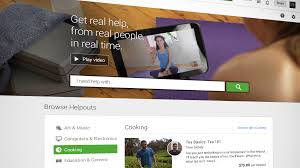
Google Helpouts is an online service providing a platform for users to collaborate, share expertise and assist other users by means of live, real-time video streaming.

To use this service, you have to be a member of Google+. You will be able to access Helpouts either through your computer or tablet or by downloading the Android app for your cellphone.

Within seconds you can have a personal instructor at your disposal or when it suits you. No limits on time or location exist – you can have access to expert advice any time of day or night.

Helpout schedules a session when it suits you best and outomatically adds it to your Google calendar. An option to be reminded via sms or e-mail also exists to ensure you don’t forget your session.

Thousands of providers have already joined Helpouts and teach in a wide range of specialist fields. Experts or, as Google refers to them, “providers” can be small, medium or large companies, but also individuals.

Even you can host your popular origami class on Helpouts. Just remember, experts have to be approved by Google and need to list their qualifications, prices and schedules.

Unlike MOOCs, Google’s new service comes at a cost.

Clients pay per minute or session for a live video conversation with an expert who gives Google 20% of his fee as payment. Free sessions are also available for some companies as part of their marketing strategy

Payment is made via Google Wallet, which holds your credit card details, and you can pay per session or per minute. If you’re not satisfied with the service, Helpout  will provide you with a full refund – if you request one within 72 hours.

Do you suddenly feel the urge to learn to play guitar? Matt Gibson is waiting for you at Google Helpouts

[SOURCE: www.iol.co.za en www.wikpedia.org]


In lyn met die vinnige groei van MOOCs (lees ons artikel oor MOOCS), het Google ook die week `n aanlyn “video-universiteit” op die been gebring. 

Google Helpouts is `n aanlyndiens wat gebruikers die geleentheid bied om te kollaboreer, kundigheid te deel en te help met behulp van lewendige, intydse videostrome.

Om die diens te gebruik, gebruik moet jy `n Google+ lid wees, waarmee jy toegang tot Helpouts kry met jou rekenaar of tablet, of deur die Android-toepassing op jou selfoon te laai.

Binne sekondes kan jy ‘n persoonlike instrukteur tot jou beskikking hê of wanneer dit jou pas. Jy kan enige tyd van die dag of nag toegang kry tot `n deskundige se kennis – geen beperking op tyd of geografiese grense nie. 

Helpout skeduleer jou sessie wanneer dit jou pas en plaas dit outomaties op jou Google kalender. Jy kan ook kies om deur middel van sms of e-pos herinner te word.

Helpouts het reeds meer as 1000 verskaffers wat enige beroep insluit en lesse gee in `n verskeidenheid spesialisareas. Kundiges of “verskaffers”, soos Google hulle noem, kan klein, medium of groot maatskappye wees, maar ook individue.

Selfs jy kan jou origami-klas op Helpouts aanbied. Onthou net dat kundiges deur Google goedgekeur moet word en `n volledige beskrywing van hul dienste, pryse en skedules verskaf moet word.

Ongelukkig, anders as MOOCs, is daar `n koste verbonde aan Google se nuwe diens.

Kliënte betaal per minuut of sessie vir lewendige, intydse videogesprekke met die deskundige, wat op sy beurt aan Google 20% van sy fooi betaal. Sommige maatskappye sal wel gratis sessies aanbied om bemarking `n hupstoot te gee. 

Betaling geskied deur middel van Google Wallet, wat jou kredietkaartdetails bevat, en jy betaal per sessie of per minuut. As jy ontevrede is met die diens, waarborg Helpout `n volledige terugbetaling –  mits jy dit binne 72 uur versoek.

Skielik lus om te leer kitaar speel? Matt Gibson wag vir jou by Google Helpouts …

[BRON: www.iol.co.za en www.wikpedia.org]


Mobile technology survey reveals new trends Mobiele tegnologie opname wys nuwe gebruikspatrone uit

Friday, November 1st, 2013

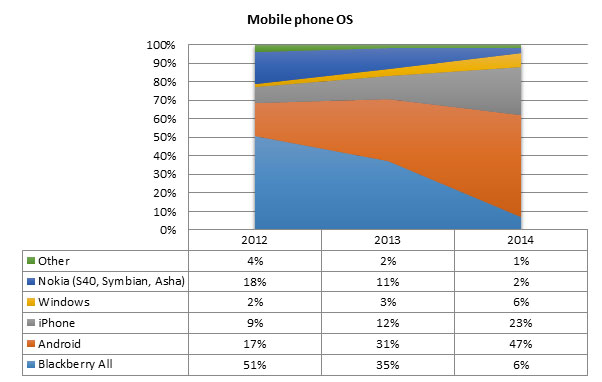
Android and Apple mobile phones look likely to dominate share amongst students within a year while Blackberry’s share is dwindling rapidly. The picture has changed significantly since 2012:

mobile-phones

This is just one example of the results of a recent mobile technology survey conducted by the Information Technology division to track trends in students’ mobile devices. The purpose of these surveys (the first was conducted in September 2012) are to identify trends so that relevant university mobile services and strategies can be implemented in future. Understanding the mix of devices that students possess and how rapidly the picture is changing, is crucial for informed planning and decision-making.

Another unexpected trend is the slow penetration of tablets on campus. Since the vast majority of students have daily access to a laptop, ultrabook or notebook, the tablet seems to be an optional “third” device, which 47% of students can’t afford and 25% prefer not to use. Only 28% of respondents have a tablet, almost half of which are Apple iPads, closely followed by Android tablets. Students indicate that the take-up is likely to increase but accelerate slowly.

Unfortunately awareness of the national Student Technology Programme, which provides students with the opportunity to purchase heavily discounted tablets, laptops and notebooks, is also still lacking.

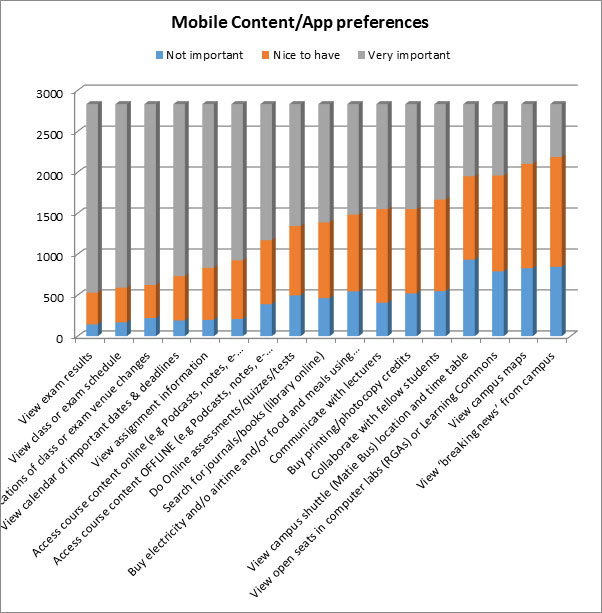
On the positive side students consistently rate mobile services and content related to learning and academic events and schedules as the most important. It is possible that as more learning content, including e-textbooks, becomes available via mobile devices, for offline consumption as well, that the penetration of tablets may accelerate.

mobile-content

More surveys will be conducted in the foreseeable future to discern trends and changes over time and students are encouraged to participate.

One lucky respondent, BComm student, Pierre-Etienne Rossouw, was the winner of an Incredible Connection gift voucher to the value of R1500.

2832 students out of 32266 invitees responded.

 

[PHOTO: Ralph Pina (director of development) with winner Pierre-Etienne Rossouw]


Diit blyk dat Android- en Apple-selfone waarskynlik binne die volgende jaar om studente se guns gaan kompeteer, terwyl Blackberry se populariteit vinnig wegkwyn. Die prentjie het beduidend verander sedert 2012:

mobile-phones

Hierdie is slegs een voorbeeld van die resultate van ‘n onlangse mobiele tegnologie opname, geneem deur Informasietegnologie, om patrone in mobiele toestelle onder studente te bepaal.

Die doel van die opnames, waarvan die eerste in September 2012 uitgevoer is, is om gedragspatrone te identifiseer sodat toepaslike universiteitsdienste en -strategieë in die toekoms implementeer kan word. Die kombinasie van toestelle waaroor studente beskik en hoe vinnig omstandighede verander, is kritiek vir ingeligte beplanning en besluitneming.

‘n Ander onverwagse neiging is die stadige toename van tablette op kampus. Aangesien die meerderheid studente daagliks toegang tot ‘n skootrekenaar, ultrabook of notebook het, word die tablet gesien as ‘n “derde” toestel wat 47% van studente nie kan bekostig nie en 25% verkies om nie te gebruik nie. 

Slegs 28% van deelnemers besit ‘n tablet, waarvan bykans die helfte Apple iPads is, met Android tablette kort op sy hakke. Studente dui aan dat `n styging mettertyd sal plaasvind, maar wel geleidelik. 

Ongelukkig is bewustheid rondom die Studente Tegnologie Program, wat aan studente die geleentheid bied om skootrekenaars, tablette en notebooks teen afslagpryse te koop, steeds gebrekkig. 

Aan die positiewe kant sien studente deurlopend dienste en inhoud wat verband hou met leer, akademiese geleenthede en skedules, byvoorbeeld eksamenresultate, klas- en eksamenroosters en taakinformasie, as die noodsaaklikste funksie wat mobiele toestelle moet vervul.

Dis moontlik dat, wanneer meer leerinhoud, insluitende e-handboeke, meer beskikbaar raak via mobiele toestelle, ook vir aflyn gebruik, die toename van tablette ook mag versnel.

mobile-content

Verdere opnames sal in die toekoms uitgevoer word om gebruikspatrone en addisionele veranderinge oor tyd te bestudeer.

Een gelukkige wenner, BComm-student Pierre-Etienne, was die gelukkige wenner van ‘n Incredible Connection geskenkbewys ter waarde van R1500.

2832 studente uit 32266 uitgenooides is, het die opname voltooi. 

[FOTO: Ralph Pina (direkteur: ontwikkeling) met wenner Pierre-Etienne Rossouw]


Free YouTube?YouTube skielik gratis?

Friday, November 1st, 2013

If you’ve been surfing YouTube the past week, whether for academic purposes or for your video fix, you might have noticed something interesting – Inetkey wasn’t always necesary to access videos. And you observation would be correct.
Good news for us, but we first we need to explain how it works so you won’t be caught off guard.

Stellenbosch University’s internet is routed through Tenet (The Tertiary Education and Research network), a network infrastructure aiming to provide the best possible internet infrastructure to academic institutions. For this reason Tenet’s server is open and accessible to SU staff at no cost and without Inetkey.

But how is this relevant to YouTube? Tenet is hosting a version of YouTube on it’s server cache to enable easier and faster access for their users.

To establish which network should be used for a request and to select the shortest route  for traffic to travel to follow, Google uses algorithms, also known as geo-tagging. In our case Google decides to direct your YouTube request to Tenet instead of one of their servers located overseas.

The risk in the current situation is that Google might decide to use another cache for optimal network capacity and free content will change to paid content once again.

All YouTube content isn’t necessarily part of the cache. Tenet caches the data according to demand. To ensure you don’t pay, keep’Inetkey closed when browsing YouTube.

However, until Google changes it’s route, you can play around on YouTube to your heart’s content. Just remember to keep your Inetkey closed, otherwise you’re in for a big surprise at the end of the month.


Indien jy die afgelope week YouTube besoek het – of dit nou om akademiese redes was of vir jou weeklikse video-fix, sou jy opgemerk het Inetkey nie noodwendig nodig was nie. En jou observasie sou heeltemal reg wees.

Goeie nuus, maar daar is ‘n stertjie aan die storie. Kom ons verduidelik eers hoekom dit skielik so is. 

Universiteit Stellenbosch se internet word herlei deur Tenet (The Tertiary Education and Research network), ‘n netwerk met die doel om die beste moontlike infrastruktuur aan akademiese instansies te verskaf. Derhalwe is Tenet se bediener oop vir US-personeel en kan toegang gratis, sonder Inetkey, verkry word. 

Maar wat het YouTube hiermee te doen? Tenet huisves ook die afgelope tyd ‘n weergawe van YouTube in sy kasgeheue, sodat gebruikers makliker en vinniger toegang kan kry.

Om te bepaal watter netwerk gebruik moet word vir ‘n versoek en die kortste pad waarheen verkeer herlei moet word, te bepaal, gebruik Google algoritmes, of te wel geo-tagging. In ons geval besluit Google om jou YouTube-versoek eerder na Tenet te wys in plaas van na hulle oorsese bedieners.

`n Risiko bestaan wel dat, indien Google besluit om ‘n ander cache te gebruik vir beter netwerkkapasiteit, die gratis inhoud kan terugverander na betaal-inhoud. 

Let wel, ALLE YouTube videos is nie outomaties deel van die kasgeheue nie – Tenet bêre die data volgens aanvraag. Om te verseker jy betaal nie, hou jou Inetkey gesluit wanneer jy YouTube besoek.

Tot tyd en wyl Google sy roete verander kan jy gratis op YouTube rondspeel. Onthou net om jou Inetkey toe te maak, anders kan jy ‘n lelike verrassing aan die einde van die maand kry.


How to safely remove mediaMediaverwydering: die regte manier

Friday, October 18th, 2013

It’s 4:32 on a Friday afternoon. You’re exhausted after a week of non-stop dramas and just want to switch off you computer, go home and enjoy the weekend. Downstairs your lift club is anxiously waiting for you to join them. You’ve been reminded of this by their persistently timed missed calls every minute.

Unfortunately at 4:31 you remembered you need to copy a specific document and it’s writing to your flash disk at the pace of a snail wading through quicksand.

Now the question is – do you just rip it out of your laptop and rush downstairs before you have to hike home? Do you wait patiently for it to finish copying? Or do you follow the prescribed, correct steps to eject a USB device? After all how dangerous can it be to remove the flash drive or external hard drive without ejecting it?

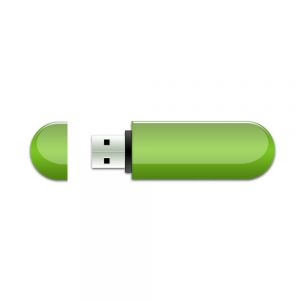
When you plug a USB device into your PC, whether it’s your camera, flash drive or external hard drive, you allow it to write and read data to the device. Some data will be cached during this process. 

When data is cached, it’s not immediately written to the USB device, but kept in the PC’s memory. If you remove the device before information is written or while it’s being written, your data will become corrupt. 

However, Windows automatically disables caching on USB devices, unless you enable the function yourself. Therefore, in most cases, you can remove a device without clicking on ‘Safely Remove Hardware’, but only when no data is being written or read by the device. If the device is flashing and data is being copied or read, you run the risk of ending up with corrupt, unusable data.

See the Safely Remove Hardware’ option as your safety net – it’s just an extra precaution to ensure you don’t damage your data. When using it, your files will close properly and all the metadata will be preserved with the file. 

For more information about safe media ejection read this thorough explanation on the How to Geek website. 

[SOURCE: www.howtogeek.com]


Dis 4:32 op `n Vrydagmiddag. Jy is gedaan na `n week vol dramas en krisisse en wil net jou rekenaar afsit en gaan naweek hou. Jou selfoon beep vir die soveelste keer met `n boodskap van die ryklub wat angstig sit en wag. 

Twee minute gelede het jy onthou van `n dokument wat jy die naweek wil lees en dit kopieer op die oomblik teen die spoed van `n slak deur dryfsand.

Die dilemma is –  gaan jy dit uittrek en hardloop voordat jy huistoe moet ryloop? Gaan jy geduldig wag tot dit klaar gekopieer is? Of gaan jy dit onderbreek en die regte, voorgeskrewe stappe neem om dit te ontkoppel? Hoe gevaarlik kan dit wees vir jou rekenaar en data as jy net vinnig jou geheuestokkie of eksterne hardeskyf uittrek?

Wanneer jy enigiets met `n USB-konneksie aan jou rekenaar koppel, kry dit die geleentheid om data te lees en skryf na die toestel – data wat soms ook elders geberg word. Met datastoring word die inligting nie onmiddellik na jou toestel geskryf nie, maar eers in jou rekenaar se geheue gebêre. 

Indien jy die USB-toestel net uitpluk voordat hierdie inligting volledig klaar geskryf is, of steeds besig is om te kopieer, kan jou data korrup word.

Die goeie nuus is dat Windows outomaties hierdie stoorfunksie vir USB-toestelle deaktiveer, tensy jy spesifiek aandui dat jy dit wil gebruik. As data nie geskryf of gelees word op daardie oomblik nie, kan jy normaalweg met `n geruste hart die “Safely Remove Hardware”-opsie ignoreer. Maar, as die geheuestokkie se liggie flikker en data gelees of gekopieer word, vat jy die kans dat jy met verlore en korrupte data gaan opeindig.

Safely Remove Hardware” is jou veiligheidsnet om te keer dat jy nie jou eie leêrs vernietig nie. As jy dit wel gebruik, verseker jy dat jou data mooi netjies verpak is en met die nodige metadata aangeheg.  

Vir meer inligting oor veilige media verwydering, lees gerus hierdie deeglike uiteensetting op How to geek se webwerf.


[BRON: www.howtogeek.com]