SEARCH
  • [:en]Recent Posts[:af]Onlangse bydraes

  • [:en]Categories[:af]Kategorieë

  • [:en]Archives[:af]Argiewe

Connectivity

[:en]Microsoft Teams meeting recordings will now be saved to OneDrive and SharePoint[:af]Microsoft Teams vergaderingopnames nou gestoor in OneDrive en SharePoint[:]

Wednesday, October 7th, 2020

[:en]

What does this mean?

Microsoft has opted to change the storage space where new Teams meeting recordings are stored on, and served from, to OneDrive and SharePoint (ODSP),  instead of Microsoft Stream. This change will occur in the next few months and more information will be made available at a later date.

How does this affect Stellenbosch University?

This change impacts the organisation in several ways:

  • New features

The move to ODSP immediately unlocks long-awaited features including external and guest sharing, with improved transcription quality, speaker attribution, transcript content search, and other features to follow in 2021.

  • Meeting storage

Non-Channel meetings will be stored in the OneDrive of the person who clicked the record button in a special folder labelled “Recordings” – that sits at the top of the recorder’s OneDrive. Channel meetings will be stored in a folder labelled “Recordings” under a folder named after the channel under the Team’s document library.

  • Permissions

All meeting invitees – except for external users – in non-channel meetings will automatically get a shared link to access the meeting recording. External users will need to be explicitly added to the shared list by the meeting organiser or the person that clicked the record button. For Channel meetings, permissions will be inherited from the owners and members list in the channel.

What should I do to prepare?

For now, you as the user should do nothing. This is an automated process being implemented on a server level. We at IT will be testing these new features extensively before any implementation will be made on the user environment. More information will be communicated at a later date.

[ARTICLE BY BRADLEY VAN DER VENTER]

[:af]

Wat beteken dit?

Microsoft het besluit om die stoorpoel vir opnames van Teams aanlynvergaderings te verander van Microsoft Stream na OneDrive en SharePoint (ODSP). Hierdie verandering sal binne die volgende paar maande plaasvind en meer inligting sal op ʼn latere datum bekendgemaak word. 

Hoe beïnvloed dit Universiteit Stellenbosch?

Die verandering beïnvloed ons organisasie op verskeie wyses:

  • Nuwe funksies

Die skuif na SharePoint stel nou funksies beskikbaar waarvoor daar reeds ʼn geruime tyd gewag word. Dit sluit die vermoeë om inligting te deel met eksterne persone en gaste; sprekertoekening; transkripsie-soektogte met verdere funksies wat in 2021 verwag word. 

  • Stoor van vergaderings

Vergaderings wat nie in die channels plaasvind nie, sal gestoor word in die OneDrive-stoorspasie van die persoon wat die opnameknoppie gedruk het. Dit sal gestoor word in `n spesiale lêer wat Recordings genoem word. Channel-vergaderings sal gestoor word in die Recordings-leêr onder ʼn l lêer genoem na die Team se document library.

  • Regte

Alle uitgenooides na die vergadering – behalwe eksterne gebruikers – in nie-channel vergaderings sal outomaties ʼn gedeelde skakel van die opname van die vergadering. Die organiseerder van die vergadering of die persoon wat die opname aktiveer het sal pertinent eksterne gebruikers moet byvoeg by ʼn gedeelde lys. Vir channel-vergaderings sal regte geërf word van die eienaars en lede in die channel

Wat moet ek doen om voor te berei?

Vir nou hoef jy as gebruiker niks te doen nie. Hierdie is ʼn geoutomatiseerde proses wat op bedienervlak implementeer word.

Informasietegnologie sal hierdie funksies eers deeglik toets voordat enige implementasie gemaak sal word op die gebruikersomgewing. Meer informasie sal gekommunikeer word op ʼn latere datum. 

[ARTIKEL DEUR BRADLEY VAN DER VENTER]

[:]

[:en]Teams: Useful links[:]

Tuesday, August 4th, 2020

[:en]

Due to the current situation many staff members have to switch to online platforms and there is a greater need for online meetings using Microsoft Teams. Below are a few convenient links with guides on how to use it.

Office 365 Training Center

Microsoft Teams help center

Planner Self-help guide

OneDrive help center

OneNote help center


Meetings in Teams

Schedule a meeting in Teams

Join a Teams Meeting (video)

Manage Meetings (Video)

Start an instant meeting in Teams

Share content in a meeting in Teams

Create instant meetings with Meet Now (video)

Record a meeting in Teams

[:]

OneDrive for Business

Monday, June 22nd, 2020

[:en]

What is OneDrive for Business?

OneDrive for Business is Microsoft’s file-hosting service that allows you to store, share and synchronise work files.  It is certified against the internationally recognised information security standards, but you are still responsible for using it in a safe and secure way.

Why use OneDrive for Business?

  • It provides 5TB of cloud storage space for each staff member and student. This means you have ample space to store your documents
  • Your data will always be available from anywhere, anytime, on any device with an internet connection
  • Your documents will also be backed up and safe if you have problems with your device’s hardware or if it gets lost or stolen.

How do I access OneDrive for Business?

All staff automatically has access to OneDrive and can be accessed in the following ways:

  • OneDrive desktop application

If you don’t have access to the OneDrive for Business application, you can download it here: https://microsoft.com/en-za/microsoft-365/onedrive/download.

  • Web Interface

Log on to Office365 with your email address and password.

  • OneDrive is also accessible via my.sun by clicking on the Office365 link or searching for Office365 in the search field.

What if I have been using OneDrive personal, Dropbox and other cloud storage options? 

You can keep on using them, but it is very important that you only use these storage options for your personal data.

OneDrive for Business and SharePoint online are available under the US MS Licence agreement for storage and sharing of institutional data. The storage and sharing of institutional data are not allowed on Dropbox, OneDrive personal or any other cloud storage

Important to know:

  • Familiarise yourself with copyright regulations. Make sure you know what you can store and share online.  SU copyright agreements do not extend to storing of documents protected under the copyright law on OneDrive for business or any other public store space.
  • You are entirely responsible for your own information. Be careful who you give rights and access to, as it will compromise your information if it’s visible to unwanted people.
  • You are responsible for synchronisation between online and local data. Synchronisation between online and local information needs to be set up correctly and done on a regular basis.
  • Keep in mind that access to cloud services when on campus will not incur any costs, but if you work from home your own data will be utilised.
  • If a staff member resigns or a student leaves the university, they will no longer have access to the information stored on their OneDrive. Remove any data stored on Microsoft One Drive and copy it on your own external hard drive or other online cloud storage, for example, Google Drive or Drop Box before you leave the university.

Further information:

https://www.agileit.com/news/benefits-of-microsoft-office-365-onedrive-business-collaboration/


[:af]

Wat is OneDrive for Business?

OneDrive for Business is Microsoft se lêer-bergingsdiens wat jou toelaat om werk-lêers te stoor, deel met kollegas en sinkroniseer. Dit voldoen aan internasionaal erkende inligting-sekuriteitstandaarde, maar dit bly steeds jou verantwoordelik om dit veilig en verantwoordelik te gebruik.  

Hoekom OneDrive for Business?

  • Dit verskaf 5TB wolk-stoorspasie aan elke personeellid en student. Dit beteken dat jy oorgenoeg spasie het om jou dokumente te stoor.
  • Jou data sal beskikbaar wees vanaf enige plek, enige tyd en met enige toestel wat aan die internet verbind is. 
  • Jou dokumente sal gerugsteun en veilig wees indien jy probleme ondervind met jou apparatuur of indien dit verlore raak of gesteel word. 

Hoe kry ek toegang tot OneDrive for Business?

Alle personeel het reeds outomaties toegang tot OneDrive en toegang kan gekry word op die volgende wyses:

  • OneDrive desktop-toepassing

Indien jy nie toegang het tot die OneDrive for Business-toepassing nie, kan jy dit hier aflaai: https://microsoft.com/en-za/microsoft-365/onedrive/download.

  • Web-koppelvlak

Teken aan by Office365 met jou e-posadres en wagwoord.

  • OneDrive is ook toeganklik via die my.sun portal deur te kliek op die Office365-skakel of te soek vir Office365 in die soek-veld.

Wat as ek OneDrive personal, Dropbox of ander wolkopsies gebruik? 

Jy kan aanhou om dit te gebruik, maar dis baie belangrik dat jy hierdie opsies slegs vir persoonlike data gebruik.

OneDrive for Business en SharePoint online is beskikbaar onder die US Microsoft lisensieooreenkoms vir stoor en deel van institusionele data. Stoor en deel van institusionele data word nie toegelaat op Dropbox, OneDrive personal of enige ander wolk-stoorspasie nie. 

BELANGRIK:

  • Raak vertroud met kopiereg-regulasies. Maak seker jy weet wat jy aanlyn mag stoor en deel. US kopiereg-ooreenkomste sluit nie die stoor en deel van dokumente wat beskerm word onder kopiereg op OneDrive for business, SharePoint online of enige ander publieke stoorspasies in nie.
  • Jy is ten volle verantwoordelik vir jou inligting.  Wees versigtig vir wie jy regte en toegang gee, aangesien dit jou inligting blootstel indien dit sigbaar is vir die verkeerde persone.
  • Jy is verantwoordelik vir die sinkronisasie tussen aanlyn en plaaslike data. Sinkronisasie tussen aanlyn en plaaslike data moet korrek opgestel word en gereeld gedoen word. 
  • Terwyl jy op kampus is, sal die gebruik van wolkdienste niks kos nie, maar as jy weg van kampus is word jou eie datakostes gebruik. 
  • Indien `n personeellid bedank of `n student die universiteit verlaat, sal hulle nie meer toegang hê tot die inligting wat op hulle OneDrive-spasie gestoor is nie. Verwyder alle data vanaf jou Microsoft One Drive stoorspasie en kopiëer dit op jou eksterne hardeskyf of eerder op aanlyn wolk-stoorspasie, byvoorbeeld Google Drive of Drop Box oordat jy die universiteit verlaat.

Meer inligting:

https://www.agileit.com/news/benefits-of-microsoft-office-365-onedrive-business-collaboration/

[:]

[:en]Residence WiFi renewal project[:af]Koshuis WiFi-hernuwingsprojek[:]

Monday, February 3rd, 2020

[:en]

Over the past two years Information Technology’s network infrastructure team worked hard at ensuring that all SU campus residences are equipped to provide effective WiFi network access to students.

As the project is drawing to a close, we can recap and provide statistics.

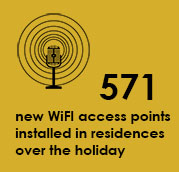
Nearly 1500 WiFi access points were installed of which 571 over the December/January holidays. The last, outstanding WiFi hotspots will be installed during the June/July holiday time period.

The following number of WiFi hotspots were installed over the holidays:

Stellenbosch campus:

Huis De Villiers               67

Dagbreek                          89

Metanoia                          186

Huis McDonald               37

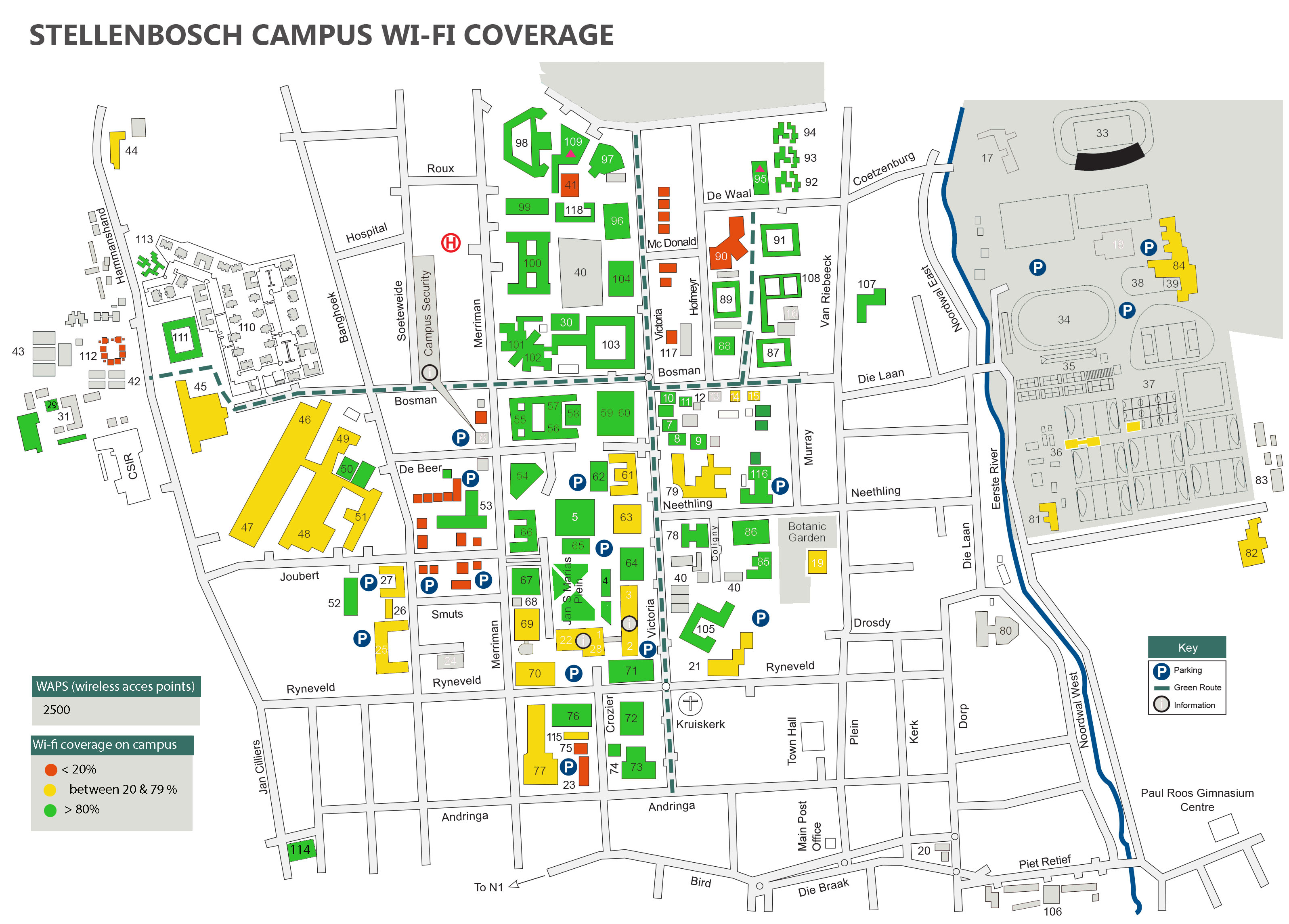
Helderberg installations will be completed at the end of February while Minerva is scheduled for the June 2020 slot. Due to construction at Goldfields installing WiFi points wasn’t possible, but is scheduled for when construction is completed. For more detail on current WiFi coverage on Stellenbosch campus, see below.

Tygerberg campus:

Franci van Zyl                  67

Hippokrates                     78

Elective students            15

Meerhof is currently being completed.

Worcester campus:

WiFi for whole building has been revamped  32


[:af]

Informasietegnologie se netwerk-infrastruktuurspan het oor die afgelope twee jaar hard gewerk om te verseker dat alle koshuise op US-kampusse voldoende toegerus is om effektiewe WiFi netwerktoegang aan studente te verskaf. 

Soos die hernuwingsprojek einde se kant toe staan kyk ons na wat ons bereik het en ’n paar syfers verskaf. 

Bykans 1500 WiFi-toegangspunte is geïnstalleer waarvan 571 oor die afgelope Desember/Januarie vakansie. Die laaste, uitstaande WiFi-punte sal gedurende die Junie/Julie vakansie installeer word. 

Die volgende aantal WiFi-punte is oor die vakansie installeer: 

Stellenbosch-kampus:

Huis De Villiers               67

Dagbreek                          89

Metanoia                          186

Huis McDonald              37

Helderberg se installasies sal voltooi word teen die einde van Februarie, terwyl Minerva geskeduleer is vir Junie. Weens konstruksie was installasies by Goldfields nie moontlik nie, maar is dit geskeduleer vir wanneer konstruksie voltooi is. Vir meer detail oor WiFi-dekking op Stellenbosch-kampus, sien die kaart onder. 

Tygerberg-kampus:

Franci van Zyl                   67

Hippokrates                     78

Elektiewe studente         15

Meerhof word tans voltooi.

Worcester-kampus:

WiFi vir die hele gebou is opgeknap  32


[:]

[:en]Effect of internet cable break on Stellenbosch University[:af]Impak van die internet kabelbreuk op Universiteit Stellenbosch[:]

Monday, January 20th, 2020

[:en]

The recent internet speed problems that South Africans have been experiencing has been front page news since mid-January. How has it affected the University community?

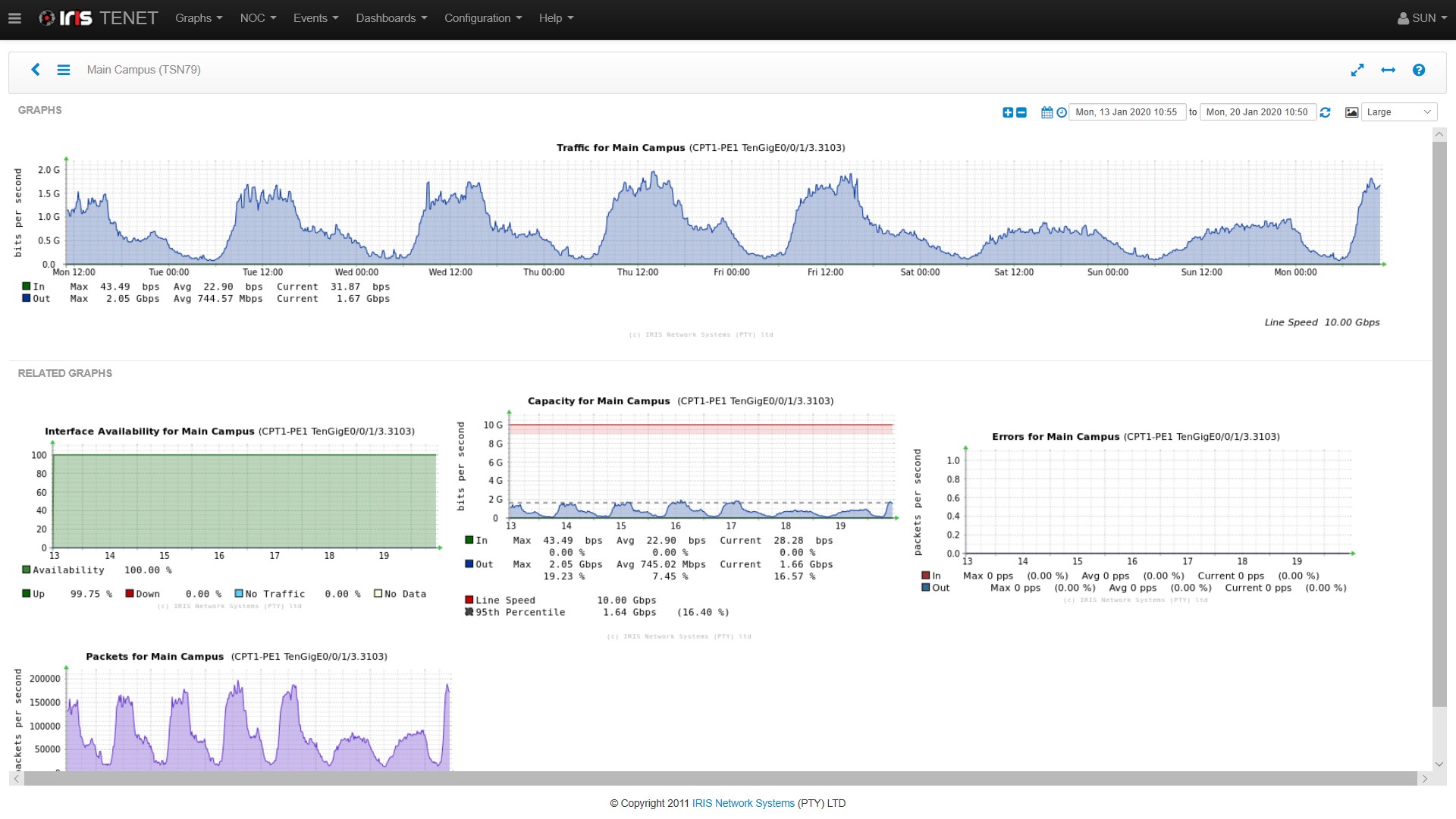
The short answer is that in most cases, we don’t see any degradation in network performance at all. How is this possible, one may ask? The answer lies in the redundant design of our international circuits, as implemented and managed by TENET, the service provider for the tertiary education sector. When a particular network circuit is broken for some reason, like the West African cable (WACS) in the current situation, the university traffic is seamlessly re-routed via another circuit, Seacom, running along the East Africa coastline. Obviously, the risk of total network failure is enlarged by the current unavailability of WACS (and SAT3), but up to now our services remained available without a hiccup. This can be seen from the following graphs, which show constant traffic flow for the past week, 100% interface availability of the network, spare capacity available and zero network errors reported.

Other network service providers often don’t have this level of redundancy available, and may be more seriously affected. That is why ISP’s like Axxess, Afrihost and others have been struggling, and why some users might have experienced communication problems at home, or while using other networks other than the campus network. 

When will this situation normalise? The WACS cable on the coast of the Congo is currently being attended to by the cable repair ship and TENET’s estimation is repairs could be completed by 11 February.

For regular updates and information on how the repair process works, follow TENET on Twitter.

Click for larger image

TENET internet usage graphs


[:af]

Die probleme met internetspoed wat Suid-Afrikaners tans ervaar is reeds vir weke lank in die nuus. Maar hoe het dit ons eie Universiteitsgemeenskap beïnvloed? 

Die kort antwoord is dat ons, in die meeste gevalle, hoegenaamd nie ʼn degradasie in netwerkverrigting opmerk nie. Hoe is dit moontlik, wonder jy dalk? Die rede lê by TENET, die diensverskaffer vir die tersiêre opvoedingsektor, se oortolligheidsontwerp van ons internasionale stroombane. Wanneer ʼn spesifieke netwerkstroombaan, om watter rede ookal, gebreek is – soos die Wes-Afrika kabel (WACS) op die oomblik – word die universiteit se internetverkeer soomloos herlei deur ʼn ander stroombaan, Seacom, wat langs die Oos-Afrika kus loop. 

Vanselfsprekend word die risiko van ʼn volslae netwerkonderbreking verhoog deur die huidige onbeskikbaarheid van die WACS (en SAT3), maar so ver het ons dienste beskikbaar gebly sonder enige glipse. Dis ook duidelik sigbaar op die grafiek onder wat deurlopende internetverkeersvloei, 100% koppelvlakbeskikbaarheid van die netwerk, ekstra beskikbare kapasiteit en geen netwerkfoute aandui. 

Ander netwerkdiensverskaffers het dikwels nie hierdie vlak van oortolligheid tot hulle beskikking nie en voel meer ernstig die impak van die kabelbreuk. Dis ook hoekom IDV’s soos Axxess, Afrihost en ander by tye gesukkel het en hoekom sommige gebruikers verbindingsprobleme tuis of elders as op kampus ervaar het. 

Wanneer sal die situasie weer terugkeer na normaal? Die WACS-kabel aan die kus van die Kongo word tans herstel deur die kabelherstelskip en TENET skat dat die herstelwerk teen 11 Februarie voltooi sal wees.

Vir meer gereelde nuus oor die situasie en inligting oor hoe die herstelproses werk, volg TENET op Twitter.

Click for larger image

TENET internet usage graphs


[:]