SEARCH
  • [:en]Recent Posts[:af]Onlangse bydraes

  • [:en]Categories[:af]Kategorieë

  • [:en]Archives[:af]Argiewe

Connectivity

[:en]IT Emergency maintenance: Saturday, 13 July[:af]IT Noodonderhoud: Saterdag, 13 Julie[:]

Thursday, July 11th, 2019

[:en]

Essential emergency maintenance will be taking place this Saturday, 13 July, from 07:00 to 12:00.

During this time a large number of functions and applications will temporarily be unavailable. This includes, among others, HR services, Financial services, Student information, SUNLearn, Short Courses and COB payments. Internet and email will not be impacted by this maintenance.

Due to the extent of this maintenance and the necessity for thorough testing of systems and applications the possibility exists for continued interruptions into the new week.

Please rest assured that we will try our best to limit interruptions to a minimum. For inquiries please contact the IT Service Desk at 021 808 4367 or log a request on the ICT Partner Portal.

[:af]

Noodsaaklike noodonderhoud vind komende Saterdag, 13 Julie, vanaf 07:00 tot 12:00 plaas.

ʼn Groot aantal funksies en toepassings sal gedurende hierdie tydperk nie beskikbaar wees nie. Dit sluit, onder andere, Menslike Hulpbronne, Finansiële dienste, SUNLearn, Kortkursusse, Studente-inligting en COB-betalings in. Internet en e-pos word nie deur hierdie onderhoud beïnvloed nie.

Wees verseker dat ons alles binne ons vermoë sal doen om onderbrekings tot die minimum te beperk.Vir navrae kontak asb. die IT Dienstoonbank by 021 808 4367 of meld ʼn versoek aan op die ICT Partner Portal.

[:]

[:en]Inetkey Android app temporarily not available for download from Google Play store[:]

Wednesday, June 5th, 2019

[:en]

From Thursday, 6 June, the official Inetkey app for Android will be unavailable for download from the Google Play store. If you have the Inetkey app installed on your smart device it will not be removed and you can continue using it. This is only temporary and we are working with Google to rectify the situation.

Currently the web-based version is still available at https://inetkey.sun.ac.za.

Take note that there are unofficial Inetkey apps available, but Information Technology does not endorse its download since it might pose a security risk. If you have a new mobile device and need the Inetkey app, please contact the IT Service Desk for assistance.

[:]

[:en]Feedback on the SU Administration system outage[:]

Friday, April 26th, 2019

[:en]

During the last week of April most of our staff and students were affected by a serious outage of core IT-related administrative services and systems. The outage’s impact was widespread and it was handled with high urgency. Almost all of the University’s administrative processes were negatively affected, due to the dependencies on the core Student Information and Financial Systems, which were both unavailable.

The affected business processes included, but were not limited to: applications by prospective students, all financial transactions and processes, all student and academic administration processes, approvals of facilities work orders, meal bookings and orders in residences, business intelligence services, amongst others.

Services that were generally unaffected by the outage include: delivery of online learning content, email, Internet and communications, Office365 collaboration services, physical access control and security services, amongst others.

We wish to thank our colleagues and students for their understanding and apologise for the frustrations that had to be endured. We would also like to thank the technical teams at IT for their dedication and the long hours put in to restore services.

When the outage manifested
The IT Division became aware of the incident at the beginning of the business day on Wednesday 24 April 2019.

When the outage was resolved
Services were gradually returned to operation overnight and were fully operational by 09h00 on Friday 26 April 2019. The outage consequently lasted at least 48 hours.

Assurances
We want to assure the campus community that no data nor transactions were lost during the outage, although we do not discount that some examples may come to light during stabilisation of services.

Next steps
1. Targeted communication with specifically affected functional and faculty partners will continue as necessary.
2. The next phase will be a thorough investigation to determine the root cause(s) of the outage.
3. The IT Division, in collaboration with its functional and faculty partners, will also review the handling of the incident and use the lessons learnt to refine its standard operating procedures and its communications with the campus.
4. Once the causes of the outage have been established, the IT Division will account to the campus community in a summary report that will also enumerate any actions and initiatives to minimise the risk of a re-occurrence.

Please be assured of the importance and urgency with which the IT Division attempts to prevent and respond to such disruptions. Please report any further problems with any service on our ICT Partner Portal.

[:]

[:en]What is TENET?[:af]Wat is TENET?[:]

Wednesday, April 3rd, 2019

[:en]

On 19 March campus practically came to a standstill when our internet service provider TENET experienced problems due to load-shedding. The issue stemmed from a failed generator at UCT and many students and staff were confused as to why we were impacted by something that happened at UCT. 

What is TENET?

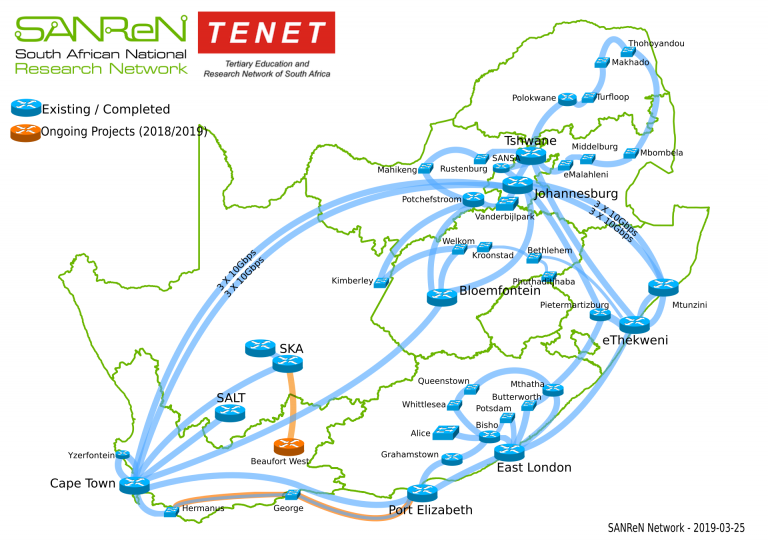
“TENET” is the short name for the Tertiary Education and Research Network of South Africa NPC. Its main purpose is to secure, for the benefit of South African universities and associated research and support institutions, Internet and Information Technology services. 

All public universities and science councils qualify to participate in TENET’s governance as members and currently, TENET provides Internet and related services to more than 300 campuses of 85 institutions. These campuses are connected via high-speed access circuits, and multiple smaller sites via ADSL lines and a shared connection between Telkom’s ADSL network and the TENET gateway in Johannesburg.

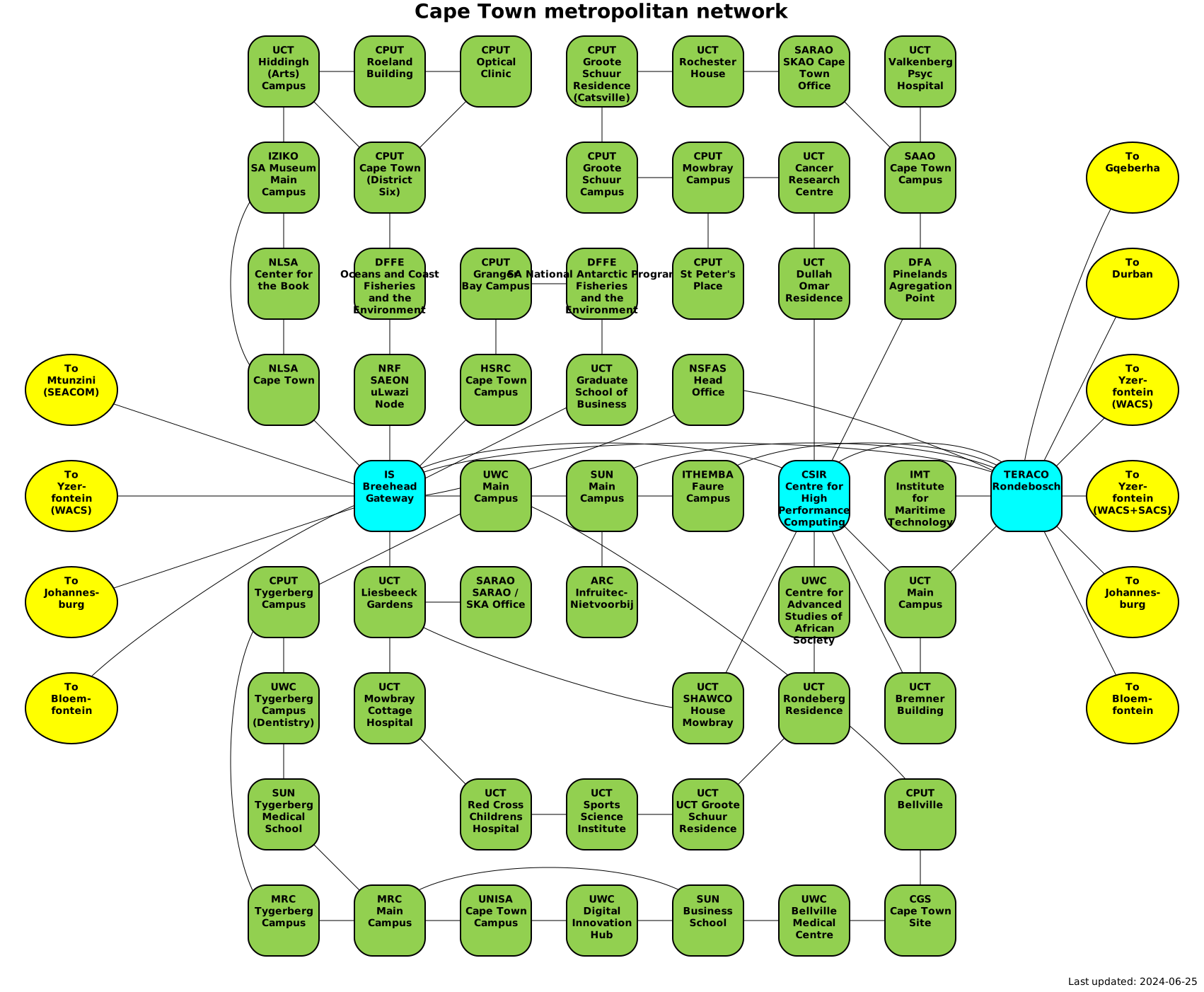
The core of the NREN network that TENET operates is the South African National Research Network (“SANReN”) that has been deployed over the past ten years by the Meraka Institute of the CSIR under contract to the Department of Science and Technology (DST). SANReN comprises a national backbone, multiple metropolitan rings, and extensive long-haul circuits to reach important research installations. (More detail on the metropolitan rings and also the Cape Town metropolitan ring in particular.)

For international connectivity TENET uses multiple submarine circuits: 

60 Gb/s on the SEACOM submarine cable that terminates at the SEACOM Landing Station at Mtunzini (and is extended from there redundantly to the SANReN backbone node at Durban), and at TENET router in Amsterdam; and

50 Gb/s on the WACS submarine cable that terminates at the SANReN backbone node in Cape Town and at TENET’s router at Telecity, London. 

If you are interested in the bigger picture and want to know what South Africa’s Internet actually looks like, MyBroadband has a handy and detailed explanation.

[SOURCE: www.tenet. ac.za]


[:af]

Op 19 Maart het ons kampus amper tot stilstand gekom toe ons diensverskaffer, TENET, probleme ondervind het weens ʼn kragonderbreking. Die probleem is veroorsaak deur ʼn foutiewe kragopwekker by die Universiteit van Kaapstad. Studente en personeel wou weet hoekom dit ons internet beïnvloed het.

Wat is TENET?

“TENET” is die afkorting vir die Tertiary Education and Research Network of South Africa NPC. Sy hoofdoel is om Internet en Informasietegnologiedienste te bewerkstelling wat tot voordeel strek van Suid-Afrikaanse universiteite en geaffilieerde navorsings en ondersteuningsinstansies. Alle openbare universiteite en wetenskaplike rade kwalifiseer om lid van TENET-lede te wees. 

Tans verskaf TENET Internet en verwante dienste aan meer as 385 kampusse en kleiner instellings. 

Die kern van die NREN-netwerk wat deur TENET bedryf word is die South African National Research Network (“SANReN”) en is die afgelope tien jaar ontplooi deur die Meraka Instituut van die WNNR onder kontrak van die Departement van Wetenskap en Tegnologie. SANReN bestaan uit ʼn nasionale gemeenskaplike dienskanaal, veelvoudige stedelike ringnetwerke en uitgebreide langafstand koppelings om belangrike navorsingsinrigtings te bereik. (Meer detail oor die stedelike ringnetwerk en meer spesifiek die Kaapstad stedelike ringnetwerk)

Vir internasionale verbindings gebruik TENET verskeie ondersee-kabelverbindings:

60 Gb/s op die SEACOM ondersee-kabel wat eindig by die SEACOM landingstasie by Mtunzini (verleng na die oorvloei-dienskanaal in Durban) en ʼn TENET roeteerder in Amsterdam; en

50 Gb/s op die WACS ondersee-kabel wat eindig by die SANReN dienskanaalnodus in Kaapstad en TENET se roeteerder by Telecity in Londen.

As jy geïnteresseerd is in die groter prentjie en wil weet hoe Suid-Afrika se Internet werk, MyBroadband het ʼn handige den gedetailleerde uiteensetting.

[BRON: www.tenet. ac.za]

[:]

[:en]Free WiFi – not always a good deal[:af]Gratis WiFi – nie altyd `n goeie idee nie[:]

Monday, February 11th, 2019

[:en]

Do you lurk in the shadows at night in your neighbourhood, looking for a neighbour who forgot to secure his Wi-Fi with a password? When times are rough and the need for internet is desperate, anything is possible.

At least the Wifi at the Wimpy or Mugg & Bean is free AND legal. But even this Wi-Fi might not be the best option.

Using Wi-Fi in itself isn’t the actual problem – it depends on what you do with it.

Public Wi-Fi hotspots are shared with other people. This means anyone, like you, with access to the same hot spot, can technically access your data and monitor your online activity

And you don’t need to be a hacker to be able to do this. Anyone with access to the right software, like Firesheep, can become an instant cybercriminal if he wants to.

In September 2014 Finn Steglich from German company SySS set up a test Wi-Fi access point in London’s financial district. The experiment was attempted to establish how many people would willingly connect to a completely insecure and unknown device. The results were unsettling.

Never conduct any bank transactions or financial business on an open Wi-Fi connection. Not even online shopping – even if you’re panicking you’ll miss Takelot’s daily deal.

Before you use any Wifi hotspot, make sure it’s the establishment’s official spot. cybercriminals set up Wifi hot spots with copies of Twitter, Facebook, etc. to encourage unsuspecting users to log on and thereby provide their login info. Using the same password for multiple websites makes it even easier for them to access other websites with more of your personal information.

There are ways to use Wifi without putting yourself at risk. Kaspersky has a few suggestions.

[:af]

Dwaal jy saans suutjies in jou buurt rond op soek na `n buurman wat vergeet het om `n wagwoord op sy Wi-Fi te sit? As die tye druk en `n mens desperaat is vir internet, is enigiets seker moontlik.

Ten minste is die Wi-Fi by die Wimpy of Mugg & Bean wettig EN gratis. Maar selfs hierdie Wi-Fi is nie noodwendig jou beste opsie nie.

Opsigself is die gebruik van Wi-Fi in openbare plekke nie `n probleem nie. Dit hang egter af wat jy op die internet doen.

Oop Wi-Fi-punte word gedeel met ander mense. Dit beteken dat enigiemand wat, soos jy, toegang tot die punt het,  jou sou data kan kry en jou aanlynaktiwiteite kan dophou.

En jy hoef nie `n slim kuberkraker te wees om toegang te bewerkstellig nie. Enigiemand met die regte sagteware, soos Firesheep, tot sy beskikking, kan ontaard in `n kuberkraker.

In September 2014 het Finn Steglich van die Duitse maatskappy SySS `n toets Wi-Fi-punt in Londen se finansiële distrik opgestel. Die doel van die eksperiment was om te bepaal hoeveel mense vrywillig sal verbind aan `n onbekende, onsekure internetkonneksie. Die resultate was kommerwekkend.

Moet onder geen omstandighede jou banksake oor `n oop Wi-Fi-konneksie doen nie. Ook nie aanlyn-inkopies nie, al is jy hoe bang jy mis Takealot se daily deal.

Voordat jy enige Wi-Fi-punt gebruik, maar seker dat dit die amptelike punt van die besigheid is. Kuberkrakers stel Wi-Fi-punte op met kopieë van webwerwe soos Twitter en Facebook bloot om internetgebruikers se aantekeninligting te bekom. As jy dieselfde wagwoord vir verskeie webwerwe gebruik, is dit net soveel makliker vir iemand om ook toegang tot meer belangrike inligting op ander webwerwe te kry.

Indien Wi-Fi jou enigste opsie is, is daar metodes om relatief veilig openbare Wi-Fi te kan gebruik. Lees gerus wat Kaspersky voorstel.


[:]