SANReN has implemented the latest version of Filesender, a web-based application that allows authenticated users to securely and easily send web-based large files to other users.
Below are the guidelines for accessing the service and what values it adds to your day to day operations.
What problem does the service solve?
You need to send a file larger than a couple of megabytes to someone and the e-mail comes back: “attachment too big” or “mailbox too full”, that’s where FileSender comes in handy.
How do I use the service?
Upon logging in, you are presented with a user-friendly interface. You can set the file to be available for download for a certain period so that it automatically gets removed when the file reaches its expiry date. You have an option to drag and drop your file when uploading it to the application. You also have an option to get a link to the file after uploading it or send it to a recipient as an e-mail.
The service is integrated with the South African Identity Federation (https://safire.ac.za/), which provides a pool of institutions you can authenticate from to use the service. If your institution is not registered on SAFIRE as yet, you can log in with a social media account if you are from an eligible institution.
Over the past weekend a number of system failures were experienced. IT staff were called out and attended to the problems from Saturday. The most serious problems included:
• No access to SUNLearn (due to authentication system problems), resolved
• No access to exam venue lookup application on my.sun.ac.za, resolved
• Sun-e-HR authentication problems, resolved
The authentication system errors also had an impact on other systems on Saturday morning. These errors primarily affected access from outside the University campus.
The SUNLearn access problem was a serious concern for students preparing for exams, and was only solved by Sunday afternoon. Although now resolved, a temporary workaround for the exam venue issue was implemented: a list of exam venues was attached to a notification on SUNLearn.
IT apologises for the inconvenience caused by the system failures. For any inquiries please contact the IT Service Desk at 021 808 4367 or log a request on the ICT Partner Portal.
[:af]
Gedurende die afgelope naweek het enkele stelsels gefaal. IT-personeel is Saterdag uitgeroep om na die probleme om te sien. Die ernstigste probleme het die volgende ingesluit:
• Geen toegang na SUNLearn (weens aantekenprobleme), opgelos
• Geen toegang na die eksamenlokaal-toepassing op my.sun.ac.za, opgelos
• Sun-e-HR aantekenprobleme, opgelos
Die stelselsaantekenfoute het ook Saterdagoggend ʼn impak gehad op ander stelsels. Hierdie foute het hoofsaaklik toegang van buite die Universiteitskampus beïnvloed.
Die probleem met toegang tot SUNLearn was ʼn ernstige bekommernis vir studente wat besig was om voor te berei vir eksamens en kon eers teen Sondagmiddag opgelos word. Hoewel die probleem nou opgelos is, is ʼn tydelike oplossing vir die probleem met die eksamenlokaaltoepassing gevind — ʼn lys met die eksamenlokale is op SUNLearn as kennisgewing geplaas.
IT vra om verskoning vir die ongerief wat veroorsaak is deur die stelsels wat gefaal het. Vir enige navrae kontak asb. die IT Dienstoonbank by 021 808 4367 of meld ʼn versoek aan op die ICT Partner Portal.
[:]
Tags: sunlearn Posted in Connectivity | Comments Off on [:en]Access to SUNLearn and other systems[:af]Toegang tot SUNLearn en ander stelsels[:]
Many of our staff and students use FortiClient to obtain VPN access to the Stellenbosch University network when they are not on campus. To maintain a safe and secure network, we have to put measures in place for our services to minimise the potential exposure to the University from damages which may result from unauthorised use of university resources. This is particularly important when it comes to access via VPN to our network.
From 6 August 2018 new VPN users have to register for VPN usage. If you have used VPN (FortiClient) since 1 January 2018, you are considered a registered user by default and don’t have to reapply for access. However, if you are a new VPN user, please follow the process described below.
If you need VPN access to the SU network via FortiClient, the following simple process is applicable:
The head of your department needs to send an email to help@sun.ac.za motivating why you require VPN access for work purposes.
You will receive an email confirming your registration with instructions on how to install the FortiClient needed for VPN usage.
A VPN (Virtual Private Network) is a way of connecting your off-site computer directly to the University network and allows you to access internal resources such as other computers, network storage, websites, journals using the applications already installed on your off-site computer. VPN provides an encrypted connection which helps to ensure that sensitive data is safely transmitted and prevents unauthorized people from eavesdropping on the traffic, allowing the user to conduct work remotely.
A secure VPN connection to the SU network with FortiClient is not necessary for standard, web-based services. These include email, library resources, SUNLearn or the SUN-e-HR website. All of these services are already accessible via the internet without a VPN connection.
More information on the use of VPN and FortiClient at SU is also available on our service catalogue.
[:af]
ʼn Groot groep van ons personeel en studente gebruik FortiClient om VPN-toegang te verkry tot die Universiteitsnetwerk wanneer hulle nie op kampus is nie. Om te verseker dat ons netwerk veilig en sekuur bly, moet ons sekere maatreëls vir ons dienste in plek sit om die Universiteit te beskerm teen skade weens die onwettige gebruik van universiteitsbronne. Dis veral belangrik wanneer dit kom by toegang tot ons netwerk met VPN.
Vanaf 6 Augustus 2018 word daar vereis dat alle nuwe VPN-gebruikers registreer vir die diens. Indien jy sedert 1 Januarie 2018 VPN (FortiClient) gebruik, is jy outomaties reeds geregistreer en hoef jy nie weer aansoek te doen nie. As jy egter ʼn nuwe VPN-gebruiker is, volg asseblief die onderstaande instruksies:
Die hoof van jou departement moet ʼn e-pos stuur na help@sun.ac.za wat motiveer hoekom jy VPN-toegang benodig vir werksdoeleindes.
Nadat die versoek ontvang is sal jy ʼn e-pos ontvang wat jou registrasie vir VPN bevestig, tesame met instruksies vir die installasie van FortiClient, die sagteware benodig vir VPN-toegang.
ʼn VPN (Virtual Private Network) is ʼn metode om direk op die Universiteit se netwerk aan te teken met jou eie rekenaar wanneer jy nie op kampus is nie. Op dié manier kry jy, met behulp van toepassings wat reeds op jou rekenaar geinstalleer is, toegang tot interne US-bronne soos ander rekenaars, netwerkstoorspasie, webwerwe en joernale. VPN bied ʼn enkripteerde verbinding wat help verseker dat sensitiewe data veilig versend word, voorkom dat ongemagtigde persone afluister op die verbinding en jy sodoende veilig elders kan werk.
ʼn Sekure VPN-verbinding aan die US-netwerk d.m.v. FortiClient is nie nodig vir standaard, webgebaseerde dienste nie. Dit sluit e-pos, biblioteekbronne,SUNLearn en die SUN-e-HR webwerf in. Al hierdie dienste is reeds toeganklik via die internet sonder `n VPN-verbinding.
Meer inligting oor die gebruik van VPN en FortiClient is ook beskikbaar op ons dienskatalogus.
All persons using the SU network have to reactivate for network usage (e-mail, internet, etc.) on an annual basis. Pensioners still using SU resources also have to complete this process to ensure they still have e-mail access.
Over the past few weeks users received an e-mail notice from helpinfo@sun.ac.za indicating that their username will expire. Generally three warnings are sent before the deadline on 1 April. Since some pensioners pay for access themselves and not a departmental cost centre, the payment method differs. Pensioners can pay for the reactivation of electronic access using one of the following methods:
EFT
Payment of R345-00 via EFT. To do the EFT payment, Stellenbosch University must be added as a beneficiary on your online banking profile.
For SU banking details, please contact us.
Cashiers at Admin Cashiers at Admin A on Stellenbosch campus or cashiers on Tygerberg campus.
Pensioners make a payment of R345-00 at the cashier with receipt type 1107 (network registration)
SU number will also be required.
If you have any questions, please contact the IT Service Desk at 021 808 4367 or help@sun.ac.za.
[:af]
Alle gebruikers van die US-netwerk moet jaarliks heraktiveer vir netwerkgebruik (e-pos, internet, ens.) Ook pensioenarisse wat steeds US-dienste gebruik moet deur die proses gaan om te verseker dat hulle steeds e-pos toegang het.
Die afgelope paar weke het gebruikers e-pos kennisgewings ontvang van helpinfo@sun.ac.za wat aandui dat hul gebruikersnaam gaan verval. Drie waarskuwings e-posse word normaalweg versend voor die afsnydatum op 1 April. Omdat sommige pensioenarisse hulle toegang self betaal en nie deur ʼn departementele kostepunt nie, verskil die betalingsmetodes. U kan op die volgende maniere u elektroniese toegang betaal:
EFT
Betaling van R345-00 d.m.v. EFT. Om die EFT-betaling te doen, moet Universiteit Stellenbosch as ʼn begunstigde op u internetbankdienste bygevoeg word. Kontak ons asb. vir die bankbesonderhede.
Kassiere by Admin Kassiere by Admin A op Stellenbosch-kampus of op Tygerberg-kampus kan gebruik word.
Pensioenarisse betaal R345-00 by die kassiere met kwitansietipe 1107 (netwerkregistrasie)
Die US-nommer word ook benodig.
Vir enige navrae of terugvoer, kontak gerus die IT Dienstoonbank by 021 808 4367 of help@sun.ac.za
[:]
Tags: pensioners, reactivation Posted in Connectivity, E-mail | Comments Off on [:en]Pensioners: Reactivation of electronic services[:af]Pensioenarisse: Heraktivering van elektroniese dienste[:]
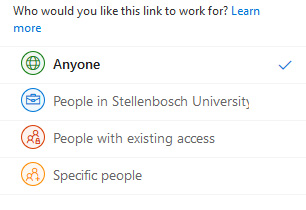
Information Technology recently assessed our OneDrive for Business platform to ensure that no security risks exist for our users and network. During this assessment we identified a number of users who are currently using the anonymous sharing function (“Anyone with the link can view and edit”) on OneDrive.
With anonymous file sharing there is no control or record of who has access to the shared files. Anybody who has the link can access and/or edit the files. This poses a security risk for the University and our users. For this reason we are compelled to switch off anonymous usage.
From Thursday, 1 February 2018 you will no longer be able to share files anonymously on OneDrive. Sharing will still be possible with internal and external users, but at a higher security level.
Guides on best practices for sharing files on OneDrive is available www.sun.ac.za/itselfhelp under the Office365 section or directly on this page.If you are have any enquiries, please contact the IT Service Desk by emailing help@sun.ac.za or calling our Service Desk at 808 4367.
[:af]
Informasietegnologie het onlangs ons OneDrive for Business–platform herevalueer om te verseker dat daar nie enige sekuriteitsrisiko’s vir ons gebruikers en netwerk is nie. Na aanleiding van die evaluering het ons ʼn aantal gebruikers geïdentifiseer wat die anonieme funksie (“Anyone with the link can view and edit”) op OneDrive gebruik om lêers te deel.
Indien lêers anoniem gedeel word, is daar geen beheer of rekord van wie toegang tot die gedeelde lêers het nie. Enige persoon met die skakel het toegang en kan inhoud verander. Dit bied ʼn hoë sekuriteitsrisiko vir die Universiteit en ons gebruikers. Gevolglik is ons verplig om die anonieme deel van lêers af te skakel.
Vanaf Donderdag, 1 Februarie 2018 sal jy nie meer lêers anoniem kan deel op OneDrive nie. Dit sal steeds moontlik wees om inligting te deel met interne en eksterne gebruikers, maar met ʼn strenger vlak van sekuriteit.
Handleidings vir die beste praktyk vir deel van lêers op OneDrive is beskikbaar by www.sun.ac.za/itselfhelp onder die Office365 afdeling of direk op hierdie bladsy.Indien jy enige navrae het, kontak asb. die IT Dienstoonbank deur e-pos te stuur aan help@sun.ac.za of 808 4367 te skakel.
[:]
Tags: Onedrive Posted in Connectivity, General, Internet, Security | Comments Off on [:en]OneDrive for Business: Anonymous file sharing[:af]OneDrive for Business: Anonieme deel van lêers [:]