SEARCH
  • [:en]Recent Posts[:af]Onlangse bydraes

  • [:en]Categories[:af]Kategorieë

  • [:en]Archives[:af]Argiewe

E-mail

[:en]Phishing scam about reaching your mailbox storage limit[:]

Tuesday, March 6th, 2018

[:en]

Monday started with a phishing scam threatening to close your mailbox, and Monday is ending with another attack, using a similar intimidation tactic about your mailbox size.

The grammar and spelling is very poor on this one so it should be rather easy to spot. However the use of University branding and “STELLENBOSCH HELP DESK” might fool some people.


The Subject will be “We apologies” (sic)

Dear User,

You have reached the storage limit for your mailbox. Please visit the following link to complete your e-mail access restore.

Follow this link to complete the process: Click Restore

STELLENBOSCH HELP DESK


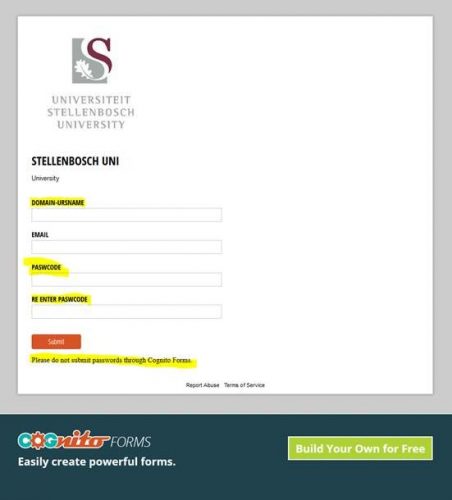
If you do click on the link (which does not go to a university website) …this webpage will appear. 


Many thanks to all of you who reported this.

Remember these 5 guidelines:

  1. Information Technology will never request sensitive information such as passwords.
  2. Phishing e-mails often appear as an important notice or urgent matter such as threats that your mailbox is over quota.
  3. Use of aggressive or intimidating language such as ‘immediately’ and threats of consequences of not verifying your account.
  4. Misspelled words and poor grammar that take away from the professional context of the e-mail. (this one is quite obvious)
  5. Use of an impersonal greeting. (Dear User)

If you have received mail that looks like this please immediately report it to the Information Technology Security Team using the following method:

Send the spam/phishing mail to help@sun.ac.za  and sysadm@sun.ac.za

 Attach the phishing or suspicious mail on to the message if possible. There is a good tutorial on how to do this at the following link (Which is safe) : http://stbsp01.stb.sun.ac.za/innov/it/it-help/Wiki%20Pages/Spam%20sysadmin%20Eng.aspx

  1. Start up a new mail addressed to sysadm@sun.ac.za (CC: help@sun.ac.za)
  2. Use the Title “SPAM” (without quotes) in the Subject.
  3. With this New Mail window open, drag the suspicious spam/phishing mail from your Inbox into the New Mail Window. It will attach the mail as an enclosure and a small icon with a light yellow envelope will appear in the attachments section of the New Mail.
  4. Send the mail.

IF YOU HAVE FALLEN FOR THE SCAM:

If you did click on the link of this phishing spam and unwittingly give the scammers your username, e-mail address and password you should immediately go to http://www.sun.ac.za/useradm and change the passwords on ALL your university accounts (making sure the new password is completely different, and is a strong password that will not be easily guessed.) as well as changing the passwords on your social media and private e-mail accounts (especially if you use the same passwords on these accounts.)

IT have set up a website page with useful information on how to report and combat phishing and spam. The address is:https://blogs.sun.ac.za/it/en/2017/11/reporting-spam-malware-and-phishing/

[Article by David Wiles]


[:]

[:en]New email banner implemented [:af]Nuwe e-pos banier geïmplementeer[:]

Wednesday, February 28th, 2018

[:en]

At the beginning of March Corporate Communications will be implementing a Be Water Smart banner (see example below).

This banner is an attempt to create awareness among students and staff regarding the ongoing water crisis in the Western Cape. It will automatically be inserted below your signature in all emails sent from @sun accounts and will click through to a web site with more information on the water crisis. 

In future the banner will also be used to create awareness of various issues affecting Stellenbosch University.

Please take note that if you make use of digital certification for your emails, the receiver of the emails will have to open the attachment sent with the email, to read the content.

Additionally it may happen that Outlook will not automatically display the banner due to security measures. If it does not display, right-click on the “broken” image and it will load.

Enquiries regarding the content and format of the banner can be sent to ecomms@sun.ac.za

[:af]

Vanaf 1 Maart 2018 sal Korporatiewe Kommunikasie ʼn Wees Water Slim banier implementeer (sien die voorbeeld onder).

Die doel van die banier is om bewustheid te skep onder studente en personeel rondom die huidige waterkrisis in die Wes-Kaap. Dit sal outomaties bygevoeg word onderaan alle e-posse vanaf  ʼn @sun rekening en sal direk onder die standaard US e-poshandtekening verskyn. Die banier sal ook ʼn skakel bevat wat die leser deurneem na `n webblad met meer inligting oor die waterkrisis.

Die banier sal ook in die toekoms gebruik word om bewustheid te kweek van verskeie ander kwessies wat die universiteit beïnvloed. 

Neem asseblief kennis dat, indien jy jou e-posse digitaal sertifiseer, die ontvanger van jou e-posse die aanhangsel wat saamgestuur word, sal moet oopmaak om die e-pos se inhoud te lees.

Daarbenewens mag dit gebeur dat die banier nie noodwendig vertoon in Outlook nie. Dit gebeur a.g.v. Outlook se sekuriteitsmaatreëls. Om die banier te sien, regskliek slegs op die “gebreekte” banier en die grafika sal laai. 

Navrae oor die inhoud en formaat van die bannier kan gestuur word na ecomms@sun.ac.za.

[:]

[:en]Pensioners: Reactivation of electronic services[:af]Pensioenarisse: Heraktivering van elektroniese dienste[:]

Tuesday, February 27th, 2018

[:en]

All persons using the SU network have to reactivate for network usage (e-mail, internet, etc.) on an annual basis. Pensioners still using SU resources also have to complete this process to ensure they still have e-mail access.

Over the past few weeks users received an e-mail notice from helpinfo@sun.ac.za indicating that their username will expire. Generally three warnings are sent before the deadline on 1 April. Since some pensioners pay for access themselves and not a departmental cost centre, the payment method differs. Pensioners can pay for the reactivation of electronic access using one of the following methods: 

EFT
Payment of R345-00 via EFT. To do the EFT payment, Stellenbosch University must be added as a beneficiary on your online banking profile.
For SU banking details, please contact us.

Cashiers at Admin
Cashiers at Admin A on Stellenbosch campus or cashiers on Tygerberg campus.
Pensioners make a payment of R345-00 at the cashier with receipt type 1107 (network registration)
SU number will also be required.

If you have any questions, please contact the IT Service Desk at 021 808 4367 or help@sun.ac.za.


[:af]

Alle gebruikers van die US-netwerk moet jaarliks heraktiveer vir netwerkgebruik (e-pos, internet, ens.) Ook pensioenarisse wat steeds US-dienste gebruik moet deur die proses gaan om te verseker dat hulle steeds e-pos toegang het.

Die afgelope paar weke het gebruikers e-pos kennisgewings ontvang van helpinfo@sun.ac.za wat aandui dat hul gebruikersnaam gaan verval. Drie waarskuwings e-posse word normaalweg versend voor die afsnydatum op 1 April. Omdat sommige pensioenarisse hulle toegang self betaal en nie deur ʼn departementele kostepunt nie, verskil die betalingsmetodes. U kan op die volgende maniere u elektroniese toegang betaal:

EFT
Betaling van R345-00 d.m.v. EFT. Om die EFT-betaling te doen, moet Universiteit Stellenbosch as ʼn begunstigde op u internetbankdienste bygevoeg word. Kontak ons asb. vir die bankbesonderhede. 

Kassiere by Admin
Kassiere by Admin A op Stellenbosch-kampus of op Tygerberg-kampus kan gebruik word.

Pensioenarisse betaal R345-00 by die kassiere met kwitansietipe 1107 (netwerkregistrasie)
Die US-nommer word ook benodig.

Vir enige navrae of terugvoer, kontak gerus die IT Dienstoonbank by 021 808 4367 of help@sun.ac.za

[:]

[:en]Phishing: PSG “Your profile details will expire”[:]

Monday, January 22nd, 2018

[:en]

There is currently a phishing email making the rounds claiming to be from PSG Wealth.

Be on the lookout for an email requesting you to update your personal information, as your PSG online “profile details will expire”. The link redirects users to a page that looks like the PSG securities trading website, but is a clever forgery.

PSG have assured us that they will never send you an email asking to provide sensitive information online. So it is important to check the validity of any such emails before you respond to requests like these.

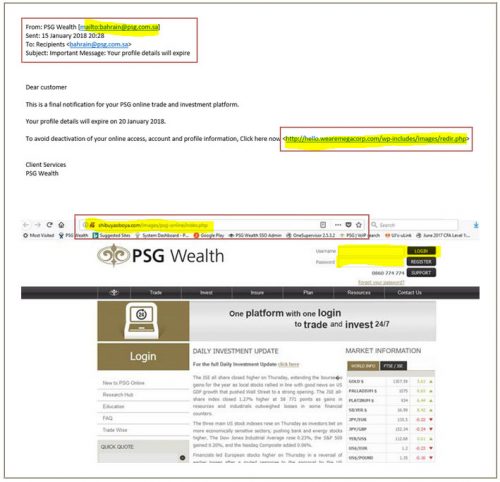
Below is an example of one such mail:

There are 3 obvious signs that this mail is fraudulent:

  • The sender´s email address (`from´ address) is disguised to look like it comes from PSG Wealth. The message is actually sent from a different address that does not match our PSG email addresses (using an @psg.com.sa address instead of an @psg.co.za address).
  • The recipient is not specified.
  • The website link provided is not to a PSG domain address and the website is not indicated as being secure. (no little padlock icon or https: in the URL)

What should you do if you have already provided your details in responding to this phishing scam?

If you responded to such an email, login to your account by typing psg.co.za into your browser window and reset your password immediately.

Continue to monitor your account for any unauthorised transactions and alert PSG immediately if you note any suspicious transactions.

Avoid becoming a victim in future: (This applies to all phishing scams, not just this fraudulent scam)

  • Type in website addresses – do not follow links embedded in emails.
  • Do not reuse passwords, especially for financial sites. 
  • Do not click on attachments, unless you know who they are from and are expecting the document in question.
  • Never part with your login details.

If you are not sure that a request for information is legitimate, rather contact the company to verify its authenticity.

~~~

Report the spam/phishing mail to the following addresses:
help@sun.ac.za and sysadm@sun.ac.za. 

Attach the phishing or suspicious mail on to the message if possible. There is a good tutorial on how to do this at the following link (which is safe) : http://stbsp01.stb.sun.ac.za/innov/it/it-help/Wiki%20Pages/Spam%20sysadmin%20Eng.aspx
1. Start up a new mail addressed to sysadm@sun.ac.za  (CC: help@sun.ac.za)
2. Use the Title “SPAM” (without quotes) in the Subject.
3. With this New Mail window open, drag the suspicious spam/phishing mail from your Inbox into the New Mail Window. It will attach the mail as an enclosure and a small icon with a light yellow envelope will appear in the attachments section of the New Mail.
4. Send the mail.

[Article by David Wiles]

[:]

[:en]Be cyberaware during the holiday period[:af]Wees kuberbewus gedurende die vakansietydperk[:]

Wednesday, December 20th, 2017

[:en]

The time has come for everyone to take a well-deserved break and spend time with friends and family. From 22 December at 12:00 until 1 January Information Technology offices will be closed and no user support will be provided.

However, just because we’re on holiday it doesn’t mean fraudsters, opportunists and cybercriminals will also take a break. On the contrary, this is the ideal time for them to scam you out of your hard-earned money.

We’d like to remind you to be especially vigilant over the holiday season by following these guidelines when receiving emails or conducting online transactions:

  • We will never ask for your username and password. Don’t divulge your username and/or password if being asked via email. By doing this, you are giving someone access to all your confidential SU information, including salary details.
  • Do not click on any attachments, even if the address is a sun email address. If you are unsure, contact the person first to confirm.
  • Do not click on a website address given in an email. Rather go to your browser and type the correct address in the address bar.
  • Never conduct any transactions on a public, unprotected WiFi connection.
  • If you are unsure of the legitimacy of an email, contact the institution or person it was sent from directly by phone to confirm.

For further assistance email help@sun.ac.za or call our Service Desk at 808 4367. More information on cybersecurity can be found on our blog and Twitter account.

[:af]

Dis uiteindelik tyd vir ons almal om ʼn welverdiende ruskans te neem en tyd saam met familie en vriende te spandeer. Vanaf 22 Desember om 12:00 tot 1 Januarie sal die Informasietegnologie-kantore gesluit wees en geen gebruikersondersteuning verskaf word nie.

Die slegte nuus is egter dat, hoewel ons met vakansie is, dit nie beteken dat opportuniste, kuberkriminele en swendelaars ook `n ruskansie gaan neem nie. Inteendeel, dis nou die ideale tyd vir hulle om jou swaarverdiende geld in die hande te probeer kry.

Wees daarom veral gedurende die vakansietyd ekstra versigtig en waaksaam deur hierdie basiese riglyne te volg as jy aanlyn transaksies doen of e-posse ontvang:

  • Ons sal nooit vir jou gebruikersnaam en wagwoord vra nie. Moenie jou gebruikersnaam en/of wagwoord verskaf as jy daarvoor in ʼn e-pos gevra word nie. Dit sal iemand toegang gee tot al jou konfidensiële US-informasie, insluitende jou salarisdetails.
  • Moenie op aanhangsels kliek nie, selfs al is die adres ʼn sun e-posadres. Indien jy onseker is, kontak eers die persoon om te bevestig.
  • Moenie op enige webwerfadresse in e-posse kliek nie. Gaan eerder direk na jou webblaaier en tik die korrekte adres in die adresveld in.
  • Moet nooit enige transaksies op ʼn openbare, onbeskermde WiFi-verbinding doen nie.
  • Indien jy onseker is oor die geldigheid van ʼn e-pos, kontak die instelling of persoon wat dit gestuur het direk per telefoon.

Vir enige navrae, stuur e-pos aan help@sun.ac.za of skakel die Dienstoonbank by 808 4367. Meer inligting oor kubersekuriteit kan verkry word op ons blog of Twitter-rekening.

[:]