SEARCH
  • [:en]Recent Posts[:af]Onlangse bydraes

  • [:en]Categories[:af]Kategorieë

  • [:en]Archives[:af]Argiewe

E-mail

[:en]History of malware, Trojans and worms (Part 2)[:af]Geskiedenis van malware, Trojaanse virusse en wurms[:]

Thursday, March 3rd, 2016

[:en]

Last time we explored the more unknown viruses, Trojans and worms, up to 1985. Now we start off in 1986, where most histories do, with the first PC virus.

1986 The first virus for PCs
The first virus for IBM PCs, Brain, was allegedly written by two brothers in Pakistan, when they noticed that people were copying their software. The virus put a copy of itself and a copyright message on any floppy disk copies their customers made.

1987 The Christmas tree worm
This was an email Christmas card that included program code. If the user ran it, it drew a Christmas tree as promised, but also forwarded itself to everyone in the user’s address book. The traffic paralyzed the IBM worldwide network.

1988 The Internet Worm
Robert Morris, a 23-year-old student, released a worm on the US DARPA Internet. It spread to thousands of computers and, due to an error, kept re-infecting computers many times, causing them to crash.

1989 Trojan demands ransom
The AIDS Trojan horse came on a floppy disk that offered information about AIDS and HIV. The Trojan encrypted the computer’s hard disk and demanded payment in exchange for the password.

1991 The first polymorphic virus
Tequila was the first widespread polymorphic virus. Polymorphic viruses make detection difficult for virus scanners by changing their appearance with each new infection.

1992 The Michelangelo panic
The Michelangelo virus was designed to erase computer hard disks each year on March 6 (Michelangelo’s birthday). After two companies accidentally distributed infected disks and PCs, there was worldwide panic, but few computers were infected.

1994 The first email virus hoax
The first email hoax warned of a malicious virus that would erase an entire hard drive just by opening an email with the subject line “Good Times.”

1995 The first document virus
The first document or “macro” virus, Concept, appeared. It spread by exploiting the macros in Microsoft Word.

1998 The first virus to affect hardware
CIH or Chernobyl became the first virus to paralyze computer hardware. The virus attacked the BIOS, which is needed to boot up the computer.

1999 Email viruses
Melissa, a virus that forwards itself by email, spread worldwide. Bubbleboy, the first virus to infect a computer when email is viewed, appeared.

2000 Denial-of-service attacks
“Distributed denial-of-service” attacks by hackers put Yahoo!, eBay, Amazon and other high profile websites offline for several hours. Love Bug became the most successful email virus yet.

2000 Palm virus
The first virus appeared for the Palm operating system, although no users were infected.

2001 Viruses spread via websites or network shares
Malicious programs began to exploit vulnerabilities in software, so that they could spread without user intervention. Nimda infected users who simply browsed a website. Sircam used its own email program to spread, and also spread via network shares.

If this history timeline hasn’t satisfied your curiosity, the recently launched Malware Museum might peak your interest. 

Take note that information below is an extract from the Sophos Threatsaurus, compiled by Sophos, a security software and hardware company.

[:af]

Verlede keer het ons meer te wete gekom oor die geskiedenis van ouer, onbekende virusse, Trojane en wurms vóór 1985. Dié keer begin ons in 1985 met die eerste PC virus.

1986 Die eerste virus vir PCs
Die eerste virus vir IBM PCs, Brain, is geskryf deur twee broers in Pakistan, toe hulle opgemerk het dat hul sagteware gekopieer word. Die virus vermeerder homself en plaas `n kopiereg boodskap op enige floppieskyf kopieë wat kliënte maak.

1987 Die Kersfeesboomwurm
Hierdie was `n Kersfeeskaartjie e-pos wat programkode ingesluit het. As die gebruiker dit aktiveer het, het dit, soos verwag, `n Kersfeesboom geteken, maar dit ook aangestuur aan almal in die se adresboek. Die Kersfeesboomwurm se verkeer het die hele IBM netwerk wêreldwye lamgelê.

1988 Die Internetwurm
23-jarige student, Robert Morris, laat, per ongeluk,`n wurm op die US DARPA Internet los. Dit versprei na duisende rekenaars en gaan voort om rekenaars telkens te besmet en ineen te laat stort. 

1989 Trojaanse virus eis `n losprys
Die AIDS Trojaan is op `n floppieskyf, wat inligting bied oor AIDS en HIV, versprei. Die Trojaanse virus het die rekenaar se hardeskyf enkripteer en betaling vereis in ruil vir die wagwoord. 

1991 Die eerste polimorfiese virus
Tequila was die eerste wydverspreide polimorfiese virus. Polimorfiese virusse verander hulle voorkoms met elke nuwe infeksie en maak dit dus besonder moeilik om op te spoor. 

1992 Die Michelangelo bohaai
Die Michelangelo virus is ontwerp om elke jaar op Michelangelo se verjaardag (6 Maart) rekenaars se hardeskywe uit te vee. Nadat twee maatskappye per ongeluk besmette diskette versprei het, was daar wêreldwye paniek, maar min rekenaars is werklik aangetas. 

1994 Die eerste e-pos virus kullery
Die eerste e-pos kullery het gedreig dat `n vyandige virus jou hele hardeskyf sou uitvee as jy `n e-pos met die onderwerp “Good Times” oopmaak.

1995 Die eerste dokument virus
Die eerste dokument of makro-virus, Concept, verskyn en word versprei deur die misbruik van makros in Microsoft Word.

1998 Die eerste virus wat hardeware beïnvloed het
CIH of Chernobyl het die eerste virus geword wat rekenaarhardeware buite aksie gelaat het. Die virus het die BIOS, wat nodig is om die rekenaar aan die gang te kry, aangeval.

1999 E-pos virusse
Melissa, `n virus wat homself versprei deur middel van e-pos, het wêreldwyd versprei. Bubbleboy, die eerste virus wat versprei wanneer `n e-pos slegs besigtig word, maak sy opwagting. 

2000 Denial-of-service aanvalle
Distributed denial-of-service-aanvalle deur kuberkrakers het Yahoo!, eBay, Amazon en ander hoë-profiel webwerwe onbruikbaar gelaat vir etlike ure. Love Bug word die mees suksesvolle e-pos virus ooit.

2000 Palm virus
Die eerste virus vir die Palm-bedryfstelsel is ontwikkel, maar geen gebruikers is aangetas nie. 

2001 Virusse versprei via webwerwe of netwerkdeelspasies
Vyandige programme begin om swakplekke in sagteware te misbruik sodat dit kan versprei sonder die hulp van `n gebruiker. Nimda besmet gebruikers as hulle `n webwerf besoek en Sircam gebruik sy eie e-posprogram en netwerkdeelspasies om te versprei.

As jy nog nie genoeg gehad het van virusse en die magdom sekuriteitsrisikos nie, sal die Malware Museum  dalk jou nuuskierigheid tevrede stel. 

Neem kennis dat bostaande inligting ʼn uittreksel is uit die Sophos Threatsaurus, saamgestel deur Sophos, ʼn sekuriteit-sagteware en -hardeware maatskappy.

[:]

[:en]E-mail account hijacked[:af]E-pos rekening gekaap[:]

Monday, February 29th, 2016

[:en]

The phishing scammers are at it again. The mail below is “spoofing” a university account, or they are using an e-mail account that they have hijacked to send out mail to fool Stellenbosch users into divulging their personal e-mail addresses, account names and passwords. Do no respond to it or go to the site in the mail. 

Here is the example of the mail that several SU users have already received:


From: SU staff member <sunstaffmemberaddress@sun.ac.za>
Sent: Saturday, February 27, 2016 10:05 AM
To: ‘dummyaddress@mail.com’
Subject: Dear Stellenbosch account users.

Dear Stellenbosch account users.

You have exceeded your sun.ac.za e-mail account limit quota of 575MB and you are requested to expand it within 48 hours or else your sun.ac.za e-mail account will be disable from our database. Simply CLICK with the complete information requested to expand your sun.ac.za e-mail account quota to 1000MB.

Thank you for using Stellenbosch University Webmail.

Copyright © 2016 Webmaster Center.

[INFORMATION SUPPLIED BY DAVID WILES]

[:af]

Die phishing skelms is alweer bedrywig. Die e-pos onder vervals `n universiteit e-posadres of gebruik `n e-posadres wat hulle gekaap het om e-pos aan Stellenbosch-gebruikers te stuur. Die e-pos mislei en oortuig die leser om sy persoonlike e-posadresse, rekeningname en wagwoorde bekend te maak.

Moenie daarop reageer nie en moenie na die webwerf in die e-pos gaan nie. 

Hier is die voorbeeld van die e-pos wat vele US-gebruikers reeds ontvang het:  


From: SU staff member <sunstaffmemberaddress@sun.ac.za>
Sent: Saturday, February 27, 2016 10:05 AM
To: ‘dummyaddress@mail.com’
Subject: Dear Stellenbosch account users.

Dear Stellenbosch account users.

You have exceeded your sun.ac.za e-mail account limit quota of 575MB and you are requested to expand it within 48 hours or else your sun.ac.za e-mail account will be disable from our database. Simply CLICK with the complete information requested to expand your sun.ac.za e-mail account quota to 1000MB.

Thank you for using Stellenbosch University Webmail.

Copyright © 2016 Webmaster Center.

[INLIGTING VERSKAF DEUR BY DAVID WILES]

[:]

[:en]The blurry line between private and professional[:af]Die vae lyn tussen tussen privaat en professioneel[:]

Wednesday, February 17th, 2016

[:en]

Microsoft recently released a plug-in which integrates information from your social network pages, for example Facebook and LinkedIn, with your Outlook client.facebook

At face value this seems like a good idea – a handy piece of software which enables you to keep up with you friends’ doings. It can also provide valuable information on potential clients.

Unfortunately it could become problematic when your professional colleagues and contacts have access to information which could cause you potential embarrassment. 

Most Outlook users use it as a professional e-mail platform. With OSC (Outlook Social Connector) you share your personal information with your professional network, possibly without even knowing. The line between professional and personal life suddenly seems a bit blurry.

If you’ve installed OSC, your social network information will be displayed at the bottom of the Outlook window in a small People Pane. The software extracts information from your social network profiles based on the e-mail addresses you have associated with the profiles.

This information can include profile photos, status updates and your most recent posts. The information will be displayed even if your e-mail address is hidden from other users on your social network. 

Your social network information can, depending on your security settings, be seen by OSC users you send mail to, even if the OSC user isn’t necessarily a Facebook friend. The visible information displayed in the People Pane BEPAAL by the e-mail addresses you have linked to your social networks and the privacy settings on your social network accounts.

To avoid that your personal information is seen by your colleagues through OSC, remove your work address on all your social network profiles. Also make sure your privacy settings is set up so OSC can’t pick up your information. For example, set it up in such a way that your information is only visible for friends and family and not publically displayed.

Preferably use a separate address for personal e-mails and try to use your @sun address only for work related correspondence. Rather create a Gmail address.

Besides causing embarrassment, sharing personal information can also result in serious ethical and professional repercussions. Remember, any OSC user can potentially, through e-mail, see all social network information linked to that account. Without you knowing, you might share more with your colleagues than you think. 

OSC is available for Outlook 2003, Outlook 2007, and Outlook 2010 and integrates Outlook’s e-mail functions with social network applications such as Facebook, LinkedIn, Windows Live Messenger and MySpace. 

IT strongly advises users NOT to use OSC as the risk involved are much higher than the benefits it promises.


[SOURCE: http://www.primerus.com]


[:af]

facebookMicrosoft het onlangs ʼn inprop-program (plug-in) vrygestel wat inligting vanaf jou sosiale netwerkbladsye, byvoorbeeld Facebook en LinkedIn, integreer met Outlook. 

Op die oog af lyk dit na ʼn nuttige stukkie sagteware wat, op ʼn enkele platform, jou op hoogte hou van jou vriende se doen en late. Terselfdertyd kan dit handige inligting verskaf oor potensiële kliënte.

Dit mag egter problematies raak as jou professionele kollegas en kontakte toegang het tot inligting wat jou in die verleentheid kan plaas. 

Outlook is vir die meeste gebruikers ʼn professionele e-pos platform. Met OSC (Outlook Social Connector) deel jy onbewustelik jou persoonlike inligting met jou professionele netwerk. Die lyn tussen jou professionele en persoonlike lewe is skielik minder duidelik.

As jy die OSC installeer het, sal jou sosiale netwerk inligting onderaan die Outlook-venster in ʼn klein People Pane verskyn. Die sagteware kry inligting van jou sosiale netwerke profiele, gebaseer op die e-posadres(se) wat jy gekoppel het aan daardie sosiale netwerk profiel. Die inligting kan profielfotos, statusopdaterings en jou onlangse skrywes, insluit en vind plaas selfs al is jou e-posadresse versteek vir ander gebruikers op sosiale media platforms. Jou sosiale netwerk inligting kan, afhangende van jou sekuriteitsverstellings, gesien word deur OSC-gebruikers vir enigiemand vir wie jy e-pos stuur, selfs al is die OSC-gebruiker nie noodwendig ʼn Facebook vriend nie. 

Die sigbare inligting wat verskyn in die People Pane word bepaal deur die e-posse adresse wat jy gekoppel het aan jou sosiale netwerke en jou privaatheidsverstellings op jou sosiale netwerkrekeninge. 

Om te voorkom dat jou persoonlike inligting deur jou kollegas gesien word deur OSC, verwyder jou werksadres op al jou sosiale netwerk profiele. Sorg ook dat jou privaatheidverstellings so gestel is dat OSC dit nie sal kan optel nie. Byvoorbeeld stel dit dat jou inligting net sigbaar is vir jou vriende en familie, nie public nie.

Onthou om verkieslik ʼn aparte adres, byvoorbeeld Gmail, vir jou persoonlike e-posse aan te skaf en jou @sun adres te gebruik nie. 

Buiten dat die situasie jou in die verleentheid kan bring, kan dit ook ernstige etiese en professionele gevolge inhou. Onthou, enige OSC-gebruiker kan potensieel d.m.v. e-pos alle sosiale netwerk inligting wat aan daardie rekening gekoppel is, sien. Jy deel dalk meer met jou kollegas as wat jy dink. 

OSC is beskikbaar vir Outlook 2003, Outlook 2007, en Outlook 2010, en integreer Outlook se e-pos funksies met sosiale netwerktoepassings soos Facebook, LinkedIn, Windows Live Messenger, and MySpace.

IT beveel nie die gebruik van OSC aan nie aangesien die risikos daaraan verbonde veel hoër is as die voordele wat daaruit geput kan word.


[BRON: http://www.primerus.com]


[:]

[:en]Phishing and whaling[:af]Phishing en whaling[:]

Friday, February 5th, 2016

[:en]

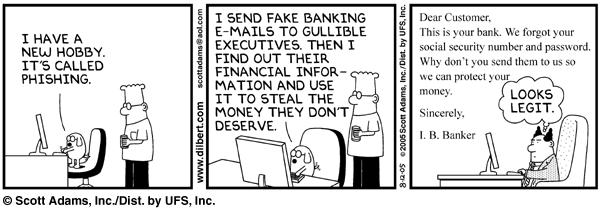
Recently we gave you some pointers on identifying phishing e-mails. So now that you know all the signs and how to outwit the criminals, there’s another variant – spear phishing. But don’t panic, it’s almost the same, with a bit of a twist.

Spear phishing is an e-mail that seems to be sent from an individual or business you know. Of course it’s really from hackers attempting to obtain you credit card, bank account numbers, passwords and financial information.

These types of attacks focus on a single user or department within an organisation and use another staff member from the organisation’s name to gain the victim’s trust. (Also see our recent article on the incident at Finance.)

They often appear to be from your company’s human resources or IT department, requesting staff to update information, for example passwords or account details. Alternatively the e-mail might contain a link, which will execute spyware when clicked on.

But wait, there are even more fishing comparisons.

When a phishing attack is directed specifically at senior executives, other high profile staff or seemingly wealthy people, it’s called whaling. By whaling cyber criminals are trying to catch the “big phish”, or whale.

phishing

[SOURCE: http://www.webopedia.com]


[:af]

Ons het onlangs vir jou `n paar wenke gegee hoe om `n phishing e-pos uit te ken. So noudat jy gereed is om enige krimineel uit te oorlê, het ons vir jou nog `n weergawe van phishingspear phishing. Maar moenie paniekbevange raak nie. Dis amper dieselfde, net ʼn bietjie anders. 

Spear phishing is wanneer ʼn e-pos lyk of dit gestuur is vanaf ʼn individu of besigheid wat jy ken. Inderwaarheid kom dit van kuberkrakers wat probeer om jou kredietkaart, bankrekening, wagwoord en finansiële inligting te aas.

Hierdie tipe aanvalle fokus op ʼn enkele gebruiker of departement binne `n organisasie. Deur die e-pos te stuur vanaf iemand binne die organisasie se e-pos, word jou vertroue gewen en gee hy makliker die inligting. (Sien ook ons berig oor die onlangse insident by  Finansies)

Die e-posse lyk dikwels asof dit gestuur word deur jou menslike hulpbronne of IT-afdeling en versoek gewoonlik dat personeel hulle inligting (byvoorbeeld wagwoorde of rekeninginligting ) opdateer of heraktiveer. Alternatiewelik bevat die e-pos ʼn skakel wat spyware aktiveer indien daarop gekliek word. 


Maar dis nie al nie – daar is selfs nog meer visvang-analogieë.

Wanneer `n phishing-aanval direk geloods word op senior uitvoerende hoofde, hoë-profiel personeel of skynbaar finansieël welaf persone, word dit whaling genoem. Deur whaling probeer kuberkrakers een “big phish”, of te wel die walvis, vang.

phishing

 
[BRON: http://www.webopedia.com]

[:]

[:en]New cyber crime e-mail targets individuals[:af]Nuwe kubermisdaad e-pos teiken individue[:]

Wednesday, January 13th, 2016

[:en]

Over the past two weeks a new e-mail scam has reared its head on campus. Scammers use contact information, available on the internet, to target individuals at the university.

One example is an e-mail which has been sent to various staff at the Finance department with a request to transfer money. (see e-mail with inactive addresses below)

The e-mail is sent from a gmail address, but the display name is a SU staff member’s name. Since the cyber criminal also saw the contact person’s name on the website (in this case Finance’s website), they address the receiver personally as, for example, Karin.

Similar scams use fax numbers available on the internet and then a fax is sent directly to the contact person.

Do not, under any circumstances, react to these e-mails. It is clearly an attempt to attract your attention and convince you to conduct a financial transaction. Delete and ignore the e-mail.

Report suspicious e-mail to sysadm@sun.ac.za and also read our articles on security on our blog, as well as the fortnightly newsletter, Bits & Bytes.


FROM: Stellenbosch University staff member name<example@gmail.com>
TO: Stellenbosch University staff member name<example@sun.ac.za>

Karin, 

Let me know if you can process a same day domestic bank transfer to a client. You will code it to professional services

The amount is R870,000, kindly confirm so i can forward the appropriate beneficiary details to enable instant clearance.

Regards

Sent from my iPhone

[:af]

Daar is die afgelope twee weke `n nuwe tendens op kampus waar kubermisdadigers kontakinligting wat op die internet beskikbaar is, gebruik om individue te teiken.

Een voorbeeld hiervan is `n e-pos wat aan verskeie personeel van Finansies gestuur is met `n versoek vir die oorbetaling van gelde. (sien e-pos onder met onaktiewe adresse)

Die e-pos word gestuur vanaf `n gmail adres, maar die display name is `n US personeellid se naam. Omdat die kubermisdadiger die kontakpersoon se naam ook op die internet (in die geval Finansies se webwerf) kon kry, rig hy die e-pos persoonlik aan byvoorbeeld Karin. 

Soortgelyke gevalle gebruik ook faksnommers wat op die internet beskikbaar is en stuur dan `n faks aan `n spesfieke persoon.

Moet onder geen omstandighede op hierdie e-posse reageer nie. Hierdie is duidelik `n e-pos wat poog om u aandag te trek en te oortuig om `n finansiële transaksie uit te voer. Verwyder en ignoreer dit bloot.

Meld verdagte e-posse aan by sysadm@sun.ac.za en lees ook artikels oor sekuriteit op ons blog, sowel as die twee-weeklikse nuusbrief, Bits & Bytes.


 FROM: Stellenbosch University staff member name<example@gmail.com>

TO: Stellenbosch University staff member name<example@sun.ac.za>

Karin,

Let me know if you can process a same day domestic bank transfer to a client. You will code it to professional services 

The amount is R870,000, kindly confirm so i can forward the appropriate beneficiary details to enable instant clearance.

Regards

Sent from my iPhone

[:]