SEARCH
  • [:en]Recent Posts[:af]Onlangse bydraes

  • [:en]Categories[:af]Kategorieë

  • [:en]Archives[:af]Argiewe

E-mail

ABSA eStatement phishingABSA eStaat phishing

Sunday, September 22nd, 2013

The only thing that must be more annoying than us constantly warning you of e-mail scams, is the persistence that is shown by the criminals and scam artists to attempt to con you, and steal your personal data and money.

The problem is they will continue to send phishing mails because they continue to catch people, even within an academic institution like the University.
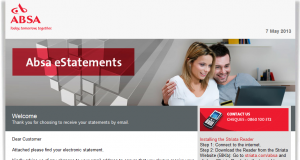
Recently another ABSA eStatement landed in our e-mail box, this time a little more sophisticated, but armed with a few basic tips you will be able to spot the scam quickly.

Keep an eye out for these mails in your mailbox and delete then or add then to your Junk-Mail filters to block them in future.

Here’s how you spot can them:

1. Did you give your @sun.ac.za work address as your primary contact for Internet Banking?

2. Do you bank with (in this case) ABSA?

3. Is the salutation addressed to you personally, or is it just “Dear Customer”?

4. Is there a .pdf or an .html file attached? (phishers almost always use .html – a forged web-page)

5. Is the Subject of the e-mail “important” sounding? (In this case “Absa Cheque Account Statement”)

6. If you click on (or open by mistake) the attachment, does the web page look like the bank’s normal login page but does it LACK the https:// text at the front of the address and is the normal http://?

Answering these questions, it will be easy to establish whether an e-mail is clearly a phishing scam and can be deleted. Be vigilant and alert. Anyone can be caught out – even you.

[ARTICLE BY DAVID WILES]


Die enigste ding meer irriterend as ons wat jou voortdurend waarsku teen e-pos skelmstreke, is die deursettingsvemoë van kriminele en kuberswendelaars om jou te probeer uitvang en jou data en geld te steel.

Ongelukkig sal die probleem nie verdwyn solank as wat hierdie metodes telkens suksesvol is nie –  selfs binne `n akademiese instelling soos die Universiteit.

Onlangs het nog `n ABSA eStaat in ons posbusse beland, hierdie keer `n bietjie meer gesofistikeerd, maar gewapen met `n paar wenke, kan jy dit baie maklik herken. 

Kyk uit vir hierdie e-posse, vee hulle uit of skuif dit na jou Junk-Mail filters sodat dit volgende keer geblok word.

Hier is hoe jy dit kan uitken:

1. Het jy jou @sun.ac.za werkadres as primêre kontakadres vir jou internetbankdiens gegee? 

2. Doen jy jou banksake by ABSA?

3. Is die aanhef aan jou persoonlik gerig of is dit net `n vae “Dear Customer”? 

4. Is daar `n .pdf of ‘n .html leêr aangeheg? (kuberkrakers gebruik graag .html omdat dit jou herlei na `n vervalsde webblad) 

5. Klink die onderwerp van die e-pos “belangrik” of amptelik? (In die geval “Absa Cheque Account Statement”)

6. As jy kliek op die aanhangsel of dit per ongeluk oopmaak, lyk die webblad soos die bank se normale aantekenblad, maar sonder die https:// teks vooraan die adres? (https:// dui op `n veilige bediener, terwyl http:// `n oop webblad is)

Na aanleiding van bogenoeme vrae kan jy duidelik vasstel of `n  e-pos `n phishing-poging is en bloot uitgevee kan word. Wees waaksaam en op jou hoede. Enigiemand kan uitgevang word.

[ARTIKEL DEUR DAVID WILES]


Subscribe, unsubscribe Teken in, teken uit

Friday, September 20th, 2013

Once of the most common questions we get asked by users is –  How do these spammers get my e-mail address? Previously we looked at Rumpelstiltskin attacks, bots, trojans and zombies. This time around we focus at a third method – by using Subscribe/Unsubscribe newsletter services.

In the 21st century it can be said that “Knowledge and not Money is Power”. The two are closely linked. Knowledge or “data” is a hot commodity on the Internet. Facebook, for instance, has over 1.2 billion users. Just think of the value of that data if Mark Zuckerberg (the founder of Facebook) decided to sell that information. 

Many times you might receive e-mail in the form of a newsletter with a button down below that’s marked “Unsubscribe”, but will the newsletters really stop if you click on it?

There are many unscrupulous newsletter senders who will sell your e-mail address for a commission. A very common unsubscribe tactic is to send millions of people a false “you have joined a newsletter” e-mail. When users click on the “unsubscribe” link, they are not actually unsubscribing but unwittingly confirming that they are a real person with an active e-mail address. This results in getting more spam and soon the spam flood will spiral out of control. Furthermore the spammers will then sell their database (containing your “confirmed” e-mail address) to other spammers and unscrupulous marketing firms.

Another vector that spammers use to obtain your e-mail address is through legitimate newsletters. You may often subscribe to a legitimate newsletter service and receive newsletters, but as soon as your personal information and contact details are placed into the care of a third party (the legitimate newsletter service) you are relying on the fact that their system and database security is adequate and not vulnerable to hacking and identity theft. Hackers could break in and steal the database of e-mail address of the original newsletter service, and very quickly your e-mail address could be in the hands of spammers and scammers throughout the world.

Often marketers and newsletter services gather e-mail addresses and sell this to a third party. Often this is mentioned in the “Terms & Conditions” when you originally subscribe, giving them the rights to give your details to their “partners” so they can contact you. This way you become the unwitting victim in the business of selling and exchanging data.

Remember these important tips:

  • Survey Sites tend to generate a lot of junk mail. While many people use surveys as a great part-time source of extra income, signing up for surveys, free gifts, free drawings, etc. often distributes your e-mail to many unwanted mailing lists.
  • Try to keep your junk mail to a minimum by not giving your e-mail address to anybody that you don’t know, trust, or use for business purposes like your bank, business websites, etc.
  • Many different junk e-mails can come from the same source. Once you start “unsubscribing” from these e-mails, you’ll begin to notice that some of the unsubscribe pages look the same.
  • If trying to get information from sites requiring an email address try abc@123.com or similar rather than your own email address. By entering a non existent email address yours doesn’t get logged & targeted.
  • If you cancel a subscription and e-mail keeps coming, it may be necessary to add the junk mail’s sender or domain to your blocked list.

[ARTICLE BY DAVID WILES]

Een van die algemeenste vrae wat gebruikers vir ons vra is – Hoe kry gemorsposversenders my e-posadres? Vorige kere het ons gekyk na Repelsteeltjie-aanvalle, robotte, trojane en zombies. Hierdie keer fokus ons op `n derde metode – die inteken/uitteken opsie van nuusbriewe.
 
In die 21ste eeu kan daar gesê word “Kennis is mag, nie geld nie“. Hierdie twee is egter baie naby aan mekaar. Kennis of “data” is `n gewilde gebruiksartikel op die internet. Facebook het byvoorbeeld meer as 1.2 biljoen gebruikers. Dink net aan die waarde van al daardie data as Mark Zuckerberg (stigter van Facebook) besluit om die inligting te verkoop?

Jy sal dikwels `n e-pos ontvang in die vorm van `n nuusbrief met `n skakel onderaan wat gemerk is met “Unsubscribe” en aan jou die geleentheid gee om uit te teken, maar gaan die e-posse ophou as jy daarop kliek?

Ongelukkig is daar vele gewetenlose nuusbrief-versenders wat jou adres vir `n lekker vet kommissie sal verkoop. `n Algemene “unsubscribe”  taktiek is om `n e-pos na miljoene mense te stuur met `n bedrieglike “you have joined a newsletter” e-pos. Wanneer gebruikers kliek op die “unsubscribe”-skakel, teken hulle nie uit nie, maar bevestig onwetend dat hulle `n regte persoon is met `n aktiewe e-posadres.

Hierdie aksie veroorsaak nog meer gemorspos en binnekort oorstroom jou posbus. Daarbenewens sal gemorspos-versenders ook hul databasis (wat jou “bevestigde “adres insluit) aan ander gemorspos-verspreiders en bemarkingsfirmas stuur.  

`n Ander metode om e-posadresse in die hande te kry is deur wettige nuusbriewe. Jy skryf dalk dikwels in vir `n regmatige nuusbriefdiens en ontvang die nuusbriewe op `n gereelde basis. Wanneer jy egter jou persoonlike inligting en kontakdetails in `n derde party (die nuusbrief-diens) se hande vertrou, maak jy staat daarop dat hulle stelsel en databasis sekuriteit voldoende is en nie kwesbaar is vir kodebreking of identiteitsdiefstal nie. Kodebrekers kan die nuusbriefdiens se e-pos databasis steel en sonder moeite is jou adres in die hande van gemorsposversenders en swendelaars.

In sommige gevalle samel bemarkers en nuusbriefdienste e-posadresse en verkoop dit aan `n derde party. Ongelukkig het jy waarskynlik vir hulle toestemming gegee toe jy ingestem het tot hulle voorwaardes, soos gestipuleer in die “Terms & Conditions” toe jy ingeskryf het vir die diens. Daar word dikwels aangedui dat jy aan die diens die reg gee om jou inligting met hulle vennote te deel, wat jou om die beurt weer mag kontak. 

Onthou hierdie paar belangrike wenke: 

  • Opnames genereer baie gemorspos. Menige mense neem deel aan opnames vir `n ekstra inkomste, gratis geskenke, ens, maar jou details word dikwels deurgegee aan bemarkers vir verdere gebruik.
  • Poog om jou gemorspos tot `n minimum te beperk deur nie jou adres vir enigiemand te gee wat jy nie ken of vertrou nie. Moet ook nie dieselfde adres wat jy vir besigheiddoeleindes, soos jou internetbankdienste gebruik vir nuusbriewe nie.  
  • Verskillende gemorspos kom dikwels vanaf dieselfde bron. Sodra jy begin uitteken, sal jy sien dat die uitteken-webblad telkens dieselfde lyk. 
  • Indien jy inligting op `n webwerf probeer kry en die blad vra vir `n e-posadres, probeer abc@123.com of iets soortgelyk aan jou adres eerder as jou regte adres.  Ten minste word JOU adres nie op rekord gehou en later misbruik nie.  
  • As jy jou inskrywing gekanselleer het en jy kry steeds gemorspos, blokkeer die stuurder se adres of domein by Outlook se “junk mail”-opsie.

[INLIGTING VERSKAF DEUR DAVID WILES]

Attack of the trojans, bots & zombiesDie trojane, bots & zombies val in

Friday, August 30th, 2013

Once of the most common questions we are asked by users is: How do these spammers get my e-mail address? Previously we looked at Rumpelstiltskin attacks and this week we will focus on the second of the methods –  by using Trojan Horses, Bots and Zombies. Now, thet may sound like something from a movie, but they do pose quite a serious threat to you as e-mail user.

Let us use a familiar example. You regularly exchange emails with your elderly mother who has a computer. Your mother uses Outlook or Thunderbird and has dozens of emails from you in her inbox. She even added you to her address book. She also has lots of emails from a distant family member – cousin Johan from Australia. You haven’t stayed in touch with Johan that closely over the years, but you definitely know who he is.

Last year, just before the Christmas, Johan downloaded and installed this really pretty Christmas screensaver that showed tranquil tree and candle scenes when he wasn’t using the computer. What he didn’t know was that the screen saver had a sinister hidden payload. While the candles flickered peacefully on his screen, the software went to work combing through his emails and address book, his browser’s cache of past webmail sessions and other files, storing every email address it would find in a separate list.

Then it sent the entire list to a server in Russia, where a criminal combined it with other such submissions to build the ultimate monster spam list that can be sold and resold over and over again.

But as if that wasn’t enough, when the “screensaver” sent the address list to Russia, it received some content in return – messages to be sent to all of Johan’s contacts. Then, unbeknownst to John, his computer started creating hundreds of emails randomly using the harvested email addresses in the To: and From: field along with the content from the Russian server and sent them out using Johan’s Internet connection. One of them used your mother’s email address as sender and yours as recipient.

Now you received some spam from your mother asking you to buy fake watches and you’re ready to speak to her telling her to stop. Well, don’t. Your mother has obviously nothing to do with the whole thing and you’ll never find out that it was actually Johan’s computer.

You just had a look into the really nasty underworld of the Internet where botmasters (the guy in Russia) control botnets (infected computers that all report to the same server) of remote-controlled zombies (Johan’s computer) that were compromised using trojan horses (the screensaver) or similar malware.

And it doesn’t even end there. The botmaster typically doesn’t spam for his own account but hires out his botnet to whoever pays the most. The equally shady factory in China wanting to sell more fake Rolexes can now hire the botmaster to blast their offers all over the internet. The guy in Russia doesn’t even care if you open or click on that email from your mother, he gets paid either way. And when he’s done with the watches, he’ll inform his entire mailing list that they all won the lottery and can pick up the prize if only they pay a small “transfer fee” up front. And after that, he’ll mail a Paypal phish for yet another “client”. And for good measure, he’ll sell his entire email address database, incl. yours, to a friend who is in the same line of “business”.

In other words, once your email address got picked up by a botnet, Pandora’s Box is wide open. The whole scheme is particularly wicked because now you have to depend on others to keep your address safe. Unfortunately, there is little you can do:

  • First of all, do your own share: NEVER open email attachments that you didn’t ask for, even if they appear to come from good friends like Johan. If you’re still curious, ask Johan or your mother first if they really sent it.
  • NEVER download anything where you can’t in­de­pend­ent­ly verify it’s safe. With“independently verify” I mean you can read about it in forums, blogs, news sites, your local “computer geek” etc. Facebook fan pages, even with 1000s of “fans”, do NOT count, they are way too easy to manipulate and are usually full of misinformation!
  • NEVER get fooled by fake “security scans” (they’re quite the opposite!) or“video codec updates” to see that funny kitten clip. If you think you need a new Flash player, type in flash.com by hand and update from there. If afterwards the site still says you need an “update” get out of there as fast as you can.
  • Then educate your friends and family about the same. Explain how trojans work. Send them a link to this blog page!
  • You can try having multiple private email addresses. Keep a super-private one, only for family and very few of your closest friends.  Use your university address for everyone you work with and don’t use this for private mail – EVER!  Get a semi-private one for your wider social circle. The latter two do get some spam, although it’s still manageable. GMail has a very good “spam filter”, and blacklisting spammers is very easy!


[ARTICLE BY DAVID WILES & MATERIAL BY BustSpammers.com]

Een van die algemeenste navrae wat ons by gebruikers kry, is – “Hoe kry gemorsposversenders my e-posadres?!”. By `n vorige geleentheid het ons gekyk na Repelsteeltjie-aanvalle en die keer kyk ons na `n tweede metode, die gebruik van Trojaanse perde, robotte en zombies. Dit klink nou wel soos iets uit `n fliek, maar ten spyte van hul belaglike name, hou al drie `n gevaar in vir jou as e-posgebruiker.

Kom ons gebruik `n bekende voorbeeld. Jy stuur gereeld e-posse aan jou ma wat onlangs `n rekenaar gekry het. Sy gebruik Outlook of Thunderbird en het dosyne e-posse van jou in haar posbus. Sy’t jou selfs bygevoeg as `n kontak in haar adresboek. Sy kry ook gereeld e-pos van `n verlangse familielid – neef Johan van Australië. Jy en Johan het nie regtig kontak nie, maar jy weet definitief wie hy is.

Verlede jaar, net voor Kersfees, het Johan ‘n baie oulike Kersfees skermskut (“screensaver”) afgelaai wat `n feestelike boom en flikkerende kersies wys as hy weg is van sy rekenaar. Wat Johan egter nie geweet het nie, is dat, terwyl die kersies vrolik geflikker het, die skermskut op die agtergrond besig was met ander aktiwiteite. Die sagteware wat Johan installeer het, het stelselmatig deur sy e-posse, adresboek, webblaaier se kasgeheue en ander leêrs gesoek en elke e-pos adres wat dit kon opspoor, gebêre op `n lys.

Die program het daarna die saamgestelde lys na `n bediener in Rusland versend waar `n kuberkrimineel dit kombineer het met soortgelyke lyste om `n super-lys saam te stel wat oor en oor verkoop kan word. Asof dit nie genoeg was nie, het die program ook boodskappe aan al Johan se kontakte gestuur. Sonder dat Johan bewus was, het sy rekenaar honderde e-posse geskep deur middel van die ge-oeste adresse, saam met die inhoud van die Russiese bediener en dit uitgestuur via Johan se adres en internetkonneksie. Een hiervan het jou ma se e-posadres as versender en joune as ontvanger gebruik.

Ewe skielik kry jy nou e-pos van jou ma oor nagemaakte horlosies en verskeie ander gemorspos. Natuurlik het sy het niks daarmee te doen nie en jy sal waarskynlik nooit uitvind dat Johan se rekenaar eintlik die skuldige party is nie.

Dit was `n kykie in die nare onderwêreld van die Internet waar “botmasters” (die ou in Rusland) “botnets” (besmette rekenaars wat almal aan dieselfde rekenaar rapporteer) beheer of afstandbeheerde zombies (Johan se rekenaar) wat blootgestel is d.m.v. trojaanse perde (die skermskut) of soortgelyke “malware”.

En daar hou dit nie op nie. Die “botmaster” huur gewoonlik net die “botnet” uit aan wie ookal die meeste betaal. Die ewe verdagte fabriek in China wat nog meer nagemaakte Rolex-horlosies wil verkoop kan dit, onder andere, huur om hul e-posse te versprei. Daarna verkoop hy die lys ten duurste aan ander suspisieuse besighede, jou adres ingesluit. 

Met ander woorde, as jou adres opgetel word deur `n “botnet” is die deure wawyd oop. Ongelukkig is daar nie baie wat jy kan doen om dit te voorkom nie, maar jy kan op die volgende let:

  • Moet nooit e-pos aanhangsels oopmaak waarvoor jy nie gevra het nie – selfs al is dit van iemand wat jy ken. As jy wel nuuskierig is, vra vir die persoon of hulle dit gestuur het.  
  • Moet nooit iets aflaai as jy nie self kan verifieer dat dit veilig is nie. Lees eers op daaroor op forums, blogs, webwerwe of vind uit by kenners.
  • Moenie val vir sekuriteitswaarskuwings of video-opdaterings om daai oulike katprentjie te sien nie. As jy dink jy het `n Flash-speler nodig, laai dit af van die webwerf self.
  • Deel hierdie inligting met jou vriende en familie. 
  • Om veilig te speel kan jy meer as een e-posadres gebruik. Kry `n privaat adres vir jou naaste vriende, `n tweede een vir kennisse en gebruik jou sun-adres net vir jou kollegas, nie vir privaat aangeleenthede nie. GMail het byvoorbeeld `n baie goeie gemorsposfilter en dis maklik om ontslae te raak van ongewenste e-posse. 

[BRON: BustSpammers.com & David Wiles]


Password syncing problematicWagwoord-sinkronisasie problematies

Friday, August 16th, 2013

Over the past week the IT Service Desk detected an increase in problems with password synchronisation. Luckily this is only a temporary situation, but there are a few steps you can follow to make sure you don’t have the same problem.

When you’re assigned a temporary password from IT, wait at least 30 minutes before login in at www.sun.ac.za/useradm and changing it to your preferred password. The syncronisation process takes a while and if you change it immediately, the database won’t be able to change it properly

 If you use more than one device switch off all your devices except for one, for example your laptop. If you don’t your password won’t synchronise seamlessly over across all your devices. After you’ve changed your password, switch the rest of your devices on one by one and log on with your new password.

Remember, you can change your password any time at HTTP://WWW.SUN.AC.ZA/USERADM with the Change Password option. Try to stick to the guidelines to ensure you have a secure password – it will safe you a lot of effort and frustration in the long run. If you’ve forgotten your password, you can also reset is by browsing to STAFF PORTAL.

More information and hints on password changes can be found HERE.

Die afgelope week ervaar die IT Dienstoonbank `n toename in probleme met die sinkronisasie van wagwoorde. Gelukkig is dit slegs `n tydelike situasie, maar daar is `n paar stappe wat jy kan volg om seker te maak jy sit nie met dieselfde probleem nie.

Wanneer jy `n tydelike wagwoord by IT kry, wag eers ten minste 30 minute voordat jy by www.sun.ac.za/useradm ingaan en dit verander na die wagwoord van jou keuse. Die sinkronisasieproses neem `n tydjie en as jy dit onmiddellik doen ondervind die databasis probleme. 

Skakel al jou toestelle af, behalwe een, bv. die skootrekenaar as jy wel jou wagwoord verander anders gaan dit nie soomloos oor al die toestelle sinkroniseer nie.  Indien jy klaar jou wagwoord verander het, skakel die ander toestelle een vir een aan en teken aan met jou nuwe wagwoord. 

Onthou, jy kan self jou wagwoord enige tyd verander op HTTP://WWW.SUN.AC.ZA/USERADM by die Change Password-opsie. Probeer om te hou by die riglyne wat gegee word om jou wagwoord so veilig moontlik te hou – dit sal jou baie moeite en frustrasie spaar op die lange duur. As jy jou wagwoord heeltemal vergeet het, kan jy dit self verander deur te gaan na DIE PERSONEELPORTAAL.

Nog wenke vir die verandering van jou wagwoord kan op https://stbsp01.stb.sun.ac.za/innov/it/it-help/Wiki%20Pages/Change%20password.aspx gevind word.

Cape of Storms and e-mail stormsKaap van Storms en e-pos storms

Friday, August 16th, 2013

We’ve been having plenty of stormy weather over the past few days, so in keeping with the theme, did you know you even get e-mail storms?

“An email storm is a sudden spike of Reply All messages on an email distribution list, usually caused by a controversial or misdirected message. Such storms start when multiple members of the distribution list reply to the entire list at the same time in response to the instigating message. Other members soon respond, usually adding vitriol to the discussion, asking to be removed from the list, or pleading for the cessation of messages. If enough members reply to these unwanted messages this triggers a chain reaction of email messages. The sheer load of traffic generated by these storms can render the email servers inoperative, similar to a DDoS attack.

A related phenomenon occurs when a subscriber to a mailing list emails the mailing list to “UNSUBSCRIBE”. People will reply to the hapless individual on the mailing list, half of them advising on how to unsubscribe, the other half referring to the manual of the mailing list manager. More subscribers will reply to the previous round of respondents, again to the list, this time about mailing list etiquette.

Some email viruses also have the capacity to create email storms, by sending copies of themselves to an infected user’s contacts, including distribution lists, infecting the contacts in turn.”

[SOURCE: www.wikipedia.org]


Die Wes-Kaap is die afgelope week met mening deur stormweer geteister. Maar het jy geweet dat daar selfs in die tegnologiese wêreld storms is – e-pos storms.

`n E-pos storm is `n skielike toename in Reply All boodskappe op `n e-pos verspreidingslys, gewoonlik veroorsaak deur `n kontroversiële of verkeerdelik geadresseerde boodskap. Hierdie storms ontstaan wanneer veelvuldige lede van `n verspreidingslys antwoord aan almal op die hele lys in reaksie op die aanhitsende boodskap. Ander lede antwoord gevolglik vinnig, vra om verwyder te word van die lys of dat die boodskappe moet stop, maar gooi daardeur nog meer olie op die vuur. 

Indien genoeg lede antwoord op hierdie ongevraagde boodskap ontlont dit `n kettingreaksie van e-posadresse. Die brute lading van verkeer gegenereer deur dié storms kan selfs e-pos bedieners plattrek.

`n Soortgelyke verskynsel vind plaas wanneer `n intekenaar van `n verspreidingslys aan die lys e-pos stuur op te  “UNSUBSCRIBE”. Ander lede sal die arme individu antwoord en raadgee oor hoe om die lys te verlaat of die persoon verwys na die handleiding. Nog meer intekenare sal op die vorige persone antwoord – hierdie keer oor e-pos etiket.

Sommige e-pos virusse kan ook e-pos storms veroorsaak deur kopieë van hulself te stuur na `n besmette gebruiker se kontakte en verspreidingslyte en dan ook die kontakte in die proses besmet. 

[SOURCE: www.wikipedia.org]