SEARCH
  • [:en]Recent Posts[:af]Onlangse bydraes

  • [:en]Categories[:af]Kategorieë

  • [:en]Archives[:af]Argiewe

E-mail

SARS wants to give you money?SARS wil vir JOU geld gee?

Friday, August 2nd, 2013

 It’s that time of the year when our mailboxes are infiltrated by messages from SARS and we start making sums and filling out forms. Unfortunately elusive cyber criminals also know that this is the perfect time to prey on our gullibility.

So it’s most likely that you will be receiving (if you haven’t already) a so-called e-mail from SARS asking you either to verify your information or to let you know that a much-welcomed amount has been paid into your account. (see example below) Don’t get excited – it’s not really SARS.

Clicking on the hyperlink in the email takes you to a fake “e-filing” site that has hyperlinks for the four big South African banks and instructions to log on to your Internet banking site for “confirmation of your details”.  When you follow the Nedbank link (as an example), you are taken to a copy of the Nedbank internet banking site that asks for profile, pin and password.  Supplying these takes you to a second page that asks you for your mobile number.  Submitting information on this page takes you to a page that requests the reference number sent to your cellphone.

Do not authorise any cellphone message that comes through if you end up in the above situation.  Furthermore, do not click on any hyperlinks in emails or divulge your account or mobile number details to anyone over the phone or via email.  Banks will never ask you to access internet banking through a link in an email, neither will banks ever ask for your mobile number when you access internet banking.

Look out for the following tell-tale signs:

–  when you move with your pc’s mouse over the link, it won’t be the official, correct web address
–  the e-mail isn’t addressed to you personally – your name isn’t mentioned anywhere
–  the address it was sent from is a generic one that doesn’t exist
–  there is no reference or account number
–  no contact person is mentioned

If you’re unsure, rather go directly to the SARS e-filing web site (type in http://www.sarsefiling.co.za/) and see if there were any payments made to your account.

———————————————————————————————–

From: Sars Efiling <message@sars.co.za>
Date: 30 July 2013 19:37:38 EDT
To: <fakeaddress@sun.ac.za>
Subject: You have a new transaction message

We have filed your return and made a deposit of R3,650.80 into your account.

Confirm your filing

This is an automated email, replies sent to this address will not be received.

Sars eFiling


Dis weer die gevreedse tyd van die jaar wanneer ons posbusse geinfiltreer word deur boodskappe van SARS en ons paniekerig begin sommetjies maak en vorms invul. Ongelukkig besef die bedrieglike kuberkriminele ook dat dit die perfekte tyd is om misbruik te maak van mense se goedgelowigheid.

Die kans is dus goed dat jy binnekort (indien jy nie reeds het nie) `n sogenaamde e-pos van SARS sal ontvang wat jou vra om jou inligting te verifieer of om jou te laat weet dat daar vir jou `n gawe bedraggie in jou rekening inbetaal is. (sien voorbeeld onder) Moenie opgewonde raak nie – dis nie SARS nie. 

As jy kliek op die skakel, neem die e-pos jou waarskynlik na `n vals “e-filing” webwerf wat skakels het na vier groot Suid-Afrikaanse banke en instruksies om aan te teken op deur middel van internet bankdienste om jou details te “bevestig”.

As jy (byvoorbeeld) die Nedbank-skakel volg, word jy geneem na `n kopie van nie Nedbank internetdienste webwerf wat vra vir jou profiel, pin en wagwoord.  As jy hierdie inligting verskaf, word jy geneem na `n tweede blad waar daar vir jou selnommer gevra word. Deur die inligting te verskaf, word jy weereens na `n volgende blad geneem wat versoek dat die verwysingsnommer na jou selfoon gestuur word.   

Moet onder geen omstandighede enige magtiging gee per selfoonboodskap as jy in bogenoemde situasie beland nie. Moet ook nie kliek op enige skakels in e-posse of rekeningbesonderhede of selfoonnommer-details aan enigiemand verskaf per e-pos of telefonies nie.

Kyk uit vir die volgende:

–  as jy met jou rekenaar se muis oor die skakel beweeg en dis nie die amptelike adres nie.
– die e-pos is nie aan jou geaddresseer nie – maw jou naam word nerens in die e-pos genoem nie.
– die adres waarvan dit gestuur het, is `n generiese adres wat nie bestaan nie.
– daar is geen verwysings- of rekeningnommer nie.
–  geen kontakpersoon word genoem nie.

Indien jy twyfel, gaan eerder na SARS se eie e-filing webwerf (tik http://www.sarsefiling.co.za/ in) en gaan kyk of daar inderdaad vir jou ‘n inbetaling is. 

———————————————————————————————–

From: Sars Efiling < message@sars.co.za>
Date: 30 July 2013 19:37:38 EDT
To: @sun.ac.za>
Subject: You have a new transaction message

We have filed your return and made a deposit of R3,650.80 into your account.

Confirm your filing

This is an automated email, replies sent to this address will not be received.

Sars eFiling

 

WARNING: New phishing e-mailWAARSKUWING: Nuwe “phishing” e-pos

Tuesday, June 18th, 2013

If you receive an email claiming to be from the IT department (see example below), do not open it or click on any of the links.

This is a phishing email attempting to acquire your passwords and other information. Immediately delete the email and do not reply to it.

IT e-mails will always be in the same format with IT’s name, correct contact details, the SU logo and and English and Afrikaans version. Please read our guidelines on how to distinguish between an offical e-mail and a phishing e-mail here.


From: University Mail Quota Verification [mailto:donotclickhere@cca.edu]
Sent: 17 June 2013 07:44 AM
Subject: Staff/Student/Employee

Dear: Webmail Subscriber

We hereby announce to you that your email account has exceeded its storage limit. You will be unable to send and receive mails and your email account will be deleted from our server. To avoid this problem, you are advised to verify your email account by clicking on the link
below:

http://universityhelpdeskteam.webs.com/

Thank you.
Copyright © 2013
The  System Administrator Management Team.


Indien jy `n e-pos ontvang met onderstaande inhoud wat lyk of dit deur die IT-afdeling gestuur is, moet onder geen omstandighede op die skakels kliek nie.

Hierdie is `n “phishing” e-pos wat poog om u wagwoord en ander inligting te oes. Verwyder dadelik die e-pos en moenie daarop reageer nie.

IT e-posse sal dieselfde formaat hê met IT se naam, regte kontakdetails, die US-logo en `n Afrikaanse en Engelse weergawe. Lees ook asseblief ons riglyne oor hoe om te onderskei tussen `n amptelike e-pos en `n “phishing” e-pos hier.


From: University Mail Quota Verification [mailto:donotclickhere@cca.edu]
Sent: 17 June 2013 07:44 AM
Subject: Staff/Student/Employee

Dear: Webmail Subscriber

We hereby announce to you that your email account has exceeded its storage limit. You will be unable to send and receive mails and your email account will be deleted from our server. To avoid this problem, you are advised to verify your email account by clicking on the link
below:

http://universityhelpdeskteam.webs.com/

Thank you.
Copyright © 2013
The  System Administrator Management Team.

Declare war on spamVerklaar oorlog teen gemorspos

Friday, June 7th, 2013

If your first mail in the morning is junk mail or spam, it’s enough to start your day off on the wrong foot. But did you know you can do something about it?  

Spam, or junk mail is defined as identical, disruptive e-emails sent to a large amount of e-mail or cellphone users When a receiver clicks on one of the links in the message, he/she is diverted to a phishing website or websites containing malware.  Spam e-mails can also contain hidden malware scripts.

Recently there has been various iterations of spam and phishing. One variation seems to be from SARS, another from ABSA and yet another one from the IT department.  Don’t ever respond ever to mail sent to you by “persons unknown”. If you are unsure phone or e-mail the IT Helpdesk (021-8084367) or e-mail them at helpinfo@sun.ac.za, otherwise call or e-mail your local computer expert who can advise or at least check-up for you.
Mail from Information Technology will always be branded and clearly addressed to you, will have an English and an Afrikaans translation and will always contain links that point to the “sun.ac.za” domain and never anything else.  

Unsure how to distinguish between the real thing and spam or phishing e-mails? Read more about it on our selfhelp wiki and you’ll find various examples on our blog.

If you’re bombarded by spam om a regular basis, there’s one way of declaring war on it. Did you know you can send the relevant mail to IT so we can block the user, domain and/or service provider? Just follow these simple instructions below.

HOW TO REPORT A SPAM E-MAIL 

  1. Start with a new e-mail in Outlook
  2. Click on File, New, Mail message.
  3. Type sysadm@sun.ac.za in the To-field.
  4. Type SPAM in the Subject-field.
  5. Click on Insert and choose Item OR click on the paperclip and choose Item.
  6. Select the SPAM (activate inetkey) e-mail that you want to send and click on OK.
  7. Click on Send.​​

For more a detailed description, go to our wiki.

[INFORMATION SUPPLIED BY DAVID WILES]

As jou eerste e-pos een of ander vorm van gemorspos aanneem, is dit genoeg rede om jou frustrasievlakke voor jou eerste koppie koffie al die hoogte in te laat skiet. Maar kan jy iets daaraan doen?

Gemorspos, of te wel “spam”, is wanneer identiese, meestal steurende,  boodskappe na `n groot hoeveelheid e-pos- of selfoongebruikers gestuur word. As `n ontvanger kliek op een van die skakels in die boodskap, word hulle herlei na strikroof webwerwe of webwerwe wat “malware” huisves. “Spam” e-posse kan ook versteekte “malware” skripte bevat.

Die afgelope tyd was daar verskeie weergawes van gemorspos en “phishing. Voorbeelde van SARS,  ABSA en selfs `n e-pos wat voorgee om van IT te wees, het opgeduik. Hoe oortuigend dit ookal lyk, moet nooit reageer op `n e-pos wat aan jou gestuur word deur `n onbekende entiteit nie. Indien jy enigsins twyfel, skakel (021-8084367) die IT Dienstoonbank of stuur vir hulle e-pos by helpinfo@sun.ac.za. Kontak andersins jou plaaslike rekenaardeskundige wat ten minste vir jou kan raad gee of die e-pos kan nagaan.  

`n E-pos van IT sal altyd duidelik herkenbaar wees en spesifiek aan jou gerig. Daar sal altyd `n Afrikaanse en Engelse weergawe wees en die skakels sal altyd wys na Mail from  “sun.ac.za” domein en niks anders nie.

Steeds onseker hoe om te onderskei tussen die regte ding en gemorspos of “phishing” e-posse? Lees meer daaroor op ons selfhelp wiki en jy kan ook verskeie voorbeelde op ons blog kry.

As jy op `n gereelde basis toegegooi word onder gemorspos, is daar `n manier waarop jy kan terugbaklei. Het jy geweet jy kan die betrokke e-pos aan IT stuur sodat ons die gebruiker, sy domein en/of diensverskaffer kan blok? Volg net die eenvoudige instruksies hier onder. 

HOE OM `N SPAM E-POS AAN TE MELD 

  1. Skep `n nuwe e-pos in Outlook
  2. Kliek op File, New, Mail message.
  3. Tik sysadm@sun.ac.za in die adresveld.
  4. Tik SPAM in die Subject-veld.
  5. Kliek op Insert en kies Item OF kliek op die skuifspel en kies Item.
  6. Kies die gemorspos e-pos wat jy wil stuur en kliek op OK.
  7. Kliek op Send.​​

Vir `n gedetaileerde beskrywing, lees meer op ons wiki.

[INLIGTING VERSKAF DEUR DAVID WILES]

ABSA phishing now also in Afrikaans!

Tuesday, March 19th, 2013

Just because an e-mail from a “bank” is sent to you and it is in perfect Afrikaans, don’t be fooled into thinking it is legitimate.

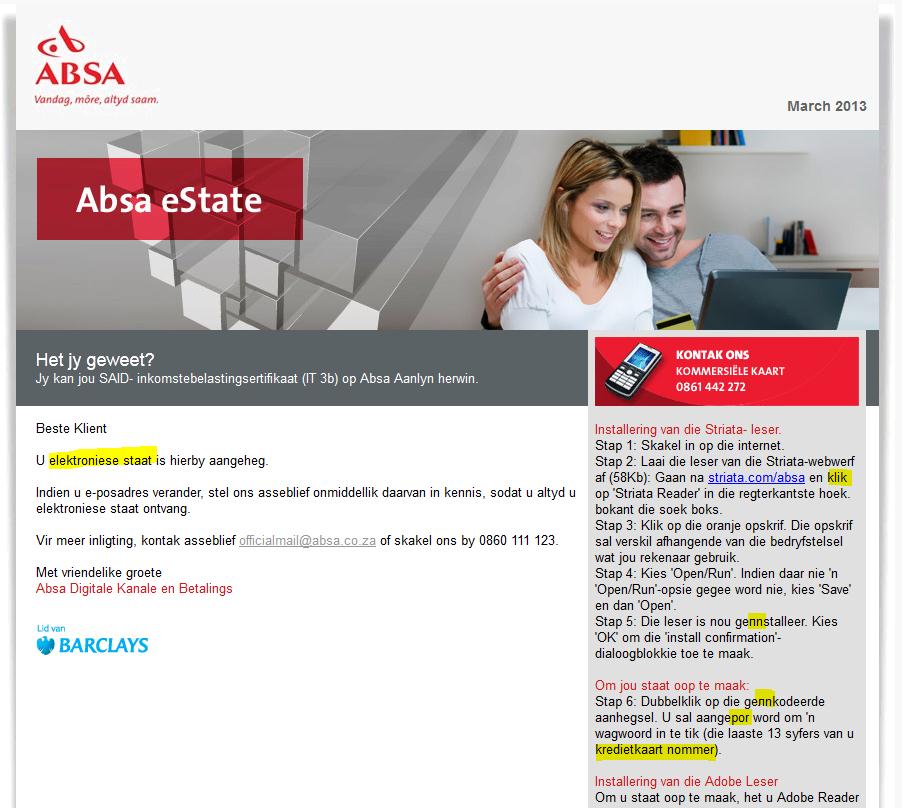
The following e-mail was sent to a number of South African addresses and is a very clever and convincing attempt to obtain users banking details and PIN codes. What is frightening about this mail is that it is written in near-perfect Afrikaans and would fool most people including myself – if I weren’t so paranoid.

Take a look at the following mail message. It looks very convincing but some spelling mistakes give it away but are not easily seen!

Subject: Absa Kredietkaart Rekening Staat -Fooi Afgetrek

absa-afrikaanse phishing

There is an attached .html file (a web page) which immediately should tell you that something is wrong.

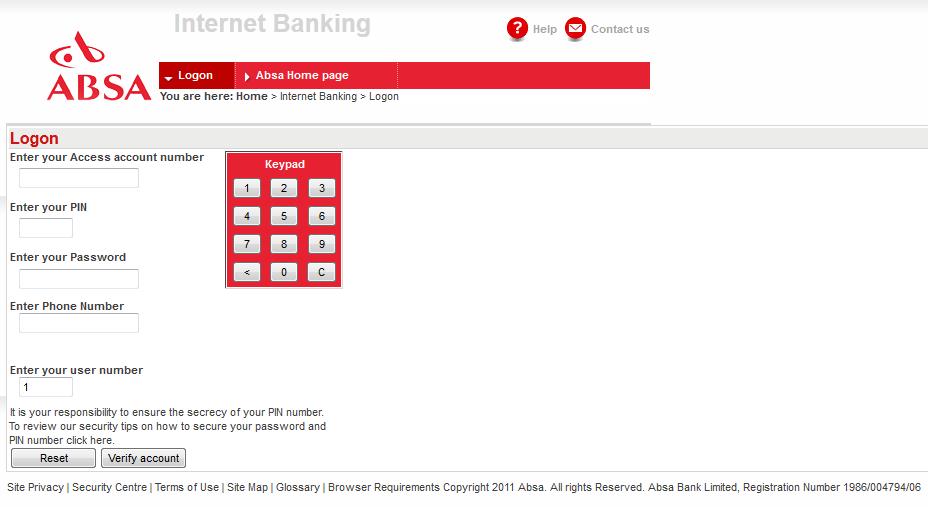
Here is what the web page looks like:

absa-afrikaanse phishing2

On closer inspection of the webpage coding reveals that this is a phishing scam run by a syndicate whose servers are currently in Italy.

  • If you use this page to type in your Account number, PIN code and password, you will have given the criminals free and open access to your bank account (if you were with ABSA)
  • ABSA, or any bank, would never send you e-mail containing links and ask you to click on that link to verify ANY personal information, especially account numbers or PIN codes.
  • Embedded html pages would never be included because they can be easily compromised (like this one)
  • Don’t be fooled by alarming subjects like “Fooi Afgetrek”, “Security Upgrade”, “Illegal Access to your account” or if the mail is in Afrikaans!

(INFORMATION SUPPLIED BY DAVID WILES)

New phishing e-mail causes confusionNuwe “phishing” e-pos veroorsaak verwarring

Tuesday, February 19th, 2013

If you receive an email claiming to be from the SU IT department (see example below), do not open it or click on any of the links or reply to the e-mail. The e-mail attempts to gain access to the university accounts using the sun.ac.za details that looks initially genuine.

This is a phishing email attempting to acquire your passwords and other information. Immediately delete the email and do not reply to it.

There are just a few of the obvious signs that this is a phishing e-mail designed to steal personal information from you. You should never respond to mail like this both at work and at home, and you should never reveal any personal details especially your username and password in an e-mail form or on a webpage that you access via an e-mail link.

IT will never request your username, password or other personal information by means of an e-mail.

  1. If it were a genuine message from Information Technology, there would be branding, and it would be in English and Afrikaans. This one has nothing like that in this e-mail.
  2. The grammar is particularly bad. (what is a “strong virus”?)
  3. We are university personnel and students or “users” we are not “subscribers”.
  4. Why would you have to enter your password in readable form in an insecure e-mail?
  5. There is no support@sun.ac.za e-mail address.
  6. If you do reply, you’ll see the default reply address is an unknown one and not a sun address.
  7. The links and the actual sender/server originate in Korea.

More information on phishing.


EXAMPLE OF “PHISHING” E-MAIL:

Dear sun.ac.za subscriber,

We are currently carrying out an upgrade on our system due to the fact that it has come to our notice that one or more of our subscribers are introducing a very strong virus into our system and it is affecting our network.We are trying to find out the specific person.

For this reason all subscribers are to provide their USER NAME AND PASSWORD for us to verify and have them cleared against this virus. Failure to comply will lead to the termination of your Account in the next 48 hours.

Information Required:
* User name: (…………….. )(Compulsory)
* Password: (……………………..)(Compulsory)
* Date of Birth: (……………………..) (optional)
* Country Or Territory: (………………) (optional)

http://webmail.sun.ac.za/owa/auth/logon.aspx

Hoping to serve you better.
Sincerely, Universiteit Stellenbosch University
********************************************************
This is an Administrative Message from sun.ac.za server. It is not spam.
From time to time, sun.ac.za server will send you such messages in
order to communicate important information about your subscription. *********************************************************


Indien u `n e-pos ontvang met onderstaande inhoud wat lyk of dit deur die US IT-afdeling gestuur is, moet onder geen omstandighede op die skakels kliek of daarop antwoord nie.

Hierdie is `n “phishing” e-pos wat poog om u wagwoord en ander inligting te oes. Verwyder dadelik die e-pos en moenie daarop reageer nie.

IT sal nooit gebruikers vra om hulle gebruikersname, wagwoorde of persoonlike inligting te verskaf deur middel van `n e-pos boodskap nie. Daar is ook `n paar ander tekens dat dit `n “phishing” e-pos is.

  1. As dit `n boodskap van IT was, sou dit sekere identifiseerbare kenmerke gehad het en dit sou in Engels en Afrikaans gewees het.
  2. Die grammatika is buitengewoon sleg. 
  3. Universiteitspersoneel is “users”, nie “subscribers” nie.
  4. Dis e-pos is `n leesbare, onsekure, maklik toeganklike formaat – hoekom sou IT vra dat jy jou wagwoord op so `n onsekure wyse verskaf? 
  5. Daar bestaan geen support@sun.ac.za e-pos adres nie.
  6. As jy wel op die “default reply” adres kliek, sal jy dadelik sien dis eintlik `n vreemde adres.
  7. Die skakels en die versender/bediener se oorsprong is in Korea. 

Meer inligting oor “phishing”.


 VOORBEELD VAN “PHISHING” E-POS:

Dear sun.ac.za subscriber,

We are currently carrying out an upgrade on our system due to the fact that it has come to our notice that one or more of our subscribers are introducing a very strong virus into our system and it is affecting our network.We are trying to find out the specific person.

For this reason all subscribers are to provide their USER NAME AND PASSWORD for us to verify and have them cleared against this virus. Failure to comply will lead to the termination of your Account in the next 48 hours.

Information Required:
* User name: (…………….. )(Compulsory)
* Password: (……………………..)(Compulsory)
* Date of Birth: (……………………..) (optional)
* Country Or Territory: (………………) (optional)

http://webmail.sun.ac.za/owa/auth/logon.aspx

Hoping to serve you better. 
Sincerely, Universiteit Stellenbosch University 
********************************************************
This is an Administrative Message from sun.ac.za server. It is not spam. 
From time to time, sun.ac.za server will send you such messages in 
order to communicate important information about your subscription. *********************************************************