SEARCH
  • [:en]Recent Posts[:af]Onlangse bydraes

  • [:en]Categories[:af]Kategorieë

  • [:en]Archives[:af]Argiewe

General

[:en]Protect your equipment against power outages[:af]Beskerm jou toerusting teen beurtkrag[:]

Sunday, March 31st, 2019

[:en]

By now we’re used to the unpredictable nature of our electricity supply and started making changes to ensure our daily routine can continue in spite of it.

But have you considered the effect these irregular power surges might have on your appliances at home and the office? To ensure you don’t suffer any serious damage, there are a few measures you can take.

the-light-bulb-371652_6401. Regularly check the load shedding schedule.
This is important since you can’t protect your appliances if you’re not sure when power will be shut down. There are various ways to do this, including Eskom’s Twitter feed, website, as well as various apps. 

2. Switch off and unplug
Before scheduled load shedding, turn off and unplug or disconnect all your electrical appliances. By doing this, you will avoid a sudden strong surge of power to your device which could damage sensitive electronic circuitry.

It is also important to unplug computer power cables from plugs, as well as telephone cables.

3. Use surge protectors
As mentioned above, power surges could damage your appliances. To prevent this, you can also fit plugs equipped with surge protectors which will lessen the surge. Just remember, even if you use surge protectors, it’s still safer to unplug devices entirely.

4. Get a power bank
These useful little things are portable chargers which you can charge your phone and any other USB device with. With their help, you won’t be stuck without your cell phone or tablet while the rest of the world is shrouded in darkness.

They are readily available at online stores like Takealot and are not that expensive considering the convenience.

5. Get a UPS
A UPS or Uninterruptible Power Supply functions as a surge protector, but with also has a built-in battery, and can provide a constant power output for up to an hour. A UPS is merely a backup system to buy you time to protect appliances and save data. 

6. Backup
Backing up your data shouldn’t be done only when load shedding is prevalent. It should be part of your weekly routine. If you know load shedding will take place, do regular backups while working or before the scheduled power outage. This will ensure you don’t lose important work.


[SOURCE: www.eskom.co.za, www.mg.co.za, www.fin24.com, www.mweb.co.za, www.property24.com]


[:af]

Teen dié tyd is ons al gewoond aan die onvoorspelbaarheid van ons kragtoevoer-situasie en het ons reeds aanpassings gemaak in ons daaglikse roetines om dit te akkommodeer.

Maar het jy al gedink watter impak onverwagse kragvloei op jou huis- en werktoestelle het? Om te verseker dat jy nie onnodig skade ly nie, kan jy ‘n paar maatreëls tref.

the-light-bulb-371652_6401. Gaan gereeld die beurtkragskedule na
As jy nie weet wanneer die krag afgaan nie, gaan jy nie toerusting betyds kan beskerm nie. Daar is verskeie plekke om die informasie te bekom – Eskom se Twitterrekening, webwerf, sowel as verskeie toepassings. 

2. Skakel af en ontkoppel
Voordat geskeduleerde beurtkrag plaasvind, skakel al jou toestelle af en trek dit by die muurprop uit. Sodoende voorkom jy dat `n skielike sterk stroom na jou toestel vloei wanneer krag herstel word, en sensitiewe elektronika beskadig.

Dit is veral belangrik dat rekenaarkabels, sowel as foonkabels, uit muurproppe verwyder word. 

3. Gebruik oorspanningafleiers
Soos ons hierbo genoem het, kan skielike sterk strome jou toestelle beskadig. `n Ander metode om dit te voorkom, is om proppe toe te rus met oorspanningafleiers (surge protectors), wat die sterkte van die stroom sal demp.

4. Kry `n kragbank
Hierdie handige klein toestelletjies is draagbare laaiers wat gebruik kan word om jou foon en enige ander USB-toestel te laai. Sodoende sal jy nie gestrand wees sonder selfoon of tablet as die res van die wereld in donkerte gehul is nie.

5. Kry `n UPS
`n Ononderbroke kragbron of UPS vervul dieselfde rol as `n oorspanning afleier, maar met die ekstra funksionaliteit van `n ingeboude battery. Dit verskaf deurlopende kragtoevoer vir `n maksimum van een uur. `n UPS is bloot `n rugsteunstelsel om jou genoeg tyd te gee om jou toestelle en data te beskerm.

6. Rugsteun
Rugsteun van data behoort nie uitsluitlik gedurende beurtkrag te gebeur nie – dit behoort deel te wees van jou roetine. As jy weet dat beurtkrag onafwendbaar is, rugsteun en stoor deurlopend jou werk of ten minste voordat die kragonderbreking plaasvind. Dit sal verseker dat jy nie belangrike werk in die proses verloor nie.


[BRONNE: www.eskom.co.za, www.mg.co.za, www.fin24.com, www.mweb.co.za, www.property24.com


[:]

[:en]Industry-wide shortage of processors[:]

Tuesday, March 5th, 2019

[:en]

Intel is facing higher than expected market demands, resulting in industry-wide supply tightness for their desktop and notebook processors.  While Intel is diligently working to maximize factory output, they expect supply to be short in Q1 and to remain tight through the end of the year. 

Dell and Lenovo, the Universities preferred suppliers of desktops and laptops, utilises Intel processors which means that there might be lead times in delivery.

Dell is however not disadvantaged in terms of supply compared to other IT providers.  Products most impacted by the supply constraints include certain configurations in the Latitude, Precision and OptiPlex product lines. 

It is important to note that these products will continue to be available, though they may be on extended lead time until supply ramps to meet demand. 


[:]

[:en]TechSmith Relay for lecture recordings[:]

Thursday, February 28th, 2019

[:en]

TechSmith Relay has been in use within Faculties and on personal devices by lecturers for lecture capture in multiple formats for a number of years. Recently, the Academic ICT department has been informed, with minimal notice, that TechSmith Relay will no longer support this self-hosted version of the software. The information provided by TechSmith Relay indicates that they will be focusing their efforts on developing a cloud-based solution. There are, however, no timelines available for if/when this will be available in South Africa.

What does this mean to lecturers and students?

Currently, the software is still fully functional. All licenses are still valid. However, should any changes (or upgrades) take place on our operating systems, this may result in a situation where the software is no longer compatible with our devices. Recordings are still accessible and downloadable in MP4/MP3 format for safekeeping, and we recommend that this continue as per normal. The content that has already recorded will not be lost.

What is ICT doing to provide a viable solution?

Since receiving this notice from TechSmith, we have been actively testing alternatives. We have also requested that a workgroup investigate sustainable alternatives and recommend a way forward for the University. This workgroup includes members of ICT staff/ Centre for Learning Technologies and the Computer User Area Manager team. This workgroup has been requested to provide feedback and initiate testing within the next four weeks. In the interim, all effort will be made to maintain the operating systems on the computers in lecture halls to avoid any potential issues with the software.

What is the alternative?

Our recommendation is that lecturers can continue with the use of TechSmith Relay for recordings for the next two months. We will notify all academic partners should the situation change in this time. However, should you be concerned about the stability of the TechSmith relay option, the SUNStream (Adobe Connect) plugin within SUNLearn is a stable and reliable alternative. Many lecturers already use this method for lecture capture and capturing any interaction with students who may be joining the classes via streaming. Assistance with user guides and/or training on using this option within your SUNLearn module will be provided via the CLT support desk

Lecturers may direct additional questions to the CLT support desk.

[:]

[:en]2018 in review[:af]2018 in oorsig[:]

Thursday, December 6th, 2018

[:en]

What an exciting year we’ve had! As I’m writing this, we’ve just entered another hour or two of load-shedding, and I’m thankful for a reliable laptop on battery power.

In the centennial year of the University, a number of bold decisions were finalised to launch some of the largest renewal projects in the last two decades.

The successor systems for two core administrative applications, Student and Financial Management, were evaluated, selected and approved by the Rectorate by the end of November. Both  applications, to be implemented over the next two years, are modern and innovative in important aspects:

  • The systems will be implemented in the cloud and developed and maintained by leading international vendors. This is a major change for the university, having developed and maintained the legacy applications in-house for more than 25 years.
  • The platforms serving these applications will be located in the cloud, and not on campus like before. This will have a major impact on the nature of our work and will enable us to utilise resources in new ways to improve our services to the university.

As far as we’re aware, no other university in South Africa has migrated these applications to a cloud based platform yet.

The IT Division has been hard at work to improve the quality and sustainability of our services. In August, we submitted the two-year Quality Improvement Report to the institutional Quality Committee, which was accepted with acclaim. The report mentioned important improvement milestones, like the establishment of a new governance body for information and technology management, the Technology and Information Committee, as well as many organisational, infrastructure and service improvements.

Another major achievement for the year is the development and implementation of the ICT Partner Portal, a system to streamline and manage all work streams for ourselves and our partners, colleagues and clients. Since implementation in September, about 80% of the service processes in the IT Division has been defined and configured in the system, and more than 17000 incidents and requests were processed in three months. The system is designed to provide transparency to the workflow and completion of tasks to all process stakeholders – users or clients, service staff and management.

The year will also be remembered for the steep increase in cyber-attacks, especially phishing attempts. A dedicated cybersecurity function was established to deal with the rising threats, and to our dismay, we noticed a significant percentage of manpower being absorbed by this phenomenon.

We are also sad to see a number of colleagues leaving our team, some retiring and others to greener pastures. We wish all of them well, especially Callie van der Merwe and Thys de Wet, who spent their entire career at Stellenbosch University.

Lastly, a word of appreciation to prof Stan du Plessis, our new Chief Operating Officer, for the first full year of his leadership and support. We are inspired and eager to enter 2019 with renewed energy, after a short period of rest.

Best wishes for the festive season!

Attie Juyn

[:af]

Wat ʼn opwindende jaar het ons nie gehad nie! Terwyl ek hier skryf, het ons sopas nog ʼn uur of twee van beurtkrag betree en is ek dankbaar vir ʼn betroubare skootrekenaar met batterykrag.

Gedurende die Eeufeesjaar van die Universiteit is ʼn aantal moedige besluite gefinaliseer om van die grootste hernieuwingsprojekte van die laaste twee dekades te loods.

Die opvolgstelsels van die twee kern administratiewe toepassings, Studente en Finansiële Bestuur, is evalueer, gekies en einde November deur die Rektoraat goedgekeur. Beide hierdie toepassings, wat oor die volgende twee jaar implementeer word, is modern en innoverend om verskeie redes:

  • Die stelsels sal in die wolk implementeer word  en deur toonaangewende internasionale verskaffers ontwikkel en onderhou word. Dis ʼn belangrike verandering vir die Universiteit wat die bestaande toepassings vir meer as 25 jaar intern ontwikkel en onderhou het.
  • Die platforms wat hierdie toepassings bedien sal wolk- en nie meer kampusgebaseerd wees nie. Dit sal ʼn groot impak hê op die aard van ons werk en ons in staat stel om hulpbronne verskillend aan te wend en sodoende ons dienste aan die Universiteit te verbeter.

Sover ons kennis strek het geen Suid-Afrikaanse universiteit hierdie toepassings al voorheen na ʼn wolkgebaseerde platform migreer nie.

Die IT-afdeling het hard gewerk om die kwaliteit en volhoubaarheid van ons dienste te verbeter. Die tweejaarlikse kwaliteitverbeteringsverslag is in Augustus voorgelê aan die institusionele Kwaliteitskomitee, is positief ontvang en goedgekeur. Belangrike verbeteringsmylpale is in die verslag genoem, onder andere die vestiging van ʼn nuwe bestuursliggaam en tegnologiebestuur, die Tegnologie- en Informasiekomitee, sowel as verskeie organisatoriese, infrastruktuur- en diensverbeterings.

ʼn Verdere beduidende sukses in 2018 is die ontwikkeling en implementering van die ICT Partner Portal, ʼn stelsel wat ons werksvloei en wisselwerking met ons vennote, kollegas en kliënte vaartbelyn maak en bestuur. Ongeveer 80% van die IT-afdeling se diensprosesse is sedert die stelsel se implementering in September gedefinieer en -konfigureer en meer as 17000 insidente en versoeke is die afgelope drie maande verwerk. Die stelsel is ontwerp sodat daar deursigtigheid vir alle prosesaandeelhouers, kliënte, dienspersoneel en bestuur is ten opsigte van die werksvloei en voltooiing van take. 

Die jaar sal ook onthou word vir ʼn skerp toename in kuberaanvalle, veral strikroofpogings. ʼn Gespesialiseerde kubersekuriteitsfunksie is gevestig om die toename in bedreigings te hanteer. Dis egter onthutsend dat ʼn beduidende persentasie van ons mannekrag gevolglik ook deur hierdie verskynsel absorbeer word. 

Ons is ook hartseer dat ʼn paar van ons kollegas die span verlaat, sommige vir aftrede, ander vir groener weivelde. Ons wens hulle almal voorspoed toe, veral Callie van der Merwe en Thys de Wet wat hulle hele loopbaan by die Universiteit spandeer het.

Laastens wil ons ook vir prof Stan du Plessis, ons nuwe Uitvoerende Bedryfshoof, bedank vir die eerste volledige jaar van sy leierskap en ondersteuning. Ons is gretig en geïnspireerd om na ʼn kort rustyd 2019 aan te durf met nuwe energie.

Beste wense vir die feesgety!

Attie Juyn


[:]

[:en]The last swipe for Phonet[:af]Phonet se tyd is verby[:]

Thursday, October 4th, 2018

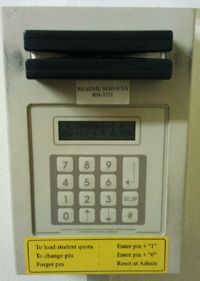
When’s the last time you swiped your staff or student card through one of the readers shown on the photo to the right? We’re hoping not recently since this particular technology is on its way out.

The Phonet system has been in use since 1998 and was the brainchild of, now retired, Prof Piet Bakkes, previously affiliated with the Department of Electrical and Electronic Engineering. In recent years usage has decreased rapidly, but a few of these devices are still used for printers and photocopiers on campus.  There are currently 58 machines still operating on the Phonet system in 28 different buildings. 

As with any technology, Phonet has reached the end of its lifespan and will have to be switched off by the end of the year. The reasons for its termination are various:

  • We no longer have support from the developer to upgrade and improve the system;
  • This is the only existing system still utilising the staff or student card’s magnetic strip. Other systems on campus already use the card’s chip to read credits;
  • We no longer have enough magnetic card programmers available for next year at registration;
  • No parts are available to upgrade the devices;
  • The server running the software cannot be upgraded and is, subsequently, posing a serious threat to the security of the rest of the campus network.

Phonet will be switched off for students on 7 December and on 31 December for departmental accounts. For the few remaining users of the system, we advise switching to a newer system before these dates.

For more information, please contact Joshwane Newman at jsnewman@sun.ac.za.