SEARCH
  • [:en]Recent Posts[:af]Onlangse bydraes

  • [:en]Categories[:af]Kategorieë

  • [:en]Archives[:af]Argiewe

General

You say Tomato, I say ZomatoJy sê Tomato, ek sê Zomato

Friday, September 4th, 2015

Some of us eat to live, others live to eat. However, deciding where to get a quick bite to eat, can lead to an unnecessary 20 minute discussion. Help is at hand with Zomato.

Zomato isn’t a distant exotic cousin of the humble tomato. No, it is in fact, an app which will make your life much, much easier. Over the past weekend we tried and tested Zomato and here’s what we found.
Zomato-2

Zomato originates from India and was launched in 2008. The web and mobile device based application can best be described as a “global restaurant search and discovery app”, but also, as Gearburn so aptly put it, as the “Facebook of food”. Because Zomato isn’t merely a search engine, it’s also a social network for food lovers.

It has, to date, 1.4 million restaurants listed in 22 countries, with 90 million visits per month.

The app uses your phones GPS to establish your location and suggests restaurants nearest to you. But, you can also search according to any other criteria, such as type of food (Indian, Chinese, Moroccan, etc.), type of meal (lunch, dinner, quick bite, take-away, etc.)

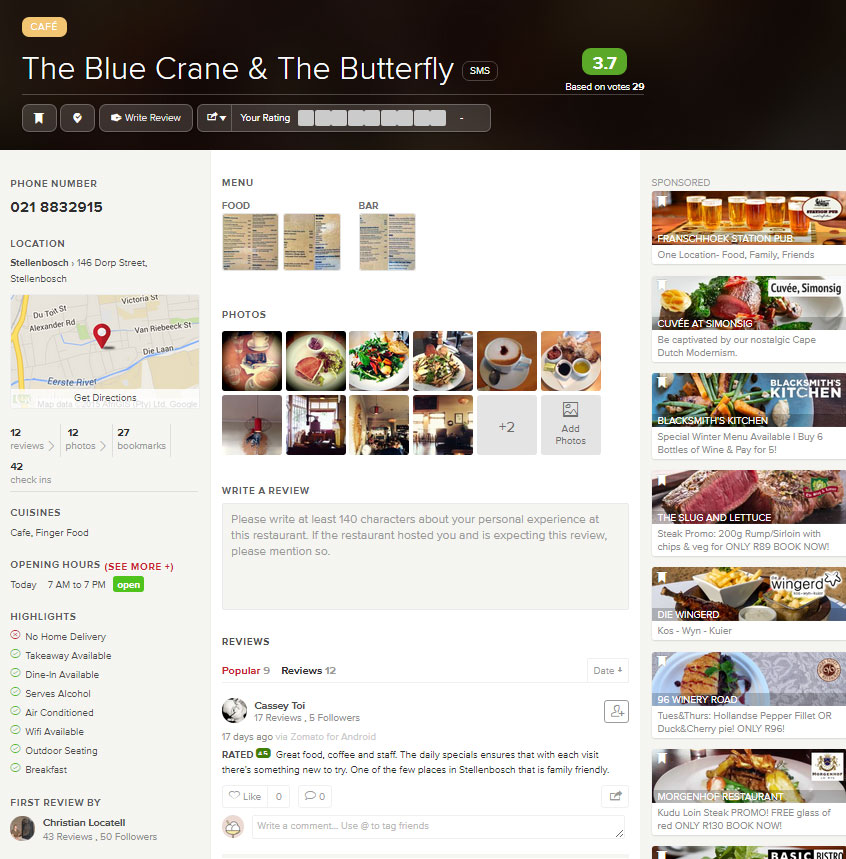
Included in results you will find the restaurant’s menu, photos of food and the venue, reviews and ratings. Most importantly it shows you the location on Google maps, as well as contact details. The phone app additionally has a call function built in, so you can just tap the button to make your booking.

The average price for a meal is also included – a handy criteria to ensure you don’t get a surprise when you arrive at the restaurant. Keep in mind that establishments on Zomato include anything from Steers to Overture – from take-away shops to seriously upmarket restaurants. There’s something for everyone, which makes it all the more fun.

Zomato is working on even more functionality, which will include online bookings and payment, as well as collaborating with Uber.

If you have a competitive streak, you can even become an expert in your own neighbourhood by reviewing at least 10 restaurants and posting 50 photos. There are various levels ruled by a point system, such as foodie, big foodie, super foodie and connoisseur.

zomatoTHE VERDICT

We used Zomato over the weekend to plan our eat-out expeditions and it worked quite well. All the information was accurate, maps were quite handy as we tried out a new restaurant in Bellville. Even ratings and reviews are easy to do and existing reviews give you a good idea of what to expect. I’m not an app-junkie, but Zomato is simple, yet effective, so I can recommend it.

Download Zomato for Android
Download Zomato for iOS 
Download Zomato for Windows

Eet jy net om aan die lewe te bly of is eet jou lewe? Wat ookal die geval, net om te besluit waar om te eet, kan vinnig ontaard in `n onnodige 20-minute gesprek. Gelukkig is daar Zomato.

Zomato is nie die veraf, eksotiese nefie van die eenvoudige tamatie nie. Dis ʼn toepassing wat jou besluite sommer baie makliker gaan maak. Oor die afgelope naweek het ons Zomato gebruik en beproef en hier is ons opinie.

Zomato-2

Zomato kom oorspronklik van Indië en is in 2008 gestig. Die web en mobiele toestel toepassing kan beskryf word as ʼn globale restaurant soek-en-ontdek hulpmiddel, of soos Gearburn dit so beskrywend stel, “Facebook vir kos”. Zomato is inderdaad meer as net ʼn soekenjin, dis ʼn sosiale netwerk vir kosliefhebbers.

Tot op datum is daar reeds 1.4 miljoen restaurante in 22 lande gelys op die databasis en word dit 90 miljoen keer per maand besoek.

Die toepassing gebruik jou foon se GPS om jou ligging te bepaal en restaurante in jou nabye omgewing voor te stel. Maar, jy kan ook volgens verskeie ander kriteria soek, byvoorbeeld die tipe kos (Indies, Chinees of Marokkaans, ens.) of tipe maaltyd (middagete, aandete, wegneemetes, ens.)

Jy sal ook spyskaarte, fotos, resensies en graderings vir restaurante te siene kan kry. Die belangrikste is egter dat die toepassing die ligging aandui op Google maps, sowel as kontakinligting. Die foontoepassing het ʼn addisionele funksie ingebou waarmee jy direk uit die toepassing die restaurant kan skakel om te bespreek.

Die gemiddelde prys per ete word ook ingesluit – baie handig as jy nie hou van onwelkome verrassings nie. Hou in gedagte dat Zomato enigiets van Steers tot Overture insluit – van wegneemete-plekke tot eksklusiewe restaurante. Daar is iets vir almal, watookal jou begroting of smaak.

Zomato ontwikkel ook meer funksionaliteit en sal binnekort aanlyn besprekings en betalings by hul toepassing insluit. ʼn Projek saam met Uber was ook al ter sprake.

As jy ʼn kompeterende streep het, kan jy probeer om ʼn ekspert in jou buurt te word deur ten minste 10 restaurante te resenseer en 50 fotos op te laai. Daar is verskeie vlakke wat bepaal word deur die hoeveelheid punte wat jy insamel. Jy kan ʼn foodie, big foodie, super foodie en connoisseur word as jy ʼn toegewyde Zomato-gebruiker is.

zomatoDIE GEVOLGTREKKING

Ons het Zomato oor ʼn naweek beproef om ons uiteet-ekskursies te beplan en dit het baie goed gewerk. Inligting was deurlopend akkuraat en die kaarte het handig te pas gekom toe ons ʼn nuwe restaurant in Bellville wou uitprobeer.

Selfs gradering en resensies is maklik om te doen en die reeds bestaande resensies gee vir jou ʼn goeie idee van wat om te verwag. Ek is nie ʼn toepassing-fanatikus nie, maar Zomato is eenvoudig, tog effektief, dus beveel ek dit aan.

Laai Zomato vir Android af 
Laai Zomato vir iOS af 
Laai Zomato vir Windows af 

Tune in to Bits & BytesSkakel in by Bits & Bytes

Friday, August 21st, 2015

This September the radio version of Bits & Bytes celebrates two years on air with more than 55 broadcasts under its belt. What started out as a fortnightly radio insert on IT news has grown into a weekly institution also covering the latest tech news. Currently Bits & Bytes is the tech show on MFM and Marc-Allen Johnson and Tian Petersen, ITs tech gurus make sure they are constantly up to date with all things hip and happening.

MFM has an audience of 30 000 listeners between the ages of 14 and 28 and is not only broadcasted on campus, but throughout the Stellenbosch area. Anyone who has an interest in technology, not only students, won’t regret tuning in for 10 minutes.  With every insert we try and combine relevant news for students and staff, but also interesting developments on the technological front.

We do realise not everyone will be able to listen to the show due to limited access, so we provide an alternative so you won’t miss out. You can also listen to the broadcasts online by browsing to www.sun.ac.za/bb where you will find all previous 56 broadcasts.  Just click on the mp3 link.

These clips are hosted within the SU network and won’t rocket your internet costs – so you can listen with ease. You’ll also find all previous versions of the Bits & Bytes newsletter.

If you do want to listen to the direct broadcast, tune in every Wednesday at 15:15 on the AM to PM Show on MFM with Eduard and our two resident IT gurus, Tian and Marc-Allen.  Click HERE to listen to MFM live.

You are also welcome to send comments and questions during the show via Twitter and if there’s enough time we will address them. Tweet us at @ITStelleni.


Komende September vier Bits & Bytes se radio-weergawe sy tweede verjaardag met meer as 55 uitsendings op ons kerfstok. Wat aanvanklik begin het as `n tweeweeklikse radio-insetsel om allerlei IT-nuus te deel, het intussen gegroei tot `n weeklikse instelling wat veel meer as net die doen en late van IT bespreek. Bits & Bytes is tans dié tech-show op MFM en hoe dan anders met twee aanbieders, Marc-Allen Johnson en Tian Petersen wat behoorlik moet bontstaan om by te hou by elke week se tegnologiese nuutjies. 

MFM het `n gehoor van 30 000 luisteraars tussen die ouderdom van 14 en 28 en word nie net op kampus uitgesaai nie, maar dek die hele Stellenbosch. IT word dus gehoor dwarsoor Stellenbosch en enigiemand wat wil op hoogte bly van tegnologie sal nie spyt wees om 10 minute af te staan en in te skakel nie. Met elke insetsel probeer ons om `n kombinasie van relevante nuus vir studente en personeel, sowel as interessante verwikkelinge op die tegnologiese front op `n informele trant aan luisteraars oor te dra.

Ons besef egter dat almal nie toegang het om altyd regstreeks daarna te luister nie en het die fasiliteit geskep waar jy, nadat dit uitgesaai is, steeds aanlyn na die uitsendings kan luister. Al wat jy hoef te doen is om na WWW.SUN.AC.ZA/BB te gaan waar daar `n lys van alle vorige nuusbriewe is, maar ook al 56 vorige radio-uitsendings. Kliek bloot op die mp3-skakel en bly op hoogte van wat aan die gebeur is met tegnologie.

Die insetsels word binne die US-netwerk gehuisves, dus gaan dit nie jou internetkoste opvreet nie – jy kan met `n geruste hart luister. As jy wel die regstreekse uitsending wil hoor, skakel gerus elke Woensdag om 15:15 op die Lunch Show op MFM saam met Lesley en ons eie Tian en Marc-Allen in. Kliek HIER om aanlyn na MFM te luister.

Jy is ook welkom om kommentaar en vrae in daardie tydsgleuf via Twitter aan ons te stuur en indien daar geleentheid is, sal dit op die lug beantwoord word. Tweet ons by @ITStellenUni!

Archiving – not just for librariansArgivering – nie net vir biblioteekarisse nie

Friday, August 21st, 2015

Archiving – it doesn’t exactly sound like a fun weekend activity, does it?

But unfortunately our mailboxes can’t always deal with too many e-mails, especially those with large attachments, we receive regularly. Unless you clean up your mailbox and delete e-mails frequently, you’ll run out of mailbox space sooner than you think. This is where archiving comes in handy.

In this article we will show you how easy it is to create and maintain archives on your computer.

  1. HOW TO CREATE YOUR ARCHIVE FILE

archiving-1

Open MS Outlook

  • Select the Home tab
  • Use the dropdown menu next to New Items
  • Click on More Items
  • Select Outlook data file

archiving-2

This will create the file for your new archive.

Important:

  • Please name it properly as to prevent confusion when creating new archives later on.
  • Please do not put a password on the archive file as this causes confusion and mail loss at the end of the day when you get a new computer or if the case may be that data recovery must be done.

This also must be under “My Documents\Outlook Files”.

When clicking on OK you will return to your Outlook Home screen.

As shown below (when the mailbox is collapsed) you will be able to see your new Outlook archive.

archiving 3

2. NOW FOR THE ARCHIVING

Click on File in the left top corner
Under Info you will find Cleanup Tools
When clicking on the button you will find Archive as the third option.

archiving-4

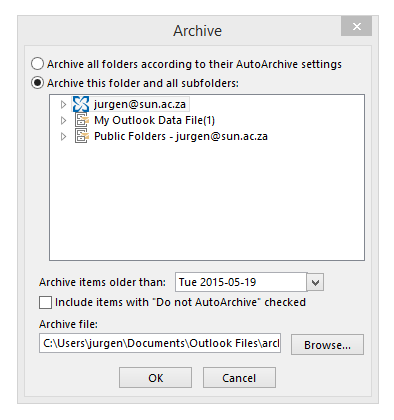
The next window you will be presented with is seen below.

archiving 5

The most important thing you need to do now is check that the correct archive file will be used for archiving.

To check this you need to click on the browse button and make sure it is pointing to the correct file in “My Documents\Outlook Files”.

Secondly:

  • Choose a date – all e-mails before the input date will be archived to your folder. This may take a while if you have not archived before.

Thirdly:

  • Select your mailbox (not only parts of it, but the Collapsed view as seen in the screenshot) and then click on OK.

You have now successfully started your first archive!  Feel free to archive instead of delete as keeping your records is quite important.

TIPS:

  • VERY IMPORTANT – no password on the archive file.
  • Keep archives small, for example – year by year. This is to prevent them from getting too big and slowing down your machine.
  • With this way of archiving your folder structure stays the same thus making it easier to actually go back and find the files you are looking for from previous years.

For  more information on various Outlook functions, please have a look at our self help site.

Argivering. Dit klink nie besonder prettig nie, né?

Ongelukkig kan ons elektroniese posbusse nie altyd byhou by die massa e-posse waarmee hulle daagliks gebombardeer word nie – veral daai groot video leêrs en prentjies … 

As jy nie gereeld huis skoonmaak en onnodige of groot e-posse uitvee nie, gaan jy kort voor lank sonder enige spasie sit. Dis op hierdie punt wat argivering sy staal wys.

In hierdie kort artikeltjie sal ons vir jou wys hoe maklik dit is om argiewe op jou rekenaar te skep en onderhou.

  1. HOE OM JOU EIE ARGIEF-LEêR TE SKEP

archiving-1

Maak MS Outlook oop

  • Kies die Home oortjie
  • Gebruik die afrol-spyskaart langs New Items
  • Kliek op More Items
  • Kies Outlook data file

archiving-2

Hierdie aksies sal `n leêr vir jou nuwe argief skep.

Belangrik:

  • Kies die regte benaming sodat daar nie verwarring is wanneer jy later nuwe argiewe skep nie. 
  • Moenie `n wagwoord op die argief plaas nie. Dit veroorsaak onnodige verwarring en verlies van e-pos wanneer jy `n nuwe rekenaar kry of data herwin moet word. 

Dit moet ook onder  “My Documents\Outlook Files” gestoor word.

Wanneer jy op OK kliek, sal jy teruggeneem word na die Outlook Home skerm.

Soos hier onder aangedui (wanneer die posbus oopgevou is), sal jy jou nuwe Outlook-argief sien.

archiving 3

2. NOU VIR DIE ARGIVERING

Kliek op File in die linkerkantse, boonste hoek. 
Onder Info sal jy Cleanup Tools sien.
Wanneer jy op die opsie kliek, sal jy Archive as die derde opsie sien.

archiving-4

Die volgende sigbare een lyk soos die een hier onder. 

archiving 5

Die belangrikste ding wat jy moet onthou is dat jy nagaan dat die regte argief-leêr gekies word vir argivering.

Om dit na te gaan, kliek op die browse-knoppie en maak seker dit wys na die korrekte leêr in “My Documents\Outlook Files”

Tweedens:

  • Kies `n datum – alle e-posse voor die ingevoerde datum sal geargiveer word na jou leêr. Dit mag `n tydjie neem as jy nog nooit voorheen geargiveer het nie. 

Thirdly:

  • Kies jou posbus (nie net dele daarvan nie, maar gebruik die oopgevoude sig soos in die voorbeeld) en kliek op OK.

Jy het nou jou eerste suksesvolle argief geskep.  Argiveer gerus jou e-posse eerder as om dit uit te vee – dis soms belangrik om rekords te behou. 

WENKE:

  • BAIE BELANGRIK – geen wagwoord op jou argief-leêr nie.
  • Hou argiewe klein – byvoorbeeld jaar-vir-jaar. Dit voorkom dat argiewe te groot raak en jou rekenaar stadig maak.  
  • Deur op bogenoemde wyse te argiveer bly jou leêrstruktuur altyd dieselfde en is dit makliker om heen en weer te soek na e-posse van vorige jare. 

Vir meer informasie op ander Outlook-funksies, gaan kyk gerus op ons selfhelp webwerf.

The future of televisionDie toekoms van televisie

Friday, August 21st, 2015

On 5 January 1976 South Africans sat with bated breath in front of newly acquired television sets to bear witness to the first ever television broadcast. A lot has changed since then, including the addition of subscription services like DSTV.

Between 1976 and 1978 no ads were broadcasted and after years of using ad breaks to make coffee, we’re back to ad-free viewing with innovations like PVR and more recently VOD.

Video on demand (VOD) perfectly satisfies our demand for instant entertainment and series binge-watching. Up to last year the choices for VOD have been slim.

DSTV’s Box office online, a movie rental service for DSTV subscribers, was the first contender for a VOD audience. Soon others followed suit – Altech with Node, MTN with Frontrow and Times Media Group’s VIDI. When American entertainment provider Netflix announced they would be expanding their service to South Africa by the end of 2016, the race was on.

The biggest game changer occurred this past Wednesday when Naspers announced their entry with Showmax.

SHOWMAX

According to sources Showmax promises to be “…the new M-Net but for the internet age.” Two subscriptions are available – a premium and free option. The premium service will cost R99-00 per month and will include a host of popular series, as well as a combination of blockbusters and older movies.  Old South African series like Egoli, Binnelanders and Agter elke man are also listed on their menu. Whether this is a move towards a target audience or merely saving money in acquiring local productions, remains to be seen.

All you need to use Showmax is a minimum internet speed of 1MB and an internet browser. If you are unsure whether Showmax is for you, a 7 day trial period is available to test the water with first.

[SOURCE: www.mybroadband.co.za,  www.iafrica.com]

vidiVIDI 

Times Media Group launched VIDI in September last year and until Wednesday, they’ve been the biggest competition for Netflix locally.

A monthly subscription goes for R149-00 with unlimited viewing including a wide selection of movies and series. (Apparently more than 1000 worth’s viewing) Movies alone can also be rented at R27-00 for new and R15-00 for older releases.

Once again, a line with a minimum internet speed of 1MB is a prerequisite. Just remember that, if you prefer watching your sport and movies in HD on a big screen, 2 – 4 MB connections are a necessity.

The biggest advantage of VIDI, and all available VOD services, is the choice to watch movies or series whenever you want to, uninterrupted or not. If you can’t finish a movie, pause, stop or bookmark it and it will be added to your to-watch list.

Content can be watched on multiple platforms, including PC, Mac, laptop, Apple and Android tablets and smartphones. VIDI also adapts the quality of files according to your platform and bandwidth, so you should be saved from the frustration of buffering images.

[SOURCES: www.htxt.co.za, www.bizcommunity.co.za, www.sabc.co.za, www.tvsa.co.za and www.mybroadband.co.za]

FRONTROW

MTN initiative, Frontrow, was launched last year in September – a week after VIDI. Marketing has been extremely low-key and the main criticism is the limited viewing options. As should be expected from a cell phone provider, they focus on handheld devices. MTN does offer a package which includes mobile data.

But don’t take our word for it, rather read mybroadband’s review of Frontrow.

Currently VOD can’t compete with traditional broadcasting channels. DSTV alone accumulated up to five million subscribers over the past 5 years. Sport still remains the biggest drawing card – something which no VOD service caters for so far. However, television as we know it will have to adapt to keep up with technology.

I you are considering the VOD route for your home entertainment, read what the experts say about the current internet VOD options, the possible arrival of Netflix in 2016 and how they compare:

ShowMax, Netflix and SA’s disrupted TV future
Netflix could be game-changer in SA
Netflix vs FrontRow vs Vidi vs Node in South Africa

5 Januarie 1976  – Menige Suid-Afrikaner sit in afwagting voor nuut-aangekoopte televisiestelle vir die eerste televisie-uitsending. Intussen het heelwat water onder die brug geloop en ook subskripsie-dienste, soos DSTV, is deesdae algemeen.

Tussen 1976 en 1978 is geen advertensies tussen programme uitgesaai nie en advertensiebreuke was `n geleentheid om vinnig te gaan koffie maak. Vandag  is ons terug by advertensielose televisie met PVR en die meer onlangse nuweling VOD. 

Video per aanvraag (VOD) bevredig die groeiende behoefte vir onmiddellike vermaak en ononderbroke reekskykery, maar tot `n jaar gelede was die keuses maar skraps.

DSTV het eerste toegetree tot die geveg met Boxoffice online, `n fliek-verhuringsdiens vir DSTV-intekenare. Kort daarna het ander hul voorbeeld gevolg – Altech met Node, MTN met Frontrow en Times Media Groep met VIDI. Die laaste hupstoot na meer kompeterende dienste, was Amerikaanse reus Netflix, se aankondiging dat hulle beplan om teen einde 2016 in Suid-Afrika te wees.

En toe gooi Naspers finaal die jakkals in die hoenderhok Woensdag met Showmax, hulle VOD-diens. 

SHOWMAX

Volgens bronne kan Showmax beskou word as nie nuwe M-Net vir die internet-eeu. Twee intekenopsies is beskikbaar – premium en gratis opsie. Premium diens sal jou R99-00 per maand kos met `n verskeidenheid gewilde reekse, sowel as nuwe en ouer flieks. Ou Suid-Afrikaanse reekse soos Egoli, Binnelanders en Agter elke man verskyn ook op hul spyskaart. Of dit `n poging is om `n spesifieke demografie te wen of bloot om geld te spaar, is `n ander vraag.

Vir Showmax het jy `n lyn met internetspoed van ten minste 1MB en `n webblaaier nodig. `n Onbeperkte internetrekening mag waarskynlik ook handig te pas kom. 

As jy onseker is of jy dié roete wil volg, kan jy gerus wees – jy kan dit eers vir 7 dae toets voor jy besluit.

[BRONNE: www.mybroadband.co.za,  www.iafrica.com]

vidiVIDI 

Times Media-Groep het VIDI in September 2014 bekendgestel en tot Woensdag was dit die grootste plaaslike kompetisie vir Netflix. 

Die maandelikse fooi vir onbeperkte toegang tot reekse en flieks (klaarblyklik meer as `n 1000 uur s’n), is ietwat meer as Showmax teen R149-00 kos. Die voordeel is egter dat jy slegs flieks apart kan huur – R27-00 vir nuwe vrystellings en R15-00 vir ouer flieks. Kyk dit wanneer jy wil, maar sodra jy begin het, verval dit na 48 uur.

Soos met Showmax het jy ook `n lyn met internetspoed van ten minste 1MB en `n webblaaier nodig. As jy egter van jou sport en flieks in HD en op `n groot skerm hou, is 2 tot 4 MB `n noodsaaklikheid. 

Een van die grootste voordele van VIDI, en die meeste ander VOD-dienste, is dat jy jou kykgenot kan skeduleer soos jy wil, met, met onderbrekings of nie. As `n fliek te lank raak, kan jy dit stop, by jou lysie voeg en volgende keer kyk jy verder.  

Inhoud kan op verskeie platforms benut word, insluitende PC, MAC, skootrekenaars, Apple en Android tablette en slimfone. VIDI pas ook die kwaliteit van sy leêrs aan by die platform waarop jy kyk en jou bandwydte.

[BRONNE: www.htxt.co.za, www.bizcommunity.co.za, www.sabc.co.za, www.tvsa.co.za and www.mybroadband.co.za]

FRONTROW

MTN-initiatief, Frontrow, is bekendgestel in September 2014 – `n week na VIDI. Bemarking vir die diens was betreklik yl en die grootste kritiek op Frontrow is die beperkte keuse van materiaal en die ondersteunde platforms. Soos seker te verwagte kan wees van `n selfoonverskaffer, is die fokus op slimfone en tablette, nie op rekenaars of televisie nie. 

MTN bied wel `n pakket wat mobiele data insluit. Maar moenie ons woord daarvoor vat nie, lees gerus mybroadband se resensie van Frontrow.

Tans kan VOD nie op dieselfde vlak kompeteer as tradisionele uitsaaikanale nie. DSTV het alleen oor die afgelope 5 jaar 5 miljoen intekenare gewerf. Sport bly sport die grootste trekpleister  – iets waarvoor VOD-dienste nie voorsiening maak so ver nie. 

Alles ten spyt sal televisie en ons bestaande kykgewoontes moet verander om by te hou by tegnologie.

As VOD vir jou klink na die ideale vermaakoplossing, lees wat die deskundiges sê het oor jou opsies, die moontlike koms van Netflix in 2016 en hoe hulle vergelyk:

ShowMax, Netflix and SA’s disrupted TV future

Netflix could be game-changer in SA
Netflix vs FrontRow vs Vidi vs Node in South Africa

You might be suffering from FOMOJy ly dalk aan FOMO

Thursday, August 6th, 2015

Are you compulsively checking your phone for e-mails, Twitter notifications or Facebook updates? You might be suffering from FOMO.

In a previous article we mentioned that the word hashtag has been added to the Oxford Dictionary last year. Believe it or not FOMO made the cut in 2013 already. Google defines FOMO as follows:

FOMO ˈfəʊməʊ/ noun informal

1. anxiety that an exciting or interesting event may currently be happening elsewhere, often aroused by posts seen on a social media website.

“I realized I was a lifelong sufferer of FOMO”

Although FOMO isn’t directly attributed to social media, it does aggravate the situation. Fear of missing out (FOMO) is merely the modern terminology for “the grass is always greener on the other side” (Psychologies magazine, 18 June 2012)

With so many options and choice available to us, it’s no wonder we feel dissatisfied with our lives. Fortunately a few years back we didn’t know we were missing out, but social platforms like Facebook, Twitter and LinkedIn make it impossible for us not to see what our peers are up to – socially and career wise.

However, social media hardly ever gives a realistic portrayal of someone’s life.  Who tweets about their sick cat, problems with plumbing or the howling dog next door? We’d rather show our extravagant holiday, meal at an upmarket restaurant or the expensive wine we’re drinking.

According to a nationwide survey done in June 2012 by a pharmaceutical firm, over 62% of about 3 000 respondents aged between 15 and 50 years said that they live in “constant fear” of missing out on something more exciting that what they are doing.

But how do we prevent ourselves from becoming swept up in the hysteria of social media and this constant nagging feeling that we’re missing something? GQ  and Nir and Far have a few ideas, but it all boils down to living and enjoying your life the way you want to and stop trying to keep up with the rest of the world. So why not rather suffer from JOMO (Joy of Missing Out)?

PS. YOLO is an acronym for “you only live once”. Similar to carpe diem, it implies that one should enjoy life, even if that entails taking risks. More on Wikipedia.

[SOURCES: www.forbes.com, www.wikipedia.org]


As jy nie kan ophou om na jou selfoon te loer vir e-posse en Twitter-kennisgewings of Facebook-opdaterings nie, ly jy waarskynlik aan FOMO.

In `n vorige artikel het ons genoem dat die woord hashtag verlede jaar bygevoeg is tot die Oxford Dictionary. FOMO is reeds gelys sedert 2013. Google definieer FOMO as volg: 

 FOMO ˈfəʊməʊ/ noun informal

1. anxiety that an exciting or interesting event may currently be happening elsewhere, often aroused by posts seen on a social media website.

“I realized I was a lifelong sufferer of FOMO”

Alhoewel FOMO nie noodwendig sy oorsprong in sosiale media gehad het nie, het die koms van sosiale netwerke mettertyd `n groot impak daarop begin maak. Fear of missing out (FOMO) is bloot die moderne terminologie vir “die gras is altyd groener aan die ander kant”. (Psychologies magazine, 18 Junie 2012)

Met soveel keuse en geleenthede tot ons beskikking deesdae, is dit geen wonder ons voel soms onvergenoegd oor ons lewens nie. Voor sosiale media was ons salig onbewus van ander se doen en late, maar Facebook, Twitter en LinkedIn herinner ons op `n daaglikse basis waarmee ons vriende, kenisse en kollegas besig is – in hul loopbane en op sosiale vlak.

Hierdie voortdurende sosiale bemarking is egter nie `n realistiese uitbeelding van iemand se lewe nie. Natuurlik sal niemand twiet oor hul siek kat, probleme met die loodgieter of die buurman se keffende hond nie. Ons wys eerder waar ons vakansie gaan hou het, watter wonderlike kos ons eet of die ekslusiewe wyn wat ons drink.

Volgens `n landwye opname deur `n farmaseutiese maatskappy, in Junie 2012, het 62% van die 3000 deelnemers tussen 15 en 50 jaar erken dat hulle in “aanhoudende vrees” leef dat hulle uitmis op iets meer opwindend as waarmee hulle besig is.

Maar hoe voorkom ons dat ons opgesweep word in die histerie van sosiale media en hierdie aanhoudende gevoel dat daar iets is wat ons mis? GQ en Nir and Far het `n paar voorstelle, maar op die ou end kom dit bloot daarop neer dat jy jou lewe moet leef en geniet soos JY wil en ophou probeer byhou met die res van die wêreld. So, hoekom nie eerder ly aan JOMO (Joy of missing out) nie?

NS. YOLO is `n akroniem vir “you only live once”. Soortgelyk aan carpe diem, gee dit te kenne dat `n mens die lewe moet geniet, selfs al is daar risikos verbonde. Lees meer op Wikipedia. 


[BRONNE: www.forbes.com, www.wikipedia.org]