SEARCH
  • [:en]Recent Posts[:af]Onlangse bydraes

  • [:en]Categories[:af]Kategorieë

  • [:en]Archives[:af]Argiewe

General

Paperless classrooms Google’s aimPapierlose klaskamers Google se mikpunt

Friday, April 17th, 2015

Google Classroom is digital learning management system that aims to simplify creating, distributing and grading assignments, encourage collaboration between students and educators and also aims to create a paperless environment.

This next instalment in Google’s ever-growing repertoire was released in August 2014 on the Google App store. The various Google Classroom apps  are also available for iOS and Android devices (for free) and to anyone with Google Apps for Education, a free suite of productivity tools including Gmail, Drive and Docs.

“Since launching, more than 30 million assignments have gone through Classroom”, noted Jorge Lugo, a software engineer on the Google for Education Classroom team in January 2015 on a Google blog post.

The biggest advantage seems to be in the improvement of educators’ workflow and therefore saving much-needed time. Classroom can be used by educators to create classrooms, post to classroom feeds, communicate with students, and view assignments.

Tutorials on Google Classroom can be found on the Educational Technology and Mobile Learning’s website.

MORE INFORMATION:

http://www.zdnet.com/article/google-opens-up-classroom-tool-for-teachers-worldwide/
http://www.zdnet.com/article/google-classroom-mobile-ios-android-education/
http://www.alicekeeler.com/teachertech/2015/02/08/10-additional-things-you-can-do-google-classroom/

SOURCE: www.wikipedia.org

Google Classroom is ‘n digitale platform wat spesialiseer in die bestuur van leer en onderig. Dit poog om die skep, versprei en nasien van werkstukke te vereenvoudig, samewerking tussen studente en opvoeders aan te moedig en ook om te streef na `n papierlose omgewing.

Hierdie volgende ontwikkeling in Google se ewig-groeiende portfolio is in Augustus 2014 vrygestel op – natuurlik – die Google toepassing-winkel. Die verskeie Google Classsroom toepassings is gratis beskikbaar vir enigeen met Google Apps for Education, `n gratis pakket van produktiwiteitshulpmiddele wat Gmail, Drive en Docs insluit.

Volgens Jorge Lugo, `n sagteware ingenieur wat in die Google Education-span, is meer as 30 miljoen werkstukke reeds sedert die bekendstelling, vier maande vroeer, verwerk. 

Die grootste voordeel blyk die verbetering in opvoeders se werksvloei en die gepaardgaande tydbesparing, te wees. Dit kan gebruik word om virtuele klaskamers te skep, inskrywings op klaskamer-voere te plaas, te kommunikeer met studente en te kyk na werkstukke. 

Tutoriale oor Google Classroom is beskikbaar op Educational Technology en Mobile Learning se webwerf.

MEER INLIGTING:

http://www.zdnet.com/article/google-opens-up-classroom-tool-for-teachers-worldwide/
http://www.zdnet.com/article/google-classroom-mobile-ios-android-education/
http://www.alicekeeler.com/teachertech/2015/02/08/10-additional-things-you-can-do-google-classroom/

BRON: www.wikipedia.org

Padlet: your virtual bulletin boardPadlet: jou virtuele aansteekbord

Friday, April 17th, 2015

padlet

Padlet boasts that their platform is “the easiest way to create and collaborate in the world”. A rather presumptuous statement if you think about it.

For that reason we decided to test it for ourselves and you can also let us know if their statement is accurate or just too optimistic.  Can Padlet be used on an academic level or even within other areas within the university? Have a look at our own Bits & Bytes Padlet-page and leave us a message. (You can do this anonymously or leave your name)

But first – what is Padlet?

This seemingly simple platform gives educators, for example lecturers and teachers and learners or students a virtual bulletin board on which they can air their opinions and thoughts on a topic to their heart’s content. It almost works like a traditional board, but with much more functionality. For example, a lecturer can ask a question in class, paste it on a wall and students can comment and collaborate on it during class. You can even load graphics, files, as well as links.

Padlet does have a few handy options to customise your wall just the way you prefer it. Whether you want to change the background or assign specific rights to a particular person. You can even get a QR-code for your site/wall and Padlet is extremely smart phone and tablet friendly.

If you’re interested in what Padlet can be used for, also read Shaun Takenouchi’s article.


Padlet provides educators and learners a virtual platform on which to collaborate on a specific topic.

Padlet is a virtual wall that allows people to express their thoughts on a common topic easily. It works like an online sheet of paper where people can put any …

Padlet is the easiest way to create and collaborate in the world

https://padlet.com/

Welcome to Padlet, possibly the easiest way to create and collaborate in the world.

https://www.youtube.com/watch?v=UuzciL8qCYM
http://web.appstorm.net/reviews/media-reviews/padlet-a-blank-slate-on-the-web-to-collaborate-with-others/
 

In a nutshell, Padlet is an online bulletin board. History teachers, however, can use this tool in myriad ways. For example, Padlet users can pose open-ended questions and elicit multiple student responses—ideal for posing document-based questions using primary sources.


http://teachinghistory.org/digital-classroom/tech-for-teachers/24636


padlet

Padlet spog dat hulle platform (moontlik) die maklikste manier ter wereld is vir `n groep mense om saam te werk en skep. Nogal `n redelik brawe stelling, sou `n mens dink.

Ons het dit self gaan toets en sal graag wil hoor wat jy daarvan dink. Kan dit op `n akademiese vlak gebruik word vir studente  of dalk selfs binne ander omgewings binne die universiteit? Gaan loer gerus by ons eie Bits & Bytes Padlet-bladsy en los vir ons kommentaar. (Jy kan dit anoniem doen of jou naam bysit)

Maar eers – wat is Padlet?

Die klaarblyklik eenvoudige platform bied aan opvoeders, byvoorbeeld lektore en onderwysers en leerders of studente `n virtuele aansteekbord waarop hulle na hartelus hul gedagtes en opinies oor `n geselekteerde onderwerp kan lug. Dit werk soos `n tradisionele aansteekbord, behalwe dat dit meer funksionaliteit bied.  `n Dosent kan byvoorbeeld tydens `n klas `n bord skep, `n vraag vra en studente kan aanlyn tydens die klas op Padlet kommentaar en insette lewer. Jy kan selfs grafika en leers laai, sowel as skakels plaas. 

Wat Padlet wel handig maak is dat dit `n verskeidenheid opsies bied om jou bladsy te pasmaak soos jy dit verkies. Of jy die agtergrond wil verander of verskeie regte toeken aan verskeie persone. Jy kan self `n QR-kode gebruik vir jou bladsy, dus is dit heeltemal selfoon- en veral ook tablet-vriendelik. Indien jy belangstel in wat Padlet nog te bied het, lees gerus Shaun Takenouchi se artikel. 


Access to Oracle problematic with Firefox 37Probleme met Firefox 37-toegang tot Oracle

Tuesday, April 14th, 2015

The latest version of Firefox seems to have compatibility issues with the logging in process of Oracle applications. This includes sun-e-HR’s payment function, ad-hoc payments are made with.

There is, however, a setting in the Firefox programme which can be changed and the IT Service Desk will be able to assist you with this.

If you are experiencing abovementioned problems, please contact the IT Service desk

Die nuutste weergawe van Firefox blyk nie versoenbaar te wees met die aantekenproses van verskeie Oracle-toepassings nie. Dit sluit sun-e-HR se betalingsfunksie, waarmee ad-hoc betalings gemaak word.

Daar is egter `n verstelling wat in die Firefox-program gemaak kan word en die IT Dienstoonbank sal u kan help hiermee. Indien u dus probleme ondervind, kontak asb. die IT Dienstoonbank.

IT staff open their pockets for VWSIT-personeel skud hulle sakke vir VWS

Thursday, March 12th, 2015

vwsOver the past week a relentless wildfire has been tearing through the Jonkershoek Valley in Stellenbosch. At least 3000 hectares of veld has been burnt down and 450 fire fighters battled to keep the fire under control.
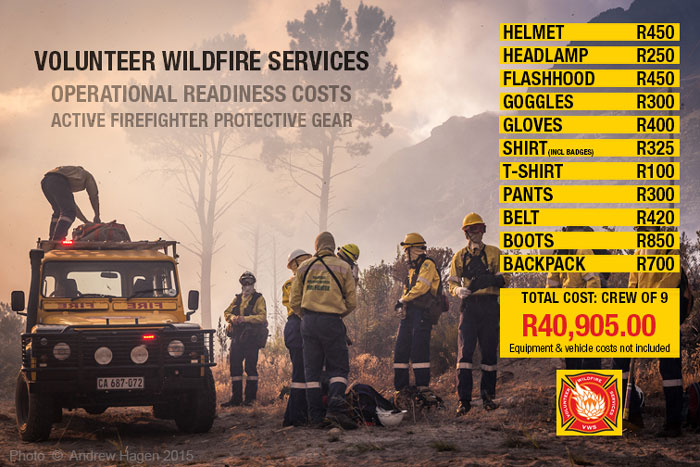
During the recent wildfire in the Cape Point area, we’ve seen the circumstances under which these fire fighters work and many of them are VWS (Volunteer Wildfire Services) volunteers. Therefore they are dependent on donations to be able to do their job and need funds to effectively fight fires with helicopters, buy equipment and also basic items like medical supplies, eye drops, food and water.

IT staff wanted to help and started collecting money on Wednesday morning. At the end of the day the total stood at R4450-00 and food supplies were also collected and delivered at MFM. The money collected was paid into VWS’s account via a registered VWS-project at Givengain and will be used as needed by the organisation.

We challenge other SU departments and divisions to do the same. Have a look on the Volunteer Wildfire Services website for more information on how to help and on their Facebook for the latest news on the fire.


volunteer-wildlife-services

vwsDie afgelope week woed `n verwoestende veldbrand in die Jonkershoekvallei in Stellenbosch. Bykans 3000 hektaar veld reeds gebrand en 450 brandbestryders het hulle hande vol gehad om die brand onder beheer te hou. 

Met die onlangse verwoestende brand in die Kaappunt-omgewing het ons gesien hoe hard brandbestryders onder moeilike omstandighede werk en `n groot deel hiervan is VWS (Volunteer Wildfire Services) vrywilligers. Hulle is dus afhanklik van bydraes om hulle werk te kan doen en het fondse nodig om brandbestryding met helikopters te doen, vir toerusting en ook basiese items soos mediese voorraad, oogdruppels, kos en water.

Informasietegnologie-personeel wou graag help en het Woensdag hulle sakke geskud en teen die einde van die dag reeds R4450-00 ingesamel, sowel as kosvoorraad. Hierdie geld word via Givengain se geregistreerde VWS-projek direk in hulle rekening betaal sodat hulle dit kan gebruik vir noodsaaklikhede.  

Ons daag ander US-departemente en -afdelings uit om dieselfde te doen.  Gaan kyk gerus op Volunteer Wildfire Services se webwerf vir meer inligting oor hoe om te help en hul Facebook-blad vir die nuutste nuus oor die brand.


volunteer-wildlife-services

3G at a price3G teen `n koste

Friday, February 27th, 2015

Is your cell phone’s sneaky behaviour taking a bite out of your pocket? By applying a few guidelines you can save yourself from a 4 digit cellphone bill.

1. Set data limits and limit your account with your service provider.
Practice caution when using certain providers’ 3G bundles on laptops. Some of these do not protect the user against overspending.

The risk of overspending occurs when users are under the false impression that their 3G package is safe to use until the package runs out. This is not necessarily the case. Higher costs can occur when the initial bundle’s capacity is exceeded and a much higher tariff kicks in. The user will then, without knowing, pay the higher tariff.

Users are strongly advised to limit the amount they want to spend or traffic they want to allow. (All this information can be found on your service provider’s website.) On Android your mobile data limit can be changed in the settings.

Also activate SMS and email notifications when your data bundle is close to its limit. In this instance prepaid data is a considerably safer option.

2. Don’t set your e-mail to synchronise automatically. Rather use the manual option and Send and Receive when you need to check your e-mail.

3. Also take care when using sites and apps like Facebook, Instagram Pinterest and YouTube as they use a lot of data.
Apps can be restricted not to use background data when mobile data is activated. Certain apps enable you to compress content (for example Google Chrome) Onavo is a 3rd party app you can use on your phone to do this compression.

4. Set software updates to manual.
The risk of overspending is increased by software updating automatically and therefore generating more traffic. To avoid overspending ensure that the settings of your software updates are set to manual. You’ll be able to choose when and where it’s done and how much data is being used. If you need to do software updates on your phone, only use your WiFi.

5. Another risk 3G users need to be aware of is the excessive cost of data overseas.
Wireless in hotels is usually much more affordable than the local service provider’s roaming data options.

6. Preferably switch off the 3G facility when it’s not being used.
3G users are encouraged to monitor their traffic and data usage on the 3G control programme, as well as the service provider’s website.

Is jou selfoon se onderduimse optrede besig om `n groot, onverwagse hap uit jou sak te vat? Daar is `n paar maatreëls wat jy kan tref om `n 4-syfer rekening te vermy.

1. Stel data-limiete en `n beperking op jou rekening by jou diensverskaffer.
Wees versigtig met jou 3G-databundel. Sommige pakkette van diensverskaffers se 3G-databundels beskerm nie die gebruiker teen oorspandering nie. Hierdie risiko kom veral voor by gebruikers wat ‘n besigheidskontrak met ‘n diensverskaffer gesluit het en onder die indruk is dat, indien ‘n databundel teen die kontrak gekoop is, dit veilig is om maar die datadiens te gebruik “tot dit op” is. 

Daar is egter ‘n groot risiko dat indien die databundel oorskry word, ‘n baie hoër “buite-bundel” tarief inskop en die gebruiker onvermoedelik ʼn baie hoër uitgawe verpligting aangaan.

Gebruikers word sterk aangeraai om limiete op die bedrag of verkeer te plaas (kyk na u diensverskaffer se webblad), asook om sms of epos boodskappe te aktiveer wanneer die verkeer naby die limiet van die kontrak kom. Voorafbetaalde data is in die opsig baie veiliger.

Gebruikers aangemoedig om die volume verkeer op die 3G beheerprogram self deeglik dop te hou. Die meeste verskaffers gee aan hul kliënte die opsie op datagebruik op hulle webwerf te monitor en IT raai gebruikers aan om van hierdie fasiliteit gebruik te maak.

Op Android kan jou mobile databeperking gestel word onder settings. Toepassings kan ook beperk word sodat hulle nie data op die agtergrond gebruik wanneer die mobiele data-funksie geaktiveer is nie. 

2. Moenie toelaat dat jou e-pos outomaties sinkroniseer nie. Gebruik eerder die manual opsie en Send en Receive wanneer jy e-pos wil nagaan.

3. Wees versigtig vir webwerwe en toepassings soos Facebook, Youtube, Instagram en Pinterest – hulle is geweldig data-intensief en laai meer af as wat jy dink.
Sekere toepassings kan dataverbruik verminder deur inhoud saam te pers, onder andere Google Chrome.   Onavo is `n 3de party toepassing wat data-inhoud op jou foon se toepassings kan verminder.

 4. Stel sagteware-opdaterings na manual

Die risiko word verhoog deur programmatuur wat outomaties, sonder die gebruiker se wete, opdateer en gevolglik hoë volumes verkeer genereer. Let dus veral op sagteware se verstellings en maak seker dat opdaterings eerder met die hand gedoen word i.p.v. outomaties.    

As jy sagteware-opdaterings op jou foon moet doen, gebruik slegs jou WiFi daarvoor. Sit outomatiese opdaterings af, sodoende kan jy self kan beheer wanneer en hoeveel data gebruik word. 

5. Vermy die buitensporige koste van data in die buiteland.
“Wireless” binne die hotel is gewoonlik meer bekostigbaar as plaaslike diensverskaffers se “roaming” data opsies.

6. Skakel die 3G-fasiliteit af indien dit nie benodig word nie.
Sodoende voorkom jy onverwagse opdaterings en sagteware wat outomaties aflaai sonder dat jy daarvan bewus is.