SEARCH
  • [:en]Recent Posts[:af]Onlangse bydraes

  • [:en]Categories[:af]Kategorieë

  • [:en]Archives[:af]Argiewe

General

Printing and copy services on campusDruk- en kopieerdienste op kampus

Monday, February 16th, 2015

From the beginning of January printing and copy services fall under the management of Commercial Services in the division Maties Copy and Print. This division is managed by Joswayne Newman and also includes the central copy facilities.

The important key points for the future are:

  • In future each environment will manage it’s equipment from it’s own account and it’s own unique cost point (as was the case with copying services in the past)
  • No cross subsidising between environments will be applicable.
  • The key strategy with which the complete service will be managed with, will be cost effectiveness and optimal network strategy.
  • The tariff will be exclusively focused on uniformity for student users, even though there will be an official campus tariff. ((35c for A4 black, single-sided) A complete series of tariffs including colour and A3 options, is also available.
  • Financial administration of the service will be located at Commercial Services.
  • Environments can, for example, choose whether they want to buy an unit cash or hire-purchase over a term of 36 months.
  • All units will be on a service contract which will include usable items such as ink, as well as under warranty repair work, as part of the tariff.
  • Maintenance costs for units not on a service contract, will be for the account of the environment until it has been replaced with a unit with a service contract.
  • At the moment both Safecom and Phonet pay systems are being maintained and a strategy regarding this will be introduced within the next 6 months.

Unfortunately no chance occurs smoothly without any problems and we would like to request all our clients to contact us if there is any confusion. Contact us at the following numbers and addresses:

Complaints: IT Service Desk     x4367
New requests:                                  jsnewman@sun.ac.za
Technical support:                        safecom@sun.ac.za

Sedert 1 Januarie 2015 val druk- en kopieerdienste onder die bestuur van Kommersiële Dienste in die nuwe afdeling by name Maties Kopieer en Druk (Maties Copy and Print). Die afdeling staan onder die bestuur van Joswayne Newman en sluit in die sentrale kopieerfasiliteite in. 

Die kern-uitgangspunte wat in die toekoms sal geld is die volgende:

  • Voortaan bestuur elke omgewing sy toerusting vir sy eie rekening (soos die kopieerdienste in die verlede was), vanuit sy unieke kostepunt.
  • Geen kruis subsidiëring tussen omgewings sal geld nie.
  • Die totale diens sal bestuur word met koste effektiwiteit en optimale netwerk integrasie as kern strategie.
  • Hoewel daar ʼn amptelike kampus tarief sal wees (35c vir A4 swart enkel kant gedruk), is die tarief suiwer gefokus op eenvormigheid vir studente gebruikers. Daar is ʼn volledige reeks tariewe beskikbaar wat kleur en A3 opsies insluit.
  • Departementele omgewings se tariewe kan verskil na gelang van hulle behoefte en gebruik.
  • Die finansiële administrasie van die diens sal by Kommersiële Dienste gesetel wees.
  • Omgewings kan byvoorbeeld self besluit of hulle ʼn eenheid wil kontant koop of huurkoop oor ʼn 36 maande termyn.
  • Alle eenhede sal uiteindelik onder ʼn dienskontrak wees wat die verbruikbare items soos ink en sekere onder waarborg herstelwerk insluit as deel van die tarief.
  • Eenhede wat nie onder dienskontrak is nie, se onderhoudskoste sal vir die rekening van die omgewing self wees tot tyd en wyl dit vervang is met ʼn eenheid onder dienskontrak.
  • Op die stadium word beide die Safecom en Phonet betaalstelsels voorlopig in stand gehou en ʼn strategie in die verband sal binne die eerste 6 maande bekendgestel word. 

Geen verandering sal ooit gaan sonder probleme nie en ons versoek alle kliënte om met ons in verbinding te tree as daar enige onsekerhede ontstaan. Kontak ons by die volgende nommers en adresse:

Klagtes:   IT Dienstoonbank          x4367
Nuwe versoeke:                                 jsnewman@sun.ac.za
Tegniese ondersteuning:               safecom@sun.ac.za

New IT building: What is a place of work?Nuwe IT-gebou: Wat is ‘n werksplek?

Thursday, December 11th, 2014

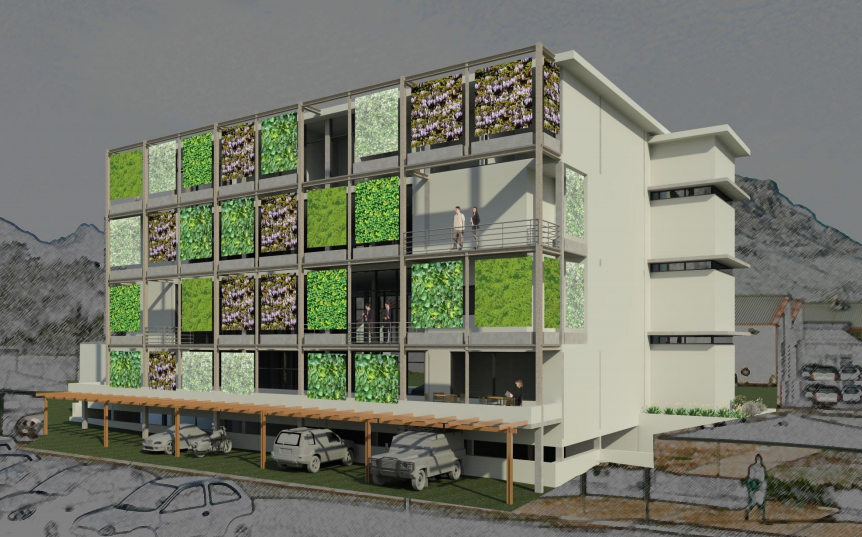
Our fairly intensive participation in the design process for the new IT building got me thinking about what a place of work is and why a knowledge New IT building NW perspectiveorganisation, like an IT division, would have one. The new building is essentially an office building: it will not house technical infrastructure such as the data centre, but will be the place of work for the division’s engineers, system administrators, technicians, architects, analysts, software developers, managers, etc.

Besides the admittedly exciting “green” design features, such as the vertical garden, optimal orientation, solar PV panels, rainwater harvesting, bicycle store, and various other efficiency elements that will make it far more energy-efficient  and sustainable than other buildings of its type, the other intriguing possibility that it presents is the opportunity to influence change in the culture of the IT division. The catalyst for this “change of culture” could be the university’s new norms that require that all new office buildings be “open plan”. For an organisation that has become accustomed to being housed for the past 25 years in what can only be described as a “rabbit warren” of cellular offices leading off dark, desolate corridors, this is a radical departure. There seems to be much trepidation and negativity about our “open plan” future, some of which at least is simply related to humans’ default discomfort with change of any sort 1.

Hierdie artikel is tans slegs in Engels beskikbaar.


(more…)

Microsoft Lync improves communication on campusMicrosoft Lync vergemaklik kommunikasie op kampus

Friday, December 5th, 2014

The world revolves around communication. Over the past few years our means of communication has expanded rapidly thanks to technological advances.lync

If these technologies are used cleverly they can improve communication and save you and your department money. One example of this is Microsoft Lync.

With Microsoft Lync you can chat away to your heart’s content with fellow SU colleagues – whether it’s through instant messaging, voice calls or a video conference. And because the programme uses the university’s existing network, this will won’t cost your department an arm and a leg (as long as your calls are to internal staff). In addition to this, Lync connects to your Outlook information, your Office documents and other Microsoft applications ensuring you’re up to date at all times.

Lync’s main focus is the corporate environment and this shows in it’s functionality. Functions and advantages include the following:

  • instant messaging
  • voice over ip (voice calls)
  • videoconferences
  • visibility of Outlook contacts
  • availability of global addresslist Outlook contacts
  • know when colleagues are available to chat
  • users can work on the same document simultaneously, whether it includes text or graphics and can see when someone else is working on a document
  • better tools for collaboration between staff, for example, desktop sharing, sharing documents, whiteboard, etc.
  • more secure communication since it takes places on the SU network
  • available for Windows Phone, Android en Mac’s
  • working from home more accessible
  • removes travel time between meetings
  • possibility for staff to link a phone number to a roaming laptop (at a registration fee and normal phone costs)
  • communication with other organisations using Lync

To start using Lync, contact the IT Service Centre at x4367 or help@sun.ac.za. For more information on Microsoft Lync, go to http://lync.stb.sun.ac.za

A programme will be installed on your PC and if you want to use of the VOIP function, a Lync headset is recommended.

The cost to use Lync on campus is as follows:

Lync Softclient: R150-00 per month
Users are responsible for their own headset at a cost of approximately R290-00

Lync with Polycom 600: R 200-00 per month
Users are responsible for their own headset at a cost of approximately R290-00

 Die wêreld draai rondom kommunikasie. En oor die afgelope paar jaar het die hoeveelheid kommunikasiekanale vermeerder, verander en ook verbeter te danke aan groeiende tegnologie.

As hierdie tegnologieë egter slim gebruik word, kan dit nie net kommunikasie verbeter nie, maar ook vir jou en jou afdeling geld bespaar. Een voorbeeld hiervan is Microsoft Lync.
Met Microsoft Lync kan jy as personeellid na hartelus gesels met jou mede-kollegas binne die US – of dit nou deur middel van `n gewone oproep, `n kitsboodskap of videokonferensie is. En omdat die program van die universiteit se netwerk gebruikmaak, kos dit jou department minder solank gebruik intern is. Daarmee saam, skakel dit met jou Outlook, jou dokumente en ander Microsoft programme of toepassings sodat jy te alle tye op hoogte is.

Lync is spesifiek gefokus op korporatiewe omgewings wat Microsoft gebruik. Funksies sluit die volgende in:

  •  kitsboodskappe
  • “voice over” ip, maw telefoonoproepe
  • videokonferensies
  • sigbaarheid van Outlook-kontakte
  • beskikbaarheid van Outlook-kontakte in globale adreslyste
  • weet wanneer kollegas beskikbaar is
  • gebruikers kan aan dieselfde dokument werk, hetsy dit grafies of teks is en ook sien terwyl iemand anders aan die dokument werk
  • Beter hulpmiddele vir samewerking tussen personeel, byvoorbeeld,  “desktop share”, deel van dokumente, “whiteboard”, ens.
  • kommunikasie is meer sekuur en veilig omdat dit binne die US-netwerk plaasvind
  • beskikbaar vir Windows Phone, Android en Mac’s
  • werk vanaf die huis word vergemaklik
  • verwyder reistyd tussen vergaderings
  • opsies vir personeel om `n telefoonnommer te koppel aan `n bewegende skootrekenaar (teen `n registrasiekoste en teen gewone foonkostes)
  • kommunikeer met ander buite-organisasies wat Lync gebruik

Om Lync te gebruik, kan `n versoek gerig word aan die IT Dienssentrum by x4367 of help@sun.ac.za.

`n Programmetjie sal geinstalleer word op jou rekenaar en indien jy van die VOIP-funksie gebruik wil maak, word `n Lync kopstuk/oorfone aanbeveel. Meer inligting oor kostes vir die lisensies en oorfone sal binnekort beskikbaar wees.

Vir meer inligting oor Microsoft Lync, gaan kyk gerus by http://lync.stb.sun.ac.za

So what do we really do?So wat doen ons nou eintlik?

Friday, November 7th, 2014

servicecatFor the most part IT are considered the people who “fix our computers” or the e-mail or internet. As that may be, that’s not all IT does.

To give everyone a wider understanding of all the services Information Technology’s staff keeps them busy with for most of the 365 days a year, we’ve compiled a user-friendly (we believe!) service catalogue in website format.

The catalogue contains all our services – those you already know about and those you had no idea about. Together with a description of each service, you’ll find instructions on how to apply for it, which times it’s available and who to contact regarding any inquiries about the services.

We also included a handy A-Z index for easy access, a sitemap and relevant links to our other resources. A web part showing all our latest news posts as well as our Twitter feed in real time will keep you up to date on everything you need to know.

We’d love for you to have a look at it at www.sun.ac.za/itservices and let us know what you think – good or bad. Are the services easily accessible and clearly explained for example?

For any suggestions or comments, please contact us by sending an e-mail to helpinfo@sun.ac.za. A feedback and contact button is also available on the bottom bar on the page for fast access.

servicecatMeeste van die tyd word IT beskou as die mense “wat rekenaars regmaak” of die e-pos of internet moet regmaak. Dis ook waar, maar, soos `n ysberg, is daar meer onder die oppervlak.

Om vir al ons gebruikers `n beter prentjie te teken van al die dienste waarmee IT-personeel hulself deur die jaar besighou, het ons `n gebruikersvriendelike (ons glo so!) dienskatalogus saamgestel in die vorm van `n webwerf.

Die katalogus bevat al ons dienste – die waarvan jy reeds weet en `n hele klompie onbekendes. Buiten `n volledige beskrywing van elke diens, verskaf ons instruksies oor hoe om daarvoor aansoek te doen, watter tye dit beskikbaar is en wie om te kontak as jy meer inligting daaroor wil hê.

Ons het ook `n handige A-Z funksie ingebou, `n webwerfkaart en skakels na al ons ander relevante hulpmiddele. `n Webgedeelte wat al ons nuutste bloginskrywings en nuus wys, sowel as `n lewendige Twitter-voer sal sorg dat jy op datum is met alles wat daar te weet is by IT.

Ons is natuurlik nuuskierig om te weet wat jy daarvan dink, so gaan kyk asb. by www.sun.ac.za/itservices en laat ons weet.

As jy enige voorstelle of kommentaar, goed of sleg, het, stuur vir ons `n e-pos by helpinfo@sun.ac.za. `n Terugvoer skakel en kontakknoppie is ook onderaan die dienskatalogus beskikbaar vir vinnige toegang.

What is PoPI or PPI?Wat is PoPI of PPI?

Friday, October 24th, 2014

PoPI or PPI is the Protection of Personal Information Act, an act approved by government at the end of 2013. The purpose of this act is to ensure that all South African institutions collect, process, save and share the personal information of entities in a responsible way.

The act deems institutions responsible if any personal information is abused or compromised. This is to your advantage as individual and owner of your personal information and gives you certain rights to be protected and also control of how your information can be used.

But what, according to PoPI, is personal information (PI)?

This is information pertaining to a living, natural person and where applicable an existing juristic person and includes the following:

Race, gender, sex, pregnancy, marital status, national or ethnic origin, colour, sexual orientation, age, physical or mental health, disability, religion, conscience, belief, culture, language and birth of a person;
Education, medical, financial, criminal or employment history;
Biometric information of the person; personal opinions, views or preferences; ID number, student number, e-mail address, physical address, telephone number;
Private or confidential correspondence. PI such as biometric information, medical status, religion, among others, are considered as Special PI (as described in section 26 of the act). Special PI is subject to stricter security measures.

8 informormation protection principles exist in PI according to PoPI. These principles can be illustrated by looking at a few examples within the university context:

PRINCIPLE DESCRIPTION EXAMPLE
Accountability The organisation must ensure that the principles and measures in the Act are complied with. SU establishes accountability and responsibilities, roles and organisation, policies and procedure to adhere to PoPI’s regulations.
Processing limitation PI may only be processed in a fair and lawful manner with the consent of individuals. US may only, for example, process the necessary PI of a prospective student, student and alumni, with the person’s permission.
Purpose specification PI may only be processed for specific, explicitly defined and legitimate reasons. Each PI item in an application form should have a specific and legitimate reason to be processed for the purposes of prospective study. “Religious belief” would therefore be questioned.
Further processing limitation PI may not be processed for a seconday purpose unless that processing is compatible with the original purpose. PI forming part of research data, processed for a specific research project, may not be used for another research project.
Information quality The organisation must ensure that PI is accurate, reliable and up=to-date. The responsibility lies with SU to ensure all PI regarding alumni, students, prospective students, scholars, etc. is accurate and up to date.
Openness The Regulator and the data subject to be aware that PI is being collected by the organisation. Potential prospective students have the right to be informed about SU’s intention to process their PI and for which reason.
Security safeguards PI must be kept secure against the risks of loss, unauthorised access, interference, modification, destruction or disclosure. The IT Division ensures that all policies, tools and control measures are in place and supplied to users to prevent leakage or unauthorised access to PI.
Data subject participation. Data subjects may request the correction/deletion of any PI held about them that may be inaccurate or misleading. This implies that alumni have the right to know what PI SU has of them and request that errors be corrected or that the item(s) be removed.

It is expected that PoPI will be fully promulgated early in 2015 and the University will be given granted 12 months to comply.

The project to comply to PoPI was launched at SU during 2013. Over a period of a year a multi-disciplinary project team, under leadership of mr Ralph Pina, Director: IT (Development) and Mobius Consulting, conducted a gap analysis and developed a road map. This phase has just been completed and the report was submitted last week. The remedial phase will be executed during this coming year.

PoPI of PPI is die Protection of Personal Information Act, `n wet wat einde 2013 goedgekeur is en waarvan die doel is om te verseker dat alle Suid-Afrikaanse instellings op `n verantwoordelike wyse persoonlike inligting van individue insamel, verwerk, stoor en deel. Die wet hou ook instansies verantwoordelik as enige persoonlike inligting misbruik of blootgestel word.

Dit bevoordeel dus vir jou as individu en eienaar van jou persoonlike inligting en gee aan jou sekere regte om beskerm te word en gee ook aan jou beheer oor hoe jou inligting gebruik mag word.

Maar wat, volgens PoPI, is persoonlike inligting (PI)? Persoonlike inligting is enige informasie wat te doen het met `n lewende persoon, en waar toepaslik, `n bestaande jursitiese persoon. Dit sluit die volgende in:

Ras, geslag, swangerskap, huwelikstatus, nasionaliteit of etniese herkoms, seksuele orientasie, ouderdom, fisiese of geestelike welstand, ongeskiktheid, geloof, gewete, geloof, kultuur, taal en geboortedetails;
Opvoeding-, mediese, finansiële, kriminele of werknemersgeskiedenis;
Biometriese informasie, persoonlike opinies, menings of voorkeure; ID nommer, studentenommer, e-posadres, fisiese adres, telefoonnommer en privaat of persoonlike korrespondensie.

PI soos biometriese inligting, mediese status, geloofsoortuigings, onder andere, word as Spesiale PI beskou (in afdeling 26 van die wet beskryf). Spesiale PI is onderhewig aan strenger beskermingsmaatreëls.

M.a.w. as die inligting die persoon kan identifiseer, is dit persoonlike inligting.

Daar bestaan 8 beginsels insake die beskerming van PI volgens POPI. Die beginsels word aan die hand van enkele voorbeelde in die universiteit se konteks verduidelik:

BEGINSEL BESKRYWING VOORBEELD
Accountability The organisation must ensure that the principles and measures in the Act are complied with. Die US vestig verantwoordbaarheid en verantwoordelikhede, rolle en organisasie, beleide en prosedures om aan die bepalings van PoPI te voldoen.
Processing limitation PI may only be processed in a fair and lawful manner with the consent of individuals. Die US mag slegs die nodige PI m.b.t. ʼn voornemende student, student en alumnus, byvoorbeeld, met die toestemming van die persoon vaslê.
Purpose specification PI may only be processed for specific, explicitly defined and legitimate reasons. Elke PI item in die aansoekvorm moet slegs vir ʼn spesifieke en legitieme rede vir die doeleindes van voornemende studie vasgelê word. ʼn “Kerkverband” sou dus bevraagteken kon word.
Further processing limitation PI may not be processed for a seconday purpose unless that processing is compatible with the original purpose. PI wat deel uitmaak van navorsingsdata wat vir ʼn spesifieke navorsingsprojek vasgelê is, mag nie vir ʼn ander navorsingsprojek aangewend word nie.
Information quality The organisation must ensure that PI is accurate, reliable and up=to-date. Die onus berus by die US om te verseker dat PI omtrent alumni, studente, voornemende studente, skoliere, ens. akkuraat en op-datum is.
Openness The Regulator and the data subject to be aware that PI is being collected by the organisation. Potensiële voornemende studente het ʼn reg om ingelig te word dat die US PI omtrent hulle vaslê, en vir welke rede.
Security safeguards PI must be kept secure against the risks of loss, unauthorised access, interference, modification, destruction or disclosure. Die Afdeling IT verseker dat die beleide, gereedskap en beheermaatreëls in plek is en aan gebruikers voorsien word om lekkasie van of ongeoorloofde toegang tot PI te voorkom.
Data subject participation. Data subjects may request the correction/deletion of any PI held about them that may be inaccurate or misleading. Dit impliseer dat ʼn alumnus die PI wat die US omtrent hom/haar het, kan ondersoek en vra dat foute reggestel word of uitgewis word.

Daar word aangeneem dat PoPI in werking gestel sal word vroeg in 2015 en dat die Universiteit gevolglik, 12 maande gegun sal word om daaraan te voldoen.

Reeds in 2013 is die projek by die US om aan PoPI te voldoen, goedgekeur. Oor `n tydperk van `n jaar het `n multi-dissiplinêre  projekspan, onder mnr Ralph Pina, Direkteur: IT (Ontwikkeling) se leierskap, en Mobius Consulting ‘n gapings-analise gedoen en `n padkaart ontwikkel. Hierdie fases is sopas afgehandel en die verslag is verlede week voorgelê. Die remediërende fases  sal in die komende jaar uitgevoer word.