

SEARCH
  • [:en]Recent Posts[:af]Onlangse bydraes

  • [:en]Categories[:af]Kategorieë

  • [:en]Archives[:af]Argiewe

General

Meet the techies: Quinton LuitersOntmoet die techies: Quinton Luiters

Friday, August 22nd, 2014

Quinton-web“IT Helpdesk, good afternoon!” Most people on campus are greeted this way when they call the IT Service Desk. But for Quinton Luiters it’s become such an automatic response, he even answers his home phone in the same way – much to the amusement of his wife.

And is it any wonder if you’ve been doing it for 8 years? Besides catching phone calls, it’s also Quinton’s responsibility to see to everyone’s e-mailboxes and network space. If Outlook reprimands you on your mailbox space, this is the guy who will save you from your fix.

He’s used to keeping a few balls in the air. At the service desk you have to be able to handle a few things at the same time.

“Those who say men can’t multitask, should see how much the seven guys at the service desk manage to do at the same time!”

Quinton has been multitasking way before he joined the hub of activity at the service desk. At UWC he was a marks administrator where he, among other things, had to administer the tutors, tutorials and also first and second years’ marks.

Only after UWC, when he joined IT, he was given the opportunity to work in the field he studied in for four years. With a National Diploma in Information Technology he was able to jump right in.

If he didn’t take the leap back then and choose Information Technology above Civil Engineering, it would’ve been our loss and Engineering’s gain.

In 1996 Information Technology was still something new and taught at PENTECH (now CPUT). The internet as we know it was hardly two years old and a mere babe.

“I had to choose between something unfamiliar and travelling to Cape Town on a daily basis or stay in my hometown, Stellenbosch and study Civil Engineering.”

Today, the diverse team of people he works with, adds to the enjoyment of his job.

“Everyone has their quirks and oddities, but the positive attitudes and helpfulness makes working a pleasure.”

When you’re thrown into a stressful situation, you find ways to ease the tension – like the odd joke or two.

There will always be pressure, but Quinton’s biggest satisfaction is being able to help someone and the appreciation they show. To deal with situations he has no control over, are more tricky, just because you really want to help, but can’t.

At least there are ways outside work to stabilise the stress levels again. Travel and exploring new places is high on his list.

“Like they say, “Life’s a journey, enjoy the ride!””

“A few years back we were fortunate to go to USA, Washington Virginia for the wedding of my wife’s brother – I was one of the best men.  We will definitely go again soon if God spares us.”

Back at home he and Alicia, according to him the actual wine connoisseur, like to do the odd wine tour. Some of their favourite wine farms in the vicinity include Devon Valley and JC le Roux in Stellenbosch and Haute Cabriere, Leopard’s Leap and Solms-Delta in Franschhoek.

And of course, who doesn’t have time for a braaitjie, beer and good conversation. If you work hard, you need to play hard, he says.

IT SERVICE DESK CONTACT DETAILS

Phone: +27 21 808 4367
E-mail: helpinfo@sun.ac.za (enquiries)
help@sun.ac.za (to log an error)
Skype: handle = ITStellenUni
Twitter: handle = ITStellenUni
Web: www.sun.ac.za/itselfhelp
Blog: www.sun.ac.za/infoteg

Quinton-web“IT Hulplyn, goeiemiddag!” Feitlik almal op kampus is al op dié manier begroet as hulle IT se Dienstoonbank geskakel het. Maar vir Quinton Luiters is dit al so `n outomatiese reaksie dat hy soms selfs die telefoon by die huis ook op dieselfde wyse antwoord – tot groot vermaak van sy vrou.

En as `n mens dit al vir 8 jaar doen is dit ook geen wonder nie. Benewens foonoproepe vang, is Quinton daarvoor verantwoordelik dat almal se e-posbusse en netwerkspasie werk soos dit moet. As Outlook jou kwaai aanspreek oor jou spasie, is hy die ou wat jou gaan red uit jou penarie.

Hy is gewoond aan vele balle in die lug hou. By die hulplyn moet jy veelvuldige take gelyktydig kan doen.

“Diegene wat sê mans kan nie “multitask” nie, moet kom kyk hoeveel dinge ons sewe ouens by die hulplyn gelyktydig doen!”

Quinton “multitask” al lank voordat hy by die hulplyn-miernes aangesluit het. Hy was destyds by UWK `n punteadministreerder en verantwoordelik vir, onder andere, die administrasie van tutors, tutoriale en ook eerste en tweedejaarspunte.

Maar hy het eers na UWK, toe hy hom by IT aangesluit het, dat daar `n geleentheid was om uiteindelik in die veld te werk waarin hy vier jaar studeer het. Met `n Nasionale Diploma in Informasietegnologie kon hy hom met die intrapslag goed van sy taak kwyt.

As hy egter nie destyds die kans gewaag en Informasietegnologie bo Siviele Ingenieurswese gekies het nie, was dit ons verlies en Ingenieurswese se wins.

In 1996 was Informasietegnologie nog `n nuutjie en is dit by PENTECH (nou CPUT) aangebied. Die internet, soos ons dit ken, was skaars twee jaar oud en nog maar `n lammetjie.

“Ek moes kies tussen iets onbekend en elke dag pendel stad toe of op my tuisdorp, Stellenbosch, Siviel swot”.

Vandag maak die diverse span mense saam met wie hy werk, dit vir hom ekstra lekker.

“Almal het hul eie maniertjies en snaaksighede, maar die positiewe gesindheid en behulpsaamheid maak werk ‘n plesier”.

As jy in `n stresvolle situasie gegooi word, kry jy vinnig maniere om die spanning te verlig, soos met `n grappie af en toe.

Druk tye sal daar altyd wees, maar Quiton se grootste satisfaksie is as hy iemand kan help en die waardering wat mense daarvoor wys. Om situasies te hanteer wat buite sy beheer is, is aansienlik moeiliker juis omdat `n mens so graag iemand wil help en jy kan nie.

Gelukkig is daar buite die werk dinge om die stresvlakke weer `n bietjie te stabiliseer. Reis en nuwe plekke ontdek is hoog op sy lysie.

“Soos hulle sê, “Life’s a journey, enjoy the ride!””

“`n Paar jaar gelede was ons gelukkig om Washington, Virginia te besoek vir my swaer se troue – ek was een van die strooijonkers. Ek sal definitief weer wil gaan as die Here ons spaar.”

Terug by die huis werk hy en Alicia, volgens Quinton, die eintlike wyn connoisseur, so af en toe `n wyntoertjie deur. Van hul gunstelingplase in die omgewing is DevonValley en JC le Roux op Stellenbosch en Haute Cabriere, Leopard’s Leap en Solms-Delta in Franschhoek.

En natuurlik, wie het dan nie tyd vir `n braaitjie, biertjie en goeie geselskap nie? As `n mens elke dag hard werk, moet jy hard speel ook, sê hy.

IT DIENSTOONBANK KONTAKDETAILS

Foon: +27 21 808 4367
E-pos: helpinfo@sun.ac.za (enquiries)
help@sun.ac.za (to log an error)
Skype: handle = ITStellenUni
Twitter: handle = ITStellenUni
Web: www.sun.ac.za/itselfhelp
Blog: www.sun.ac.za/infoteg

“I have Microsoft Exploder”“I have Microsoft Exploder”

Friday, August 22nd, 2014

We’ve found a few interesting calls, recorded by http://www.callcentrehelper.com/. Luckily we know our own users are much more clued up than these ones!

Tech Support: “I need you to right-click on the Open Desktop.”
Customer “Ok.”
Tech Support: “Did you get a pop-up menu?”
Customer: “No.”
Tech Support: “Ok. Right click again. Do you see a pop-up menu?”
Customer “No.”
Tech Support:: “Ok, sir. Can you tell me what you have done up until this
point?”
Customer: “Sure, you told me to write ‘click’ and I wrote ‘click’.”
Customer: “I received the software update you sent, but I am still getting the same error message.”
Tech Support:: “Did you install the update?”
Customer: “No. Oh, am I supposed to install it to get it to work?”


Customer:: “I’m having trouble installing Microsoft Word.”
Tech Support:: “Tell me what you’ve done.”
Customer: “I typed ‘A:SETUP’.”
Tech Support:: “Ma’am, remove the disk and tell me what it says.”
Customer:: “It says ‘[PC manufacturer] Restore and Recovery disk’.”
Tech Support:: “Insert the MS Word setup disk.”
Customer:: “What?”
Tech Support: “Did you buy MS word?”
Customer: “No…”


Customer:: “Do I need a computer to use your software?”
Tech Support:: ?!%#$
Tech Support:: “Ok, in the bottom left hand side of the screen, can you see the ‘OK’ button displayed?”
Customer: “Wow. How can you see my screen from there?”
Tech Support:: “Type ‘A:’ at the prompt.”
Customer:: “How do you spell that?”


Tech Support:: “What operating system are you running?”
Customer: “Pentium.”


Customer: “I have Microsoft Exploder.”


Customer: “How do I print my voicemail?”


Customer: “You’ve got to fix my computer. I urgently need to print document, but the computer won’t boot properly.”
Tech Support: “What does it say?”
Customer: “Something about an error and non-system disk.”
Tech Support: “Look at your machine. Is there a floppy inside?”
Customer: “No, but there’s a sticker saying there’s an Intel inside.”


Tech Support:: “What does the screen say now?”
Customer: “It says, ‘Hit ENTER when ready’.”
Tech Support:: “Well?”
Customer: “How do I know when it’s ready?”


Customer:My broadband is not working.
Tech Support: What exactly is happening when you try to access the internet.
Customer:#$%@..I have nothin to do with the internet. I SAID MY BROADBAND IS NOT WORKING.

Ons het `n paar interessante oproepe opgespoor op http://www.callcentrehelper.com/. Gelukkig weet ons ons eie US-gebruikers is baie slimmer as hierdie klompie!

Tech Support: “I need you to right-click on the Open Desktop.”
Customer “Ok.”
Tech Support: “Did you get a pop-up menu?”
Customer: “No.”
Tech Support: “Ok. Right click again. Do you see a pop-up menu?”
Customer “No.”
Tech Support:: “Ok, sir. Can you tell me what you have done up until this
point?”
Customer: “Sure, you told me to write ‘click’ and I wrote ‘click’.”
Customer: “I received the software update you sent, but I am still getting the same error message.”
Tech Support:: “Did you install the update?”
Customer: “No. Oh, am I supposed to install it to get it to work?”


Customer:: “I’m having trouble installing Microsoft Word.”
Tech Support:: “Tell me what you’ve done.”
Customer: “I typed ‘A:SETUP’.”
Tech Support:: “Ma’am, remove the disk and tell me what it says.”
Customer:: “It says ‘[PC manufacturer] Restore and Recovery disk’.”
Tech Support:: “Insert the MS Word setup disk.”
Customer:: “What?”
Tech Support: “Did you buy MS word?”
Customer: “No…”


Customer:: “Do I need a computer to use your software?”
Tech Support:: ?!%#$
Tech Support:: “Ok, in the bottom left hand side of the screen, can you see the ‘OK’ button displayed?”
Customer: “Wow. How can you see my screen from there?”
Tech Support:: “Type ‘A:’ at the prompt.”
Customer:: “How do you spell that?”


Tech Support:: “What operating system are you running?”
Customer: “Pentium.”


Customer: “I have Microsoft Exploder.”


Customer: “How do I print my voicemail?”


Customer: “You’ve got to fix my computer. I urgently need to print document, but the computer won’t boot properly.”
Tech Support: “What does it say?”
Customer: “Something about an error and non-system disk.”
Tech Support: “Look at your machine. Is there a floppy inside?”
Customer: “No, but there’s a sticker saying there’s an Intel inside.”


Tech Support:: “What does the screen say now?”
Customer: “It says, ‘Hit ENTER when ready’.”
Tech Support:: “Well?”
Customer: “How do I know when it’s ready?”


Customer:My broadband is not working.
Tech Support: What exactly is happening when you try to access the internet.
Customer:#$%@..I have nothin to do with the internet. I SAID MY BROADBAND IS NOT WORKING.

R27 000 to spare?R27 000 wat rondlê?

Friday, August 22nd, 2014

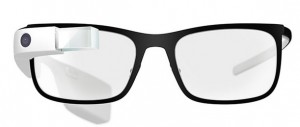
google-glassIf you see someone wandering around campus, occasionally blurting out “Ok Glass!” , don’t be too worried. He’s probably one of the lucky ones who recently acquired a pair of Google Glass.

And so can you, on Takealot,  if you have R27 000 to spare. This nifty piece of technology has been, as the name indicates, developed by information giant Google and has been available in the USA since April this year. Initially it was only made available to a select few, but in May the American public could strart buying Google Glass.

According to Google, Glass isn’t expensive to manufacture. The hefty price tag is due to engineering costs and expensive software and platform development.

Sergey Brin, co-founder of Google, says Glass was developed in order for people to meet the word heads-up, instead of hunched in front of a screen or watching a phone screen all the time.

Because we ultimately questioned whether this is the ultimate future of how you want to connect to other people in your life, how you want to connect to information. Should it be by just walking around looking down? But that was the vision behind Glass,and that’s why we’ve created this form factor. ” (Sergey Brin, TEDtalks)

Google Glass is a wearable computer, disguised as a pair of standard glasses. The only difference is an extra mounted screen on the frame, manufactured out of liquid crystal on silicon, using LED. It’s as light as your sunglasses and available in various shapes and colours.

Unfortunately Google Glass doesn’t replace your phone, even if it is in fact practically a smart phone. You need a compatible phone as well to use Glass.

As with Street View, Google once again finds themselves on the controversial side of things – also due to security an privacy issues. Using Glass in public evokes a few ethical questions. Are you allowed to take photos and make recordings of people without their knowledge? In the light of these questions Google even published a few guidelines for users. (read them here)

We’ve established that these pair of smart glasses react when being talked to, but you first have to activate it by saying “OK Glass”, otherwise it won’t listen. Then you can fire off almost any command at it, for example “Take photo”, “Give directions”, etc. For now it seems to be English speaking, but maybe one day it might react to Afrikaans and other languages as well.

You also have the option to tap a touch pad at the side of the screen to activate functions. Depending on which way you scroll it will display either weather, news, photos or phone calls.

The list of functions you can perform with Google Glass looks very impressive – too many to list here. But have a look on it’s website to see what it can do.

More Google Glass YouTube-videos.

[SOURCES: www.wikipedia.org, www.mashable.comwww.techradar.com, www.pcmag.com]

google-glassAs jy iemand met `n bril op kampus sien rondloop, terwyl hy sporadies “Ok Glass!” sê, moenie te bekommerd raak nie. Hy is dalk `n techverslaafde wat Google Glass vir homself aangeskaf het.

Jy kan ook `n paar op Takealot koop – dis nou as jy R27 000 het om rond te gooi. Dié stukkie tegnologie is, soos die naam aandui, ontwikkel deur informasie-reus Google en reeds sedert April beskikbaar in die VSA. Aanvanklik is dit slegs beskikbaar gestel aan `n gekose groepie, maar in Mei kon die Amerikaanse publiek ook hul eie Google Glass bekom.

Volgens Google is Glass nie duur om te vervaardig nie, maar die hewige prys word veroorsaak deur ingenieurskostes en duur sagteware- en platformontwikkeling.

Sergey Brin, medestigter van Google, beweer dis ontwikkel sodat mense weer die wêreld in die oë kan kyk in plaas van kop-in-die-grond rondloop met `n foon in die hand of krom getrek voor `n rekenaarskerm.

Because we ultimately questioned whether this is the ultimate future of how you want to connect to other people in your life, how you want to connect to information. Should it be by just walking around looking down? But that was the vision behind Glass,and that’s why we’ve created this form factor. ” (Sergey Brin, TEDtalks)

Google Glass is `n draagbare rekenaar vermom as `n gewone bril. Die enigste verskil is `n ekstra gemonteerde skermpie bo-aan die raam, vervaardig uit vloeibare kristal op silikon, terwyl dit ook LED gebruik. Dis so lig soos jou sonbril en is beskikbaar in verskeie style en kleure.

Ongelukkig vervang Google Glass nie jou foon nie, al het dit bykans al `n slimfoon se komponente. Jy het steeds `n versoenbare foon nodig om dit  te kan gebruik.

Soos met Streetview, neig Google weereens na die kontroversiële kant – om sekuriteit- en privaatheidsredes. Bloot om Glass in die openbaar te gebruik opper `n paar etiese kwessies. Mag jy fotos en opnames van mense neem, terwyl hulle nie bewus is daarvan nie? Google het in die die lig hiervan riglyne uitgebring vir Glass-gebruikers. (lees meer daaroor)

Ons het nou reeds vasgestel dat dié slim brille reageer as jy daarmee praat, maar jy moet eers “OK Glass” sê voordat dit vir jou gaan luister. Daarna kan jy bevele afsneller soos “Take photo”, “Give directions”, ens. Vir nou lyk dit asof Glass Engelssprekend is, maar dalk sal dit eendag ook op Afrikaans en ander tale kan reageer.

Buiten stem-aktivering het jy ook die opsie om met die tik van jou vinger op `n raakskerm teen die kant funksies te aktiveer. Afhangende van die rigting waarin  jy rol (“scroll”), wys dit die weer, nuus, vorige oproepe of fotos.

Die lys van funksies wat jy met Google Glass kan verrig lyk geweldig indrukwekkend – te veel om hier te lys. Maar gaan kyk gerus op die webwerf wat dié nuwigheid alles kan doen.

Nog Google Glass YouTube-videos.

[BRONNE: www.wikipedia.orgwww.mashable.comwww.techradar.com, www.pcmag.com]

IT in the Middle AgesIT in die Middeleeue

Friday, August 8th, 2014

Ever wondered what IT technicians did in the Middle Ages? Well, this might be it.

Al ooit gewonder wat IT tegnici gedoen het in die Middeleeue? Hier is jou antwoord!

Meet the techies: Mandy WanzaOntmoet die techies: Mandy Wanza

Friday, August 8th, 2014

mandyIt may be a cliché, but dynamite comes in small packages – and this couldn’t be truer when it comes to Mandy. If you hear a click-clack of heels in IT’s passageways, you’ll know that this small package is on another mission to get things done.

Mandy started at Information Technology in 2006, mainly just to help out, but was given the opportunity to join as permanent staff member in 2008. After these eight years, she’s the only woman left among the seven service desk guys, but this Snow White holds her own.

The road to IT had a few twists and turns and it started in 1999 with an application to UWC for a BA degree. Mandy planned on studying Journalism, but she soon found out that it wasn’t quite what she wanted to do. Being a journalist for your school’s newspaper is quite different than studying journalism and doing the real course work. It wasn’t long before she changed her major to Psychology – which was really her calling. Unfortunately she had to give up her studies due to personal reasons.

This year she and Adrian celebrates their tenth anniversary and they have a daughter in grade 4 at de Kuilen Primary. Outside IT she spends most of her time with my family, something she believes in doing as often as possible.

“I call myself a jack of all trades.”

“I was in the retail industry for a while I guess that’s where I got my niche – to offer good customer service, and to pay attention to detail.”

She’s even applied her skills as a dental assistant – “quite an interesting experience”.

“But I needed more job satisfaction, so I enrolled myself in some Basic computer classes, and I guess that’s where my journey began.”

Currently she is a helpdesk agent, and her core duties are to answer calls, log the incidents, do 1st level support, but her job description goes a bit further than that. She also does network administration and software enquiries and is responsible for the Microsoft IT courses, which includes the registrations, bookings, administration, and course enquiries. And that’s her role at IT in a nutshell.

“The best part of my job is the satisfaction that you get when you are able to solve a user’s problem. I guess that is probably our main goal at the end of the day!”

The less pleasant aspect of the job is when all systems just stop working and receive hoards of calls from users demanding answers.

In spite of the stressful moments, there are lighter moments. Like when she facilitates a remote session (VNC) with a new staff member. “”They get such a fright when the mouse moves on their machine, the reaction that you get is priceless.”

“”Being in the IT environment has taught me so much. It’s a place where I have learned to voice my opinions and to swim in the deep end. Every day challenges you, and at the same time it creates a learning curve.”

IT SERVICE DESK CONTACT DETAILS

Phone: +27 21 808 4367
E-mail: helpinfo@sun.ac.za (enquiries)
help@sun.ac.za (to log an error)
Skype: handle = ITStellenUni
Twitter: handle = ITStellenUni
Web: www.sun.ac.za/itselfhelp
Blog: www.sun.ac.za/infoteg

mandyDinamiet kom in klein pakkies – dit mag  nou wel `n cliche wees, maar dis waar as Mandy ter sprake is. As jy `n geklik-klak van hakke in IT se gang hoor, kan jy maar weet dié klein pakkie is op `n missie om iets gedoen te kry.

Mandy het aanvanklik in 2006 net tydelik by IT aangesluit as Dienstoonbankagent, maar teen 2008 is sy permanent aangestel. Na die agte jaar is sy die enigste vrou wat oorgebly het tussen die sewe ander hulptoonbank-manne, maar hierdie Sneeuwitjie laat haar nie onderkry nie.

Die pad tot hier het `n paar interessante wendings gemaak voordat Mandy haar nis by IT gevind het. Dit het in 1999 begin met `n aansoek by UWK vir `n BA-graad, met die doel om joernalistiek te studeer. Sy het egter gou agtergekom dat haar verwagtinge, gebaseer op haar betrokkenheid by `n  skoolkoerant en realiteit verwyderd van mekaar was. Kort voor lank het Joernalistiek verander na Sielkunde, maar weens persoonlike redes moes sy ook dit, haar eintlike roeping, opgee.

Sy en Adrian vier dié jaar hul tiende huweliksherdenking en het `n dogter wat in graad 4 by De Kuilen Laerskool is. Familie is vir haar belangrik en sy glo daarin om so veel moontlik kwaliteit-tyd saam met hulle te spandeer.

“Ek noem myself `n alspeler, `n “Jack of all trades”.”

“Ek was in die kleinhandel-industrie vir `n tydjie …. ek skat dis waar ek my sterkpunt ontdek het – om goeie kliëntediens te bied en aandag te gee aan detail.”

Sy het selfs al as `n tandartsassistent gewerk – `n “heel interessante” ervaring!

“Maar ek het meer werkstevredenheid gesoek en ingeskryf vir `n paar basiese rekenaarklasse en ek raai dis waar my reis eintlik begin het …”

Op die oomblik is Mandy `n dienstoonbank-agent en haar hooffunksies is om oproepe te beantwoord, insidente aan te teken en eerste vlak gebruikersondersteuning te gee. Maar dit sluit `n bietjie meer as dit in. Sy behartig ook netwerkregistrasies en sagteware navrae en daarmee saam is sy verantwoordelik vir die Microsoft IT-kursusse. Sy behartig die registrasies, besprekings, administrasie en kursusnavrae. Dis haar rol by IT in `n neutedop.

“Die lekkerste deel van my werk is die bevrediging wat jy kry as jy iemand se probleem kan oplos. Op die ou end is dit tog die hoofdoel van ons werk!”

Die minder lekker deel is wanneer belangrike stelsels skielik net ophou werk en gebruikers antwoorde soek.

Ten spyte van die stresvolle tye, is daar darem ligter oomblikke. Soos wanneer jy vir die eerste keer `n afstandsessie (VNC) doen met `n nuwe gebruiker. “Hulle skrik SO groot as die muismerker skielik vanself op die rekenaar beweeg. Daardie reaksie is kostelik.”

“Om by IT te werk, het my so baie geleer – dis die plek waar ek geleer het om my opinie te lug en in die diep kant te leer swem! Elke dag daag jou uit, terwyl dit aanhou om `n leerkuwe te skep.”

IT DIENSTOONBANK KONTAK DETAILS

Tel:: +27 21 808 4367
E-pos: helpinfo@sun.ac.za (navrae)
help@sun.ac.za (foutaanmelding)
Skype: handle = ITStellenUni
Twitter: handle = ITStellenUni
Web: www.sun.ac.za/itselfhelp
Blog: www.sun.ac.za/infoteg