
SEARCH
  • [:en]Recent Posts[:af]Onlangse bydraes

  • [:en]Categories[:af]Kategorieë

  • [:en]Archives[:af]Argiewe

General

Snap and shop!Kliek en koop!

Friday, August 8th, 2014

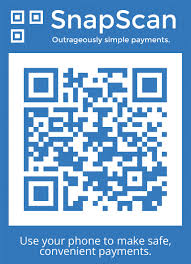
snapscan3Have you ever wondered what the cryptic image (see right) at some restaurants, coffee shops and markets is? Here’s a hint – it’s not some secret code of a society you don’t belong to. On the contrary, it’s something useful guaranteed to make your life somewhat easier.

SnapScan is a smartphone payment app developed right here in Stellenbosch by technology start-up company FireID, located in Tegnopark – Stellenbosch’s own Silicon Valley. The guys from FireID realised that a cashless society, where payments were easier and faster to make, is became a necessity.

In 2013 SnapScan won the South African App of the year and it has been featured on Business Insider’s Top 12 African Start-ups list. In May of this year it joined in partnership with Standard Bank.

SnapScan benefits both the customer and the merchant. For the customer it provides an alternative for cash and credit cards, it’s faster and is meant to be more secure.

You no longer have to wait to have a payment processed at a terminal or risk carrying a credit card with you. You simply take a picture of the merchant’s unique QR code (the cryptic image) with your phone, enter your pin and the amount you want to pay. After the transaction is completed the customer and merchant receives an SMS notification to confirm.

The merchant never handles your credit card or details. Your card details are stored securely on your phone, encrypted and protected by a pin you select yourself.

It doesn’t cost you anything, no sign-up fee, setup, installation or monthly fee. All you need to do is download the app from the Apple or Google Play store, fill in your card details and you’re good to go. The app is available for iOS, Android, and BlackBerry.

For merchants the application is easy and fast. All they need is a cell phone and they can process payments, whether it’s a coffee shop or an informal trader at a market. The Big Issue, the non-profit magazine sold at intersections, vendors have recently been enabled to use SnapScan.

Not too bad for something starting out only in a number of stores around in Stellenbosch – from 600 merchants at the end of 2013 to 12 000 at present. So what are you waiting for? Start snapping!

More info on SnapScan: 

https://www.facebook.com/SnapScanApp
http://www.getsnapscan.com/

[SOURCES: http://mybroadband.co.za, http://www.techcentral.co.za, http://www.2oceansvibe.com, http://ventureburn.com]


snapscan3Het jy al gewonder wat die kriptiese prentjie (sien regs) by sommige restaurante, koffiewinkels en markte is? Wel, dis NIE die geheime kode van een of ander organisasie waaraan jy nie behoort of `n optiese illusie nie. Inteendeel, dit eintlik iets nuttig wat gewaarborg is om jou lewe makliker te maak.

SnapScan is `n slimfoon applikasie wat net hier in Tegnopark, Stellenbosch se eie Silicon Valley, deur FireID ontwikkel is. Die ouens van FireID het besef dat `n kontantlose samelewing waar betalings vinnig en maklik gemaak kan word, binnekort `n noodsaaklikheid gaan begin word.

In 2013 het SnapScan die eerste prys gewen as Suid-Afrikaanse Toepassing van die jaar en is dit reeds gelys op Business Insider se Top 12 African Startups– lys. In Mei vanjaar het dit ook `n venootskap aangegaan met Standard Bank.

SnapScan is voordelig vir beide die kliënt en die handelaar. Vir die kliënt bied dit `n alternatief vir kontant en kredietkaarte, beloof dit om veiliger te wees en is dit vinniger as tradisionele betaalmetodes.

Jy hoef nie meer te staan en wag dat jou betaling by `n kredietkaartmasjien verwerk word of die risiko neem om `n kaart saam met jou te dra nie. Jy neem bloot `n foto van die handelaar se unieke QR-kode (die kriptiese prentjie), sleutel jou PIN-kode in en die bedrag wat jy wil betaal. Sodra die transaksie voltooi is, ontvang die handelaar en kliënt beide `n sms ter bevestiging.

Die handelaar hanteer nooit jou kredietkaart of details nie. Jou kaartinligting word veilig op jou foon gestoor, enkripteer en word beskerm deur `n PIN-nommer wat jy self gekies het.

Dit kos jou niks. Geen aansluitfooi, opstelling of maandelikse betaling nie. Jy hoef net die toepassing af te laai van die Apple of Google Play-winkel, jou kaartinligting te stoor en jy’s reg om dit te gebruik. Die toepassing is reeds beskikbaar vir iOS, Android, en BlackBerry

Vir handelaars is die aansoek vinnig en maklik. Hulle benodig slegs `n selfoon om betalings te kan verwerk – of dit nou `n koffiewinkel of `n informele handelaar by `n mark is. So gebruik verkopers van The Big Issue, `n nie-winsgewende tydskrif wat op straathoeke verkoop word, ook reeds SnapScan.

Nie sleg vir iets wat eers net in `n paar winkels in Stellenbosch gebruik is nie – van 600 handelaars aan die einde van 2013 tot die huidige 12 000.

So waarvoor wag jy? Gaan neem daai prentjie af!

Meer inligting oor SnapScan: 

https://www.facebook.com/SnapScanApp
http://www.getsnapscan.com/

[BRONNE: http://mybroadband.co.za, http://www.techcentral.co.za, http://www.2oceansvibe.com, http://ventureburn.com]

I’m not Billi Gates!!!I’m not Billi Gates!!!

Friday, July 25th, 2014

We all have our little embarassing moments when it comes to technology. At least we can laugh at ourselves – and these people.


Tech Support: What kind of computer do you have?
Customer: A white one.
…………………………………………

Customer: Hi, this is Celine.  I can’t get my DVD out !!!
Tech Support: Have you tried pushing the button?
Customer: Yes, I’m sure it’s really stuck.
Tech Support: That doesn’t sound good; I’ll make a note.
Customer: No, wait a minute, I hadn’t inserted it yet.  It’s still on my desk . . . sorry.  Thank you.
………………………………………….

Tech Support: Click on the ‘MY COMPUTER’ icon on the left of the screen.
Customer: Your left or my left?
………………………………………….

Tech Support: Hello.  How may I help you?
Male Customer:  Hi … . . I can’t print.
Tech Support: Would you click on ‘START’ for me and . . …..
Customer: Listen pal; don’t start getting technical on me.  I’m not Billi Gates!!!
………………………………………….

Customer: Good afternoon, this is Martha.  I can’t print.  Every time I try, it says .. . . ‘CAN’T FIND PRINTER’.  I even lifted the printer and placed it in front of the monitor, but the computer still says it can’t find it!!!
………………………………………….

Customer: I have problems printing in red.
Tech Support: Do you have a color printer?
Customer: Aaaah . . . . . . . . . . thank you.
………………………………………….

Tech Support: What’s on your monitor now, ma’am?
Customer: A teddy bear that my boyfriend bought for me at the 7-11 store.
………………………………………….

Customer: My keyboard is not working anymore.
Tech Support: Are you sure your keyboard is plugged into the computer?
Customer: No.  I can’t get behind the computer.
Tech Support: Pick up your keyboard and take ten steps backwards.
Customer: Okay.
Tech Support: Did the keyboard come with you?
Customer: Yes.
Tech Support: That means the keyboard is not plugged in.  Is there another keyboard?
Customer: Yes, there’s another one here.  Wait a moment please. .. . . . . .  Ah, that one does work.
Thanks.
………………………………………..

Tech Support: Your password is the small letter ‘a’ as in apple, a capital letter ‘V’ as in Victor, and the number ‘7’.
Customer: Is that ‘7’ in capital letters?
………………………………………….

Customer: I can’t get on the internet.
Tech Support: Are you absolutely sure you used the correct password?
Customer: Yes, I’m sure.  I saw my co-worker do it.
Tech Support: Can you tell me what the password was?
Customer: Five dots.
………………………………………….

Tech Support: What anti-virus program do you use?
Customer: Netscape.
Tech Support: That’s not an anti-virus program.
Customer: Oh, sorry . . . Internet Explorer.
…………………………………………

Customer: I have a huge problem! My friend has placed a screen saver on my computer . . . but, every time I move my mouse, it disappears.
………………………………………….

Tech Support: How may I help you?
Customer: I’m writing my first email.
Tech Support: OK, and what seems to be the problem?
Customer: Well, I have the letter ‘a’ in the address, but how do I get the little circle around it.
………………………………………….

And last, but not least . . .

A woman customer called the Canon help desk because she had a problem with her printer.
Tech Support: Are you running it under windows?
Customer: No, my desk is next to the door, but that is a good point.  The man sitting next to me is by a window, and his printer is working fine!
………………………………………….Die meeste van ons het al `n paar rooigesig-oomblikke gehad waar tegnologie betrokke was. Maar ten minste kan ons vir onsself lag – en vir hierdie mense.


Tech Support: What kind of computer do you have?
Customer: A white one.
…………………………………………

Customer: Hi, this is Celine.  I can’t get my DVD out !!!
Tech Support: Have you tried pushing the button?
Customer: Yes, I’m sure it’s really stuck.
Tech Support: That doesn’t sound good; I’ll make a note.
Customer: No, wait a minute, I hadn’t inserted it yet.  It’s still on my desk . . . sorry.  Thank you.
………………………………………….

Tech Support: Click on the ‘MY COMPUTER’ icon on the left of the screen.
Customer: Your left or my left?
………………………………………….

Tech Support: Hello.  How may I help you?
Male Customer:  Hi … . . I can’t print.
Tech Support: Would you click on ‘START’ for me and . . …..
Customer: Listen pal; don’t start getting technical on me.  I’m not Billi Gates!!!
………………………………………….

Customer: Good afternoon, this is Martha.  I can’t print.  Every time I try, it says .. . . ‘CAN’T FIND PRINTER’.  I even lifted the printer and placed it in front of the monitor, but the computer still says it can’t find it!!!
………………………………………….

Customer: I have problems printing in red.
Tech Support: Do you have a color printer?
Customer: Aaaah . . . . . . . . . . thank you.
………………………………………….

Tech Support: What’s on your monitor now, ma’am?
Customer: A teddy bear that my boyfriend bought for me at the 7-11 store.
………………………………………….

Customer: My keyboard is not working anymore.
Tech Support: Are you sure your keyboard is plugged into the computer?
Customer: No.  I can’t get behind the computer.
Tech Support: Pick up your keyboard and take ten steps backwards.
Customer: Okay.
Tech Support: Did the keyboard come with you?
Customer: Yes.
Tech Support: That means the keyboard is not plugged in.  Is there another keyboard?
Customer: Yes, there’s another one here.  Wait a moment please. .. . . . . .  Ah, that one does work.
Thanks.
………………………………………..

Tech Support: Your password is the small letter ‘a’ as in apple, a capital letter ‘V’ as in Victor, and the number ‘7’.
Customer: Is that ‘7’ in capital letters?
………………………………………….

Customer: I can’t get on the internet.
Tech Support: Are you absolutely sure you used the correct password?
Customer: Yes, I’m sure.  I saw my co-worker do it.
Tech Support: Can you tell me what the password was?
Customer: Five dots.
………………………………………….

Tech Support: What anti-virus program do you use?
Customer: Netscape.
Tech Support: That’s not an anti-virus program.
Customer: Oh, sorry . . . Internet Explorer.
…………………………………………

Customer: I have a huge problem! My friend has placed a screen saver on my computer . . . but, every time I move my mouse, it disappears.
………………………………………….

Tech Support: How may I help you?
Customer: I’m writing my first email.
Tech Support: OK, and what seems to be the problem?
Customer: Well, I have the letter ‘a’ in the address, but how do I get the little circle around it.
………………………………………….

And last, but not least . . .

A woman customer called the Canon help desk because she had a problem with her printer.
Tech Support: Are you running it under windows?
Customer: No, my desk is next to the door, but that is a good point.  The man sitting next to me is by a window, and his printer is working fine!
………………………………………….

Me, my selfie and IEen, twee, drie, blok my selfie

Friday, July 25th, 2014

Nowadays practically everyone takes ‘selfies’ – celebrities, politicians, musicians … The word is so widely used, The Oxford English Dictionary is monitoring it for inclusion in it’s online version. In 2012 Time magazine considered it to be one of their top 10 buzz words.

A ‘selfie’ can be defined as a self portrait taken at arm’s length with a hand held device, such as a digital camera or phone. Usually it’s also distributed widely on social networks like Twitter, Instagram or Facebook.

Taking selfies became popular in the early 2000’s with the “MySpace pic” – an amateur photo taken in front of a mirror. Flickr started using the term in 2009 to describe the endless stream of photos teenage girls posted of themselves on the Flickr network.

But are selfies really such a recent occurrence we led ourselves to believe?

[Photo: Twitter / @TheRealBuzz]

Buzz_Aldrin_EVA_SelfieAstronaut Buzz Aldrin claims he took the first selfie in 1966 during a training mission where he spent 5.5 hours wandering around outside the space craft.
Unfortunately for Mr Aldrin someone beat him to it – a whole 127 years earlier. In 1839 Robert Cornelius, an American pioneer in photography, photographed himself, in what might also be one of the first photographs of a person. Other historical self portraits include Joseph Byron (1909) and the Russian duchess Anastasia Nikolaevna (1914).

Some say this phenomenon is an indication of the self centered society we live in, while others believe it just shows the increasing influence of technology on our lives. Whatever the case, and our opinions might be, ‘selfies’ are here to stay. Until the next technological craze anyway.

[SOURCE: www.wikipedia.org]

Deesdae neem al wat leef en beef ‘selfies’ – bekendes, politici, musikante … Die woord word so algemeen gebruik, die Oxford English Dictionary monitor dit reeds vir moontlike insluiting by sy aanlyn weergawe. In 2012 is dit deur Time magazine as een van die jaar se Top 10 gonswoorde beskou.

`n ‘Selfie’ word gedefinieer as `n selfportret, geneem met `n handtoestel (`n digitale kamera of selfoon) `n armlengte weg. Dit word gewoonlik op sosiale netwerke soos Twitter, Instagram of Facebook versprei.

Die neem van selfportrette het reeds in die vroeë 2000’s populêre geraak met die “MySpace pic” – `n onprofessionele foto wat normaalweg voor `n spieël geneem is. Ook Flickr het in 2009 die woord begin gebruik om die eindelose fotos wat tienermeisies van hulleself op dié netwerk geplaas het, te beskryf.

Maar is ‘selfies’ regtig so `n nuwe verskynsel soos ons dink?

[Foto: Twitter / @TheRealBuzz]

Buzz_Aldrin_EVA_Selfie

Ruimtevaarder Buzz Aldrin beweer hy het die eerste ‘selfie’ geneem in 1966 toe hy, as deel van `n opleidingsessie in 1966, homself afgeneem het.

Ongelukkig vir Mnr Aldrin was daar iemand wat hom voorgespring het 127 jaar tevore. In 1839 het Robert Cornelius, `n Amerikaanse baanbreker in fotografie, homself afgeneem. Ander historiese selfportrette sluit Joseph Byron (1909) en die Russiese hertogin Anastasia Nikolaevna (1914) in.

Sommige sê die fenomeen is `n aanduiding van die self-gesentreerde samelewing waarin ons leef – ander beweer dit dui op ons toenemende tegnologiese ingesteldheid. Hoe dit ookal sy en wat jou opinie daaroor is, ‘selfies’ is, vir nou, hier om te bly. Tot die volgende tegnologiese gril in elk geval.

[

BRON: www.wikipedia.org]

Meet the techies: Petro UysOntmoet die techies: Petro Uys

Friday, July 25th, 2014

“To work in IT is like being on another planet every day”

profile-petroPetro Uys, the IT Service desk’s manager and all round sympathetic ear, started her career at the university long before Information Technology.

After completing an Honors degree in Counselling Psychology she starts working as a data capturer at Student Records in 1985, where it was her task to store student data on microfiche. Rex van Staden, her manager at the time, recognised her interest in technology and computer skills – an early indication of the direction her career would take eventually.

After a stint at Courses and a short break to be a full-time mom, she accepts a position at Huis Horison, a home for disabled adults, as, amongst others, a book keeper. In these four years Petro and her family become closely involved in the lives of the home’s inhabitants.

However, the computer bug has bitten and even before joining IT, Petro teaches computer classes at two primary schools in the Western Cape between 1994 and 1996.

In April 1996 she starts at the IT helpdesk and here it all begins – first as helpdesk  agent, then support specialist and eventually as manager.

During the following 18 years she learns to think analytically,  handle any complaint and sharpens her problem solving skills. Benette Kriel plays a cardinal role as mentor in these initial years as support specialist.

“I’m extremely thankful for the training opportunities IT has given me. In this environment you have to be willing to push through and not be discouraged by obstacles. IT offers limitless opportunities and with the necessary interest and passion, there’s a spot for anyone in the IT field.”

Every day at IT is different. Technology constantly grows and it’s the dynamic of a changing environment she enjoys.

“To do the same work every day, would be extremely monotonous. The most apt comparison I’ve come across was – to work for IT is like being on a new planet every single day. Your basic survival elements are there, but the rest is always new.”

She still remembers the day when someone called the helpdesk asking for “call-a-housewife” or one academic whose office was covered with cigarette stumps everywhere.

Crawling on the floor to connect cables or carrying around heavy equipment across campus wasn’t unusual. To work in a traditionally male dominated world did have it’s advantages. It’s taught her to be strong, stand up for her rights and be prepared for any given situation.

Petro’s unlimited supply of patience and her accessibility ensures she gets along with practically every personality type.  Difficult clients are a challenge and provide the perfect opportunity to practice her love for people and technology.

Communication in an IT environment remains difficult and something one has to work on continuously. “On campus there still exists a misconception about what exactly IT does. We’re not a profitable department trying to extort users. They should have the confidence to contact us – we really want to help and at least make their technological lives easier!”

IT does not function as a separate entity, it supports the university as a business. After completing the ITIL (Information Technology Infrastructure Library) exams in 2009, she came to the conclusion ITIL would be the best framework to align IT with the university as a business.

As a mother of three daughters, who are mostly settled on their own, she, nowadays, just enjoy the restfulness with her husband, Jannie. But when she’s not busy on the phone, you’ll find her cycling – she’s even completed 9 Cape Argus cycling tours.

Just to keep things interesting, she’s also currently working on her MPhil in Management Coaching which will enable her to apply her people skills and experience even better.

IT SERVICE DESK CONTACT DETAILS

Phone: +27 21 808 4367
E-mail: helpinfo@sun.ac.za (enquiries)
help@sun.ac.za (to log an error)
Skype: handle = ITStellenUni
Twitter: handle = ITStellenUni
Web: www.sun.ac.za/itselfhelp
Blog: www.sun.ac.za/infoteg


“Om vir IT te werk is soos om elke dag op ‘n nuwe planeet te wees.”

profile-petroPetro Uys, IT Dienstoonbank bestuurder en alombekende simpatieke oor, se loopbaan by die universiteit strek veel verder terug as net die afgelope agtien jaar by Informasietegnologie.

Na die voltooiing van haar Honneursgraad in Voorligtingsielkunde begin sy in 1985 as datavaslegger by Studenterekords, waar dit haar taak is om studentedata op microfiche te stoor. Rex van Staden, haar destydse hoof, merk op dat sy `n buitengewone belangstelling in en vaardigheid met rekenaars het en speel `n beduidende rol in die rigting wat haar loopbaan inslaan.

Na `n draai by Kursusse en `n breuk om ma te wees, aanvaar sy `n halfdagpos by Huis Horison, ‘n tehuis vir volwasse gestremdes, as, onder andere, boekhouer. Vier jaar volg waartydens Petro en haar familie nou betrokke raak by die tehuis se inwoners.

Die rekenaargogga het egter gebyt en selfs voordat sy by IT beland, bied sy rekenaarklasse aan by twee laerskole in die Wes-Kaap vanaf 1994 tot 1996.

In April 1996 begin haar IT-loopbaan by die destydse hulptoonbank  – eers as hulptoonbankagent, daarna ondersteuningspesialis en later as bestuurder.

Gedurende die 18 jaar leer sy om analities te dink, haar probleemoplossingsvaardighede te slyp en gebruikers se navrae soomloos kaf te draf. Benette Kriel se mentorskap in die aanvangsjare as ondersteuningspesialis, bly haar steeds by.

“Ek is baie dankbaar vir al die opleidingsgeleenthede wat IT US vir my gegee het. In die omgewing moet jy bereid wees om deur te druk en jou nie deur struikelblokke te laat onderkry nie.Dit bied legio geleenthede en met die nodige belangstelling en passie, is daar vir ieder en elk `n plek binne hier.

Elke dag is anders en tegnologie bly ontwikkel. Hierdie dinamika is vir haar lekker. “Om elke dag dieselfde werk te doen, sou sieldodend wees.”

“Die beste vergelyking wat ek nog daarvoor gekry het was: Om vir IT te werk, is soos om elke dag op ‘n nuwe planeet te wees.Die basiese oorlewingselemente moet daar wees, maar verder is alles nuut.”

Sy onthou hoe, destyds by die hulplyn, `n verwarde persoon geskakel en gevra het,  “Is this call-a-housewife?”, en ook die akademikus wie se kantoor bestrooi was met sigaretstompies.

Om op die grond rond te kruip om rekenaarkabels te koppel, of swaar toerusting op kampus rond te dra, was niks eienaardig nie. `n Tradisionele manswêreld het egter sy voordele. Sy het geleer om sterk te wees, op haar regte te staan en voorbereid te wees vir enige situasie.

Petro se onuitputbare geduld en toeganklike geaardheid verseker dat sy oor die weg kom met feitlik enige persoonlikheid. Moeilike kliënte is vir haar `n uitdaging en bied `n goeie geleentheid om haar liefde vir mense en tegnologie te beoefen.

Kommunikasie in `n IT-omgewing bly `n tameletjie en moet deurlopend aan gewerk word. “Daar bestaan steeds `n wanpersepsie op kampus oor wat IT presies doen. Ons is nie `n winsgewende afdeling wat gebruikers wil uitbuit nie. Gebruikers moet asseblief die vrymoedigheid hê om ons te kontak – ons wil regtig help en hulle tegnologiese lewens maklik maak!”

Petro glo dat IT nie `n entiteit op sy eie is nie, maar die universiteit as `n besigheid moet ondersteun. Met die voltooiing van die ITIL (Information Technology Infrastructure Library ) bestuurseksamens in 2009 het sy ook besef dat ITIL die beste raamwerk is om te volg om IT te belyn met besigheid.

As die ma van drie dogters, wat grotendeels nou al op hul eie gevestig is, geniet sy deesdae die rustigheid saam met haar man, Jannie. Maar wanneer jy haar nie op die telefoon sien nie, is sy `n kranige fietsryer wat al 9 Cape Argus fietstoere voltooi het.

Daarbenewens is sy tans besig om ‘n MPhil in Management Coaching te voltooi, sodat sy al haar mensekennis en ervaring ten volle kan benut.

IT DIENSTOONBANK KONTAKDETAILS

Foon: +27 21 808 4367
E-pos: helpinfo@sun.ac.za (navrae)
help@sun.ac.za (foutaanmelding)
Skype: handle = ITStellenUni
Twitter: handle = ITStellenUni
Web: www.sun.ac.za/itselfhelp
Blog: www.sun.ac.za/infoteg

SUNid – even betterSUNid – nog better

Friday, July 25th, 2014

Over the past few months we’ve introduced you to IAM (Identity Access Management) and in particular, one of it’s offspring, SUNid. If this all seems a bit hazy to you, let me recap.

SUNid is the first and an important building block of identity and access management (IAM). External workers and visitors are registered on this system. Previously this task was completed by Human Resources, but it has been decentralised and departments are now responsible for external workers and visitors themselves. Read more on the step by step procedures here.

After a few tweaks, a new version of SUNid will be implemented shortly. Most of the changes have been made at the back end of the system, but there are a few changes users of SUNid will notice.

1. Staff and student engagements are added on SUNid to ensure that there’s only one place (‘Maintain Identities’) where all a person’s engagements can be viewed. (HR and student engagements can not be created or changed on SUNid by SUNid users.)

2. Previously a person could only have an identity on HR or SUNid. This limitation has been removed. However, a person may still have only one of each type of engagement, whether it’s staff, student, external worker or visitor.

3. The “Register Identity” function has been changed in such a way that users first have to do a search for an existing person record before attempting to create an entirely new one. This is of utmost importance to avoid duplicates being created. Training in the use of SUNid is necessary before staff are given access to SUNid.

4. Lastly, a delete function has been added for engagements in the ‘Draft’ status in case a mistake has been made and the request has to be cancelled. SUNid does delete all drafts after 7 days, but users will now be able to also do this manually.

We hope these updates will ensure an even smoother and more pleasant SUNid experience for all SUNid users. If you have any questions or suggestions, feel free to contact us at helpinfo@sun.ac.za.Oor die afgelope paar maande het ons julle bekendgestel aan IAM (Identity Access Management) en spesifiek, aan een van sy kroos, SUNid. As dit alles vir jou `n bietjie vaag klink, laat ek jou herinner.

SUNid is die eerste en en `n belangrike bousteen van identiteit-en toegangsbestuur(IAM). Eksterne werkers en besoekers word op hierdie stelsel geskep. Die taak is voorheen deur Menslike Hulpbronne verrig, maar is nou desentraliseer en departemente neem dus self verantwoordelikheid vir eksterne werkers en besoekers by die departement.  Lees meer oor die stap-vir-stap prosedures hier.

Ons het onlangs `n paar veranderinge aangebring en `n nuwe weergawe van SUNid sal binnekort implementeer word. Die grootste gedeelte van die aanpassings is aan die tegniese kant van die stelsel gemaak en dus nie direk sigbaar aan gebruikers nie. Daar is egter `n paar veranderinge wat gereelde SUNid-gebruikers wel mag oplet.

Die belangrikste veranderings wat gebruikers sal sien, is:

  1. Personeel- (HR) en studenteverbintenisse (engagements) word bygevoeg op SUNid sodat daar een plek is (‘Maintain Identities’) om alle verbintenisse van ʼn persoon te sien (HR en studente verbintenisse kan nie op SUNid geskep of verander word deur SUNid gebruikers nie).
  2. Voorheen kon ʼn persoon nie gelyktydig ʼn HR en SUNid verbintenis mag hê nie. Hierdie beperking is verwyder. ʼn Persoon mag egter steeds slegs een van elke tipe verbintenis, onder andere personeel, student, eksterne werker en besoeker, gelyktydig hê.
  3. Die ‘Register Identity funksie’ word verander sodat gebruikers eers ʼn soektog moet doen vir ʼn bestaande persoonrekord voordat daar gepoog word om ʼn nuwe te skep.  Hierdie stap is uiters belangrik om duplikate te vermy. Opleiding vir die gebruik van SUNid is eintlik noodsaaklik voordat persone toegang tot SUNid kry.
  4. `n ‘Delete’-funksie word bygevoeg vir verbintenisse in ‘Draft’ status vir gebruik waar die invoerder ʼn fout maak of besluit om nie voort te gaan nie. SUNid vee wel alle ‘drafts’ na 7 dae uit as dit nie goedgekeur word nie, maar nou sal gebruikers dit self ook kan doen.

Ons hoop hierdie verbeterings sal `n gladder en meer aangename SUNid-ondervinding vir alle SUNid-gebruikers meebring. Indien jy enige navrae of voorstelle het, kontak ons gerus by helpinfo@sun.ac.za.