SEARCH
  • [:en]Recent Posts[:af]Onlangse bydraes

  • [:en]Categories[:af]Kategorieë

  • [:en]Archives[:af]Argiewe

General

The end of XPDie einde van XP

Friday, April 11th, 2014

Tuesday, 8 April at last saw the end of the XP era. From this date onward Microsoft will no longer release any new patches and updates for XP.

Although your XP operating system will keep on going, it does mean your pc will be much more vulnerable to virus attacks and security breaches. At the same time XP is an out of date system and not nearly as efficient as it should be.

There’s no need to panic just yet. IT has been working on the upgrade process since last year and we have gradually rolled out XP’s replacement, Windows 7, on campus.

We do realise that you have busy schedules and will try our best not inconvenience you during the upgrades. For this reason we appreciate your assistance and patience.

By implementing Windows 7 we lay down an acceptable standard of digital security and integrity, and just as importantly, we create an opportunity for users to learn new and master new technology.

This being said, it’s important to keep in mind not all computers are able to handle a heavier, newer operating system. Older workstations may need extra components and in cases like these a technician will make recommendations. In this case expenses will have to be covered by the department. 

The upgrade from XP to Windows 7 will be free of charge, but there is a cost for backups of work related data, personal data (music, movies, etc.), as well as hardware needed (if any).

 No third party software will be reinstalled – in other words if you ran AutoCAD or SAS, it will not be reinstalled. These software packages do not form part of IT’s standard software installations. We do, however, support selected packages and will be able to reinstall them if a request is sent to help@sun.ac.za.  AutoCAD is not supported by IT and it will be the responsibility of the department to reinstall the software.

Cost for data backups are R950-00 for less than 15GB and R1650-00 for over 15GB.

If you’re in a hurry to get your pc up to speed, you’re welcome to contact us and schedule a time that suits you.

Unsure of your operating system? Try HTTP://WHATSMYOS.COM/ and the website will do the thinking for you. If you do use XP, send an e-mail to HELP@SUN.AC.ZA  requesting an upgrade with the following information:

computer’s asset number, contact telephone number, building name and room number.

Op Dinsdag, 8 April het die einde van die Windows XP-era uiteindelik na 12 jaar aangebreek. Vanaf dié datum sal Microsoft nie meer opdaterings vir XP vrystel nie. 

Hoewel jou XP-bedryfstelsel steeds sal funksioneer, beteken dit wel dat jou rekenaar meer blootgestel sal wees aan rekenaarvirusse. Terselfdertyd is XP verouderd en nie meer  effektief genoeg om aan ons behoeftes vandag te voldoen nie. 

Daar is egter nog nie rede vir grootskaalse paniek nie. IT is sedert verlede jaar in die proses om Windows 7, XP se plaasvervanger, uit te rol na XP-rekenaars op kampus.  Ons wil so min as moontlik ongerief veroorsaak en verstaan dat personeel baie besig is en stel ons gebruikers se hulp in die verband hoog op prys.

Met die uitrol van Windows 7 stel ons ʼn aanvaarbare standaard van digitale sekuriteit en integriteit, en ewe belangrik, skep ons ʼn geleentheid vir gebruikers om nuwe tegnologie aan te leer en te bemeester.

Dis wel belangrik om in gedagte te hou dat `n groot aantal rekenaars se hardeware nie in staat is om `n swaarder en nuwer bedryfstelsel te hanteer nie. Ouer werkstasies mag komponente benodig en in so `n geval sal `n tegnikus `n aanbeveling doen. Hierdie uitgawes sal vir  die departement se koste wees. 

Opgradering van XP na Windows 7 is gratis, maar daar is `n koste verbonde aan die rugsteun van werksverwante data,  persoonlike data soos musiek, video en flieks, asook die addisionele hardeware (indien enige) benodig.

Geen 3de party sagteware sal herinstalleer word nie. Indien die rekenaar byvoorbeeld AutoCAD of SAS opgehad het, sal dit nie oorgelaai word nie. Sagteware soos SAS, wat nie deel vorm van IT se standaardsagteware installasie nie, maar steeds ondersteun word deur IT, sal per versoek aan help@sun.ac.za weer installeer word. Sagteware soos AutoCAD, word glad nie deur IT ondersteun nie en die onus berus bydie personeellid/departement om dit weer gelaai te kry.

Die koste vir datarugsteun beloop  R950-00 vir minder as 15GB en R1650-00 bo 15GB. 

As jy haastig is om jou rekenaar op datum en spoed te kry, kan jy ons gerus kontak om `n tyd te skeduleer wat jou sal pas.

`n Vinnige manier om vas te stel watter bedryfstelsel jy tans gebruik, is om HTTP://WHATSMYOS.COM/ te raadpleeg en die webwerf sal die dinkwerk vir jou doen. Indien jy wel XP gebruik, kan jy `n e-pos stuur aan HELP@SUN.AC.ZA  en `n opgradering versoek. Onthou net om vir ons die volgende inligting te gee om die proses te bespoedig – 

die rekenaar se batenommer,  kontaktelefoonnommer,  gebounaam en kamernommer.

Need to conduct a survey?Wil jy `n meningsopname doen?

Friday, February 28th, 2014

SUrveys.sun.ac.za is a web-based service available free of cost to University entities and staff members. Its main purpose is to support academic staff or post-graduate students who need to conduct online surveys as part of their academic research activities. SUrveys allows one to:

1. easily create a sophisticated, customised online survey that includes functionality such as branching.

2. test the survey.

3. invite respondents or publish a unique hyperlink to the survey.

4. collect responses in a central, institutional database (which means it’s backed up and is secure).

5. control one’s own response data

6. export data to SPSS or Excel.

If you are interested in doing a survey, please note the following:

1. If the survey incorporates people associated with the University, whether they are staff or students, it is subject to the approval by the University’s Ethics Committee. For information regarding these requests, please visit the web page of the Institutional Research and Planning Department and click on “Applications to undertake research involving University staff or students“.If the survey is done outside the University, ethical clearance is not necessarily required. Nevertheless, still follow the steps outlined under point 1 above. If it is indicated that no ethical clearance is required, complete the e-Survey application form . Technical information regarding the software used, is available on the site of Checkbox Survey Solutions

2. Your study leader or lecturer can be approached to provide assistance regarding the formulation of questions and the composition of the questionnaire in order to obtain the best possible results. Assistance is also available from the Centre for Research in Science and Technology and the Centre for Statistical Consultation.

SUrveys.sun.ac.za is `n webgebaseerde diens, gratis beskikbaar aan alle Universiteitseenhede en -personeel. Die hoofdoel is om akademiese personeel of nagraadse studente wat aanlyn meningsopnames, as deel van hul akademiese aktiwiteite moet uitvoer, te ondersteun.  SUrveys bied die geleentheid om:

1. maklik `n gesofistikeerde, pasgemaakte, aanlyn meningsopname te skep wat vertakking as addisionele funksie kan hanteer, 

2. die opname te toets,

3. deelnemers uit te nooi of `n unieke hiperskakel vir die opname te publiseer,

4. antwoorde in `n sentrale, geinstitusionaliseerde databasis (dit word gerugsteun en dis sekuur) te stoor,

5. jou eie reaksiedata te kan beheer,

6. data na SPSS of Excel te kan uitvoer.

As jy belangstel om `n meningsopname te doen, let op die volgende:

1. Indien die opname persone insluit wat geassosieer word met die Universiteit – of dit personeel of studente is – is dit onderworpe aan goedkeuring deur die Universiteit se Etiese komitee. Vir inligting oor hierdie proses, besoek asseblief die webwerf van die Departement van Institusionele Navorsing en Beplanning en kliek op  “Applications to undertake research involving University staff or students“.

Indien die meningsopname buite die Universiteit gedoen word, is etiese goedkeuring nie noodwendig nodig nie. Volg egter nogsteeds die stap uiteengesit by punt 1. hierbo. Indien daar aangedui word dat goedkeuring nie vereis word nie, voltooi die e-Survey aaansoekvorm . Tegniese inligting oor die sagteware wat gebruik word, is beskikbaar op die webwerf van Checkbox Survey Solutions.

2. Jou studieleier of dosent kan ook genader word vir hulp met die formulering van vrae en die samestelling van die opname om die beste moontlike resultate te kry. Hulp is ook beskikbaar by die Sentrum vir Navorsing in Wetenskap en Tegnologie en die  Sentrum vir Statistiese Konsultasie.

Still don’t know what SUNid is?Weet jy nog nie van SUNid nie?

Friday, February 14th, 2014

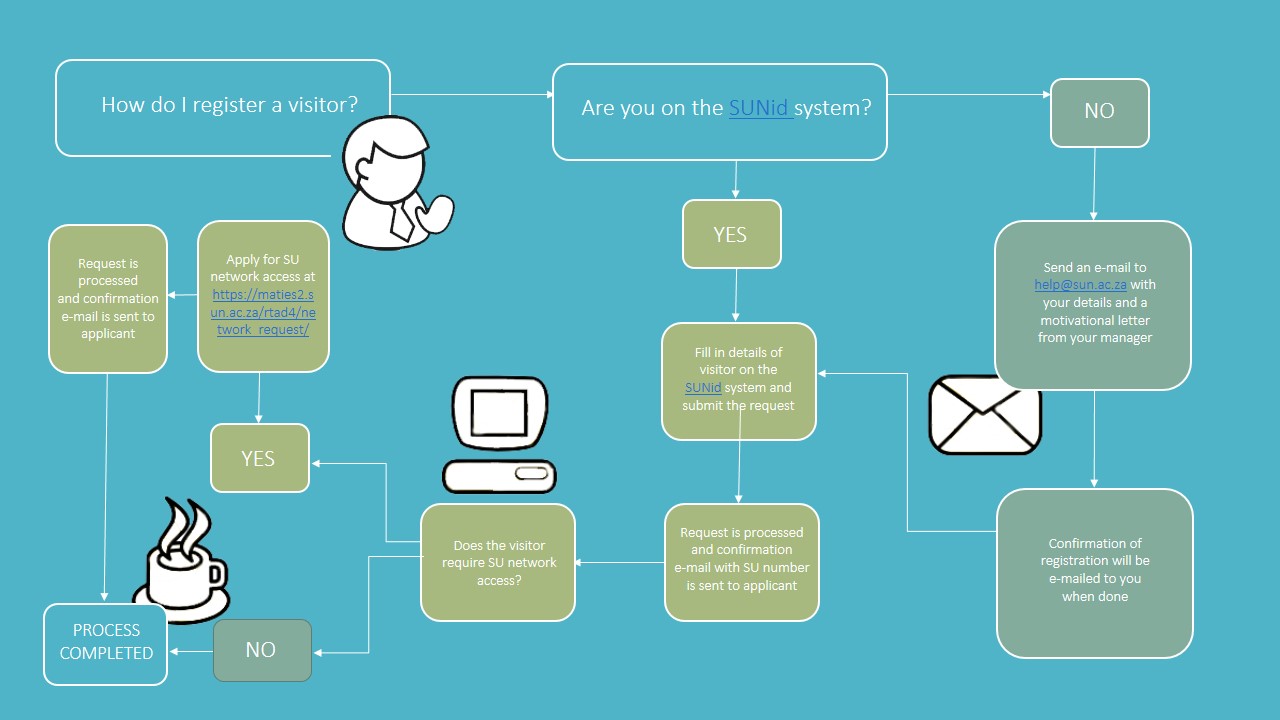
In October last year a simple process was implemented to register visitors or external workers on the university’s systems. Until then departments had to complete a form and submit it to Human Resources. This is no longer necessary, since each department can register its own visitors and external workers.

When a person requires an appointment or role and he/she will not be receiving any payment during the period of appointment, he/she has to be registered as an external worker and on the SUNid system.

Only three types of appointments are still facilitated by Human Resources:

1. A permanent appointment.

2. A temporary appointment, also known as a HEMIS appointment. This refers to the type of forms needed to be completed to receive payment.

3. Diverse payments are loaded by representatives in departments by using the  sun-e-HR system. If new diverse payments are loaded, this function also creates UT numbers. The diverse payments are made by Human Resources, but if  any electronic access or access to buildings is needed, the person also has to be created as an external worker or visitor on SUNid.

For more detailed instructions, read here or follow our easy diagram below.


In Oktober verlede jaar is daar `n eenvoudige proses geimplementeer om besoekers of eksterne werkers op die universiteit se stelsels te registreer. Voorheen was dit nodig om `n vorm in te vul en by Menslike Hulpbronne in te dien. Hierdie stap is sedertdien nie meer nodig nie, aangesien elke departement sy eksterne werkers of besoekers kan registreer. 

Wanneer ‘n persoon ‘n aanstelling of rol benodig en die persoon gaan geen betaling ontvang vir die tydperk van die aanstelling nie, moet hierdie persoon as ‘n eksterne werker aangestel  en dus op SunID registreer word.

Daar is slegs drie tipes aanstellings wat Menslike Hulpbronne steeds hanteer: 

1)      ‘n Permanente aanstelling. 

2)      ‘n Tydelike aanstelling. Hier praat ons sommer ook van ‘n HEMIS aanstelling en dit verwys na die tipe vorms wat voltooi moet word met aanstelling om betaling te ontvang.

3)      Diverse betalings word deur persone in departmente gelaai deur die sun-e-HR stelsel te gebruik. Indien daar nuwe diverse betalings gelaai moet word, skep hierdie funksie ook nuwe UT nommers. Die diverse betalings word wel deur MHB hanteer, maar indien hierdie tipe betaling of aanstellings enige elektroniese toegang of toegang na geboue benodig, moet die persoon ook as eksterne werker of besoeker geskep word op SunID.

Meer volledige instruksies kan hier gevind word of volg ons maklike diagram hieronder.


Record amount of calls for IT Service DeskRekordgetal oproepe vir IT Dienssentrum

Friday, February 14th, 2014

Few jobs are as ungrateful as working at any kind of service desk – throw technology into the mix and it’s even worse! Just remember how you feel by the time you call the IT Service Desk with your problem. Even before you pick up the phone your frustration levels are peaking. 

In the late 90’s I also had a stint at the IT Service Desk – back then only four people weeded out the whole campus’ tech problems. Nowadays the team consists of eight people, but technological demands also expanded. 

Luckily mine was a brief experience, otherwise murder or a nervous breakdown would’ve been the order of the day. However in spite of these stressful conditions, the IT Service Desk has to perform miracles every day – just have a look at the past year’s stats:

Jan 2014 

9 798 calls received in Jan 2014,  8 780 (90%) were dealt with. This is the highest amount of calls in 4 years. 

Average waiting time: 1 minute, 6 seconds

Average length of calls: 2 minutes, 17 seconds


 Jan 2013 

8 004 calls received, of which 7 402 (92%) calls were dealt with.

Average waiting time: 42 seconds

Average length of calls: 2 minuts, 12 seconds 


1 378 more calls were handled as the same time span last year.


More information on the IT Service Desk can be found at  https://stbsp01.stb.sun.ac.za/innov/it/it-help/Wiki%20Pages/Service%20Desk.aspx

Daar is min werke wat so ondankbaar is as om by `n hulptoonbank te werk – gooi dan nog tegnologie ook by en dis dubbeld so erg. Dink maar net hoe jy voel teen die tyd dat jy die IT Dienssentrum skakel. Jy’t nog nie eers met iemand gepraat nie en jou frustrasievlakke is reeds hoog. 

In die laat 90’s het ek ook `n draai gemaak by die einste IT Dienstoonbank – destyds net vier mense wat `n hele kampus se gebruikers moes red van tegnologiese jakkalsies. Deesdae is dit darem `n stewige spannetjie van agt, maar intussen het gebruikers se tegnologiese behoeftes ook meer geword.

Gelukkig was myne `n vlugtige ondervinding, anders was moord of `n senuwee-ineenstorting my voorland. Ten spyte van hierdie stresvolle omstandighede verrig die IT Dienstoonbank steeds elke dag wondere – kyk maar na die statistieke oor die afgelope jaar:

Jan 2014 

9 798 oproepe is in Jan 2014 ontvang by IT se Dienstoonbank waarvan 8 780 (90%) hanteer is. Dit is die hoogste aantal oproepe in die afgelope 4 jaar. 

Gemiddelde wagtyd: 1 minuut, 6 sekondes

Gemiddelde duur van oproepe: 2 minute, 17 sekondes

 Jan 2013 

8 004 oproepe ontvang waarvan 7 402 (92%) oproepe hanteer is.

Gemiddelde wagtyd: 42 sekondes

Gemiddele duur van oproepe: 2 minute, 12 sekondes 


1 378 meer oproepe is hanteer as in die ooreenstemmende tydperk verlede jaar.


Meer inligting insake IT se Dienstoonbank is beskikbaar by: https://stbsp01.stb.sun.ac.za/innov/it/it-help/Wiki%20Pages/Service%20Desk.aspx

E-ink, not your standard BIC penE-ink, nie jou gewone BIC-pen nie

Thursday, November 28th, 2013

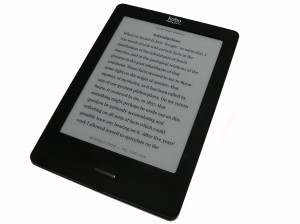
With the emergence of e-readers people have been exposed to a whole world of new technologies – one of these is e-ink.

If the ink that runs out of your shirt pocket, is the only type you’ve been aware of up till now, we’ll explain. 

Electronic ink, e-ink, electronic paper or e-paper are display technologies developed to mimic the appearance of normal ink on paper. Unlike standard flat panel displays emitting light, electronic paper reflects the same way traditional paper does. 

It consists of an electrophoric image with thousands of light and dark nanoparticles trapped between two plates of electrostatically charged glass. The exact application of the stream to the screen attracts or deters the nanoparticles to create a viewable image.

Electronic paper has been used for electronic boards in shops, digital ads, schedules on stations and cell phone screens for years. Thanks to the arrival of the e-reader, we only became more aware of in recent times. With e-ink e-book readers can display digital versions of books and magazines and is an integral part of readers such as Amazon Kindle,Barnes & Noble Nook, Sony Reader, and Kobo.

E-ink is ideal for reading when a slow refresh rate is not important. It’s easier to read due to the fact that it has the appearance of normal paper and doesn’t emit rays like a screen and also has a wider reading angle. The perfect e-ink device can be read in direct sunlight without fading or any reflection.

[SOURCE: www.howtogeek.com & www.wikipedia.org] 


Met die verskyning van e-boeke, is mense blootgestel aan `n wêreld van nuwe tegnologieë.  Een hiervan is e-ink. 

Vir diegene wat glo die enigste ink is die tipe wat in jou hempsak uitloop, hier is `n kort verduideliking van die elektroniese eweknie.

Elektroniese ink, e-ink,  elektroniese papier of e-papier is skermtegnologieë ontwikkel om die voorkoms van gewone ink op papier na te maak. Anders as gewone skerms wat lig uitstraal, reflekteer elektroniese papier lig soos tradisionele papier. 

Die elektroforiese beeld bestaan uit duisende lig- en donker nano-partikels vasgevang tussen twee plate elektrostaties-gelaaide glas. Die noukeurige toepassing van die stroom na die skerm trek die nanopartikels aan of stoot hulle weg om ‘n sigbare beeld te skep.

Elektroniese papier word alreeds suksesvol gebruik vir elektroniese borde in winkels, digitale advertensies, skedules op stasies en selfoonskerms. Met e-ink kan e-lesers soos die Amazon Kindle,Barnes & Noble Nook, Sony Reader, en die Kobo e-leser, digitale weergawes van boeke en tydskrifte vertoon. 

E-ink is ideaal vir lees wanneer die stadige herlaaispoed onbelangrik is. Omdat dit reflekteer soos gewone paper en nie, soos `n skerm, lig uitstraal nie, word die leesproses vergemaklik en het die oppervlak `n wyer leesvlak.  Die ideale e-ink skerm kan gebruik word in direkte sonlig sonder enige refleksie of om weg te raak. 

[SOURCE: www.howtogeek.com & www.wikipedia.org]