SEARCH
  • [:en]Recent Posts[:af]Onlangse bydraes

  • [:en]Categories[:af]Kategorieë

  • [:en]Archives[:af]Argiewe

General

On the roll with Windows 7Windows 7 stoomroller voort

Friday, October 4th, 2013

Some of you might have received a mail with the subject “Windows 7 Service Pack 1 – Weekend rollout” from “IT – Algemene Navrae – General Enquiries”.

This is not a scam or a hoax! 

This mail was sent out by ITUS to a specific targeted group – all people with Windows 7 on their PCs that do not have Service Pack 1 installed. 

  • If you did NOT receive the mail then your PC is already up to the correct patch level and no further action is required from you. 
  • If you DID receive the mail then it is important that you follow the instructions in the mail mentioned above carefully, in other words, do NOT switch off your computer when you leave for home on Friday afternoon. You do not have to be logged in to the machine, it just has to be switched on and displaying the “Ctrl + Alt + Delete to log on” message. 

[ARTICLE BY DAVID WILES]


EXAMPLE OF THE NOTIFICATION E-MAIL

ITUS – Stellenbosch University – critical update

August – October 2013

The When:

  • Weekend of …….  2013.
    If your workstation is a desktop PLEASE ENSURE THAT YOU DO NOT SWITCH IT OFF TOMORROW. 
    You may lock it or log off, but please do not switch the PC off this weekend (tomorrow) – once you leave the office at the end of the day.
    Please make sure to save and close your work (e.g. open word documents, etc.) before you leave.

The Who:

  • ITUS has found that your version of Windows 7 requires a critical update: “Service Pack 1”.
    Please read this email thoroughly!

The What:

  • As your computer forms part of our SUN network and is an asset of the University of Stellenbosch, it is crucial to keep your computer updated and secure.  ITUS will be engaging in a campus wide rollout of this “Windows 7 Service Pack 1” to all computers that require it.

The How:

  • ITUS will be utilising an automated process to update your Windows 7. The automated process will target a few computers at a time starting tomorrow evening at 19h00 and will be completed before Sunday at 19h00.
  • If you find yourself working on the office computer this weekend, this is what you could expect :
    This process will download and execute the installation of the update, automatically. These actions will execute in the background as not to interfere with your working experience.  However, at completion of the said installation, a computer “Restart” is necessary. This will also be an automatic action.
  1. 1.       You will be notified via a pop-up, after which the computer will restart. This is pop-up will act as a countdown, to allow you to save any work if needed. This allows you 2 minutes to save your work or to send that last email! J
  2. Please note the restart is mandatory and cannot be undone.
  3. After the restart, the final stage of the installation will commence. This might include, but is not limited to, flickering of the screen, rebooting once, displaying the progress of the installation. This part of the process might take upwards of 10 minutes to complete.
  4. PLEASE NOTE: You will not be able to work on the computer at this stage; ideal time for a coffee/tea break! Please do not at any time manually switch off or restart your computer. 
  5. Once the computer displays the Welcome screen, the installation is done and you may continue to log in etc.


**********************************************************

The automated process is one that ITUS will be using more frequently as there is much less interruption to workflow. In the unlikely event that the Welcome screen does not display within 30 minutes of the restart, please contact ITUS as soon as possible by dialling the IT Service Desk on 0218084367.

We thank you for your support and understanding!


Sedert Augustus het ons `n e-pos aan sommige kampusgebruikers gestuur oor `n opgradering wat vereis word vir rekenaars met Windows 7 (sien onder).

Indien jy ‘n e-pos ontvang het van “IT – Algemene Navrae – General Enquiries” met die onderwerp “Windows 7 Service Pack 1 – Weekend rollout”, hoef jy nie bekommerd te wees dat dit een van die vele gevalle van “phishing” of gemorspos is nie. Ons is wel vanaf Augustus tot Oktober besig om rekenaars met Windows 7 op te gradeer met `n kritiese Service Pack. 

Die e-pos dien slegs as kennisgewing en al wat van jou verwag word, is slegs om nie jou rekenaar af te skakel op die datums wat verskaf word in die e-pos nie. 

Indien jy nie `n e-pos ontvang het nie, beteken dit dat jou rekenaar op datum is met die nuutste program-opdaterings en geen verdere aksie word van jou verlang nie. Vir enige verdere navrae, skakel gerus die IT Dienstoonbank by 808 4367.


VOORBEELD VAN DIE E-POS

ITUS – Stellenbosch University – critical update

August – October 2013

The When:

  • If your workstation is a desktop PLEASE ENSURE THAT YOU DO NOT SWITCH IT OFF TOMORROW. 
    You may lock it or log off, but please do not switch the PC off this weekend (tomorrow) – once you leave the office at the end of the day.
    Please make sure to save and close your work (e.g. open word documents, etc.) before you leave.

The Who:

  • ITUS has found that your version of Windows 7 requires a critical update: “Service Pack 1”.
    Please read this email thoroughly!

The What:

  • As your computer forms part of our SUN network and is an asset of the University of Stellenbosch, it is crucial to keep your computer updated and secure.  ITUS will be engaging in a campus wide rollout of this “Windows 7 Service Pack 1” to all computers that require it.

The How:

  • ITUS will be utilising an automated process to update your Windows 7. The automated process will target a few computers at a time starting tomorrow evening at 19h00 and will be completed before Sunday at 19h00.
  • If you find yourself working on the office computer this weekend, this is what you could expect :
    This process will download and execute the installation of the update, automatically. These actions will execute in the background as not to interfere with your working experience.  However, at completion of the said installation, a computer “Restart” is necessary. This will also be an automatic action.
  1. 1.       You will be notified via a pop-up, after which the computer will restart. This is pop-up will act as a countdown, to allow you to save any work if needed. This allows you 2 minutes to save your work or to send that last email! J
  2. Please note the restart is mandatory and cannot be undone.
  3. After the restart, the final stage of the installation will commence. This might include, but is not limited to, flickering of the screen, rebooting once, displaying the progress of the installation. This part of the process might take upwards of 10 minutes to complete.
  4. PLEASE NOTE: You will not be able to work on the computer at this stage; ideal time for a coffee/tea break! Please do not at any time manually switch off or restart your computer. 
  5. Once the computer displays the Welcome screen, the installation is done and you may continue to log in etc.


**********************************************************

The automated process is one that ITUS will be using more frequently as there is much less interruption to workflow. In the unlikely event that the Welcome screen does not display within 30 minutes of the restart, please contact ITUS as soon as possible by dialling the IT Service Desk on 0218084367.

We thank you for your support and understanding!

 

Linux & HPC support now available for Science FacultyLinux & HPC-ondersteuning nou beskikbaar vir Natuurwetenskappe

Friday, August 30th, 2013

Good news for researchers in the Faculty of Science! Charl Möller recently joined the IT team as a senior systemsadministrator for the HPC and Linux environment.  Charl will be providing support for the HPC (High performance Cluster) and the Linux environment within the Faculty of Science.

This service will be extended to the rest of campus at a later stage.

“High Performance Computing most generally refers to the practice of aggregating computing power in a way that delivers much higher performance than one could get out of a typical desktop computer or workstation in order to solve large problems in science, engineering, or business.” [SOURCE: http://insidehpc.com/hpc-basic-training/what-is-hpc/]

HPC is currently being used by researchers from the departments of Chemistry, Engineering (Civil, Process, E&E, Mechanical and Industrial), Wine Bio Technology, Genetics and Agri Sciences to sift through terabytes of genetic data. Other researchers use HPC to simulate the load capacity of roads and tar, whilst others modulate the interaction between atoms and chemical reactions.

This service is available to any researcher on campus, provided that it is used for research and non-commercial purposes. In total it consists of 992 CPU’s and 2048GB of memory and can handle workloads varying from hundreds of small tasks running parallel to large, single tasks processed by a few machines.

For more information on HPC at Stellenbosch University, browse to www.sun.ac.za/hpc.

If you need Linux support, contact the IT service centre at x4367 or help@sun.ac.za.


Goeie nuus vir navorsers in Natuurwetenskappe! Charl Möller het onlangs by die IT span aangesluit as ‘n Senior Stelseladministrateur vir die HPC en Linux omgewing.  Charl sal ondersteuning bied aan die HPC (High performance Cluster) en die Linux-omgewings binne die Fakulteit Natuurwetenskappe.

Hierdie diens sal ook later uitgebrei word na die res van kampus.  

High Performance Computing” verwys na die bestuur van rekenaarkrag op so `n wyse dat dit `n veel beter resultate en uitsette lewer vir die gebruik in probleemoplossing in wetenskap, ingenieurswese en besigheid, as die standaard tafelrekenaar of werkstasie. [SOURCE: http://insidehpc.com/hpc-basic-training/what-is-hpc/]

Die HPC word tans gebruik deur navorsers van onder andere Chemie, Ingenieurswese (Siviel, Proses, E&E, Meganies en Bedryf), Instituut vir Wynbiotegnologie, Genetika en Agriwetenskappe om deur terabytes se genetiese data te sif. Ander navorsers gebruik dit om simulasies van paaie en teer se krag en lading te doen en ander modeleer weer die interaksies tussen atome in chemiese reaksies.

Die diens is beskikbaar vir enige navorser op kampus om te gebruik, mits die gebruik vir navorsingsdoeleindes is (nie-kommersiëel) en beskik oor gesamentlik 992 CPU’s en 2048GB geheue. Die werksladings wat hanteer kan word wissel van honderde klein take wat in parallel loop, tot enkele groot take waaraan ‘n paar masjiene saam werk. 

Vir meer inligting oor die HPC by Stellenbosch Universiteit, gaan na die webtuiste www.sun.ac.za/hpc

Vir Linux-ondersteuning te kry kontak die hulplyn by x4367 of stuur ‘n e-pos aan help@sun.ac.za.


This week’s tech newsDie week se tech-nuus

Friday, August 16th, 2013

It’s practically impossible to keep track of all the technological advances taking place worldwide. We’ve compiled a list of the most interesting tech news so you don’t have to spend hours on the internet trying to keep up.

Where to live for the best broadband?
Broadband speeds in South Africa’s cities fall well below the international average – and Durban is one of the worst. More …

Twitter suspends Tutu Foundation account
The official Twitter account of the Desmond and Leah Tutu Legacy Foundation has been suspended for “aggressive following” behaviour, the foundation said on Thursday. More …

Free Wi-Fi for Pretoria
The City of Tshwane will soon offer free Wi-Fi connectivity in selected areas around Pretoria. The first phase of the project, which will provide free connectivity to five locations by the end of November, will cover the Tshwane University of Technology’s Soshanguve campus, the University of Pretoria’s Hatfield campus, Tshwane North CollegeMore …

‘Mark your calendars’ – Windows 8.1 arrives 18 October
Windows 8.1 is coming 18 October and is being rolled out in stores, on new devices or as a free update for existing Windows 8 owners. More …

Neotel LTE coming soon
Telecommunications firm Neotel has reportedly sent out invites for its LTE launch.The invite lists 21 August as the launch date, according to MyBroadbandMore …

More connected, less happy
People who use Facebook may feel more connected, but less happy. A study of young adults released on Wednesday concluded that the more people used Facebook, the worse they subsequently felt. More …

Dis bykans onmoontlik om by te hou by alles wat wêreldwyd gebeur op die tegnologiese front. Ons het vir jou `n lysie saamgestel van die interessantste verwikkelinge sodat jy nie ure hoef te gaan soek om by te bly nie.

Where to live for the best broadband?
Broadband speeds in South Africa’s cities fall well below the international average – and Durban is one of the worst. Meer …

Twitter suspends Tutu Foundation account
The official Twitter account of the Desmond and Leah Tutu Legacy Foundation has been suspended for “aggressive following” behaviour, the foundation said on Thursday. Meer …

 Free Wi-Fi for Pretoria
The City of Tshwane will soon offer free Wi-Fi connectivity in selected areas around Pretoria. The first phase of the project, which will provide free connectivity to five locations by the end of November, will cover the Tshwane University of Technology’s Soshanguve campus, the University of Pretoria’s Hatfield campus, Tshwane North College. Meer..

‘Mark your calendars’ – Windows 8.1 arrives 18 October
Windows 8.1 is coming 18 October and is being rolled out in stores, on new devices or as a free update for existing Windows 8 owners. Meer …

Neotel LTE coming soon
Telecommunications firm Neotel has reportedly sent out invites for its LTE launch.The invite lists 21 August as the launch date, according to MyBroadband. Meer …

More connected, less happy
People who use Facebook may feel more connected, but less happy. A study of young adults released on Wednesday concluded that the more people used Facebook, the worse they subsequently felt. Meer …

Linux Ubuntu or Windows?

Monday, June 10th, 2013

In this article we will look at a few of the common differences between Ubuntu and windows 8. Firstly with any software package before making decisions most people will look at what it would cost me as user to purchase it. With windows 8 you are looking at a retail price of R800 upwards, but of course as a student of Stellenbosch University, it can be purchased for a mere R180-00 from the Student IT Centre. However with Ubuntu, it’s completely free!

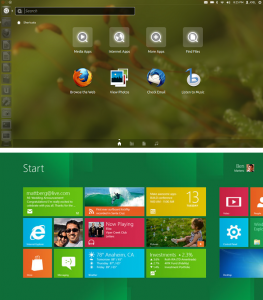
Now let’s have a look at how they differ at first glance, Ubuntu brings their Unity look to the platform whereas Windows 8 brings there new metro look to theirs.

Ubuntu is also a fairly light weight operating system compared to Windows 8 which takes up 16 to 20 GB of hard drive space compared to Ubuntu’s 4.5GB.  Below is a table of a list of relevant comparisons.

Feature/App

Linux

Windows

Cost to end-user

Free

R800 and upwards

Office application choices

Libre & Open Office, Google docs, Office Web Apps, Soft maker Office

Libre & Open Office, Google docs, Office 365 + Web Apps, Microsoft Office suite, Soft maker Office

Space required for installation

OS size 4.5GB

OS size is 16 GB (32-bit) or 20 GB (64-bit)


Risk of software security threats

Almost non existent

Various malicious software, High risk

Email clients

Thunderbird, Evolution, KMail, Opera Mail, Pegasus Mail, Claws Mail

Thunderbird, Evolution, Opera Mail, Pegasus Mail, Claws Mail, Windows Live Mail, Office Outlook

Web Browsers

Google Chrome, Firefox/Waterfox, Opera, Epiphany, Konqueror

Internet Explorer, Google Chrome, Firefox/Waterfox, Opera

Music/Video Players

Rhythmbox, VLC, Songbird, Musique, Clementine, Boxee, Miro

Windows Media Player, VLC, Winamp, Media Monkey, iTunes, Clementine, Zune Player, Foobar2000, RealPlayer, MPC, Gom Player

Instant Messaging

Pidgin, Empathy, Skype, Digsby

Pidgin, Skype, Google Talk, MXit, Digsby, Yahoo Messenger

Image Editors

GIMP, GimpShop, Inkscape, Picasa

GIMP, GimpShop, Inkscape, Picasa, Adobe Photoshop, Paint.net, Adobe Illustrator

Cloud Storage

Ubuntu One, Dropbox, Skydrive ( through SME)

Amazon Cloud drive, Google drive, Skydrive, Ubuntu One, Dropbox

Games services

Steam, Ubuntu Software market, tons of online stores including GOG, many games through WINE

Steam, Origin, uPlay, online stores including GOG, Xbox Live Marketplace, Microsoft Store (Windows 8)


With regards to applications, the list is really endless as there are applications available for free or as paid options of software on Windows, so there are fully-featured versions of apps that do the same thing on Linux. Some of them are free, others are paid for.

The beauty of both operating systems is that you’re not that limited for choice – just a glance at the table shows that there’s more choice for Windows users than ever before. And if you’re more comfortable with the way Windows works, you can still save money in other areas – using Libre Office, Thunderbird and GIMP in place of their paid-for counterparts like Office, Outlook and Photoshop.

Ubuntu and Windows 8 desktops

In terms of user interfaces, both are easy to get used to. I’m not too fond of the way Ubuntu handles maximised applications but that’s okay because you can install any interface you’d prefer. Windows works more or less the same, but there are options, apps and skins to make it look and work the way you want it to.

As far as driver support goes, though, you may struggle here and there with particular objects. Many peripherals and devices are natively supported in the Linux kernel but some require proprietary software to work properly, as in the case of graphics drivers from NVidia, AMD and Intel. All three do support Linux to some degree, although it’s nothing like the support users enjoy on Windows.

So to conclude its entirely up to you with which operating system you go with. This comparison guide should assist you in making that decision in deciding which one suits your requirements from what you looking for in an operating system.

(ARTICLE BY RIYAAD PARKER, IT STUDENT CENTRE)

Safecom – the facts and the futureSafecom – die feite en die vooruitsig

Friday, April 26th, 2013

The mere mention of the word Safecom has been causing a combination of panic and frustration over the last few months – and this just among IT staff. Just like you, our patient users on campus, we’ve been worn out by all the problems. However, the good news is, after months of pulling our hair out, we’re closer to a solution and the light at the end of the tunnel is, indeed, not an oncoming train.

The first time we started seeing problems with Safecom was in September 2012. At this time the load on the printers weren’t as high as it was a fairly quiet time academically. By the end of the academic year the effect on end users, in particular students, was prevalent.

The system we initially implemented was clearly not sufficient for a changing and growing environment. Both the production environment and the product’s attributes changed since the implementation (new upgrades were also released) and consequently the system design wasn’t optimal.

Keeping this in mind, there was decided to call in an international Safecom expert and also a local HP expert to advise us on the current set up and situation. With the assistance of said experts and the IT team significant decisions were made and plans put into place to resolve the situation as soon as possible.

Most of the suggested plan has been executed, but due to the fact that all printers on campus have to be upgraded with new firmware, this is a time consuming exercise. However, a visible improvement has been noted when compared to the previous quarter.

We are aware of certain issues that must still be resolved. IT is continuously coordinating and resolving the existing challenges as fast as possible. These include the creation of more internal system capacity, a more efficient printer driver able to generate smaller printing files, more stable printer firmware, implementing more stable Safecom software on each printer and the optimal functioning of this whole configuration.

We appreciate staff and student’s patience and invite you to report problems at your CUA manager or IT Sevice Centre.


Die woord Safecom wek die afgelope paar maande `n kombinasie van paniek en frustrasie – en dis net by IT-personeel. Want net soos julle, die gebruikers op kampus, is ons ook moeg gesukkel. Die goeie nuus is egter, dat ons na al die maande se gewroeg en naels stomp kou nader is aan `n oplossing en die lig aan die einde van die tonnel inderdaad nie `n aankomende trein is nie.

Safecom se probleme het in September 2012 ontstaan, maar omdat dit `n redelike rustige tydperk was met `n laer lading, was die probleem nie noodwendig sigbaar nie. Met die massas drukwerk aan die einde van die akademiese jaar was die effek op eindgebruikers, en veral studente, egter klinkklaar.

Die stelsel wat aanvanklik implementeer is, was nie voldoende vir ‘n veranderende en groeiende omgewing nie. Beide die bedryfsomgewing  en die produk se eienskappe het oor afgelope paar jaar verander (nuwe opgraderings is onder andere ook intussen uitgerol) en gevolglik was die oorspronklike stelselontwerp nie optimaal nie. 

Met die inagname van bogenoemde is daar besluit om `n internasionale Safecom-deskundige en `n  plaaslike HP-kundige se advies oor die huidige opstelling en stand van sake, in te win. Met die hulp van hierdie kundiges en IT se span is daar sinvolle planne in plek gesit en implementeer om so spoedig moontlik `n oplossing vir die netelige probleem te kry.

`n Groot gedeelte hiervan is reeds suksesvol afgehandel, maar omdat sagteware op alle drukkers opgradeer moet word, is dit vanselfsprekend`n tydrowende oefening. Daar is reeds `n verbetering aan die stelsel se funksionering, in vergelyking met verlede kwartaal, te bespeur.

IT is deurlopend besig om die bestaande uitdagings gekoördineerd en so vinnig as moontlik die hoof te bied. Dit behels onder meer die skep van meer interne stelselkapasiteit, die verkleining van die druklêers deur die implementering van ʼn meer effektiewe drukkerdrywer, die implementering van meer stabiele drukker firmware, implementering van meer stabiele Safecom programmatuur op elke drukker en daarmee saam die optimering van die hele konfigurasie. 

Ons het groot waardering vir die geduld wat personeel en studente aan die dag lê en nooi personeel en studente uit om probleme by die RGA-bestuurders of IT Hulplyn aan te meld.