SEARCH
  • [:en]Recent Posts[:af]Onlangse bydraes

  • [:en]Categories[:af]Kategorieë

  • [:en]Archives[:af]Argiewe

General

DRM – a Central African country?DRM – `n Sentrale Afrikaland?

Friday, April 26th, 2013

The abbreviation sounds like a reference to a Central African country and although DRM has to do with management, it’s about managing something less tangible and with less defined borders.

With the increasing amount of digital content flooding our world, whether it’s music, e-books or video it has become necessary for companies to protect their property by setting certain measures in place. But what is DRM?

We’ve  found the following definition and description on one of our favorite websites –

“Digital Rights Management (DRM) is a type of access control technique used by copyright holders, publishers, and hardware manufacturers to limit the use, manipulation, and distribution of digital content after the initial sale of that content.

Examples of DRM include the encryption of digital video (on DVD and Blu-ray discs) to prevent the purchaser from ripping the content off the disc, locking ebooks to the account with which they were purchased (thus you can read your Amazon-supplied ebook on your Kindle, transfer it to your Kindle app on your iPad, or read in on Amazon.com, but you cannot give that book to a friend or transfer it to your Barnes and Noble Nook), and the restriction of downloaded gaming content to the console or computer with which it was downloaded (you cannot simply copy your Xbox Live Arcade games from your console to the consoles of all your friends).

While publishing and content companies maintain that DRM is necessary to protect their intellectual property and fight piracy, many annoyed consumers note that content locked down by DRM is still widely distributed by pirates yet paying customers are stuck with the frustration of dealing with DRM systems including locked hardware, content they cannot transfer between other devices, and other such inconveniences.”

Today is also World Intellectual Property Day with various activities presented by Stellenbosch University. More info. 


(SOURCE: www.howtogeek.com)

Die afkorting klink soos `n verwysing na `n sentrale Afrikaland en alhoewel DRM ook versigtige bestuur behels, is dit minder tasbaar en strek dit wel oor grense heen.

As gevolg van die drastiese toename in digitale inhoud in ons lewens, of dit musiek, video of e-boeke is, het dit noodsaaklik geword vir maatskappye om hul eiendom te beskerm deur sekere maatreёls in plek te sit. Maar wat is DRM?

Ons het die volgende definisie en verduideliking op een van ons gunsteling webwerwe opgespoor – 

Digital Rights Management (DRM) is `n tipe toegangsbeheer tegniek gebruik deur kopiereg-eienaars, uitgewers en hardwarevervaardigers om die gebruik, manipulasie en verspreiding van digitale inhoud na die verkoop daarvan te beperk.

Voorbeelde van DRM sluit die inkripsie van digitale video (op DVD en Blu-ray skywe) om te voorkom dat die koper nie die inhoud ontsluit nie of die beperking van e-boeke tot die rekening van die oorspronklike koper (jy kan byvoorbeeld you Amazon e-boek op jou Kindle lees of op Amazon.com, maar jy kan nie die boek vir iemand anders aanstuur of gee nie). Dit sluit ook die beperking op die aflaai van speletjies na slegs die rekenaar waarvan die afgelaai is – dus kan jy dit nie kopieer en uitdeel vir vriende nie. 

Onder sekere geledere is daar `n sterk weerstand teen DRM en bly dit `n kontroversiёle onderwerp. Maatskappye voel dis nodig om hul intellektuele eiendom te bekerm en rowery te beveg, maar gebruikers se grootste frustrasie is dat DRM hardeware as’t ware sluit en data nie tussen verskeie toestelle geskuif kan word nie. 

Vandag is ook Wereld Intellektuele Eiendom dag en Stellenbosch Universiteit het verskeie aktiwiteite om bewustheid te kweek georganiseer. Meer inligting. 

(BRON: www.howtogeek.com)

Herding cats & other management functionsWie is aan die (be)stuur?

Friday, April 12th, 2013

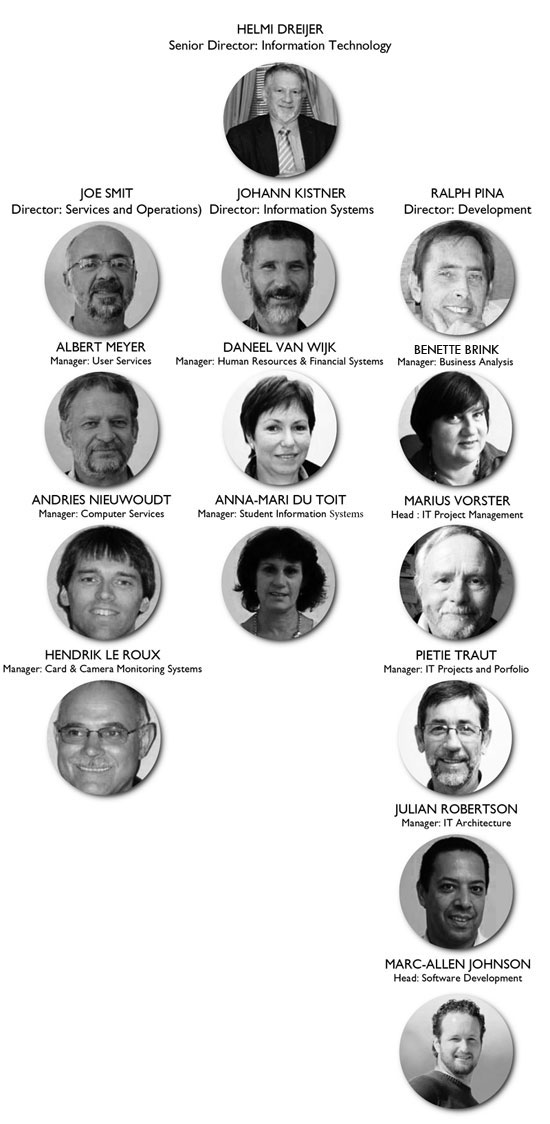
Dave Platt once said “Managing senior programmers is like herding cats.” The IT Division comprises some 105 staff members ranging from support technicians, through system administrators, engineers, software developers to business analysts.  So who are the brave herders who manage this unmanagable group and also the rest of the IT staff?

bestuur-organogram-bw


Read the detailed job descriptions here. 


Dave Platt het per geleentheid gesê “Managing senior programmers is like herding cats.” Die IT-afdeling bestaan uit meer as `n honderd personeellede wat strek van ondersteuningstegnici, stelseladministrateurs, ingenieurs, sagteware ontwikkelaars tot besigheidsanaliste.  So wie bestuur hierdie groep en ook die hele IT-personeel?

bestuur-organogram-bw

Lees die gedetaileerde posbeskrywings hier.

The big drive in the skyTe veel data? Bêre dit op `n wolk

Friday, April 12th, 2013

Last year we told you more about cloud storage, what it is and the multitude of options available to you. (read the articles here) If you haven’t taken the virtual leap yet, we have even more information for you to digest. This time we have a closer look at one of those options, Microsoft’s OneDrive.

What is OneDrive?

OneDrive is a file hosting service that allows users to upload and sync files to a cloud storage and then access them from a Web browser or their local device.

What does OneDrive offer me?

The service offers 7 GB of free storage and additional storage is available for purchase. Files of up to 300 MB can be uploaded via drag and drop into the web browser, or up to 2 GB via the OneDrive desktop application for Microsoft Windows and OS X.

With the OneDrive desktop application for Windows or Mac, your files on OneDrive are available online or offline and update automatically across your devices. You can also access your OneDrive using a brand new app for Android v2.3 or the updated apps for Windows Phone, iPhone, and iPad.

The Office apps (Word, Excel, etc.) let you save your documents by default into your OneDrive directory on your local computer. With the help of OneDrive, those files are synchronized with the files in your OneDrive cloud storage, letting you access them from anywhere, or edit them using the online Web version of Microsoft Office.

Online collaboration is made easy with the new  Office Web apps, including Excel forms, co-authoring in PowerPoint and embedable Word documents. Microsoft added Office Web Apps support to OneDrive allowing users to upload, create, edit, and share Microsoft Office documents directly within a Web browser.

You can share documents with other people, which provides them with a link to access the documents from their own OneDrive account. From there, the other people can make changes to the documents at the same time that you’re changing them. As you’re working, you’ll see the areas you’re changing. Then when you save, your document will receive the updates from the other person before saving. If there are any conflicts, you’ll be notified of them and given a chance to fix them.


When users delete any files on OneDrive, the service will allow the user to undo the action and restore the deleted file from the recycle bin back to the original folder.  All items stored in the recycle bin are kept for a minimum of 3 days and a maximum of 30 days.

OneDrive integrates with social networks such as Facebook, Twitter and LinkedIn to enable users to quickly share their files with their contacts on these social networks. It also supports geo-location data for photos uploaded onto the service, and will automatically display a map of the tagged location. OneDrive also allows users to tag people on the photos uploaded onto the service via the web interface or via Windows Photo Gallery.

Additionally you can sort files, change file views, view photo slide shows, and stream video.  All this functionality in one place, safe up in the clouds.

[SOURCE: Wikipedia]


Verlede jaar het ons julle meer vertel van “cloud storage”, wat dit behels en wat die opsies is as jy jou inligting erens op `n wolkie wil bêre. (lees die artikels hier) As jy nog nie die groot virtuele stap geneem het nie, het ons vandag meer inligting vir jou – die keer spesifiek oor Microsoft se Skydrive.

Wat is SkyDrive?

SkyDrive is a leêr huisvestingsdiens wat aan gebruikers die geleentheid gee om leêrs op te laai en sinkroniseer na `n wolkbergingsfasiliteit en daarna toegang daartoe te verkry deur middel van `n webblaaier of jou plaaslike toestel.

Wat bied SkyDrive my?

Die diens bied 7 GB gratis stoorspasie en ekstra spasie is te koop beskikbaar. Leêrs van tot 300 MB kan opgelaai word deur die webblaaier met `n sleep-en-los-proses of tot  2 GB deur middel van die SkyDrive gebruikskoppelvak-toepassing (desktop app) vir Microsoft Windows en OS X.

Met die SkyDrive gebruikskoppelvlak-toepassing vir Windows of Mac, is jou leêrs aanlyn of van lyn af beskikbaar en word dit outomaties oor alle toestelle opgedateer. Jy kan ook toegang tot SkyDrive verkry deur `n splinternuwe toepassing vir Androi v2.3 of die opgedateerde toepassing vir Windows Phone, iPhone, en iPad te gebruik.

Die Office toepassingss (Word, Excel, etc.) laat jou toe om jou dokumente by verstek na die SkyDrive gids op jou plaaslike rekenaar te stoor. Met die hulp van SkyDrive word daardie leêrs gesinkroniseer met jou dokumente in jou SkyDrive wolkstoorspasie – en gevolglik het jy toegang van enige plek en kan jy jou dokumente aanlyn redigeer met die webweergawe van Microsoft Office.

Aanlyn samewerking word aansienlik vergemaklik met nuwe Office Web toepassings, insluitende Excel vorms, mede-outeurskap in PowerPoint en ingebedde Word-dokumente. As jy dokumente deel met ander mense wil deel, word `n skakel outomaties aan hulle gegee waarmee hulle deur hul eie SkyDrive-rekening toegang tot die dokumente kan kry. Hulle kan veranderinge aanbring aan die dokumente terwyl jy ook daaraan werk en jy kan die veranderinge  sien soos dit verander word. Wanneer jy dus die dokument wil stoor, sal jy die opdaterings van die ander persoon ontvang. Indien daar enige konflikte is, sal jy daarvan in kennis gestel word en die geleentheid kry om dit aan te pas. Jy kan ook die geskiedenis van al die vorige weergawes nagaan.

Indien jy enige dokumente uitvee van SkyDrive, laat die diens jou toe om die aksie te herroep en die verwyderde dokument te herstel na sy oorspronklike leêr uit die Recycle bin. Alle items in die Recycle bin word vir `n minimum van 3 dae gestoor en `n maksimum van 30 dae.

SkyDrive is ten volle geintegreer met sosiale netwerke soos Facebook, Twitter en LinkedIn om aan gebruikers die geleentheid te gee om vinnig leêrs met hulle kontakte te deel op hierdie netwerke. Dit ondersteun ook geo-ligging data vir fotos wat opgelaai word en sal outomaties `n kaart wys indien `n ligging gemerk word. SkyDrive laat ook gebruikers toe om persone te merk op fotos deur middel van die webkoppelvlak of deur die Windows fotogallery. 

Addisioneel tot bogemoemde funksies kan jy ook leêrs sorteer, leêr uitlegte verander, foto skyfievertonings kyk en video stroom. Al hierdie funksionaliteit op een plek, veilig in die wolke.

[SOURCE: Wikipedia]


(more…)

It’s all about memeMemes neem oor

Friday, April 12th, 2013

Years ago it was the dancing baby, now it’s the Harlem Shake. These silly & sometimes shocking internet video clips are called meme’s and they’re just as entertaining and random as their live siblings, flashmobs.

A meme is a phenomenon spreading via the internet and can take on various forms – images (for example the Grumpy Cat and Lol cats photos), video, hashtags, websites or a simple work or phrase.

The word memes was originally coined by evolusionary biologist Richard Dawkins in his 1976 book The Selfish Gene. The word originated from the Greek word  “mimema” (which means “something imitated”). Dawkins described memes as a form of cultural propaganda, a means for people to communicate social memories and cultural ideas to each other. Memes spread organically and just like evolutionary biology, they include mutations and duplications. They spread fast and very rapidly change into different, new versions. People see the original, imitate and change it, and then distribute the new version on the internet.

Telling examples include the dancing baby, dating from 1996, and possibly also one of the first well-known memes. Recently the internet was invaded by the notorious Harlem Shake, a meme that even featuring during a Varsity Cup match.

Came across any interesting memes? Let us know!

[SOURCE: www.howtogeek.com & www.about.com]

Eers was dit die dansende baba en deesdae is die Harlem Shake die nuuste gier.  Hierdie verspotte en soms uitlokkende verskynsels word memes genoem en is net so lukraak en vermaaklik as hul lewendige flitsbende-weergawes. 

`n Meme is `n verskynsel versprei deur middel van die internet en kan in die vorm wees van `n prentjie (byvoorbeeld die Grumpy Cat en Lol-cats fotos), video, hutstekens, webwerwe of `n eenvoudige woord of frase. 

Die woord memes is ook oorspronklik geskep deur evolusie-bioloog Richard Dawkins in sy 1976 boek The Selfish Gene. Die woord “meme” is afgelei van die Grieks “mimema” (wat beteken “iets wat nageboots is”). Dawkins het memes beskryf as `n vorm van kulturele propaganda, `n wyse waarop mense sosiale herinneringe en kulturele idees aan mekaar oordra.  Memes versprei organies en net soos evolusionêre biologie, sluit hulle mutasies en dupliserings in. Hulle kan tipies daaraan herken word dat hulle vinnig ontwikkel in ander, nuwe weergawes. Internetgebruikers sien die oorspronklike, boots dit na, verander en versprei dit deur middel van die internet. 

Sprekende voorbeelde van internet memes, sluit 1996 se dansende baba, en waarskynlik een van die eerste bekende memes, in. Meer onlangs is die internet oorgeneem deur die berugte Harlem Shake wat selfs by `n Varsity Cup wedstryd sy kop uitgesteek het. 

Het jy al op interessante memes afgekom? Laat ons weet!

[SOURCE: www.howtogeek.com & www.about.com]


Free upgrade to Windows 7Gratis opgradering na Windows 7

Thursday, March 28th, 2013

Are you still stuck with an outdated pc running Windows XP? We have some good news for you! From now until 15 December 2013 upgrades from Windows XP to Windows 7 will be done for free!

All you have to do, is send us an email to help@sun.ac.za to request the upgrade. Please include the following information in the e-mail:

–  the work station’s asset number

–  contact telephone number

–  building name

–  room number

An IT technician will contact you as soon as the work station’s specifications have been checked. Older workstaions may need components for the upgrade and this will be for the account of the department.

IT will do the following without charge:

  1. Upgrade the operating system from Windows XP to Windows 7

You will have to pay for:

  1. Backups of work related data (including MS Office extensions, .pst files)
  2. The backup of personal data such as music files, video files and movies
  3. Hardware components necessary for the upgrade to Windows 7

If IT is requested to backup data, the cost will be as follow:

Less than 15GB – R950-00

More than 15GB – R1650-00


Sit jy nog opgeskeep met `n verouderde rekenaar met Windows XP? Ons het goeie nuus vir jou! Tot die 15 Desember sal IT jou rekenaar gratis opgradeer van Windows XP na Windows 7.

Al wat jy moet doen, is om `n e-pos te stuur na help@sun.ac.za om `n opgradering te versoek. Sluit asseblief die volgende inligting in:

–  die werkstasie se batenommer

–  kontaktelefoonnommer

–  gebounaam

–  kamernommer

‘n IT tegnikus sal u kontak sodra die werkstasie se spesifikasies nagegaan is. Ouer werkstasies mag komponente benodig en hierdie uitgawe sal vir  die departement se koste wees.

IT sal die volgende gratis doen:

  1. Opgradering van XP na Windows 7

Jy sal moet betaal vir:

  1. Rugsteun van jou werksverwante data.
  2. Rugsteun van persoonlike data soos musiek, video en flieks.
  3. Hardeware benodig vir die opgradering na Windows 7

Indien IT versoek word om data te rugsteun, sal die koste as volg wees:

Minder as 15GB – R950-00
Meer as 15GB – R1650-00