
SEARCH
  • [:en]Recent Posts[:af]Onlangse bydraes

  • [:en]Categories[:af]Kategorieë

  • [:en]Archives[:af]Argiewe

General

QVT Terminal discontinued from 1 March 2013QVT Terminaal beëindig vanaf 1 Maart 2013

Wednesday, February 6th, 2013

Out with the old, in with the new. Through the years most of us made use, at some stage, of the university’s administative system (QVT) and we got used to the black screen with it’s neon green digits.

Unfortunately QVT’s time has come and it’s replacement is here.

Last year we announced the phasing out of the administrative programme, QVT Term and announced it’s replacement Tera Term. Most staff should have Tera Term installed by now and use the software without any problems.

If, however, you are still using the old QVT programme, please take note that, as of the first of March, Tera Term will be the only available programme for administrative functions.

You will be contacted by an IT representative during February for an appointment for the removal of the old software.

The icon for Tera Term looks slightly different that the previous QVT icon, (see below). To start using Tera Term, go to Start, All Programs, Tera Term and choose Sentrale Rekenaars.

For any information, e-mail the IT Helpdesk at helpinfo@sun.ac.za.


Uit met die oue, in met die nuwe. Deur die jare het die meeste van ons al kennisgemaak met die administratiewe stelsel, of te wel QVT en gewoondgeraak aan die swart skerm met sy neongroen lettertjies.

Ongelukkig het QVT sy vervaldatum bereik en het die behoefte al groter geword vir `n plaasvervanger.  

Daar is verlede jaar aangekondig dat die administratiewe program, QVT Term binnekort vervang sal word met `n nuwe program, Tera Term. Alle personeel behoort teen die tyd reeds Tera Term geinstalleer te hê en te gebruik.

Indien jy nog gebruikmaak van die ou QVT administratiewe program, neem asseblief kennis dat, vanaf 1 Maart, Tera Term die enigste beskikbare program vir administratiewe funksies sal wees. Alle gebruik van QVT word vanaf bogenoemde datum beeindig.

Gedurende Februarie sal `n IT-verteenwoordiger u kontak om `n afspraak te maak vir die verwydering van die ou sagteware.

Die ikoon vir Tera Term lyk anders as QVT, (sien onder). Om Tera Term te begin gebruik, gaan na Start, All Programs, Tera Term en kies Sentrale Rekenaars.

Vir enige navrae, e-pos gerus die IT Dienstoonbank by helpinfo@sun.ac.za.

Forgot your password after the holiday?Wagwoord vergeet na die vakansie?

Friday, January 25th, 2013

Forgetting your password after the holiday only means one thing – you had a long, good rest and managed to forget about work. The only problem now is getting access to your computer …

Well, you’re not the only one. Unfortunately the IT Service Desk is inundated with calls this time of year exactly for this reason. But did you know you can save yourself the frustration and reset it yourself by using the Password Self help function online? Not only is this system fast and effective, but it’s also more secure because you’re changing your password yourself.

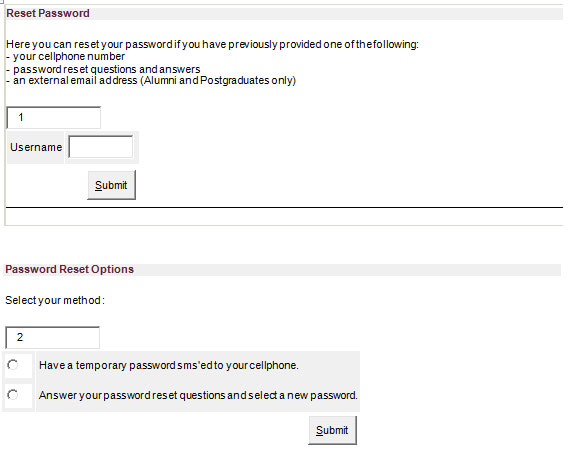
The password selfhelp function can be found on the staff portal (my.sun.ac.za) by clicking on “Forgot password”. The following prompts will appear. Just follow the two easy steps and you’ll be able to change your password.

Take note that your cellphone and other personal information has to be up to date on SUN-e-HR  to make use of this function. If you experience any problems with the system, send an e-mail to help@sun.ac.za

As jy jou wagwoord na die vakansie vergeet het, beteken dit dat jy `n lekker lang vakansie gehad het en vir `n verandering afgeskakel het. Die enigste probleem is nou om weer toegang tot jou rekenaar te kry …

Jy is nie die enigste een nie. Maar ongelukkig word die IT Dienstoonbank juis om hierdie rede dié tyd van die jaar oorval deur versoeke om wagwoorde te verander. Het jy egter geweet dat jy nie eers die dienstoonbank hoef te kontak nie, maar dit sommer self vinnig kan verander deur middel van die aanlyn Wagwoord Selfhelp-funksie? Dié funksie is nie net vinnig en effektief nie, maar ook meer sekuur omdat jy self verantwoordelik is vir jou wagwoord.

Die wagwoord selfhelpfunksie kan opgespoor word op die personeelportaal (my.sun.ac.za) deur te kliek op “Wagwoord vergeet”. Onderstaande skermpie sal verskyn en volg net die twee stappe om jou wagwoord te verander.

Om seker te maak dat jy van hierdie funksie gebruik kan maak, gaan asseblief na of jou selfoonnommer en ander persoonlike inligting op die SUN-e-HR op datum is. Indien jy enige probleme ondervind met die stelsel, stuur asseblief aan ons `n e-pos by help@sun.ac.za

What is bandwidth?Wat is bandwydte?

Friday, January 25th, 2013

We often hear people talking about bandwidth and we know that higher bandwidth is usually a good thing. But what does the term “bandwidth” mean?

“Bandwidth, when used in the computational terms, is the amount of data that can be transferred over a given connection in a set period of time. The speed of many things such as internet connections, local network connections, and even local connections between host computers and peripherals are frequently described in terms of bandwidth.

Bandwidth is usually noted in the format of bits-per-second (or whatever multiple of bits-per-second is most practical for the application). Thus you will frequently hear Internet Service Providers toting that their top-tier residential internet connection offers 50Mbit/s or an article on a technology blog explaining that a new cable standard offers a 2Gbit/s increase in available bandwidth over the previous standard.”

SOURCE: www.howtogeek.com

Ons hoor gereeld mense praat van bandwydte  en ons weet ook dat hoër bandwydte `n goeie ding is. Maar wat beteken “bandwydte”?

Bandwydte, as dit in rekenaarterme gebruik word, is die hoeveelheid data wat oorgedra kan word binne `n sekere periode deur middel van `n verbinding. Die spoed van internetverbindings, plaaslike netwerkverbindings en selfs plaaslike verbindings tussen rekenaars en toestelle word dikwels gemeet in terme van bandwydte.

Bandwydte word normaalweg aangeteken in `n bits-per-sekonde eenhede. Jy sal dus gereeld hoor dat internetverskaffers spog dat hulle beste tuis internetverbinding 50Mbit/s kan verskaf of die universiteit se netwerkverbindings opgegradeer gaan word na 10Mbit/s.

BRON: www.howtogeek.com

US network picks up speedUS-netwerk tel spoed op

Friday, January 25th, 2013

Just like Lance Armstrong over the past few years, the university network also became faster over the past few months. Luckily we don’t have any dubious activities to declare.

Last year the decision was made to start upgrading the network of all academic buildings, as well as student residences. The project entails the upgrade of fibre connections to the central IT core.

Until recently a large part of buildings on campus were still equipped with outdated cabling which caused network connections to be slow and unresponsive. The existing network was also not geared for the growing capacity and needs of it’s users.

Therefore it was decided to standardise all buildings as soon as possible and upgrade from 1Gbit per second to 10Gbit per second bandwidth. This project forms part of the greater aim to ensure the SU network will have the ability to supply adequate bandwidth to meet growing academic demands. After the upgrade, the university will be ready for future applications and services which will potentially require higher bandwidths for optimal functioning.

Thirteen academic buildings and seven student residences have been upgraded to higher speeds. The remaining buildings and residences will be upgraded over the next few months. Upgrades will, as far as possible, be done over lunch times or after hours and departments will be notified beforehand if down times will occur.

Dis nie net Lance Armstrong wat vinniger geword oor die afgelope paar jaar nie. Die US-netwerk het ook die afgelope paar maande begin spoed optel. Gelukkig het ons nie twyfelagtige aktiwiteite om te verklaar nie.

Sedert verlede jaar is daar beplan om alle akademiese geboue en koshuise se veselkoppelinge na die IT “core”, waar alles bymekaar kom, op te gradeer. Die grootste gedeelte van geboue op kampus was tot onlangs nog bekabel met verouderde bekabeling. As gevolg hiervan was netwerkverbindings soms stadig en kon nie die groeiende kapasiteit en behoeftes van gebruikers hanteer nie.

Daar is gevolglik besluit om so spoedig moontlik alle geboue te standardiseer en op te gradeer vanaf 1Gbit per sekonde na 10Gbit per sekonde bandwydte. Hierdie projek vorm deel uit van die groter plan om die US-netwerk van voldoende bandwydte te voorsien sodat die groeiende akademiese behoeftes vervul kan word. Na die opgradering sal die universiteit gereed wees vir die applikasies en dienste van die toekoms wat potensieël hoë bandwydte benodig om optimaal te funksioneer.

Dertien akademiese geboue en sewe koshuise is reeds opgegradeer na die nuwe spoed bekabeling. Die res van die geboue en koshuise op kampus word oor die volgende paar maande aangepak. Opgraderings word so ver moontlik oor middagetes of na-ure geimplementeer en departemente sal vroegtydig in kennis gestel word indien enige aftyd mag voorkom.

Want to give something back this festive season?Wil jy dié Kersfees iets teruggee?

Thursday, December 13th, 2012

Maybe you’ve considered contributing to charity in some way, whether by fundraising, volunteering or buying Christmas presents for the less fortunate over the festive season. But how do you know which organisations really need your help and how do you go about assisting them?

GivenGain, based in Stellenbosch, aims to provide these organisations with the platform and means to manage their fundraising and enables you as individual to get involved.

The GivenGain Group was founded in July 2001 by two brothers inspired by the idea that “it is more blessed to give than to receive”. Eleven years later the foundation is stronger than ever, spans over the South African border to Switzerland and has become an integral part of the organised, private, non-profit sector. During this time, GivenGain Foundation has processed more than R400 million in donations.

The GivenGain Foundation helps non-profit organisations build strong, sustainable funding models and also assists individuals to achieve extraordinary things while raising money for their favourite causes. The GivenGain platform enables non-profit organisations to mobilise their online fundraising at a fraction of the traditional time and cost while enabling individuals to fundraise online for projects on their behalf in a secure way.

To support your favourite non-profit organisation (cause) this festive season, go to www.givengain.com/causes and search by Cause or Keyword. Or would you like to start a Christmas project  on behalf of an organisation and invite your friends to support the cause? Then the Activist initiative is for you – www.givengain.com/learn/activists/

For more information visit www.givengain.com or send an email to support@givengain.com

Jy het dit dalk al oorweeg om uit te help met liefdadigheidswerk, of dit nou geld insamel, vrywilligerswerk, of Kersfeesgeskenke vir minderbevoorregte kinders koop, is. Maar hoe weet jy watter organisasies regtig hulp nodig het en hoe gaan jy te werk om hulle te help?

Gelukkig is daar `n stigting soos die Stellenbosch-gebaseerde GivenGain wat spesifiek daarop gemik is om `n platform aan hierdie organisasies te bied.

Die GivenGain-groep is in Julie 2001 gestig deur twee broers wat geinspireer is deur die idee dat dit beter is om te gee as om te ontvang. Elf jaar later loop die maatskappy van krag tot krag, strek dit oor die Suid-Afrikaanse grense tot in Switserland en het dit `n integrale deel geword van `n georganiseerde, privaat, nie-winsgewende sektor.

Gedurende hierdie tydperk het die GivenGain Stigting reeds R400 miljoen in donasies ingesamel.

Die stigting help nie-winsgewende organisasies om sterk, volhoubare befondsingmodelle te bou en help individue om ook ongelooflike doelwitte te bereik terwyl hulle geld insamel vir hulle gunsteling instansie. Die GivenGain-platform stel nie-winsgewende organisasies in staat om hul fondsinsameling veilig, vinnig en koste-effektief aanlyn te bestuur en gee aan individue die geleentheid om namens organisasies aanlyn fondse in te samel vir spesifieke projekte.

Om jou gunsteling nie-winsgewende organisasie  dié Kersfees te ondersteun, gaan na www.givengain.com/causes en soek volgens organisasie of sleutelwoord. Of wil jy ‘n Kersfeesprojek opstel ten bate van ‘n organisasie en jou vriende uitnooi om dit te ondersteun? Ondersoek gerus die Aktivis-inisiatief by www.givengain.com/learn/activists/

Vir meer inligting, gaan kyk by www.givengain.com of stuur `n e-pos aan  support@givengain.com