SEARCH
  • [:en]Recent Posts[:af]Onlangse bydraes

  • [:en]Categories[:af]Kategorieë

  • [:en]Archives[:af]Argiewe

General

Stop waiting and start updating

Friday, March 31st, 2023

[:en]

Why Windows Updates are crucial for your device’s health

This article was compiled by Elnita Jacobs, Computer Technician 1: IT General Support Services, and Bradley van der Venter, Senior Configuration Specialist: IT General Support Services.

In today’s world with the ever-changing threat landscape, keeping our devices up to date is essential for ensuring they run smoothly and securely. Windows Updates is one of the most critical updates we need to keep up with. 
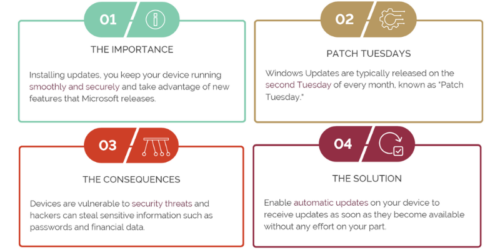
Windows Updates visual


1 – The Importance

Firstly, let’s talk about why installing Windows Updates is so important. These updates are designed to fix bugs and vulnerabilities in the operating system, improve performance, and add new features. This means that by installing updates, you can keep your device running smoothly and securely and take advantage of new features that Microsoft releases. Windows Updates can also help to protect your device from malware and other security threats, making them a critical part of your device’s overall security.

2 – “Patch Tuesdays”

It’s also worth noting that Windows Updates are typically released on the second Tuesday of every month, known as “Patch Tuesday”. This means that by default, Windows Updates are enabled to install automatically, and you can expect your device to receive updates shortly after this date each month. Additionally, if you fail to restart your device after updates have been installed, Windows will force a restart after seven days to ensure compliance. 

Please note that this is not enforcement from Stellenbosch University (SU) but from Microsoft. 

This is important to keep in mind, as it ensures that your device stays up-to-date and secure, even if you forget to restart after installing updates. For example, suppose you restart your device immediately after updates are installed. In that case, you minimise the risk of, for example, being in a meeting and then Windows notifying you that it will restart in approximately 20 minutes. 

This will only happen if you haven’t restarted your device for more than seven days after installing the Windows Updates. 

3 – The Consequences

Now, let’s consider the consequences of failing to install Windows Updates. First, when you fail to update and restart your device, you leave it vulnerable to security threats. Hackers can exploit the operating system’s vulnerabilities to gain access to your device and steal sensitive information such as passwords and financial data. Malware can also infect your device, causing it to slow down, crash, or render unusable. Additionally, failing to update your device can result in poor performance, as bugs and other issues can accumulate over time, making it harder to use your device efficiently.

One of the most significant risks of not updating your device is the possibility of data loss. If your device becomes infected with malware or crashes due to bugs, you may lose important data such as documents, photos, and videos. This can be devastating, particularly if you have not backed up your data. Additionally, if you use your device for work, you may risk losing valuable business data, which can be catastrophic for your business.

4 – The Solution

What can you do to ensure that you are keeping your device up to date? The simplest solution is to enable automatic updates on your device (Stellenbosch University Windows Asset devices joined to the domain have this enabled by default). This will ensure that your device receives updates as soon as they become available without any effort on your part. Alternatively, you can manually check for updates by going to the Windows Update in the Settings option on the Start Menu. Restarting your device regularly after installing updates is also important, as this ensures that they are fully installed and can take effect.

In conclusion, installing Windows Updates is crucial for ensuring your device runs smoothly and securely. By keeping your device up to date, you can take advantage of new features, improve performance, and protect yourself from security threats. Failing to update and restart your device for updates can lead to poor performance, data loss, and security vulnerabilities. So, ensure you enable automatic updates or manually check for updates regularly, and always restart your device after installing updates.

Reference:

[:]

[:en]Meet your Computer User Area (CUA) Manager[:]

Wednesday, February 22nd, 2023

[:en]

As registered students, you have access to a CUA and passionate staff to help you along your journey. It is a privilege to introduce them to you:

FHARGA: Faculty of Economic and Management Sciences


FIRGA: Faculty of Engineering


GERGA: Faculty of Health Sciences


HUMARGA: Faculties of the Arts, Education, Law and Theology and Disability Unit

NARGA: Faculties of Science and AgriSciences

[:]

[:en]Getting to know SUNLearn[:]

Wednesday, February 22nd, 2023

[:en]

The first few weeks of being a first-year student at Stellenbosch University (SU) can be overwhelming. Getting to know how SUNLearn, the university’s electronic learning management system works – and familiarising yourself with the terminology that goes with it, can be daunting. We want to encourage you to stay calm and to reassure you that help and support are at hand!

SUNLearn has been in operation since 2014 and, through the years, it has been improved to make it increasingly accessible and user friendly for both staff and students to navigate. On top of that, the SUNLearn learning technology support team is in place to help students with all their queries.

In this article, we asked the people responsible for SUNLearn to take students on a welcome journey to understand the system so that they are able to use it and are better prepared for their academic year. We picked the brains of Dr Lianne Keiller – Manager: Learning Technology Systems and Morris Samuels – E-Learning Technical Officer at SU to answer some of the most frequently asked questions related to onboarding.

According to Dr Keiller and Mr Samuels, an important thing students need to note is that only students who have completed their registration process will have access to SUNLearn.

“We have found that sometimes students forget to complete their registrations at the beginning of the year; and then they start classes and realise they cannot get into SUNLearn and cannot access their content or their modules. So you have to be registered first before you will have access to SUNLEearn,” Dr Keiller said.

Below are some of the more common questions asked by first-year students at Stellenbosch University.

What, in a nutshell, is SUNLearn?

LIANNE KEILLER: SUNLearn is the name of the learning management system we use at Stellenbosch University. A learning management system (LMS) is an online space where a student can manage their learning and their interactions with their lecturers and with each other.

SUNLearn is where lecturers will upload all the content for a lecture, or they might even conduct a lecture on SUNLearn if they are doing it virtually. SUNLearn also allows the creation of spaces where students can talk to each other on discussion boards and can send private messages within the LMS. If a student is registered for a module, there is a SUNLearn space for it and the lecturer is the one who decides how to put things onto the module.

A number of lecturers make use of the SUNLearn system for tests or exams for the students to do online.

From an IT perspective, the SUNLearn system is supported by a small team which is dedicated to making sure that the student and lecturers’ experiences are as simple and easy as possible.

What is your message to students who are feeling overwhelmed at the thought of using the SUNLearn system?

MORRIS SAMUELS: Students should not be overwhelmed. Using SUNLearn is as easy as accessing any web page on the internet.

How do students access SUNLearn?

MORRIS SAMUELS: SUNLearn can be accessed via any web browser on a computer, mobile phone or tablet. In the address bar of the browser, type in learn.sun.ac.za and press ‘ENTER’. On the SUNLearn homepage, click on the ‘Log in’ link that is located in the top righthand corner to navigate to the ‘Single Sign-on login page where you will need to enter your username (student number) and the password set for it.

Alternatively, you can also access SUNLearn via the MY.SUN entry page by typing in my.sun.ac.za in the address bar of the browser. When the page opens you will be prompted to enter your network login credentials. Once you are logged in, locate the shortcut link for SUNLearn and click on it to open the SUNLearn Dashboard page where you should see all your registered modules. Most students access SUNLearn and other university systems via the MY.SUN entry page.

What should students do if they need support in using SUNLearn, or if they encounter problems?

MORRIS SAMUELS: The important thing for students to understand is that the IT help desk is there for general IT information and support, but, in terms of SUNLearn, there is a dedicated support team which falls under my leadership.

The SUNLearn learning technology support team deals with any queries related to SUNLearn. For example, if a student finds that a registered module is not listed on their course overview page or if, for some reason, they cannot access a module on SUNLearn, then the SUNLearn learning technology team is your port of call to report that.

How do students access the SUNLearn learning technology team to get help with a problem?

MORRIS SAMUELS: The correct way to get support is to log a ticket on the SUNLearn service desk. This should by using the portal at www.learnhelp.sun.ac.za. Alternatively, you can call the support desk on 021 808 2222.

If, for some reason, students struggle to log a ticket via the learnhelp.sun.ac.za portal, they can also send an email to learn@sun.ac.za to automatically log a ticket on our service desk.

What do students do if they’ve logged into SUNLearn but there is no content in the module or there are no notes or any activities in the module?

MORRIS SAMUELS: Lecturers are responsible for uploading the content and for the visibility of content in their modules on SUNLearn. Students with this problem should first contact the lecturer directly about uploading notes if there is nothing there and they expected to see something.

What does a student do if they are unable to log into SUNLearn; in other words, they are registered but unable to log in to SUNLearn.

MORRIS SAMUELS: If this happens, there may be a problem with your password or it needs to be updated on www.sun.ac.za/password.

On which of my devices can I access SUNLearn?

MORRIS SAMUELS: You can access SUNLearn on any device – your mobile device, your laptop or your tablet. There is also an app for the learning management system you can download from the Apple app store or Google Play store. SUNLearn is zero-rated. This means that it doesn’t use any of your mobile data to access the Moodle app (the system SUNLearn is built on) or the LMS via your mobile browser.

In a final word of advice to students, Mr Samuels had this to say: “First-year students, don’t call your mother, call us! We’ve had a few phone calls from mothers or fathers on behalf of students, who are sitting in class, struggling with SUNLearn. Don’t ask your parents to call us – rather call us yourselves. Our support services are easy to use and we are here to help.”

The online learning support page contains the full range of tips on logging in, loading print credits and other tips.

Also on the technology onboarding page, students can find information on how to connect to wifi on campus. Here is the direct link to that information: https://tech.sun.ac.za/faq/#step-11-apps-to-download. It is located under the frequently asked questions (FAQ) section on that page.

[:]

[:en]Tidy up your tech before you leave [:]

Thursday, December 15th, 2022

[:en]

We are all looking forward to escaping for a well-deserved break over the December holiday season. But before you leave, there are a few things you can do now to ensure that your return is seamless.

Here are a few tips: 

  1. Activate your Out of Office function on your sun.ac.za Outlook mailbox and indicate in the message when you will be available again in case someone needs to contact you. Also, indicate who will be responsible during your time away and add their email address to your Out of Office.
  2. Make sure that your relevant work-related data is accessible for usage by your colleagues while you are away. However, do NOT give your password to colleagues when as this poses a security risk.
  3. If your sun password might expire during your holiday, rather change it before you go. If it expires while you are away you will be locked out of your account and it will cause unnecessary stress to deactivate it in January. 
  4. If you receive a phishing email on your sun account over the holiday and clicked on links or typed in your username and password, your account may be compromised. Immediately change your password at www.sun.ac.za/password and log a service request on the ICT Partner Portal. Your device will then be checked and scanned after the holiday. Remember that you can also report spam directly to Microsoft by using the handy Report Message function in Outlook.
  5. IT will be on skeleton staff between 15 December – 15 January 2023, even by saying that we will continue to deliver our services without any delays or disruption. Please log all requests on the Service Desk Portal.

[:]

[:en]SU takes great leap forward into cloud era[:]

Monday, October 24th, 2022

[:en]

hand touching visual screen with icons floating above it

Stellenbosch University is currently in the process of taking a “great leap forward” into the “cloud” era, which will see the new finance and student systems, SUNFin and SUNStudent, operating in the cloud.

This is not only going to make all the difference to security against cyber threats but will also make the university’s systems more efficient and accessible, in a number of ways, for students and staff. The move into the cloud, which is the culmination of years of work, will take SU into an entirely different risk profile, said Marc-Allen Johnson, acting director IT Institutional Software Systems at SU.

“This is a big step in the right direction, as the threat of cyber fraud at universities is growing all the time, all over the world,” Mr Johnson said in an interview. To date, most of the university’s administrative systems have been housed on premises, in a data centre on campus. “But now they will be housed in the cloud, running in data centres in Johannesburg and Cape Town, and according to the latest standards in technology, to ensure that the personal information of both students and staff remains secure,” Mr Johnson said.

“At the same time, once fully operational, it will be possible to access the systems from anywhere without having to be affected by loadshedding or interrupted internet connectivity on the Stellenbosch campus. So, we are providing a much-improved service, while ensuring a secure system.”

Elaborating on the two new systems, SUNFin and SUNStudent, Mr Johnson said SUNFin refers to the university’s new financial system. “It is an Enterprise Resource Planning (ERP) system that SU will use to manage day-to-day business activities of the Finance capability within the organisation. It manages all the key financial requirements that a university has to fulfil to ensure that the books balance, that people get paid and that we manage our finances well. The implementation of the SUNFin project has been under way for the last two to three years.”

“SUNStudent refers to the new system that supports the Student Administration capability and all the related student services. The SUNStudent system will usher in a modern, integrated and cloud-based solution that will allow key university capabilities like Registration, Bursary Awards, Assessment and Degree Audits to be supported in a secure way. Although the staff and students have always had access to self-service functionality, the modernised interface provides it all levels. The new Application and Admission process went live in 2021 and facilitated a significant jump in the number of applicants and demographic.”

Mr Johnson said the university is planning to be fully operational with both systems by the end of next year. The application and admissions functionality of SUNStudent have already been live for two years.

He said that, for the IT team at the university, the new moves address “quite a few risks”. “We have legacy administrative systems of between 20 and 30 years old at the university. Through the years, the demands on these systems have been continuously growing and the world continues to throw security challenges our way. We’ve responded by making changes ourselves, but the technical debt has grown untenable over the years. Coupled with a technology that the industry is not actively pursuing anymore and people who have been part of building these systems retiring, it was necessary to make a leap.

“So, it is a great relief for me to see us moving into a new era where we are implementing software solutions that will last another 30 years. It is also exciting to know that, from now on, our system will be continuously improving and remain up to date.”

Part of the improved efficiency, he said, was the fact that the IT Division will work in close partnership with vendors like Oracle and Serosoft “to ensure that we have security by design”.

“We also know that we are not their only client, which means that we benefit from the collective. For instance, if they implement enhanced security measures, or conduct vulnerability tests for one client, they implement it for all of us. That is one of the benefits of going to the cloud –the vendor takes responsibility to keep the system up to date and secure according to a contract.”

Mr Johnson said that in the past many institutions bought software “off the shelves from a vendor” and then tried to maintain their systems themselves.

“But then they fall behind the latest versions and patches which opens them up to security risks. By moving to the cloud, Stellenbosch University will receive regular updates and be assisted regularly, and we will not fall behind as new functionalities are released.”

Mr Johnson said that the mechanisms implemented by the new systems will be a great deterrent to the ever-present cybersecurity threats.

“I recall a quote, often attributed to Thomas Jefferson, – “The price of freedom is eternal vigilance” – and it really rings true. With these new systems, we have invested in a solution that will continuously be kept up to date. Yes, along with the vendors, our team will have to be continuously vigilant, but it means newly discovered vulnerabilities will be quickly patched by our partners. We are contractually partnered with our vendors to provide that level of surety.”

Mr Johnson said once the system is up and running, “we will all sleep easier”.

“As the research shows, one of the most difficult IT challenges at any institution is to implement a new system. It involves a lot of change and the switchover from the one system to the other is a risk that can be easily exploited by people wanting to do harm.

“For instance, if cyber criminals know that a new system is being implemented, they could send out an email to a student or staff member and invite them to click on a link to be “onboarded” on the new system – potentially leading to compromised credentials. During this period of transition, we have to promote a heightened awareness and ensure we educate all students and staff about the risks. Our teams monitor and respond to phishing attacks like these that target our users. One of the measures that counter the reach of these attacks is to implement multi-factor authentication. For instance, when you log into the system, you receive a prompt to either supply a one-time PIN or approve the log in using a mobile app. For many staff and students, it feels like a burden, but that simple act is an important deterrent, because if someone gets hold of your username and password it makes it much harder to get past that hurdle.

“We can try to put in place as many security measures as we can, but if the attacker manages to use phishing techniques to trick a student or staff member to disclose their username or password, it could give the attacker access to sensitive information. This is a critical threat to administrative systems and something we are obviously concerned about, hence measures like Multi-factor Authentication.”

Mr Johnson continued: “SUNFin and SUNStudent will not only provide better functionality, to enable us to become a more modern and efficient university, but they will also make us more resilient to cyber-attacks. However, we really need everyone’s help to be vigilant by educating oneself and being on the lookout for suspicious messages. All students and staff are encouraged to reach out to us if they have any doubts or queries about suspicious emails or notifications they receive. Our IT support desks and relationship managers are there to assist, especially during this transition period to final implementation of SUNFin and SUNStudent.”

[:]