SEARCH
  • [:en]Recent Posts[:af]Onlangse bydraes

  • [:en]Categories[:af]Kategorieë

  • [:en]Archives[:af]Argiewe

Internet

High internet usage problematicHoë internetgebruik problematies

Friday, May 29th, 2015

Our service desk has been inundated with calls regarding high internet accounts over the past two weeks.

In one incident unusually high traffic on a user’s account was detected. When investigated it came to light that someone else saw him type his password and used it to download illegal series from the internet.

Information Technology can’t safeguard users in against incidents like these. Unfortunately it remains your sole responsibility to keep your password safe,

Sharing of usernames and passwords are still commonplace on campus, as is writing passwords down on post-its and leaving them on desks.

It’s just as important to keep your network password safe as it is to keep your bank card’s PIN number safe and surely you won’t share your PIN with someone?

With your password someone can not only access your internet, but also your e-mails containing bank and other private information, as well as human resources information – including your salary information! The risk remains the same.

Make sure you use a strong password. Microsoft has some clear guidelines on this.

Always close Inetkey when leaving your PC or lock your PC (ctrl+alt+del). If it’s open, anyone can use it and there’s no way for IT to establish who really used the account if you logged in.

Regularly check your internet usage and make sure you don’t get any nasty surprises. Your internet balance is displayed on the Inetkey prompt box and can also be checked at www.sun.ac.za/useradm.

Keep in mind that the university internet speed and your ADSL line at home aren’t the same speed. You might assume because you’re spending the same amount of time online, it will cost you the same, but downloading is much faster on the university network.

If you notice a sudden increase in your internet usage, lodge a query at IT at the cost of R200-00. More information on internet usage on the SU network can be found in our service catalogue.

Die dienstoonbank is die afgelope twee weke oorval met navrae oor hoë internetrekeninge.

Tydens een insident is buitengewone hoë internetverkeer by `n personeellid se rekening opgemerk. Met nadere ondersoek het dit geblyk dat iemand gesien het hoe hy sy wagwoord intik en dit daarna gebruik het om onwettig reekse daarmee af te laai. 

Informasietegnologie kan gebruikers nie beskerm teen gevalle soos hierdie nie. Dit bly uitsluitlik jou verantwoordelikheid om jou wagwoord veilig te hou.

Daar is steeds personeel wat hul gebruikersname en wagwoorde met ander deel of dit sigbaar op `n stukkie papier op hul lessenaar tentoonstel.

Dis net so belangrik om jou netwerk-wagwoord veilig te hou as jou bankkaart se PIN-nommer en jy sal sekerlik nie jou PIN-nommer vir iemand gee nie?

Met jou netwerk-wagwoord kan iemand nie net toegang kry tot jou internet nie, maar ook tot e-posse wat jou bankdetail en persoonlike informasie bevat, sowel as jou menslike hulpbronne inligting – insluitend jou salarisinligting! Die risiko bly dieselfde.

Maak seker dat jy `n goeie, sterk wagwoord het. Microsoft het goeie riglyne daarvoor. 

Bo en behalwe goeie wagwoordpraktyk, moet jy onthou om altyd jou Inetkey toe te maak as jy weg is van jou rekenaar of jou rekenaar te sluit. (ctrl+alt+del) As dit oop bly, kan enigiemand dit gebruik en daar is geen manier vir IT om te bepaal wie jou internet gebruik het as jy die een was wat dit ontsluit het met jou wagwoord nie. 

Gaan gereeld jou internetgebruik na sodat jy nie aan die einde van die maande `n verrassing kry nie. Jou internetbalans verskyn op die Interkey aantekenblokkie en kan ook nagegaan word by www.sun.ac.za/useradm.

Hou in gedagte dat die spoed van die universiteitnetwerk en jou ADSL-lyn by die huis nie dieselfde is nie. Jy mag dink dat dieselfde hoeveelheid tyd op die US-netwerk jou dieselfde gaan kos as by die huis. Die universiteitnetwerk is baie vinniger en jy gaan meer data vinniger gebruik.

As jy `n ongewone toename in jou internetgebruik opmerk, kan jy `n navraag rig aan IT teen die koste van R200-00. Verdere inligting oor internetgebruik op die US-netwerk kan in ons dienskatalogus gekry word.

Online shopping on the increaseAanlyninkopies aan die toeneem

Friday, May 29th, 2015

987110_basket_reflection

Whether you’re a bookworm who frequently visits the Exclusive Books’ website or a techie who always finds a gadget on Takealot – there’s an online shop for everyone.

Although online shopping isn’t the default shopping choice for South Africans, this is changing.

In January of 2015 Statistica.com reported that 40% of internet users worldwide bought products online – that’s 1 billion online shoppers. This amount will increase as more efficient encryption and security measures are developed.

In South Africa the percentage of buyers is around 22% and 48% of internet users claim they might be using the internet for shopping in future. (Survey conducted by IPSOS on behalf of PayPAL and FNB) If we consider that South Africa has the best developed economy in Africa and 86% adults own a cellphone, predictions by IPSOS and Statistica.com aren’t so far-fetched.

Studies show a noteworthy increase in internet purchases, as well as the amount users spend.

The SA council of shopping centres (SACSC) claim that serious internet users already conduct 50% of their shopping online and spend up to R2500 per month. Lighter users make around 14 transactions and spend R350 per month. Shoppers also tend to first do research on a product online and then buy it in the shop.

But where do South Africans like to shop and what do we buy? Woolworths, Exclusive Books and Pick ‘n Pay’s online versions seem to be most popular, while exclusively online shops Kalahari.com, Takealot and Amazon take preference. On the clothing front Zando and Spree totaled a low 9% in 2014.

Popular choices are digital products, event tickets, travel and clothing.

Security remains the biggest reason for not buying online. According to Statistica.com 38% of their respondents don not trust security on the internet enough to do payments online.

Security shouldn’t be a problem when an online shop’s website is PCI DSS certified or uses good encryption methods like 3D secure. As with any other website, trust your instincts and don’t shop and divulge your bank details on unknown or suspicious sites. Rather stick to legitimate, safe shops like Takealot, Zando, Spree, etc.

Some internet users are under the impression that you need a credit card when shopping online. This isn’t the case. Online shops have been adding various other payment options to accommodate shoppers. External payment companies like PayPal ensure that transactions are more secure and if you do feel uneasy divulging credit card details, pay with a bank EFT. Some shops even give you the choice to pay cash when your order is delivered.

Tangibility and quality guarantee is another consumer concern. More effective procedures have been put into place and consumers can easily  return a product they’re not satisfied with.

On the upside, online shopping is convenient and easy. It gives you the opportunity to choose between a wide selection of products, some sourced worldwide and pick the price best suited to your pocket. You don’t have to wait weeks for your purchase to be delivered. Good online shops will deliver within 24 hours if they have the product in stock.

By the end of this decade e-commerce in Africa will expand by 20 times and according to McKinsey & Company, by 2025 10% of retail sales will be done online.

Whether we like it or not, online shops are here to stay and hopefully we as consumers will be the ones who benefit from it.

[SOURCES: www.mybroadband.co.za; www.ventureburn.com; www.eprop.co.za; www.itnewsafrica.com]


987110_basket_reflectionOf jy `n boekwurm is wat gereeld op Exclusive Books se webwerf kuier of `n techie wat katoeters soek op Takealot, daar is `n aanlynwinkel vir elke smaak.

Hoewel aanlynaankope nie die norm in Suid-Afrika nie, is die prentjie besig om vinnig te verander.

Statistica.com het in Januarie berig dat 40% van internetgebruikers wêreldwyd reeds items aanlyn gekoop het. Met ander woorde, 1 biljoen aanlyn-kopers. Hierdie getal sal toeneem soos enkripsie en sekuriteitsmaatreëls verbeter.

In Suid-Afrika is die persentasie kopers ongeveer 22% en glo 48% van internetgebruikers dat hulle dit in die toekoms tog sal oorweeg. (IPSOS-opname namens PayPAL en FNB) As ons in ag neem dat Suid-Afrika die mees-ontwikkelde ekonomie in Afrika het en 86% van volwassenes selfoongebruikers is, lyk voorspellings soos dié van IPSOS en Statistica.com nie so verregaande nie. 

Studies wys `n opmerklike groei in internetaankope en ook die bedrae wat gebruikers bereid is om te spandeer. 

Die SA council of shopping centres (SACSC) se opname in Februarie vanjaar bevestig dat ernstige gebruikers reeds 50% van hul inkopies aanlyn doen en tot R2500-00 per maand spandeer. Ligte gebruikers daarenteen doen 14 transaksies en spandeer R350-00 per maand. Kopers is geneig om aanlynwinkels te gebruik om eers navorsing oor `n produk te doen en dit daarna in `n winkel te gaan koop.

Waar en wat koop Suid-Afrikaners? Woolworths, Exclusive Books en Pick `n Pay se aanlynweergawes blyk populêr te wees, terwyl die uitsluitlik aanlynwinkels Kalahari.com, Takealot en Amazon die voorkeurkeuse is. Op die klerefront trek Zando en Spree by slegs 9% in 2014. 

Gewilde keuses is digitale produkte, kaartjies na geleenthede en vir reis en klere.  

Sekuriteit is die grootste rede waarom Suid-Afrikaners nie aanlyn wil koop nie. 38% van die deelnemers aan Statistica.com se opname vertrou nie sekuriteit op die internet genoeg om aankope aanlyn te doen nie.

Sekuriteit behoort nie `n probleem te wees as `n webwerf PCI DSS gesertifiseer is of goeie enkripsie- en waarmerkmetodes soos 3D secure, gebruik word nie. Soos met enige ander webwerf, vertrou jou goeie oordeel en moenie onbekende winkels gebruik en jou inligting daarop gee nie. Hou by die bekendes soos Takealot, Zando, ens.

Gebruikers verkeer onder die wanindruk dat jy `n kredietkaart nodig het om aanlyn te koop. Dis nie die geval is nie. Aanlynwinkels bied ook alternatiewe aan kopers. Buite-betalingsmaatskappye soos Paypal maak transaksies meer sekuur. As jy onveilig voel om jou kredietkaartdetails in te vul, betaal met `n bank EFT. Sommige winkels laat jou selfs toe om die koerier kontant te betaal met aflewering.

Tasbaarheid en `n waarborg van produkkwaliteit  `n verdere bekommernis. Beter prosedures is reeds in plek gesit sodat gebruikers moeiteloos produkte kan terugstuur indien hulle nie tevrede is nie. 

Aan die positiewe kant is aanlyninkope se gerief en gemaklikheid nie te betwyfel nie. Dit bied jou die geleentheid om te kies tussen `n verskeidenheid produkte, ook wêreldwyd, en sodoende die beste keuse vir jou sak te maak. Daarnenewens hoef jy nie meer weke te wag vir aflewering nie. Goeie aanlynwinkels lewer binne 24 uur jou aankope by jou af – mits dit in voorraad is.

Teen die einde van die dekade word voorspel dat e-handel in Afrika 20 maal sal vermeerder en volgens McKinsey & Company sal dit teen 2025 10% van alle kleinhandel-verkope uitmaak. 

Of ons daarvan hou of nie, aanlynwinkels is hier om te bly en hopelik kan ons as gebruikers, ook daaruit voordeel trek.

[BRONNE: www.mybroadband.co.za; www.ventureburn.com; www.eprop.co.za; www.itnewsafrica.com]

Mobile payments making payment easierSelfoonbetalings maak die lewe nog makliker

Friday, May 29th, 2015

Just when you thought it was safe to leave your credit card at home, along came mobile payment facilities.

Snapscan, developed here in Stellenbosch, is the best-known mobile payment option at the moment. Apart from SnapScan, PocketPOS, FlickPay and Payment Pebble are also widely used in South Africa.

All these use your cell phone as Mobile POS (point of sale) so you don’t have to carry cash or a card on you. The assumption is that most people always carry their phones with them, but not their wallets. The mobile wallet is therefore an easy and convenient alternative. You also don’t have to queue or get for a waiter to notice you – just make the payment yourself.

You may think this is just another passing tech-fad, but according to research mobile transactions are higher in Africa than in America. Easier, cheaper internet access by cell phone when a computer isn’t available, being the main reason. In 2012 Africans spent more than 57.8 billion dollar just on mobile payments.

Although QR codes  (as used by SnapScan) are still used, new technology is already on the cards. Beacon technology uses your location for a different functions.

Snapscan recently developed Snapbeacon, a first in South Africa. Tap a button in the app and a transaction in the shop will be initiated via Bluetooth. If the function has been activated on your phone, it will automatically show a Pay here option.

Snapbeacon is only compatible with specific phones – iPhone 4S and higher and the latest smartphones with Android 4.3 and higher. At the start of April Snapbeacon was available at 30 SnapScan vendors in Cape Town and 20 in the rest of South Africa.

 [SOURCES: www.memeburn.comwww.ventureburn.com]

Net toe jy gedink het dis veilig om jou kredietkaart by die huis te los. Ons stel bekend – selfoonbetalings.

Snapscan, ontwikkel hier in Stellenbosch, is die mees bekende vorm van selfoonbetaling. Maar buiten SnapScan word PocketPOS, FlickPay en Payment Pebble ook tans in Suid-Afrika gebruik. 

Teen die tyd het ons almal al gehoor van Snapscan. Hoe anders, dit het sy oorsprong hier op Stellenbosch. Maar Snapscan is nie die enigste selfoon betaalmetode nie. Die ander drie bestaande platforms: PocketPOS, SnapScan, FlickPay en Payment Pebble gebruik ook jou selfoon as Mobile POS (point of sale) sodat jy nie kontant of `n kaart by jou hoef te hou nie.

Die veronderstelling is dat niemand ooit sonder `n foon is nie, maar nie altyd `n beursie saamdra nie. Daarom is die “mobile wallet” `n gemaklike alternatief. Jy hoef ook nie meer in rye te staan of te wag vir die kelner om jou raak te sien nie – hy betaal self vanaf jou foon.

Jy mag dink dat hierdie net nog `n verbygaande gril is, maar volgens navorsing is selfoontranssaksies in Afrika groter in Amerika. Maklike en goedkoop toegang tot selfone vir internet eerder as rekenaars is waarskynlik die rede vir hierdie statistieke. In 2012 het Afrikane meer as 57.8 biljoen dollar spandeer net op selfoonbetalings.

Alhoewel QR kodes  (soos die wat SnapScan gebruik) steeds algemeen is, is daar alreeds nuwer tegnologie beskikbaar. Beacon-tegnologie gebruik jou ligging vir verskeie funksies. 

SnapScan het onlangs Snapbeacon, `n eerste in Suid-Afrika, ontwikkel. Tik `n knoppie in die Snapscan-toepassing en `n transaksie word geaktiveer met Bluetooth. As die funksie op jou foon geaktiveer is, sal dit outomaties `n Pay here opsie wys. Jy kan dit ook deaktiveer as jy dit nie wil gebruik nie.

Snapbeacon is slegs versoenbaar met spesifieke fone – iPhone 4S en hoër en die nuutste slimfone met Android 4.3 en hoër. Aan die begin van April was Snapbeacon beskikbaar by 30 SnapScan-handelaars in Kaapstad en 20 in die res van Suid-Afrika.

[BRONNE: www.memeburn.comwww.ventureburn.com]

Access to Oracle problematic with Firefox 37Probleme met Firefox 37-toegang tot Oracle

Tuesday, April 14th, 2015

The latest version of Firefox seems to have compatibility issues with the logging in process of Oracle applications. This includes sun-e-HR’s payment function, ad-hoc payments are made with.

There is, however, a setting in the Firefox programme which can be changed and the IT Service Desk will be able to assist you with this.

If you are experiencing abovementioned problems, please contact the IT Service desk

Die nuutste weergawe van Firefox blyk nie versoenbaar te wees met die aantekenproses van verskeie Oracle-toepassings nie. Dit sluit sun-e-HR se betalingsfunksie, waarmee ad-hoc betalings gemaak word.

Daar is egter `n verstelling wat in die Firefox-program gemaak kan word en die IT Dienstoonbank sal u kan help hiermee. Indien u dus probleme ondervind, kontak asb. die IT Dienstoonbank.

Easy file transfer with FTPMaklike leêroordrag met FTP

Friday, March 13th, 2015

You’ve probably heard the word somewhere and know it has something to do with files. But other than that you have no idea what FTP is. After all, what would you do with it?

Here’s the good news. You CAN actually use it quite easily and it might prove to be very useful when you need to share huge amounts of data with someone outside the university network. Interested yet?

Ok, let’s start by explaining what FTP means first before we get ahead of ourselves.

File Transfer Protocol or FTP is a standard network protocol used to transfer computer files from one host to another host over a TCP-based network, such as the Internet. FTP users may authenticate themselves using a username and password, but can connect anonymously if the server is configured to allow it. (If you want to get more technical, read more on Wikipedia)

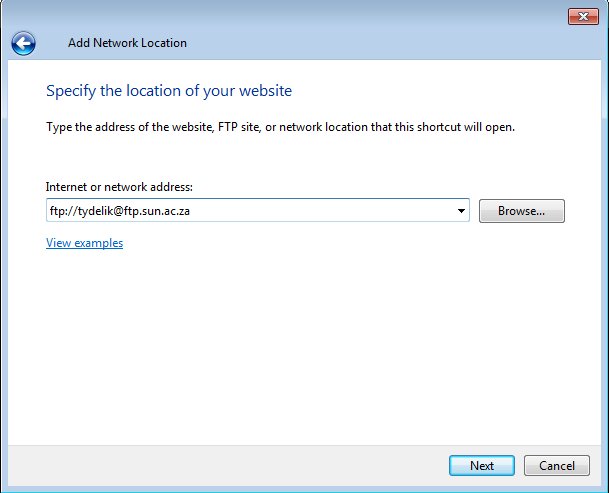
To use Stellenbosch University’s FTP server you will need the address of the server and the password:

ftp server: ftp://tydelik@ftp.sun.ac.za
password: tydelik

Keep in mind that this space is not for storing or backing up data. It’s merely a temporary spot to put files in order for someone else to easily access them. The person on the other side who needs to access the files will use the same information.

To set up FTP on your PC, just follow these step-by-step instructions on the Microsoft website.

If you need more information on FTP, here are a few sources:
https://kb.iu.edu/d/aerg
http://www.webopedia.com/TERM/F/ftp.html

As a user of the SU network there are a few other perks when it comes to free access. You can also use a few selected sites without opening your internet account. Read more about these sites on our blog – https://blogs.sun.ac.za/it/2012/04/20/free-access-to-selected-websites/ and https://blogs.sun.ac.za/it/2012/06/08/mirror-mirror/


Jy’t dalk al die woord erens gehoor en weet vaagweg dat dit iets te doen het met leêrs. Maar buiten dit het jy geen idee wat FTP is nie. Buitendien, wat sou jy tog daarmee doen?

Maar hier is die goeie nuus. Dis eintlik maklik om te gebruik en mag handig te pas kom as jy groot hoeveelhede data met iemand buite die universiteit-netwerk moet deel. Is jy nou al meer geinteresseerd?

Goed, maar voor ons in die diep kant inspring, kom ons begin eers deur te verduidelik wat FTP presies is.

File Transfer Protocol of FTP is `n standaard netwerk-protokol wat gebruik word om rekenaarleêrs van een gasheerrekenaar na `n ander oor `n TCP-gebaseerde netwerk, soos die Internet. FTP-gebruikers kan hulself staaf deur die gebruik van `n gebruikersnaam en wagwoord, maar sommige FTP-bedieners is wel so opgestel dat gebruikers anoniem kan aanteken daarsonder. (Indien jy meer tegniese inligting oor FTP soek, lees gerus op Wikipedia)

Om Universiteit Stellenbosch se FTP-bediener te gebruik, het jy die adres van die bediener en wagwoord nodig:

ftp-bediener: ftp://tydelik@ftp.sun.ac.za
wagwoord: tydelik

Hou net in gedagte dat hierdie spasie nie gebruik mag word vir die stoor of rugsteun van data nie. Dis slegs `n tydelike spasie om leêrs te sit sodat iemand anders maklik toegang daartoe kan kry. Die persoon wat die data aflaai, gebruik dieselfde aanteken-inligting. 

Om FTP op jou rekenaar op te stel, volg hierdie stap-vir-stap instruksies op Microsoft se webwerf.

As jy meer inligting oor FTP soek, hier is `n paar bronne: 

https://kb.iu.edu/d/aerg
http://www.webopedia.com/TERM/F/ftp.html

As `n gebruiker van die US-netwerk is daar ook `n paar ander voordele as dit by gratis toegang kom. Jy kan `n paar webwerwe besoek sonder om jou internetrekening daarvoor te gebruik. Lees meer oor hierdie webwerwe op ons blog –  https://blogs.sun.ac.za/it/2012/04/20/free-access-to-selected-websites/ en https://blogs.sun.ac.za/it/2012/06/08/mirror-mirror/