SEARCH
  • [:en]Recent Posts[:af]Onlangse bydraes

  • [:en]Categories[:af]Kategorieë

  • [:en]Archives[:af]Argiewe

Internet

Heartbleed wreaks havocHeartbleed saai verwoesting

Friday, May 9th, 2014

If you read about a computer bug in the YOU, it has to be serious. This is exactly what happened with Heartbleed last week.

The now already infamous bug surfaced last month and wreaked havoc and many popular websites. You also might have received an e-mail by now requesting you to change your password for certain websites.

Heartbleed indicates a vulnerability in security in OpenSSL software commonly for web encryption. The vulnerability allows a hacker access to the memory of data servers. According to Netcraft, a company specialising in interne research, 5000 websites might have been infected by it.

Unlike some viruses infiltrating your computer via e-mail, Heartbleed targets a weakness on web servers. This implies that someone using a compromised website, runs the risk of having his username, password or credit card details intercepted. Without too much effort your data can be obtained and also access to your account.

With Heartbleed hackers can also gain access to the digital keys responsible for encryption on servers and thereby access a company’s confidential, internal documents.

According to Vocativ, the term Heartbleed was chosen by Ossi Herrala, a systems administrator at Codenomicon. The technical name is CVE-2014-0160 and refers to the line of code where the bug is located. Heartbleed refers to an extension in OpenSSL called heartbeat. The protocol is used to keep connections open, even if data is not transmitted between connections.

If you haven’t changed your password for the affected sites, rather play it safe and change it anyway. It still remains good practice to change your passwords on a regular basis. If you want to know which sites have been targeted or what their current status is, you can do so here.

More detailed information on Heartbleed is available at:

http://www.cnet.com/news/how-to-protect-yourself-from-the-heartbleed-bug/
http://www.cnet.com/news/heartbleed-bug-what-you-need-to-know-faq/
http://mashable.com/2014/04/09/heartbleed-bug-websites-affected/
http://www.vocativ.com/tech/hacking/behind-scenes-crazy-72-hours-leading-heartbleed-discovery/

BRON: www.cnet.com


Jy moet weet `n rekenaarswakplek is ernstig as dit al in die Huisgenoot gedraai het en dis presies wat laasweek met die Heartbleed gebeur het.

Die berugte swakplek het verlede maand sy opwagting gemaak en verwoesting gesaai op verskeie populêre webwerwe. Jy het waarskynlik teen die tyd  ook `n e-pos ontvang wat jou vriendelik versoek het om jou wagwoord te gaan verander op sommige webwerwe.

Heartbleed dui op `n swakplek in sekuriteit in OpenSSL sagteware wat `n kuberkraker toegang gee tot databedieners se geheue. Volgens Netcraft, `n maatskappy wat spesialiseer in internetnavorsing, is 5000 webwerwe moontlik besmet daardeur. 

Anders as virusse wat deur middel van e-pos op jou rekenaar beland, het Heartbleed swakplekke in kode op webbedieners aangeval. Dit beteken dat `n gebruiker van die webwerf wat aangeval is, se data – gebruikersnaam, wagwoorde en kredietkaartdetails, die risiko loop om onderskep te word. Jou inligting kan dus sonder moeite bekom word en kuberkrakers kan toegang kry tot jou rekening.

Dit beteken ook dat kuberkrakers toegang kan kry tot die bedieners se digitale sleutels, wat verantwoordelik is vir enkripsie en tot `n maatskappy se vertroulike, interne dokumente.

Volgens Vocativ, is die naam Heartbleed gekies deur Ossi Herrala,`n stelseladministreerder by Codenomicon. Die tegniese naam is CVE-2014-0160 en verwys na die lyn kode waarin die swakplek vervat is. Heartbleed verwys na `n verlenging in OpenSSL  genaamd heartbeat. Die protokol  word gebruik om verbindings oop te hou, selfs as data nie gestuur word tussen verbindings nie. 

Indien jy nog nie jou wagwoord verander het nie, speel liefs veilig en verander dit in elk geval. Dit bly steeds goeie praktyk om jou wagwoord gereeld te verander vir veiligheid. As jy wil weet watter webwerwe geteiken is deur Heartbleed, kan jy hier gaan kyk.

Meer gedetaileerde inligting oor Heartbleed is ook beskikbaar by:

http://www.cnet.com/news/how-to-protect-yourself-from-the-heartbleed-bug/
http://www.cnet.com/news/heartbleed-bug-what-you-need-to-know-faq/
http://mashable.com/2014/04/09/heartbleed-bug-websites-affected/
http://www.vocativ.com/tech/hacking/behind-scenes-crazy-72-hours-leading-heartbleed-discovery/

BRON: www.cnet.com
 

Internet Explorer vulnerability disclosedInternet Explorer swakplek uitgewys

Thursday, May 8th, 2014

Recently security vendor FireEye publicly disclosed a vulnerability in all versions of Internet Explorer. Government security response teams urged users to rather use an alternative browser until a security fix was released. After Microsoft released the update this week, it”s no longer needed to use an alternative browser.

This high risk vulnerability, if exploited by an attacker, would allow him to gain the same user rights as the current user. The security breach could be achieved by an attacker hosting a specially crafted website that is designed to exploit this vulnerability through IE and then convince a user to view the website.

He would then entice the user the attacker enticing a user to view the attacker-controlled content by getting them to click a link in an e-mail or IM message or by opening an attachment in an e-mail.

Updating your Internet Explorer (versions 6, 7, 8, 9, 10 and 11) is critical on Windows clients. The security update addresses the vulnerability by modifying the way IE handles objects in its memory.

Microsoft has released update KB2964358 and KB2964444 to prevent this vulnerability. (More information on Microsoft’s security update can be found here.)

Campus assets running Microsoft Windows OS have the WSUS configuration installed, automatic updating enabled and users will not need to take any action. The security update will be downloaded and installed automatically.

FireEye noted that attacks rely on Flash and advised users to disable the Flash plugin in IE. Also always ensure that your antivirus software is current and updated regularly to avoid future security attacks.

SOURCE: http://www.zdnet.com en www.mirosoft.com

Sekuriteitsmaatskappy FireEye het onlangs bekendgemaak dat alle weergawes van Internet Explorer  oor `n swakplek beskik. Sekuriteitspanne van die Amerikaanse regering het selfs gebruikers versoek om eerder `n alternatiewe webblaaier te gebruik totdat `n sekuriteitsopdatering vrygestel word. Nadat Microsoft die week die `n nuwe opdatering vrygestel het, is die gebruik van `n alternatiewe blaaier egter nie meer nodig nie.

Hierdie hoë risiko kwesbaarheid kan, indien dit misbruik word deur `n kuberkraker, aan hom dieselfde regte gee as die huidige gebruiker van die program. Die sekuriteitskending kan plaasvind indien die aanvaller `n spesiaal-geboude webwerf, ontwerp om IE se kwesbaarheid te misbruik daarstel en gebruikers oortuig om dit te gebruik.

Die aanvaller kan `n gebruiker uitlok om na inhoud op sy webwerf te kyk deur middel van `n skakel in `n e-pos, `n aanlyn boodskap of deur die aanhangsel in `n e-pos oop te maak. 

Die opdatering van Internet Explorer (weergawes 6, 7, 8. 9, 10 en 11) is krities op Windows rekenaars. Die sekuriteitsopdatering spreek die swakplek aan deur die wyse waarop IE items in sy geheue hanteer, te verander. 

Microsoft het die sekuriteitsopdaterings KB2964358 en KB2964444 vrygestel om die swakplek te voorkom. (Meer inligting oor Microsoft se opdatering kan hier gelees word.)

Kampusrekenaars met Microsoft Windows OS het die WSUS konfigurasie, dateer outomaties op en gebruikers hoef self geen verdere aksie te neem nie. Die opdatering sal afgelaai word en outomaties installeer. T

FireEye het opgemerk dat hierdie tipe aanvalle Flash gebruik en het gebruikers aangeraai om die Flash inpropprogram buite werking te stel. Maak ook altyd seker dat jou antivirus sagteware op datum is en gereeld opdateer word om aanvalle in die toekoms te vermy.


BRON: http://www.zdnet.com en www.microsoft.com


IE & my.sun not playing along?Wil IE en my.sun nie saamspeel nie?

Friday, February 28th, 2014

Recently we introduced a brand new my.sun interface (read the article here). As with most new developments, there are bound to be some hiccups.

One of the problems recently experienced by some users when they browse to the staff portal are either that their version of Internet Explorer has to be upgraded or only a blank screen is displayed.

There reason for this glitch is Internet Explorer’s compatibility mode. This function of Internet Explorer has the tendency to recognise the wrong versions of the software. For example, with compatibility mode Internet Explorer 8 and 9 thinks it’s running 7, while version 10 and 11 recognises it as 9.

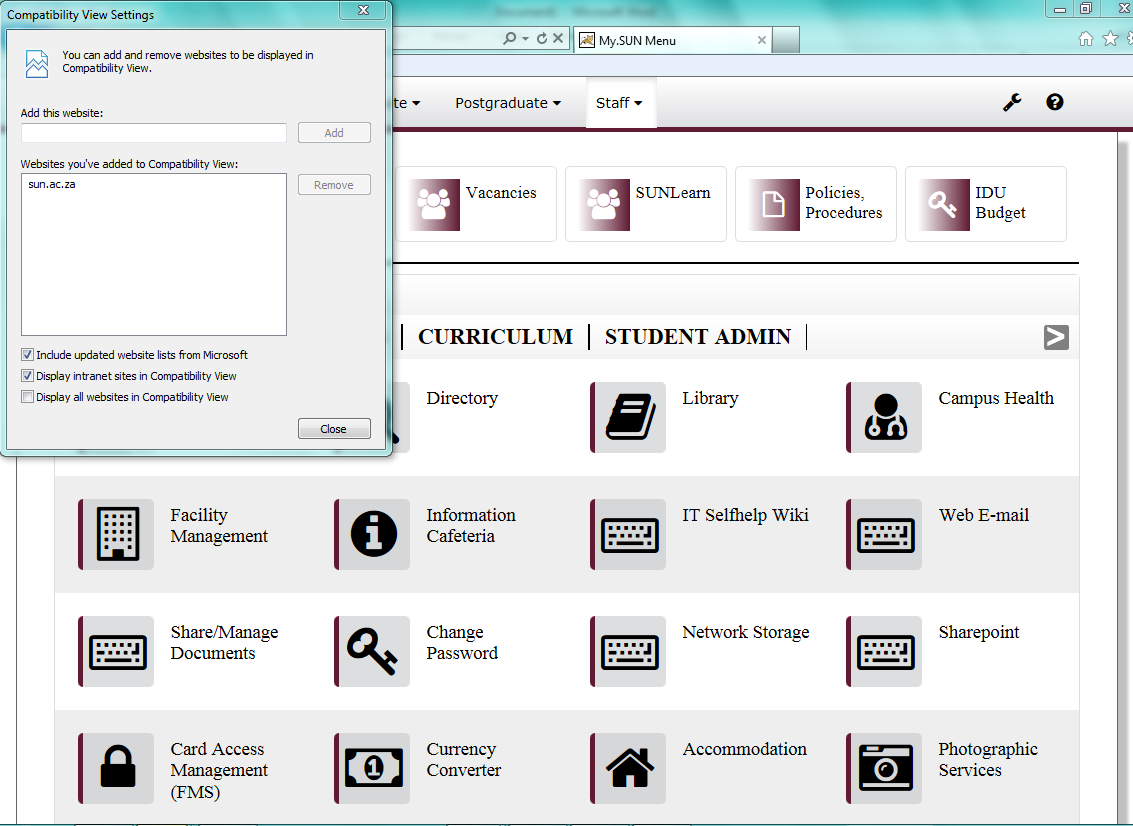
However, there is an easy solution. By deselecting “Display intranet sites in Compatibility View” (see picture) Internet Explorer will report the correct version of the browser and not request an upgrade of the browser.

If Internet Explorer requests an upgrade, first check the version of the browser (see above ) and deselect compatibility view. Internet Explorer version 10, Mozilla Firefox and Google Chrome are recommended internet browsers.

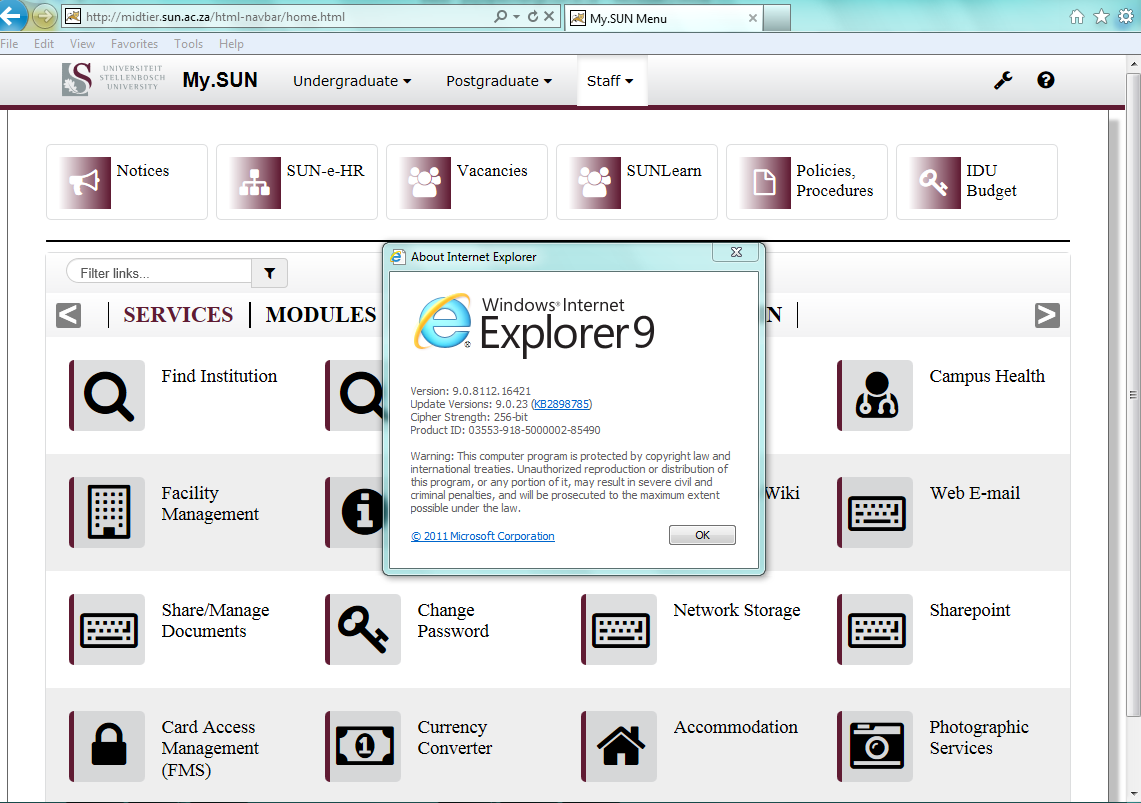
1. How to find out which version of IE is installed on your pc
Click:  Help, About Internet Explorer


2. How to check if compatibility mode is enabled
Click: Tools, Compatibility View  Settings


Send an email to help@sun.ac.za or contact IT ’s Service Desk on 0218084367 if you need assistance or experience problems. More information can be found on the my.sun help page. 

Ons het onlangs `n splinternuwe my.sun. koppelvlak bekendgestel (lees die artikel hier) Soos dit dikwels die geval met nuwe projekte is, is dit onvermydellik dat daar hier en daar haakplekke voorkom.

Een van die probleme wat tans deur gebruikers ondervind word wanneer hulle na die personeelportaal blaai, is dat hulle `n kennisgewing kry dat hul weergawe van Internet Explorer opgradeer moet word of slegs `n leë skerm word vertoon. 

Die oorsaak vir hierdie probleem is Internet Explorer se versoenbaarheidfunksie (“compatibility mode”). Hierdie funksie is geneig om die verkeerde weergawe van die geinstalleerde sagteware te herken. So byvoorbeeld, word Internet Explorer 8 en 9 herken as 7 as die funksie aan is, terwyl weergawe 10 en 11 as 9 gesien word.

Daar is egter `n maklike oplossing. Deur  “Display intranet sites in Compatibility View” (sien foto) te deselekteer, sal Internet Explorer die korrekte weergawe van die webblaaier herken en nie `n opgradering versoek nie. 

Indien Internet Explorer wel `n nuwe weergawe versoek, gaan eers jou weergawe na en deselekteer die “compatibility view”. Internet Explorer weergawe 10, Mozilla Firefox en Google Chrome is die tans aanbevole webblaaiers.  

1. Hoe om uit te vind watter weergawe van IE is geinstalleer op jou rekenaar – 
     Kliek:  Help, About Internet Explorer


2. Hoe om te kyk of “compatibility mode” geaktiveer is – 
    Kliek: Tools, Compatibility View  Settings


Stuur `n e-pos na help@sun.ac.za of kontak die IT Dienstoonbank by 021 8084367 indien jy nog hulp verlang of probleme ondervind. Meer inligting kan ook gevind word op die my.sun hulpbladsy. 

Download the mobile Inetkey application Laai die Inetkey mobile toepassing af

Friday, February 14th, 2014

[:en]With the growing amount of mobile applications used on a daily basis, a need arose for a simple, effective Inetkey application that can be used on all devices and platforms – including Android, iOS, Blackberry and Windows.

After extensive testing on most available platforms, the official Inetkey app was launched on iOS, Android, Windows and Blackberry. You can download the appropriate version by clicking on the links below.

downloadandroid2
downloadblackberry
Download_on_the_App_Store_Badge_US-UK_135x40
downloadwindows

Non-official Inetkey mobile applications exist, but have been developed by independent individuals and are not supported or endorsed by Information Technology. Unofficial Inetkey apps carry the risk that they may intercept users’ credentials, which could be abused or stolen.  A user keys credentials into an app and does not know how or where they are stored or communicated, or even if it’s secured.

We can accept no responsibility if users download these apps and experience problems.

FOR MORE INFORMATION ON INTERNET AND INETKEY, PLEASE CONSULT OUR SERVICE CATALOGUE

[:af]Met die groeiende hoeveelheid mobiele applikasies wat daagliks gebruik word, het die behoefte ontstaan om `n eenvoudige, effektiewe Inetkey-toepassing te skep wat bruikbaar is op alle toestelle en platforms. – insluitend Android, iOS, Blackberry en Windows.

IT se mobiele Inetkey-toepassing is ontwikkel en is beskikbaar vir die verskeie platforms. Laai die gepaste weergawes af deur op die ikone te kliek.  

downloadandroid2
downloadblackberry
Download_on_the_App_Store_Badge_US-UK_135x40
downloadwindows

Daar bestaan reeds nie-amptelike Inetkey mobiele toepassings wat deur privaatpersone ontwikkel is, maar geensins deur Informasietegnologie onderskraag word nie. Nie-amptelike Inetkey toepassings dra die risiko dat dit gebruikers se inligting kan onderskep, wat op die beurt kan misbruik of gesteel word. Gebruikers sleutel besonderhede in op `n toepassing terwyl hulle nie weet hoe of waar dit gestoor word, hoe dit gekommunikeer word of selfs of dit sekuur is nie. 

Ons kan dus geen verantwoordelikheid aanvaar indien gebruikers die toepassings gebruik en probleme ondervind nie. 

VIR MEER INLIGTING OOR INTERNET EN INETKEY, RAADPLEEG ASB. ONS DIENSKATALOGUS.

Cell C offers now available for students and staffCell C-aanbiedinge nou beskikbaar vir studente en personeel

Friday, January 31st, 2014

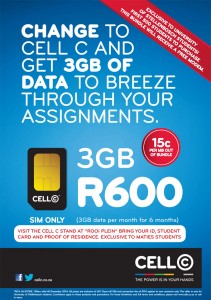
Students, as well as staff, can now obtain cheaper cellular data offerings through a joint offering by the University and Cell C.

These deals brings the cost per MB from 15c a megabyte down to around 3.3 cent/meg. The offer includes 3GB of data per month for six months at R600-00, but there are also deals available for 12 months.

Cell C will be on site on the Rooi Plein under the bridge between Admin A and B until 7 February, so make use of this opportunity! You need to take basic RICA documents: ID and proof of residence to the Cell C stall to make use of these special deals.

Telkom mobile will also introduce their offerings during the month of February, in case you miss out.

For more information e-mail the IT HUB at student@sun.ac.za​, visit them (entrance below the bridge on the Rooi Plein) or visit the Cell C stall.

Studente, sowel as personeel, kan dié jaar van goedkoop selfoon data-aanbiedinge gebruik maak te danke aan `n gesamentlike poging deur die Universiteit en Cell C. 

Hierdie aanbiedinge bring die normale koste per MB van 15c per megagreep af na ongeveer 3.3 sent/meg. Die aanbod sluit 3gb data per maand vir ses maande in teen R600-00, maar daar is ook pakette vir 12 maande as jy dit so sou verkies. 

Cell C sal gedurende dié tydperk `n stalletjie beman op die Rooiplein, onder die brug tussen Admin A en B tot en met 7 Februarie. Al wat jy hoef te doen om die stalletjie te besoek en jou basiese RICA-dokumente – ID en bewys van verblyf te wys. 

 Gedurende Februarie sal Telkom ook hul eie aanbiedinge aan kampus kom bekendstel – net vir ingeval jy uitmis dié rondte.

Vir meer inligting, stuur e-pos die IT HUB by student@sun.ac.za​, loer in by hulle kantoor (ingang onder die brug op die Rooiplein) of besoek Cell C se stalletjie.