SEARCH
  • [:en]Recent Posts[:af]Onlangse bydraes

  • [:en]Categories[:af]Kategorieë

  • [:en]Archives[:af]Argiewe

Notices

[:en]Phishing scam from a forged email[:]

Thursday, May 14th, 2020

[:en]

We are almost all in lock down and less careful with cyber security. The scammers know this and are launching numerous attacks taking advantage of the “work-from-home” situation we find ourselves in. A number of personnel have reported getting e-mails from “Prof. Jimmy Volmink” asking for assistance and are not spotting the tell-tale signs of a phishing scam.

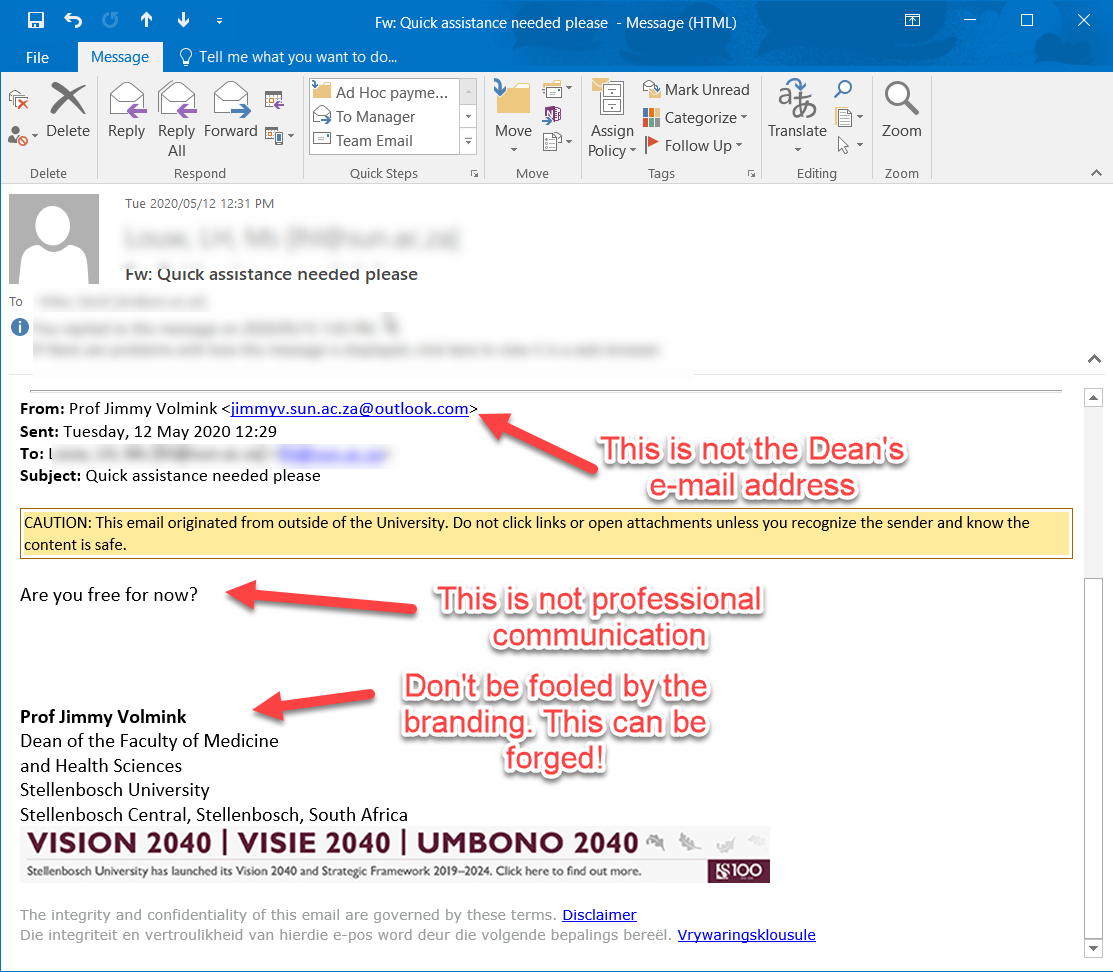
Here is the mail:

  1. Notice that although it looks like Prof Volmink sent it, the email address is not correct.
  2.  Secondly Prof Jimmy is a very approachable person, but he is always professional in his communication so he would never say “Are you free for now”. Nor would he say something like this: (if you did respond to his mail)
    “I am currently in a meeting and I don’t know when the meeting will round off. I would have called you but phone is not allowed. I will want you to handle something for me right away and I will be glad if you can do that for me as soon as possible”.

This is a spear-phishing attack where an institution is directly attacked by impersonating prominent or public figures within the university (like the Dean) to gain access to the university network. This is an especially effective means of attack with everybody at home in lock down, where our guard is down and we are more relaxed. There was a very similar attack in September 2019, using the same tactics.  

Prof Volmink’s account has not been compromised. Phishers are just trying to fool us into thinking that prominent members in our leadership are emailing us asking for assistance, but they are not. It is a scam.

Over the next few days be on the lookout for similar mails that look like they coming from other people within the university.

If you do get mail like this be sure to report it to IT ASAP so they can block the attack and help people who have become victims.

Please immediately report such phishing scams and spam by reporting it on the ICT Partner Portal.​​

Go to https://servicedesk.sun.ac.za/jira/servicedesk/customer/portal/6/create/115.​​

Fill in your information and add the email as an attachment. Your request will automatically be logged on the system.​​

If you have accidentally clicked on the link and already given any personal details to the phishers it is vitally important that you immediately go to the USERADM page (either http://www.sun.ac.za/password  or www.sun.ac.za/useradm ) and change your password immediately. Make sure the new password is completely different, and is a strong password that will not be easily guessed, as well as changing the passwords on your social media and private e-mail accounts, especially if you use the same passwords on these accounts.


[:]

[:en]Sun email for personal purposes[:af]Sun e-posse vir persoonlike doeleindes[:]

Tuesday, May 12th, 2020

[:en]

Recently some staff have been caught off-guard by emails from cyber criminals trying to exploit them by threatening to release sensitive video material. The sender of this email does not have any video material, but tries to be psychologically manipulative and convince the receiver that he does. Unfortunately he also refers to the email receiver’s sun email address and a password they used at some stage.

This is not because the university’s network has been compromised. It happens because staff and students also use their sun address in a personal capacity. We highly discourage you to do this. In this case someone used their sun address on a website, for example Ster Kinekor, whose database was, at some stage, compromised. Subsequently cyber criminals gained access to the username and password. This gave them access to the person’s Ster Kinekor’s (or whichever site it was) information, but also – and this is more dangerous – to the person’s potential information everywhere he reused the email address and specific password. This includes Stellenbosch University sites and applications, including the financial and HR system. Of course, it the password has been changed over time, it will be useless. However, this remains an enormous risk.

Please note the following: 

  1. Never use your sun email address for anything except for University applications. If you need to send personal emails, rather consider getting a free email account, for example, Gmail. Separating your business and personal activities is better security practice in the long run and will protect you and the University network.
  2. Keep in mind that according to the Electronic Communication Policy which all staff and students agree to when they register their usernames each year, you’re not allowed to use your sun address for personal communication and that the University owns any communication sent via email. If needed, University management has the right to access any material in your email or on your computer.  
  3. If you receive an email as mentioned above, for safety sake, go and change your login details and passwords on any sites where you are registered with your @sun address.

[:af]

US-personeel is onlangs onkant gevang met dreigende e-posse van kuberkriminele. Spesifiek e-posse met die doel om die ontvanger te oortuig dat die kuberkrimineel sensitiewe videomateriaal van die ontvanger het waarmee hy afgepers kan word. Natuurlik het die persoon nie sulke materiaal nie, maar dit lei tot paniek by die e-pos ontvanger. Om verdere paniek te veroorsaak verwys die persoon ook na ʼn wagwoord wat die ontvanger voorheen saam met sy sun-adres gebruik het.

Insidente soos die gebeur nie omdat dit Universiteit se netwerk gekompromitteer is nie. Dit vind plaas omdat personeel en studente sun-adresse ook vir persoonlike doeleindes gebruik op potensieel onveilige webwerwe. Ons wil aanbeveel dat dit ten alle koste vermy word.

Met die strikroof-poging het iemand hulle sun-adres gebruik op ʼn eksterne webwerf (Ster-Kinekor, Facebook, ens.) en op kuberkrakers het toegang tot die eksterne webwerf se databasis verkry. In die proses het hulle toegang gekry tot e-posadresse en wagwoorde, onder andere sun-adresse. Alhoewel die persoon se inligting nie noodwendig krities is nie, is dit wel gevaarlik indien die persoon nie net dieselfde sun-adres gebruik het nie, maar ook dieselfde wagwoord as op die Universiteit se platforms. Sodoende het ʼn kuberkraker dalk toegang tot die Universiteit se netwerk, webwerwe en toepassings, insluitende die finansiële en Menslike Hulpbronne-platforms. 

Indien dit ʼn verouderde wagwoord is en intussen verander is, sal dit nie kan misbruik word nie. Die risiko bly egter steeds hoog.

Onthou asb: 

  1. Moet nooit jou sun e-posadres vir enigiets anders gebruik behalwe Universiteitsplatforms nie. Indien jy persoonlike e-posse wil stuur of erens wil aanteken, kry ʼn gratis e-pos adres, byvoorbeeld Gmail. Op die lange duur is ʼn duidelike onderskeid tussen werk- en persoonlike aktiwiteite beter sekuriteitspraktyk en sal dit jou en die Universiteit beskerm. 
  2. Volgens die Elektroniese Kommunikasiebeleid, waarvoor alle personeel en studente instem elke jaar wanneer gebruikersname heraktiveer word, word jy nie toegelaat om jou sun-adres vir persoonlike kommunikasie te gebruik nie. Alle kommunikasie vanaf ʼn sun-adres behoort aan die Universiteit en indien nodig, het die Universiteitsbestuur die reg tot toegang op enige materiaal op jou toestelle.  
  3. Indien jy e-posse ontvang wat verwys na ʼn ou of bestaande wagwoord, verander asb. jou kontakdetails op die webwerwe waarvoor jy @sun gebruik het, sowel as jou wagwoord. 

[:]

[:en]Illegal software on SU devices[:af]Onwettige programmatuur op batetoerusting[:]

Tuesday, May 12th, 2020

[:en]

Stellenbosch University devices are equipped with the necessary software for our staff to perform their work effectively. This includes the latest operating system; all the Microsoft applications (Office 365, including Word, Excel, PowerPoint, etc.), Adobe Acrobat Professional, TeraTerm and the necessary Antivirus software. Licenses for specialist software can also be purchased through the IT department, will fall under the University’s educational license and therefore be less expensive than a license bought in a personal capacity. These include Adobe Creative Cloud; MatLab and Statistica, among others.

Installing and using this software is essential for staff, however some of our staff use their SU devices for their own personal use and subsequently download and install non-supported as well as illegal software on their PCs.  This includes games and illegal series or movies.

Not only does this put the University’s network at a high risk security-wise, it also puts the University at risk legally. Even if Information Technology does not install the software, we are still being held responsible for it if it’s an SU asset and it runs on our network. 

The fight against illegal software and piracy is mainly fought by the BSA. The Business Software Alliance (BSA) confronts companies that use or distribute illegal
software. Read BSA’s statement on illegal software. 

Therefore we kindly request that you ensure that if you install software, it’s safe and legal to use. Otherwise it might have implications for you and the University.

[:af]

Universiteit Stellenbosch rekenaars en ander toestelle word toegerus met die nodige sagteware om te verseker dat personeel hulle werk effektief kan verrig. Dit sluit die nuutste bedryfstelsel, alle Microsoft-applikasies (Office 365, insluitende Word, Excel, PowerPoint, etc.), sowel as Adobe Acrobat Professional, TeraTerm en die nodige anti-virus sagteware. 

Lisensies vir spesialis-programmatuur kan ook deur die IT-afdeling aangekoop word. Aangesien dit onder die Universiteit se spesiale lisensie vir opvoedkundige instansies val, sal dit ook goedkoper wees as om dit self aan te koop. Dit sluit, onder andere, Adobe Creative Cloud; MatLab en Statistica in. 

Die installasie en gebruik van hierdie programmatuur is essensieel vir personeel. Sommige personeel gebruik daarbenewens egter ook US-toerusting vir persoonlike doeleindes en installeer programmatuur wat IT nie ondersteun nie of selfs onwettig is. Dit sluit dikwels speletjies en onwettige reekse of flieks in.

Hierdie tipe programmatuur en materiaal is ʼn hoë sekuriteitsrisiko vir die Universiteit se netwerk, sowel as vanaf ʼn wetlike perspektief. Selfs al installeer Informasietegnologie nie die programmatuur nie, word ons steeds verantwoordelik gehou wanneer dit ʼn US-bate is en op ons netwerk aanteken.

Die bekamping van onwettige programmatuur en rowery word deur die BSA aangevoer. Die Business Software Alliance (BSA) konfronteer maatskappye wat onwettige programmatuur gebruik of versprei.  Lees die BSA se standpunt oor onwettige programmatuur. 

Ons versoek dus dat, voordat jy enige programmatuur self installeer, jy sekermaak dat dit beide veilig en wettig is om te gebruik. Andersins mag dit verreikende implikasies hê vir beide jou en die Universiteit. 

[:]

[:en]Zoom not recommended for meetings[:af]ZOOM nie aanbeveel vir vergaderings[:]

Friday, May 8th, 2020

[:en]

Over the past few weeks we’ve had to find new ways of connecting with people. Zoom has become the popular choice for anything from online exercise classes to quizzes. While it is perfectly fine for personal use, we do not recommend Zoom for your official meetings with colleagues or students. Although it’s simple to set up and free, there are multiple security risks.

Why take the risk if Microsoft Teams can do the same safely?

To help you make an informed decision we prepared a comparison table of Adobe Connect, Teams and Zoom. The comparison table shows the strengths and weaknesses of each product and the areas marked in red are serious weaknesses. Do not use a product if any area is marked red. 

SUNStream is based on Adobe Connect and runs on a server on campus which is fully integrated with SUNLearn. It will be zero-rated to allow students to access the system without data costs. This is the preferred streaming platform for lecture use and is particularly suited for larger classed as it uses a very structured approach. Adobe Connect is also fully integrated with SUNLearn.  

Teams has become the University standard for meetings and is also suitable for classes of up to 250 participants. Teams is not just a streaming service; it is an excellent collaboration platform. Teams has also been integrated into SUNLearn, allowing lecturers to use class groups within Teams. Unfortunately it will not be zero-rated soon, since it is running on the Microsoft commercial cloud. 

*  NB. If you record your meetings in teams, keep in mind that the recording will be available to everyone who attended the meeting – even if just for a short while as a guest. Don’t use your current meeting to continue a different meeting, for example with a smaller group. If you do this everyone who attended the initial meeting will be able to listen to your recording.  Rather create a separate one. More on privacy and security in Microsoft Teams.

Zoom has become very popular largely due to its ease of use – but therein lies the risk: security and ease of use are on the opposites of the scale. Zoom places the burden on the users to protect themselves. Two South African ministers have found themselves in trouble when using Zoom, the latest being reported 6 May 2020 in a so-called “Zoombombing” incident. (also see below what “Zoombombing” is) The University regards Zoom as a risk, and will not support its use.  

Also read security expert, Basie von Solms’, article on protecting your video calls on LitNet (unfortunately only available in Afrikaans) and Computerworld’s article on the do’s and don’ts of video conferencing security.


ZoombombingZoom-bombing or Zoom raiding[1] is the unwanted intrusion into a video conference call by an individual, causing disruption. The term became popularized in 2020, after the COVID-19 pandemic forced many people to stay at home and videoconferencing was used on a large scale by businesses, schools, and social groups. The term is associated with and derived from the name of the Zoom videoconferencing software program but it has also been used to refer to the phenomenon on other video conferencing platforms.[2][3][4]

SOURCE: Wikipedia


[:af]

Gedurende die afgelope paar weke moes die meeste van ons nuwe metodes kry om ons verbindings met ander mense te volhou, Zoom het die gewilde keuse geword vir enigiets van aanlyn oefenklasse tot vasvra-kompetisies. Alhoewel dit voldoende is vir persoonlike gebruik, beveel ons nie Zoom aan vir jou amptelike vergaderings met kollegas of studente nie. Ja, dis gratis en eenvoudig om op te stel, maar die sekuriteitsrisiko’s weeg swaarder as die voordele.

Hoekom die kans waag as jy dieselfde met Microsoft Teams kan doen?

Om jou te help om ʼn ingeligte besluit te neem, het ons ʼn vergelykende tabel opgetrek wat die voor-en nadele van Adobe Connect, Teams en Zoom aandui. Die vergelykende tabel dui die sterk- en swakpunte aan van elke produk. Die areas wat in rooi gemerk is, is ernstige swakplekke en die produk moet in daardie geval nie gebruik word nie. 

SUNStream is gebaseer op Adobe Connect en loop op ʼn kampusbediener wat ten volle geïntegreer is met SUNLearn. Toegang is teen ʼn zero-tarief wat studente toegang tot die stelsel gee sonder enige datakostes. Dis die voorkeur stroom-platform vir lesings en is veral geskik vir groter klasse aangesien dit `n gestruktureerde benadering volg. Adobe Connect is daarbenewens ten volle geïntegreer met SUNLearn.

Teams het die Universiteit-standaard geword vir vergaderings en is ook geskik vir klasse van tot 250 deelnemers. Teams is nie net ʼn stroom-platform nie, dis ʼn uitstekende platform vir samewerking. Teams is ook geïntegreer met SUNLearn en laat dosente toe om klasgroepe te gebruik binne Teams. Ongelukkig sal dit nie binnekort teen ʼn zero-tarief beskikbaar wees nie aangesien dit op die kommersiële Microsoft-wolk is.

* NB. Indien jy vergaderings opneem in Teams, hou in gedagte dat die opname beskikbaar gestel word aan almal wat die vergadering bygewoon het – selfs net vir ʼn kort tydperk as ʼn gas. Moenie jou huidige vergadering gebruik om aan te gaan met ʼn volgende vergadering nie. Wanneer jy dit doen sal almal wat die oorspronklike vergadering bygewoon het steeds toegang hê tot die opname. Skep liewer ʼn nuwe sessie vir elke vergadering.  Meer oor privaatheid en sekuriteit in Microsoft Teams.

Zoom is hoofsaaklik populêr weens sy gemak van gebruik – maar dit is die risiko: sekuriteit en gemak van gebruik lê aan teenoorgestelde pole. Zoom plaas die las op gebruikers om hulleself te beskerm. Onlangs het twee Suid-Afrikaanse ministers met rooi gesigte gesit toe hulle  Zoom-vergadering ge”Zoombomb” is. (sien ook onder wat “Zoombombing” is) Die Universiteit beskou Zoom as `n risiko en sal nie die gebruik daarvan ondersteun nie.  

Lees ook sekuriteitsdeskundige, Basie von Solms, se LitNet-artikel oor sekuriteit tydens video-oproepe en Computerworld se artikel oor die moets en moenies van videokonferensies.


ZoombombingZoom-bombing or Zoom raiding[1] is the unwanted intrusion into a video conference call by an individual, causing disruption. The term became popularized in 2020, after the COVID-19 pandemic forced many people to stay at home and videoconferencing was used on a large scale by businesses, schools, and social groups. The term is associated with and derived from the name of the Zoom videoconferencing software program but it has also been used to refer to the phenomenon on other video conferencing platforms.[2][3][4]

SOURCE: Wikipedia


[:]

[:en]Phishing emails, SMS and WhatApp messages offering payment relief during lock down[:]

Wednesday, April 1st, 2020

[:en]

A new potential threat has emerged as we enter the 2nd week of the national lock down and facing the beginning of the new month with bills  to be paid.

Phishers are already targeting the South African public with so-called COVID-19 phishing scams, attaching malware infected attachments and encouraging victims to click on a link to download “important information about the COVID-19 pandemic”.

However this week’s scam involves emails, SMS and WhatsApp messages being sent with information about “Payment Relief” from South African banks.

While it is true that most major South African banks are offering payment relief measures to their customers, phishing scammers have grasped this opportunity and adapted their tactics to send emails with content like the following:

“Dear Valued Customer,

“At ABSA Bank, we realise that this is a difficult time for our customers and businesses whose financial means are being negatively affected. After careful consideration and engagements with The Minister of Finance the, Hon. Tito Titus Mboweni, we are pleased to offer you, as a valued customer, a once-off access to a comprehensive relief programme. Please click on the following link to see if you qualify for payment relief.

VERIFY YOUR ACCOUNT

This is a once-off offer made to selected customers and will close at midnight on 2 April 2020.”

This is one such e-mail, but similar scams with forged identities from other South African banks, as well as Whatsapp and SMS messages will also surface. Note the specific deadline and the call to verify your account. Your bank won’t ever ask you to verify your account by email and certainly won’t give you a day to make such a decision. 

If you need to make use of a relief programme, rather contact your bank directly than reply to an online message. 

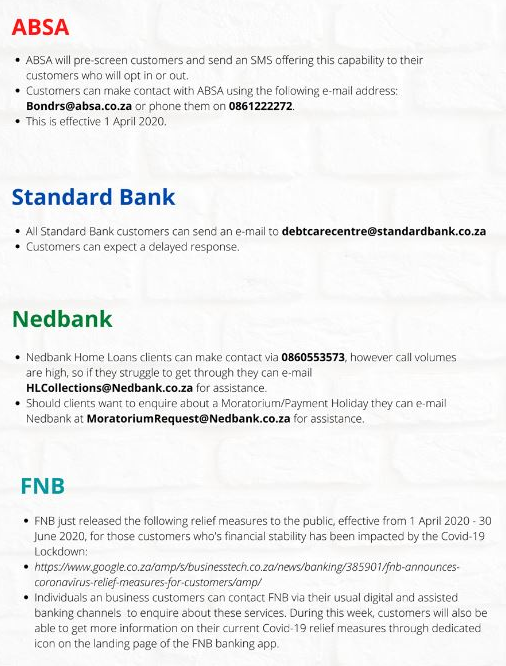
Here is a collection of the current verified details for payment relief from South Africa’s 4 major banks:


 [ARTICLE BY DAVID WILES]

[:]