
SEARCH
  • [:en]Recent Posts[:af]Onlangse bydraes

  • [:en]Categories[:af]Kategorieë

  • [:en]Archives[:af]Argiewe

Notices

[:en]Upgrade to Office 365 and Windows 10[:af]Opgradering na Office 365 and Windows 10[:]

Wednesday, November 3rd, 2021

[:en]

Microsoft recently sent out a notification that some versions of Office 2013 and Office 2016 may experience connectivity issues due to the retirement of support for these versions. It is therefore imperative that all users who still use  Office 2013 and Office 2016 immediately upgrade their Office software to Office 365. 

Users whose devices are still using Windows XP, Windows 7 and Windows 8 as operating systems are also required to urgently upgrade their devices as this software is no longer supported by Microsoft.

Benefits of upgrading your software

With the challenges we’ve faced over the few months, why do we have to sacrifice valuable time to have my software upgraded?

New malware is released daily, putting your data and the University at risk.  So, apart from gaining new features by updating your software you are also protected from outsider threats as the new software has better security features, is more reliable and has better performance. 

When must I do this?

We recommend that users do this upgrade as soon as possible to ensure that you don’t fall prey to malware and lose valuable data.

Who will help me with the upgrade?

A support ticket can be logged on the ICT Partner Portal.  As soon as the ticket is logged, you will receive a reference number via email after which an IT technician will contact you to arrange an appointment to assess if an upgrade is possible on the device.

[Article by Ronel Reynecke]

­­­­­­­­­­­­­­­­­­­­­­­

[:af]

‘n Onlangse skrywe van Microsoft het aangedui dat sekere weergawes van Office 2013 en Office 2016 verbindingsprobleme mag ondervind omdat Microsoft ondersteuning op sekere weergawes van dié sagteware staak.  Dit is dus absoluut noodsaaklik dat alle gebruikers so gou as moontlik hulle Office programmatuur moet opgradeer na Office 365.

Ons wil ook graag vra dat gebruikers wat steeds Windows XP, Windows 7 en Windows 8 gebruik hulle rekenaars moet laat opgradeer aangesien dieprogrammatuur nie meer deur Microsoft ondersteun word nie.

Voordele van opgradering

Met die afgelope paar maande se uitdagings, waarom moet ek van my kosbare tyd afstaan vir `n programmatuuropgradering?

Nuwe malware, wat jou data in gevaar stel, word daagliks vrygestel. Behalwe dat `n opgradering nuwe funksies bied, beskerm dit jou ook teen sekuriteitsrisiko’s aangesien die nuwer weergawes van Office en Windows beter sekuriteitsfunksionaliteit het, meer betroubaar is en beter werkverrigting het.

Wanneer moet ek die opgradering doen?

Ons beveel aan dat jy jou rekenaar so gou as moontlik opgradeer sodat dit nie deur malware besmet kan word en data verlore kan gaan nie.

Wie kan my help met die opgradering?

Jy kan op ICT Partner Portal ‘n versoek aanteken waarna jy ‘n verwysingsnommer per epos sal ontvang.  ‘n IT-tegnikus so gou moontlik verbinding tree om te bepaal of `n opgradering moontlik is. 

[Artikel deur Ronel Reynecke]


[:]

[:en]Information Security Awareness Training[:]

Tuesday, October 5th, 2021

[:en]

Part of living in a connected world is understanding that our private information is more vulnerable. ID theft and data breaches are no longer isolated incidents, they happen every single day.
So why would a university be targeted?

Universities hold a great deal of information that could be exploited if it gets into the wrong hands. This information includes personal details and research data.

Consequences and why it matters:

Though not all data security incidents will lead to the loss or theft of information, they will expose information to unwanted risk.

A full data security breach will involve a known disclosure or inappropriate access to information, which is a more serious incident. Any data security incident could potentially be disastrous for both you and the institution.

In an effort to create awareness around some of the typical hacks that we all fall prey to, we have made an Information Security Awareness training programme available. This is a self-study programme with fun quizzes in-between. This is by no means a programme that you will need to have a pass record. This course is strictly informational so that you will have the necessary tools when it comes to Information Security.

To access the course, go to https://learn.sun.ac.za. When the SUNLearn main page opens, click on the “Information Security Awareness Training” link and log in with your network username and password. If you’re successfully logged in, scroll down and click on the “Enrol me” button to enrol yourself for the course and to access the training material.

If you are unable to log on to SUNLearn and you are certain that the network credentials you have entered are correct and active, please log a request via https://learnhelp.sun.ac.za for SUNLearn support.


[:]

[:en]New e-waste bins at IT[:af]Nuwe houers vir e-afval by IT[:]

Monday, October 4th, 2021

[:en]

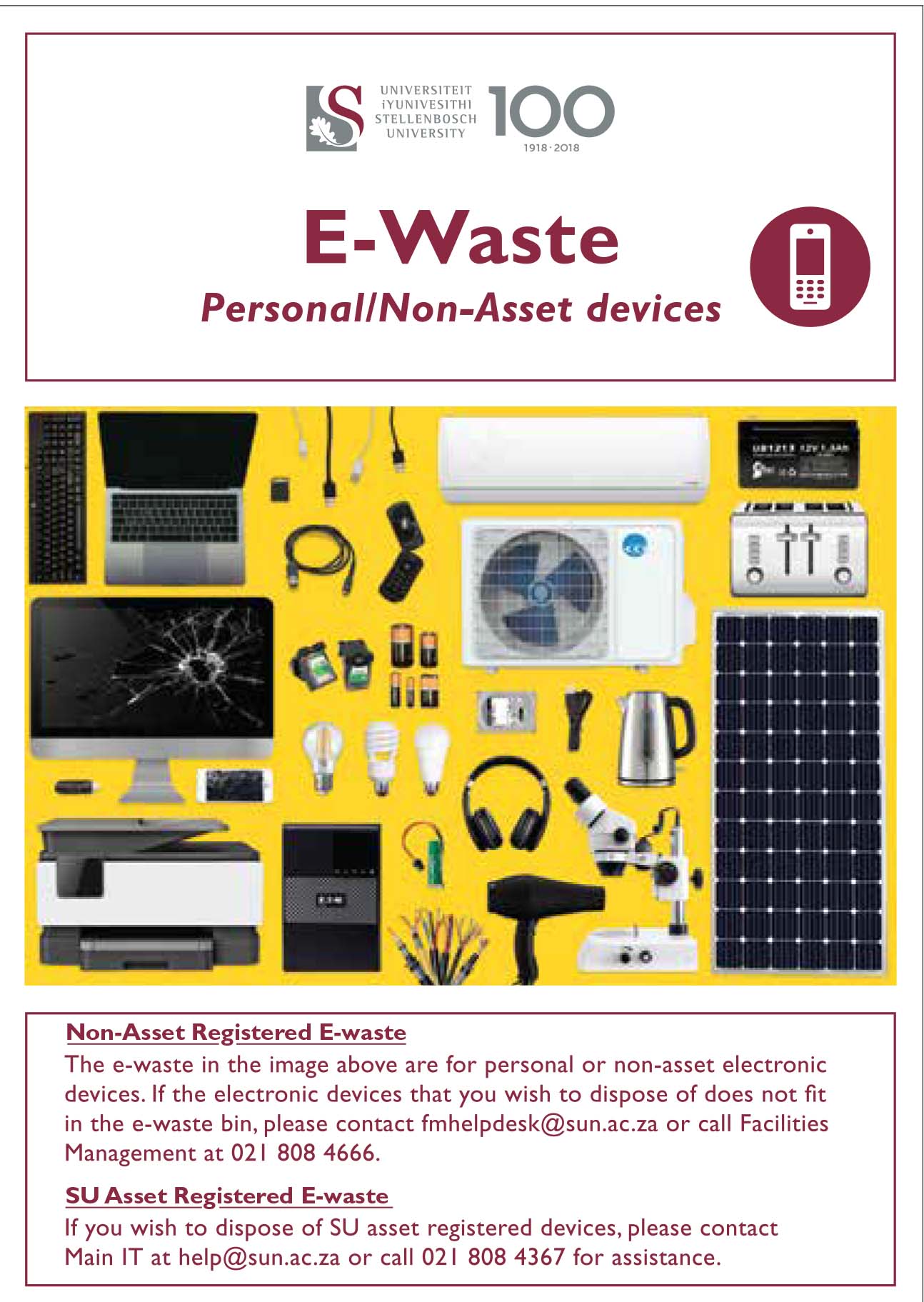
 As part of the campus “Going Green” project Facilities Management will be placing e-waste bins at selected spots on campus. We encourage staff and students to use these bins for any non-asset e-waste.

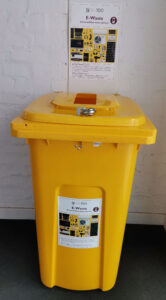
Two of these yellow bins (see example right) will also be located at IT. A bin will be placed at the IT HUB by the entrance and a second one will be placed at the IT Main building in Hammanshand Rd at the service entrance (facing IT the door on your right) Both bins will be just inside the buildings by the doors. 

WHAT IS E-WASTE?

Electronic waste (e-waste) or Waste Electrical and Electronic Equipment (WEEE) are the terms used to describe old, end-of-life or discarded appliances using electricity. It includes computers, consumer electronics, batteries etc. which have been disposed of by their original users.  More on e-waste.

We encourage all staff and students to use these bins for any non-asset e-waste. Bins will be serviced by Wasteplan and weekly inspections will be made by the university’s Wasteplan site supervisor to assess when a collection is needed.

For assistance and enquiries please email fmhelpdesk@sun.ac.za.


[:af]

 As deel van die “Going Green”-projek sal Fasiliteitsbestuur e-afval houers op uitgesoekte plekke op kampus uitplaas. Ons moedig personeel en studente aan om hierdie houers te gebruik vir enige e-afval wat nie US-bates is nie.

Twee van hierdie geel houers (sien voorbeeld regs) sal ook voortaan by IT wees. Een houer word geplaas by die IT HUB-ingang en die tweede sal geplaas word by die diensingang (die deur aan jou regterkant as jy voor IT staan) van die IT-hoofgebou in Hammanshandstraat. Beide houers sal binne die gebou geplaas word by die ingang. 

WAT IS E-AFVAL?

Elektroniese afval (e-afval) is die term wat gebruik word om verouderde of weggooi-toerusting wat met elektrisiteit werk, te beskryf. Dit sluit rekenaars, enige elektroniese toerusting, batterye, ens. in wat uit die weggeruim is deur die oorspronklike eienaars. Meer oor e-afval.

Houers sal onderhou word deur Wasteplan en die universiteit se Wasteplan terreinopsigter sal bepaal wanneer die houers leeggemaak moet word.

Vir enige navrae oor die e-afval projek, stuur gerus `n e-pos aan fmhelpdesk@sun.ac.za.


[:]

[:en]Remember to check your Junk Email folder[:af]Onthou om in jou Junk Email vouer te kyk[:]

Monday, August 30th, 2021

[:en]

To ensure that staff and students aren’t exposed to malicious phishing or spam emails our system administrators and security team had to enable a stricter spam filter earlier this year as added protection.

A spam filter assigns every message, received and sent, a spam confidence level based on the likelihood that the message is spam. Depending on its level an inbound message may be relayed directly to the user’s Junk Email folder. The filter looks at certain criteria contained in the email it rates, for example too many hyperlinks or a suspicious file attached. Tweaking the filter can be tricky – we don’t want you to miss important emails, but at the same time it’s our responsibility to protect you and all our staff from harmful attacks. 

For this reason, it’s important that you regularly look in your Junk Email folder in case the spam filter might have relayed it there. 

The main purpose of Microsoft Outlook’s Junk Email Filter helps is to reduce unwanted email messages in your Inbox. Junk email, also known as spam, is moved by the filter away to the Junk Email folder. This is done at an institutional level by Microsoft (as mentioned above), but you can also flag or “un”flag messages from a person or company as Junk email.

How to change your spam filter’s preferences.
How to tag an email as junk mail.
How to report spam or junk email to Microsoft. (downloadable PDF-document) 

If you have any questions, please log a request on the ICT Partner Portal.

[:af]

Om te verseker dat personeel en studente nie blootgestel word aan gevaarlike strikroof of gemorspos nie het ons stelseladministrateurs en sekuriteitspan vroeër die jaar `n addisionele vlak van sekuriteit implementeer deur die gemorsposfilter strenger te maak. 

Maar hoe werk `n gemorsposfilter? Aan elke boodskap wat ontvang of gestuur word, word`n sekerheidsvlak toegeken op grond van die waarskynlikheid dat dit gemorspos is. Afhangende van dié vlak sal die inkomende boodskap direk na die gebruiker se Junk Email vouer gestuur word, of nie. Die filter kyk na sekere kriteria in die e-pos, soos byvoorbeeld meer as `n sekere hoeveelheid skakels of potensieël gevaarlike aanhangsels. Om die perfekte balans te tref is moeilik – ons wil nie hê jy moet belangrike e-posse mis nie, maar terselfdertyd is dit ons verantwoordelikheid om jou en al ons gebruikers te beskerm van kwaadwillige aanvalle.

Om hierdie rede is dit belangrik dat jy gereeld in jou Junk E-mail vouer kyk om seker te maak dat daar nie belangrike e-posse lê en wag nie. 

Die hoofdoel van Microsoft Outlook se gemorsposfilter is om onwelkome e-posboodskappe weg te hou uit jou Inbox deur dit in die Junk Email vouer te plaas. Hierdie proses word op `n institusionele vlak deur Microsoft toegepas (soos hierbo genoem word), maar jy kan self ook boodskappe van `n persoon of maatskappy merk as gemorspos of nie.

Hoe om jou gemorsposfilter aan te pas.
Hoe om `n e-pos as gemorspos te merk.
Hoe om gemorspos en strikroof by Microsoft aan te meld. (aflaaibare PDF-dokument) 

Vir verdere navrae teken asseblief `n versoek aan op die ICT Partner Portal.


[:]

[:en]Service levels impacted by COVID[:af]Diensvlakke beinvloed deur COVID[:]

Monday, August 23rd, 2021

[:en]

We have a number of positive COVID cases among our support staff.  In all probability our support service levels will be reduced until the affected staff are able to return to their normal duties.

Only critical on-site support for staff will be possible as per appointment at the ICT Main Building. During this period requests can still be logged on the ICT Partner Portal and we will attend to them as quickly as possible.

We apologise for the inconvenience.

[:af]

Weens ‘n paar positiewe Covid gevalle onder ons IT ondersteuningspersoneel bestaan die moontlikheid dat ons ondersteunsdiensvlakke beïnvloed gaan word totdat personeel kan terugkeer en hul take kan hervat.

Slegs kritiese “op-perseel” ondersteuning vir personeel sal by die IKT hoofgebou per afspaak hanteer word. Versoeke kan egter steeds aangeteken word by ICT Partner Portal en daar sal so gou moontlik daaraan aandag gegee word.

Ons vra byvoorbaat om verskoning vir enige ongerief.

[:]