SEARCH
  • [:en]Recent Posts[:af]Onlangse bydraes

  • [:en]Categories[:af]Kategorieë

  • [:en]Archives[:af]Argiewe

Notices

[:en]Atlas.ti campus license now available[:af]Atlas ti kampuslisensie nou beskikbaar[:]

Monday, May 3rd, 2021

[:en]

We are thrilled to announce that we now have an Atlas ti campus license available to staff and students.

What is ATLAS.ti?

ATLAS.ti is a powerful workbench for the qualitative analysis of large bodies of textual, graphical, audio and video data.

Sophisticated tools help you to arrange, reassemble, and manage your material in creative, yet systematic ways. ATLAS.ti keeps you focused on the material itself. Whether your field is anthropology, economics, criminology, or medicine: ATLAS.ti will meet your qualitative analysis needs.

To learn how to put ATLAS.ti to good use in your research, visit the Research Blog

For more information watch this YouTube video.

The license is available to staff and students and the software can be downloaded on  www.sun.ac.za/softwarehub.  
Users first need to create their own account on Atlas.ti website and use the invite code to gain access to the license and software.

*Please note: Users must please register with their @sun email account and not external email addresses so that the licenses can be managed.

[:af]

Ons is bly om aan te kondig dat ons nou `n Atlas.ti kampuslisensie beskikbaar het vir personeel en studente.

Wat is ATLAS.ti?

ATLAS.ti is `n kragtige werksbank vir die kwalitatiewe analise van groot hoeveelhede grafiese, teks-, oudio- of videodata. 

Met behulp van gesofistikeerde bybehore kan jy jou materiaal op kreatiewe, tog sistematiese wyses rangskik, bymekaarsit en bestuur. ATLAS.ti hou jou gefokus op alleenlik die materiaal waarmee jy werk.  Hetsy jou spesialisveld antropologie; kriminologie of medisyne is ATLAS.ti kan aan jou kwalitatiewe behoeftes voldoen. 

Om ATLAS.ti te benut in jou navorsing, besoek die Navorsingsblog

Vir meer inligting, kyk ook na hierdie YouTube video.

Die ATLAS-lisensie is beskikbaar vir studente en personeel op www.sun.ac.za/softwarehub.
Gebruikers moet eers hulle eie rekening skep op die ATLAS.ti webwerf en die uitnodigingskode gebruik om die lisensie af te laai.

*Neem kennis: gebruikers moet asseblief met hulle @sun e-posadres en nie `n eksterne e-pos adres registreer nie sodat die lisensies bestuur kan word.  

[:]

[:en]3 day online Excel course[:af]3-dag aanlyn Excel-opleiding[:]

Monday, May 3rd, 2021

[:en]

Due to Covid restrictions training will still be hosted online through our training partner Stellietech.

The following course dates are available on Sun-e-hr for staff members to enrol.

10-12 May 2021
17-19 May 2021
5-7 June 2021
7-9 June 2021
2-4 August 2021

Should you be interested in attending you must please apply via the Sun-HR System by following the steps below:

>employee self-service
     >>training and development
             >>>learner home
                     >>>>Information Technology
                                >>>>>Online Excel course

COURSE OUTLINE:

Import Data and Navigate workbooks

  • Import Data from Text Files
  • Import Data from CSV Files
  • Search for Data
  • Navigate to workbook Elements

Format worksheets and workbooks

  • Modify Page Setup
  • Adjust Row Height and Column Width.
  • Customise Headers and Footers

Customise Options and Views

  • Customise the Quick Access Toolbar
  • Explore Workbook Views
  • Freeze Rows and Columns
  • Change Window View
  • Modify Basic Workbook Properties
  • Display Formulas

Configure Content for Collaboration.

  • Set a Print Area
  • Save in Alternative File Formats
  • Configure Print Settings
  • Inspect Workbook for Issues.

Manipulate Data in Worksheets

  • Use Special Paste Options
  • Use Autofill to Fill Cells
  • Insert and Delete Rows and Columns
  • Insert and Delete Cells

Format Cells and Ranges

  • Merge and Unmerge Cells
  • Alignment, Orientation, and Indentation
  • Use the Format Painter
  • Wrap Text Within Cells
  • Apply Number Formats


[:af]

Weens COVID-regulasies word opleiding steeds aanlyn aangebied met behulp van ons opleidingsvennoot Stellietech.

The following course dates are available on Sun-e-hr for staff members to enrol.

10-12 Mei 2021
17-19 Mei 2021
5-7 Junie 2021
7-9 Junie 2021
2-4 Augustus 2021

As jy dit graag wil bywoon, doen asseblief aansoek op die Sun-HR stelsel deur die stappe onder te volg:

>employee self-service
     >>training and development
             >>>learner home
                     >>>>Information Technology
                                >>>>>Online Excel course

KURSUSRAAMWERK:

Import Data and Navigate workbooks

  • Import Data from Text Files
  • Import Data from CSV Files
  • Search for Data
  • Navigate to workbook Elements

Format worksheets and workbooks

  • Modify Page Setup
  • Adjust Row Height and Column Width.
  • Customise Headers and Footers

Customise Options and Views

  • Customise the Quick Access Toolbar
  • Explore Workbook Views
  • Freeze Rows and Columns
  • Change Window View
  • Modify Basic Workbook Properties
  • Display Formulas

Configure Content for Collaboration.

  • Set a Print Area
  • Save in Alternative File Formats
  • Configure Print Settings
  • Inspect Workbook for Issues.

Manipulate Data in Worksheets

  • Use Special Paste Options
  • Use Autofill to Fill Cells
  • Insert and Delete Rows and Columns
  • Insert and Delete Cells

Format Cells and Ranges

  • Merge and Unmerge Cells
  • Alignment, Orientation, and Indentation
  • Use the Format Painter
  • Wrap Text Within Cells
  • Apply Number Formats

[:]

[:en]WiFi access via eduroam[:af]WiFi-toegang met eduroam[:]

Thursday, April 8th, 2021

[:en]

Since the beginning of this year the MatiesWiFi service is no longer available for any staff or students for access to WiFi on campus. Instead you will be required to use eduroam for wireless connections. This change was mainly made to ensure better security. More information.  

To further improve security and comply to eduroam’s GEANT guidelines we had to implement a new security certificate. This certificate will lead to better performance and speed up the sign-on process in future.

If you connect and sign on to eduroam on a Windows device, depending on the versions, you will be prompted with a messages This will happen only once. Click on Connect and continue working as usual.  Similar messages will appear if you work on devices with Linux or Apple operating systems.

NB. Please take note that you need to enter your full sun email address when signing on to eduroam.


[:af]

Sedert die begin van die jaar is MatiesWifi nie meer beskikbaar aan personeel en studente vir toegang tot WiFi op kampus nie. In plaas van MatiesWiFi moet gebruik gemaak word van eduroam vir enige WiFi-verbinding. Hierdie verandering is hoofsaaklik gemaak om sekuriteitsredes. Meer inligting. 

Om sekuriteit verder te verbeter, asook om te voldoen aan eduroam se GEANT-riglyne, was dit nodig dat ons `n nuwe sekuriteitsertifikaat implementeer. Hierdie sertifikaat sal lei tot beter werkverrigting en voortaan ook die aantekenproses bespoedig. 

Wanneer jy verbind aan eduroam met `n Windows-toestel (afhangende van die weergawe) sal jy `n kennisgewing kry kry. Dit sal slegs eenmalig gebeur. Kliek op Connect en gaan voort soos gewoon. Soortgelyke boodskappe sal ook verskyn as jy op toestelle werk met Linux of Apple bedryfstelsels.

NB. Neem kennis dat jy jou volle sun e-posadres moet gebruik wanneer jy aanteken op eduroam. 


[:]

[:en]Interactive campus map shows WiFi in buildings[:af]Interaktiewe kampuskaart wys WiFi in geboue[:]

Thursday, April 1st, 2021

[:en]

Almost a year ago Facilities Management introduced their custom-made, interactive campus map. This online application was developed in collaboration with Information Technology and Esri South Africa and is particularly handy for new students who are not yet familiar with our campus. More on the app’s functionality.

One of the useful functions that has been added over time is a layer which indicates WiFi availability in buildings. To access the WiFi layer, just follow the instructions below. 

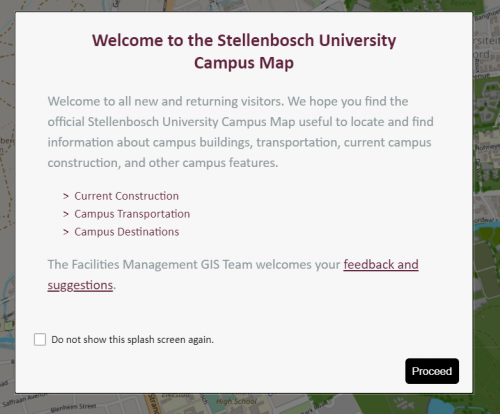
  1. Open https://campusmap.sun.ac.za/in your browser.
  2. Select Proceed. 


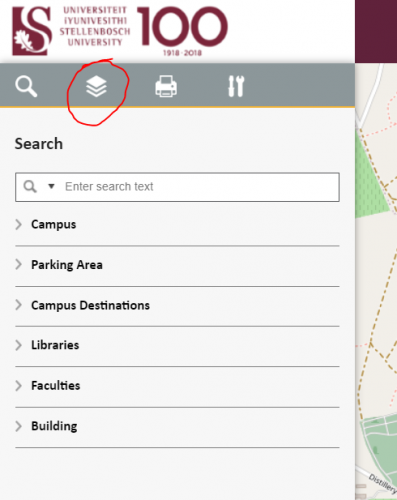
3. Click on the layers-icon (circled in red below)


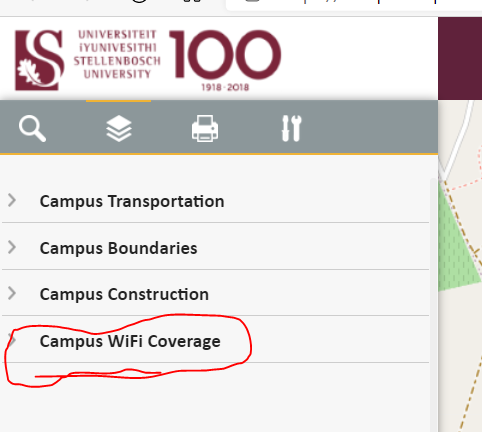
4. Select Campus WiFi Coverage


Although the campus map is live, it is continuously improved and updated as new needs arise from its users. 

For enquiries and suggestions, you are welcome to  contact Facilities Management. 

https://www.matiemedia.org/su-releases-first-interactive-campus-map/

[:af]

Bykans ‘n jaar gelede het Fasiliteitsbestuur hulle pasgemaakte, interaktiewe kampuskaart bekendgestel. Dié aanlyn-toepassing is in samewerking met Informasietegnologie en Esri Suid-Afrika ontwikkel en is veral handig vir nuwe studente wat nog nie bekend is met die kampusomgewing nie. Meer oor die funksionaliteit van die kaart.

Een handige funksie wat mettertyd bygevoeg is, is die aanduiding van WiFi-beskikbaarheid in geboue. Om die WiFi-koppelvlak te sien, volg die instruksies onder:

  1. Maak https://campusmap.sun.ac.za/in jou webblaaier oop.
  2. Kies Proceed. 


3. Kliek op die layers-ikoon (met rooi gesirkel)


4. Kies Campus WiFi Coverage


Alhoewel die interaktiewe kaart lewendig is, word dit deurentyd verfyn en opgedateer soos dit gebruik word en nuwe behoeftes bepaal word. 

Vir navrae en voorstelle kontak gerus vir Fasiliteitsbestuur. 


https://www.matiemedia.org/su-releases-first-interactive-campus-map/

[:]

[:en]SUNLearn support for students[:]

Thursday, April 1st, 2021

[:en]

Are you a Matie? Then you use SUNLearn.

Face-to-Face SUNLearn Support for students is now available at the IT Hub on Monday, Wednesday and Friday from 09h00-17h00.

Do you need assistance with:

  • SUNLearn access and log in issues?
  • Basic SUNLearn site navigation?
  • Accessing courses and course materials?
  • Knowing what to expect when your assessments are due?
  • Struggling to submit an assignment or find your Turnitin report?

Then set up an appointment today by sending an email to: angunge@sun.ac.za

We also offer weekly webinars for basic SUNLearn training for students on Tuesday and Friday at 18h00.

To make a booking for individualised SUNLearn assistance and support, please email angunge@sun.ac.za

[:]