SEARCH
  • [:en]Recent Posts[:af]Onlangse bydraes

  • [:en]Categories[:af]Kategorieë

  • [:en]Archives[:af]Argiewe

Training

Become a Microsoft proWord slim met Microsoft

Wednesday, March 26th, 2014

Technology plays a crucial role in our lives. Subsequently, 50% of today’s jobs require some degree of technology skills. According to the US Bureau of labour statistics, over the next 4 years, 51% of jobs will be software related.

At the same time high youth unemployment rates are rising and to such an extent that 46% of adults aged 18 to 24 are unemployed.

The Microsoft IT Academy addresses both these issues by attempting to equip students with the IT skills they will need to have a successful career in today’s workforce. The purpose of the academy is to “help prepare students, create successful academic institutions and strengthen communities”.ms-it-academy

So what exactly is the Microsoft IT Academy?

The Academy is a complete technology education solution connecting students, teachers, staff, employers and local communities through leading-edge technology skills. It wants to connect education and the real world and provide development resources for educators and staff.

Training is done online through e-learning and is available anywhere, anytime with more than 300 eLearning courses to your disposal. Staff and students can complete courses on their own time. Although no formal classes are held, learners who complete the Microsoft exam, will receive a certificate.

So far the academy has reached 8.5 million students and educators annually. It has over 15 000 IT Academy members in over 130 countries and 1.4 million student certifications over the last 12 months.

Who qualifies for training at the Microsoft IT Academy?

Membership is open to global academic institutions including public or K-12 schools, vocational schools, junior colleges, universities, scientific/technical schools, libraries and museums. Stellenbosch University has already been registered as a Microsoft IT Academy at an annual tariff currently funded by Information Technology.

Microsoft Official Academic Course (MOAC) and lesson plans

Productivity

  • Word
  • Excel
  • PowerPoint
  • Outlook
  • Access
  • Publisher
  • OneNote
  • Office
  • SharePoint

Computer Science

  • Learn to code
  • Software development
  • Web development
  • Microsoft .NET
  • Gaming development
  • HTML5 app development
  • Software testing

IT infrastructure

  • Windows operating system
  • Windows Server administration
  • Networking
  • Database fundamentals
  • Security

If you are interested in a course, contact our IT Service Desk at help@sun.ac.za and clearly indicate the course you are interested in, as well as you own details.

A learning path will be assigned to you and you will be informed via email as soon as it has been completed. You will also receive the necessary guidelines of how to use the online training.


Tegnologie speel `n sentrale rol in ons lewens. Gevoglik vereis 50% van vandag se loopbane `n mate van tegnologiese vaardigheid. Volgens die Amerikaanse Buro vir Arbeid-statistieke sal 51% van werk oor die volgende 4 jaar iets met sagteware te doen hê.

Terselfdertyd is die hoë getalle werklose jongmense besig om te styg –  tot so `n mate dat 46% van volwassenes tussen die ouderdomme van 18 en 24 werkloos is. 

Die Microsoft IT Academy spreek beide verskynsels aan deur persone toe te rus met die vaardighede wat hulle nodig het vir `n suksesvolle loopbaan in vandag se werksomgewing.

ms-it-academyWat is die Microsoft IT Academy?

Die Microsoft IT Academy is `n volledige, opvoedkundige oplossing wat studente, onderwysers, personeel, werkgewers en plaaslike gemeenskappe verbind met behulp van rigtinggewende tegnologievaardighede. Die leerskool poog ook om opvoeding en die regte wêreld te verbind en ontwikkelingsbronne vir opvoeders en personeel daar te stel.

Opleiding word deur middel van e-leer gefasiliteer en is enige plek, enige tyd beskikbaar met meer as 300 e-leer kursusse. Personeel en studente kan dus die aanlynkursusse op hulle eie tyd aanpak. Hoewel geen formele klasse word aangebied nie, ontvang deelnemers wat die Microsoft-eksamens slaag, wel `n amptelike sertifikaat.

Tot dusver het die inisiatief jaarliks  8.5 miljoen studente en opvoeders bereik en het meer as 15 000 IT Academy lede in meer as 130 lande en 1.4 miljoen studentesertifiserings oor die laaste 12 maande.

Wie kwalifiseer vir opleiding by die Microsoft IT Academy?

Lidmaatskap is oop vir internasionale akademiese instellings, insluitende openbare skole, K-12 skole, vakskole, junior kolleges, universiteite, wetenskap/tegniese skole, biblioteke en museums. Universiteit Stellenbosch is registreer as ‘n Microsoft Academy teen ‘n jaarlikse tarief wat op die stadium deur Informasietegnologie befonds word.

Amptelike en akademiese Microsoft kursusse en leerplanne

Produktiwiteit

  • Word
  • Excel
  • PowerPoint
  • Outlook
  • Access
  • Publisher
  • OneNote
  • Office
  • SharePoint

Rekenaarwetenskap

  • Leer programmeer
  • Sagteware-ontwikkeling
  • Web-ontwikkeling
  • Microsoft .NET
  • Speletjie-ontwikkeling
  • HTML5 toepassing-ontwikkeling
  • Sagtewaretoetsing

IT infrastruktuur

  • Windows bedryfstelsel
  • Windows bedieneradministrasie
  • Netwerke
  • Basiese databasis-beginsels
  • Sekuriteit

Indien jy geinteresseerd is in `n kursus, kontak ons IT Dienstoonbank by help@sun.ac.za en dui dadelik aan in watter kursus jy belangstel, sowel as jou eie inligting.

`n Leerplan sal aan jou toegeken word en sodra dit voltooi is, sal ons jou met e-pos in kennis stel. Jy sal ook die nodige riglyne ontvang waarin daar verduidelik word hoe om die aanlynopleiding te voltooi.  

We’ll save you a seat!Ons hou vir jou `n sitplek!

Friday, February 14th, 2014

With 2014 well on it’s way, you’ve probably forgotten those New Year’s resolutions, haven’t you? Well, here’s your opportunity to make up for it and banish that guilt complex.

If learning a new skill was one of those forgotten resolutions, you can now  brush up on your MS Excel or MS Access skills.

IT is once again offering computer courses at both Stellenbosch and Tygerberg campuses.  For more information and instructions on how to register for any of these courses, browse to the IT SELF HELP WIKI.


COURSE NAME  STELLENBOSCH TYGERBERG VENUES
Typing & Digital Literacy 24-28 Febr       CTU Training Solutions, (STB)
MS Excel 2010 Basic 05-Mar   03-Apr   Admin A (STB), Gerga (TYG)
MS Word 2010 Basic 03-Mar   01-Apr   Admin A (STB), Gerga (TYG)
MS Outlook 2010 Basic 07-Mar   08-Apr   Admin A (STB), Gerga (TYG)
MS Powerpoint 2010 Basic 06-Mar   09-Apr   Admin A (STB), Gerga (TYG)
MS Access 2010 Basic 18-19 Mar   22-23 Apr   Admin A (STB), Gerga (TYG)
MS Excel 2010 Intermediate 17-Mar   08-May   Admin A (STB), Gerga (TYG)
MS Word 2010 Intermediate 10-Mar   06-May   Admin A (STB), Gerga (TYG)
MS Outlook 2010 Intermediate 13-Mar   13-May   Admin A (STB), Gerga (TYG)
MS Powerpoint 2010 Intermediate 12-Mar   14-May   Admin A (STB), Gerga (TYG)
MS Excel 2010 Advanced 14-15 Aug   12-13 Aug Admin A (STB), Gerga (TYG)
MS Project 2010 Level 1 19-20 May   21-22 May Admin A (STB), Gerga (TYG)
MS Sharepoint 2010 Level 1 Foundation 15-16 Apr       CTU Training Solutions, (STB)
MS Sharepoint 2010 Level 1 Foundation 24-25 Apr       CTU Training Solutions, (STB)
MS Sharepoint 2010 Level 1 Foundation 26-27 May       CTU Training Solutions, (STB)
MS Sharepoint 2010 Level 1 Foundation 29-30 May       CTU Training Solutions, (STB)
MS Sharepoint 2010 Level 1 Foundation 30-31 July       CTU Training Solutions, (STB)
MS Sharepoint 2010 Level 1 Foundation 21-22 Aug       CTU Training Solutions, (STB)
MS Sharepoint 2010 Level 1 Foundation 16-17 Sept       CTU Training Solutions, (STB)
MS Sharepoint 2010 Level 2 Site Administrator 26-28 Mar       CTU Training Solutions, (STB)

Met 2014 reeds goed aan die gang, het jy waarskynlik ook gerieflikheidshalwe vergeet van daai plegtige Nuwejaarsvoornemens, né? Wel, hier is jou kans om op te maak daarvoor en van jou skuldgevoelens ontslae te raak.

As `n nuwe vaardigheid op jou lysie was, kan jy nou jou Excel en Access-vaardighede slyp of iets nuut soos SharePoint leer. 

IT bied weer kursusse aan by beide Stellenbosch en Tygerberg kampusse. Vir meer inligting en instruksies vir registrasie, gaan na die  IT SELF HELP WIKI.


KURSUSNAAM  STELLENBOSCH TYGERBERG LOKALE
Typing & Digital Literacy 24-28 Febr       CTU Training Solutions, (STB)
MS Excel 2010 Basic 05-Mar   03-Apr   Admin A (STB), Gerga (TYG)
MS Word 2010 Basic 03-Mar   01-Apr   Admin A (STB), Gerga (TYG)
MS Outlook 2010 Basic 07-Mar   08-Apr   Admin A (STB), Gerga (TYG)
MS Powerpoint 2010 Basic 06-Mar   09-Apr   Admin A (STB), Gerga (TYG)
MS Access 2010 Basic 18-19 Mar   22-23 Apr   Admin A (STB), Gerga (TYG)
MS Excel 2010 Intermediate 17-Mar   08-May   Admin A (STB), Gerga (TYG)
MS Word 2010 Intermediate 10-Mar   06-May   Admin A (STB), Gerga (TYG)
MS Outlook 2010 Intermediate 13-Mar   13-May   Admin A (STB), Gerga (TYG)
MS Powerpoint 2010 Intermediate 12-Mar   14-May   Admin A (STB), Gerga (TYG)
MS Excel 2010 Advanced 14-15 Aug   12-13 Aug Admin A (STB), Gerga (TYG)
MS Project 2010 Level 1 19-20 May   21-22 May Admin A (STB), Gerga (TYG)
MS Sharepoint 2010 Level 1 Foundation 15-16 Apr       CTU Training Solutions, (STB)
MS Sharepoint 2010 Level 1 Foundation 24-25 Apr       CTU Training Solutions, (STB)
MS Sharepoint 2010 Level 1 Foundation 26-27 May       CTU Training Solutions, (STB)
MS Sharepoint 2010 Level 1 Foundation 29-30 May       CTU Training Solutions, (STB)
MS Sharepoint 2010 Level 1 Foundation 30-31 July       CTU Training Solutions, (STB)
MS Sharepoint 2010 Level 1 Foundation 21-22 Aug       CTU Training Solutions, (STB)
MS Sharepoint 2010 Level 1 Foundation 16-17 Sept       CTU Training Solutions, (STB)
MS Sharepoint 2010 Level 2 Site Administrator 26-28 Mar       CTU Training Solutions, (STB)

Would you like lessons from Google?Wil jy klasloop by Google?

Friday, November 15th, 2013

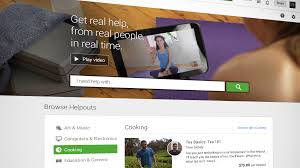
Given the fast growing MOOC phenomenon (read our article on MOOCs), Google launched an online video university recently.

Google Helpouts is an online service providing a platform for users to collaborate, share expertise and assist other users by means of live, real-time video streaming.

To use this service, you have to be a member of Google+. You will be able to access Helpouts either through your computer or tablet or by downloading the Android app for your cellphone.

Within seconds you can have a personal instructor at your disposal or when it suits you. No limits on time or location exist – you can have access to expert advice any time of day or night.

Helpout schedules a session when it suits you best and outomatically adds it to your Google calendar. An option to be reminded via sms or e-mail also exists to ensure you don’t forget your session.

Thousands of providers have already joined Helpouts and teach in a wide range of specialist fields. Experts or, as Google refers to them, “providers” can be small, medium or large companies, but also individuals.

Even you can host your popular origami class on Helpouts. Just remember, experts have to be approved by Google and need to list their qualifications, prices and schedules.

Unlike MOOCs, Google’s new service comes at a cost.

Clients pay per minute or session for a live video conversation with an expert who gives Google 20% of his fee as payment. Free sessions are also available for some companies as part of their marketing strategy

Payment is made via Google Wallet, which holds your credit card details, and you can pay per session or per minute. If you’re not satisfied with the service, Helpout  will provide you with a full refund – if you request one within 72 hours.

Do you suddenly feel the urge to learn to play guitar? Matt Gibson is waiting for you at Google Helpouts

[SOURCE: www.iol.co.za en www.wikpedia.org]


In lyn met die vinnige groei van MOOCs (lees ons artikel oor MOOCS), het Google ook die week `n aanlyn “video-universiteit” op die been gebring. 

Google Helpouts is `n aanlyndiens wat gebruikers die geleentheid bied om te kollaboreer, kundigheid te deel en te help met behulp van lewendige, intydse videostrome.

Om die diens te gebruik, gebruik moet jy `n Google+ lid wees, waarmee jy toegang tot Helpouts kry met jou rekenaar of tablet, of deur die Android-toepassing op jou selfoon te laai.

Binne sekondes kan jy ‘n persoonlike instrukteur tot jou beskikking hê of wanneer dit jou pas. Jy kan enige tyd van die dag of nag toegang kry tot `n deskundige se kennis – geen beperking op tyd of geografiese grense nie. 

Helpout skeduleer jou sessie wanneer dit jou pas en plaas dit outomaties op jou Google kalender. Jy kan ook kies om deur middel van sms of e-pos herinner te word.

Helpouts het reeds meer as 1000 verskaffers wat enige beroep insluit en lesse gee in `n verskeidenheid spesialisareas. Kundiges of “verskaffers”, soos Google hulle noem, kan klein, medium of groot maatskappye wees, maar ook individue.

Selfs jy kan jou origami-klas op Helpouts aanbied. Onthou net dat kundiges deur Google goedgekeur moet word en `n volledige beskrywing van hul dienste, pryse en skedules verskaf moet word.

Ongelukkig, anders as MOOCs, is daar `n koste verbonde aan Google se nuwe diens.

Kliënte betaal per minuut of sessie vir lewendige, intydse videogesprekke met die deskundige, wat op sy beurt aan Google 20% van sy fooi betaal. Sommige maatskappye sal wel gratis sessies aanbied om bemarking `n hupstoot te gee. 

Betaling geskied deur middel van Google Wallet, wat jou kredietkaartdetails bevat, en jy betaal per sessie of per minuut. As jy ontevrede is met die diens, waarborg Helpout `n volledige terugbetaling –  mits jy dit binne 72 uur versoek.

Skielik lus om te leer kitaar speel? Matt Gibson wag vir jou by Google Helpouts …

[BRON: www.iol.co.za en www.wikpedia.org]


Statistica, step by stepStatistica, stap vir stap

Friday, November 15th, 2013

Statistica is a statistical and analysis software package developed in the mid 80’s by StatSoft.

This package is also used on our campus for data analysis, data mining and data visualization processes.

To optimally use everything Statistica has to offer, additional resources such as manuals, videos and tutorials can add value to user experience. For this reason we’d like to share the resources below with our Statistica users and hope it will be of some use.

1. Online, electronic manual

2. Video-series on YouTube

3. Online tutorials

4. Introduction to Statistica (pdf-format)

5. Introduction to Statistica: Graphics and macros (SVB) (pdf-format)

[SOURCE: www.wikipedia.org & www.statsoft.co.za]


Statistica is `n statistieke en analise sagteware pakket ontwikkel deur StatSoft in die middel-80s.

Die syferslim pakket word ook op ons kampus gebruik vir data-analise, om data te myn en vir data-visualiseringsprosesse. 

Om Statistica optimaal te gebruik, kan addisionele hulpbronne in die vorm van handleidings, videos en tutoriale handig te pas kom. Om hierdie rede deel ons graag die onderstaande bronne met al ons Statistica-gebruikers en hoop dat dit van waarde sal wees. 

1. Aanlyn, elektroniese handboek

2. Video-reeks op YouTube

3. Aanlyn tutoriale

4. Inleiding tot Statistica

5. Inleiding tot Statistica: Grafieke en makros (SVB) (pdf-formaat)

[SOURCE: www.wikipedia.org & www.statsoft.co.za]


Information at your finger tipsInligting op jou vingerpunte

Friday, November 1st, 2013

Every day we’re bombarded by an enormous amount of information, of which only a small percentage is relevant to us. It’s no wonder then that we struggle to distinguish between the useful and useless.

When it comes to IT related questions, there is indeed one central place where you can find useful answers with a simple mouse click. Whether you want to apply for a telephone line or want to know how to back up your data – all the answers can be found on IT’s selfhelp wiki. 

If you don’t feel like calling the IT Service Desk or want to wait for feedback via e-mail, save yourself some time and see if your question isn’t listed already.

Can’t find your question? Just let us know, we’ll add it and you’ll help to improve our database of information. 

Ons word daagliks toegegooi met massas informasie waarvan waarskynlik net `n klein persentasie bruikbaar is. Dis geen wonder dat ons dit wat wel relevant is, nie kan opspoor tussen die res nie.

As dit by enige IT-vrae kom, is daar wel een sentrale plek waar jy met ‘n muiskliek nuttige antwoorde kan kry. Wonder jy hoe om aansoek te doen vir ‘n telefoon? Wil jy weet hoe om jou data te rugsteun voordat jou skootrekenaar se hardeskyf sy laaste asem uitblaas? Hierdie antwoorde en meer is reeds op IT se selfhelp wiki. 

Nie lus om die IT Dienstoonbank te skakel of te wag vir terugvoer via e-pos nie, gaan kyk gerus of jou vraag nie vinnig beantwoord kan word sonder die moeite van ‘n telefoonoproep nie.

Indien daar geen teken van ‘n oplossing op die wiki is nie, laat weet ons net en ons voeg dit by. Sodoende groei ons databasis en kan ons meer mense help met knellende IT-vrae.