SEARCH
  • [:en]Recent Posts[:af]Onlangse bydraes

  • [:en]Categories[:af]Kategorieë

  • [:en]Archives[:af]Argiewe

Training

Want to enroll for a course, but don’t know how?Wil jy inskryf vir `n kursus, maar jy’t geen idee hoe nie?

Friday, August 16th, 2013

As you know by now, IT offers various courses for free – all you have to do is enroll. But does the sight of the online registration fill you with dread and in the end you give up and just call the IT Service desk?

Don’t panic, we’ll show you step-by-step how to survive this relatively painless procedure.

STEP 1

Go to the staff portal –  my.sun.ac.za

STEP 2

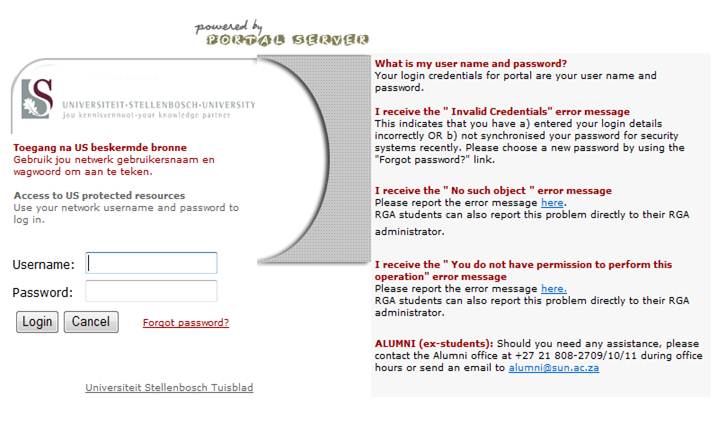
Click on SUN-e-HR.

STEP 3

Log in with your SU username and password.

Pic4

STEP 4

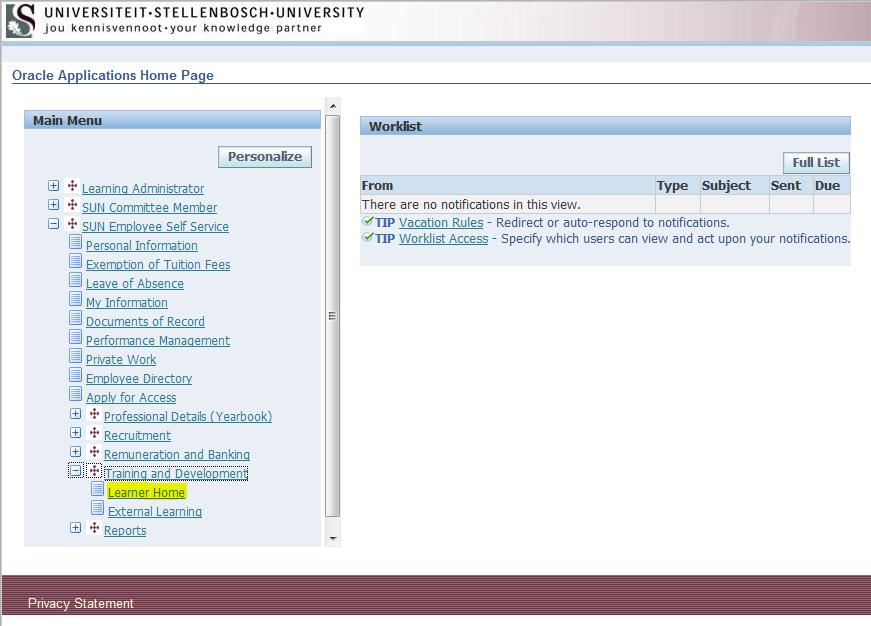
Click on Training and Development and then Learner Home.

Pic5

STEP 5

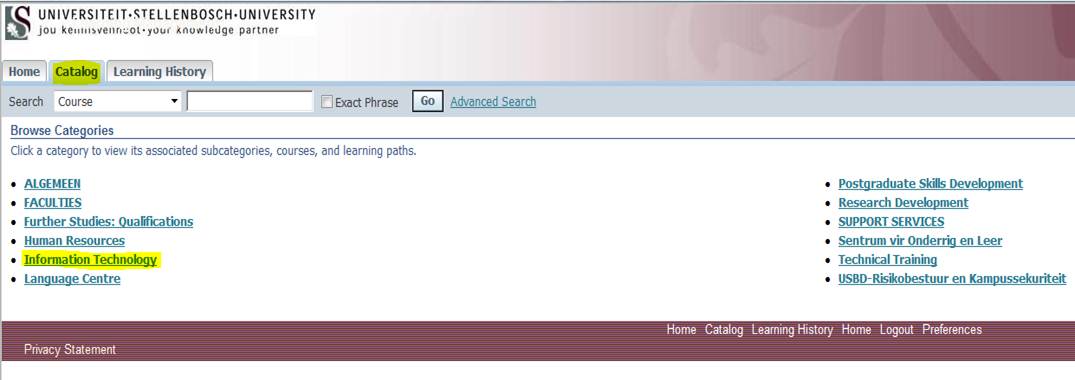
Click on Catalog and select Information Technology

Pic6

STEP 6

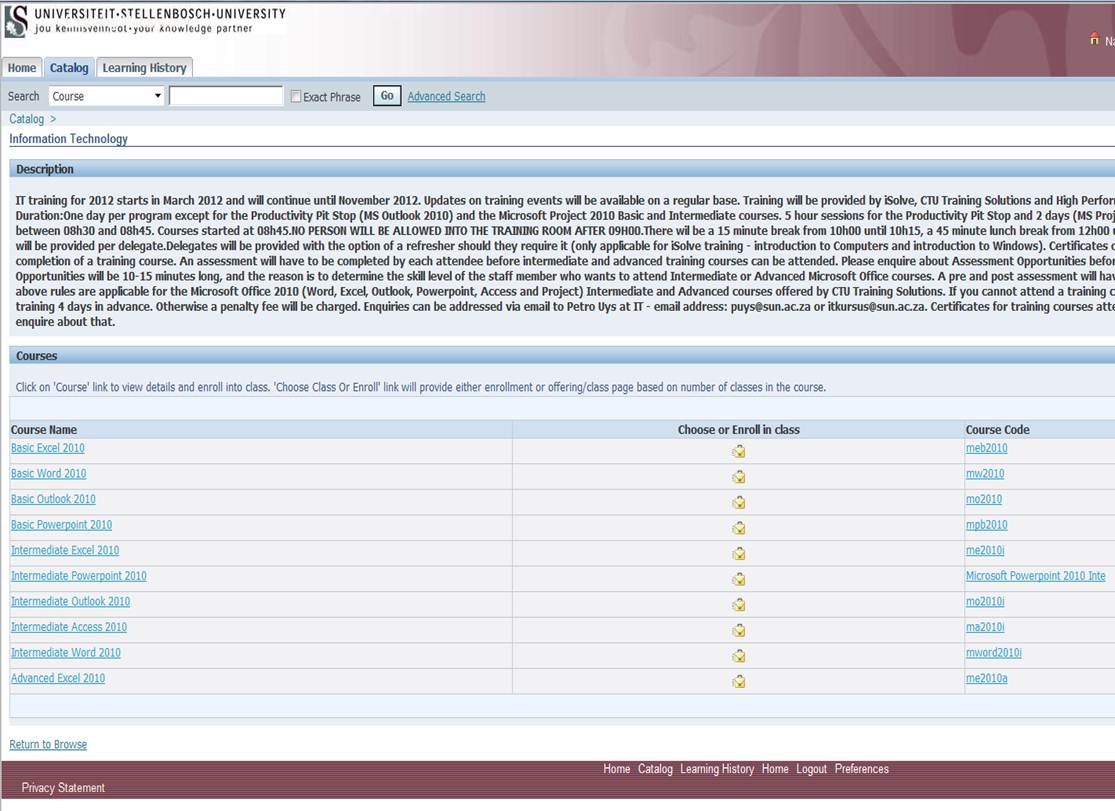
Select your course

Pic7

For more information on our courses, click here.

Soos julle reeds weet is daar vele IT-kursusse om van te kies en waarvoor jy gratis kan inskryf. Jy het al probeer inskryf op die personeelportaal, maar dit was so verwarrend dat jy maar liewer die hasepad gekies het en summier die IT Dienstoonbank gebel het.

Moenie paniekerig raak nie – dit lyk erger as wat dit is en ons sal jou stap-vir-stap wys hoe om dit te doen.

STAP 1

Gaan na die personeelportaal – my.sun.ac.za

STAP 2

Kliek op SUN-eHR

STAP 3

Teken aan met jou US gebruikersnaam en wagwoord

Pic4

STAP 4

Kliek op Training and Development en daarna Learner Home.

Pic5

STAP 5

Kliek op Catalog en kies Information Technology

Pic6

 STAP 6

Kies jou kursus

Pic7

 Vir meer inligting oor Augustus se kursusse, kliek hier.


Moodle takes over from Vista & BlackboardVista & Blackboard staan opsy vir Moodle

Friday, May 24th, 2013

From 2014 Stellenbosch University’s electronic learning management system will switch from Vista and Blackboard to Moodle, an  open source eLearning system. The switch to another system was necessitated from a change in the University’s strategy and shortcomings in the existing system that could not be corrected. The decision was based on a thorough investigation. Henceforth Moodle will be the standard eLearning system of the University.

A task team (Johann Kistner, drs Antoinette van der Merwe & JP Bosman and ms Marinda van Rooyen) facilitated the evaluation, including consulations with academic, administrative and support services staff. The success of systems, as well as the scale on which they were used by other universities, were also looked at. In the end a decision was made based on a set of predefined, weighed criteria. The following was taken into account:

  1. Off-campus access to the system must be reliable, because of the significant growth in the use of e-Learning Technology from outside campus:  service courses,      postgraduate modules, and students working from their homes.
  2. A reliable assessment component, because e-assessment is increasingly  used.
  3. A mobile interface that works on all equipment, due to the huge increase in the use of mobile devices (phones, tablets, laptops) to access the learning        management system.
  4. An accurate tracking system, because the tracking of students’ progress are critical for student success.
  5. Off-line functionality, which is very important in the (South) African context. The system must provide for students learning materials and other information to easily sync to their devices while on campus or via the network, and then to work at home without having to be online all the time.
  6. A more flexible licensing model, because community involvement and working with schools and other universities, especially on the African continent (e.g. in the CHEC courses and schools support) means that restrictive license agreements is not sustainable.

On a practical level this means that Moodle will be used for all modules from January and Vista and Blackboard will only be available for 2013 modules until March 2014. (until after the  last exam opportunity)

The short time span before implementation is planned presents substantial challenges for lecturers to migrate information in time and also for IT to ensure that servers are ready for the change. The project is currently being defined and the team is sticking to a tight time line to ensure that this goal will be achieved.

More information will also be communicated in future editions of Bits & Bytes.

Vanaf 2014 skakel die Universiteit se elektroniese onderrigleerbestuurstelsel oor van Vista en BlackBoard Learn na ‘n oop-bron e-Leer-stelsel, Moodle. Die oorskakeling is genoodsaak deur  ‘n verandering in die Universiteit se strategie en tekortkominge in die bestaande stelsel wat nie reggestel kon word nie. Die besluit is gegrond op `n deeglike ondersoek. Moodle is dus voortaan die standaard e-Leer stelsel van die Universiteit.

‘n Taakspan (Johann Kistner, drr Antoinette van der Merwe & JP Bosman en me Marinda van Rooyen) het die evaluering gedoen, insluitend konsultasie met akademiese, administratiewe en steundienste personeel.  Daar is ook gekyk na hoe die stelsels suksesvol en op groot skaal by ander universiteite gebruik word.  Uiteindelik is die besluit gemaak op grond van ‘n stel vooraf gedefinieërde, geweegde kriteria. Dit het volgende in ag geneem:

  1. Toegang tot die stelsel van buite kampus moet betroubaar wees. Daar is `n beduidende groei in die gebruik van e-Leertegnologie van buite die kampus:  dienskursusse, nagraadse modules, en studente wat vanaf hul huise werk.
  2. E-assessering word toenemend gebruik, dus is `n betroubare assesseringskomponent noodsaaklik.  
  3. ’n Mobiele koppelvlak wat op alle toerusting werk, agv die groot toename in die gebruik van mobiele toerusting (selfone, tabletrekenaars, skootrekenaars).
  4. ‘n Akkurate tredhoustelsel om rekord te hou van studente se vordering. 
  5. Af-lyn funksionaliteit om voorsiening te maak dat studente die leermateriaal en ander inligting maklik kan sinkroniseer na  toerusting terwyl hulle op kampus is en dan tuis kan werk sonder om aanlyn te wees.
  6. ‘n Meer soepel lisensiëringsmodel aangesien beperkende lisensieooreenkomste nie meer volhoubaar is indien daar groter gemeenskapsbetrokkenheid en samewerking met skole en ander Universiteite, veral op die Afrika kontinent (bv in die CHEC kursusse, skole ondersteuning) in die vooruitsig gestel word nie. 

In praktyk beteken dit dat Moodle vanaf Januarie vir alle modules gebruik word, en dat Vista en BlackBoard net tot Maart 2014 vir 2013 modules beskikbaar bly (tot na die laaste eksamengeleentheid).

Die kort tydperk voor die implentering moet plaasvind bied `n groot uitdaging vir dosente om inligting  betyds te migreer, asoof aan IT om die bedieners betyds gereed te kry.  Die projek word tans gedefinieer en daar word streng by `n tydlyn gehou om te verseker dat hierdie doelwit bereik word. 

Meer inligting sal ook in volgende uitgawes van Bits & Bytes kommunikeer word. 

Turnitin clips plagiarism’s wingsTurnitin fnuik plagiaat

Friday, May 24th, 2013

Academic work at a university entails that the student be exposed to the ideas, written material and other intellectual and creative material of others. The intention with academic studies is precisely that the ideas of both the lecturers and the students will be shaped and polished by others. At the same time, students ought to go further than what was devised, written and created by others; he or she should critically evaluate it, provide new and original input or syntheses, and apply these to contemporary and local studies of problems. This is where academic activity becomes satisfying at university level.

Naturally, lecturers can only evaluate the contribution of their students if the contributions of others are clearly distinguished. This takes place through acknowledged systems or the process of acknowledgement and referencing. If these conventions are not adhered to and the required recognition is not given, the basis of the academic work at a university is undermined. Plagiarism is committed when someone else’s work (words, ideas, creations) are taken over and passed off as the writer’s own.

The university uses Turnitin to test plagiarism. Turnitin integrates with the Learning Management System (Webstudies or Ematies). (See more information below) Assignment links are created within the LMS which students use to upload their assignments to. The assignments submitted by students are stored in a database used to check for plagiarism. This prevents one student from using another student’s paper, by identifying matching text between papers. Assignments are also be checked against web pages, books, newspapers and available journals on the net.

The University aims to ensure that mechanisms are in place that will enable lecturers to promote academic integrity and to eliminate plagiarism. The most successful approaches to dealing with student instances of plagiarism allow for a ‘developmental approach’, which implies that cases of plagiarism – with the exception of serious cases – be used as opportunities to instruct the guilty persons as to what is expected and how to handle information. In addition, such a student could be directed to redo the assignment.

For more information on the university’s the Interim Guidelines for dealing with Plagiarism, please visit the CTL website: http://stbweb02.stb.sun.ac.za/ctl/policies.html

Article compilied from the Interim approach to dealing with plagiarism policy by Marinda van Rooyen

 TURNITIN/WebStudies official website

TURNITIN Logon problems & Help

–          If you can’t log in to WebSTudies or Blackboard, Go to www.sun.ac.za/useradm  and change your password.

–          Any other WebSTudies or Blackboard related queries (modules not showing etc.), send an e-mail to WebStudies or Samuel Morris or
call+27(0)21 808-2443


Akademiese werk aan ’n universiteit bring mee dat die student blootgestel word aan die idees, geskrewe materiaal en ander intellektuele en kreatiewe produkte van ander. Die bedoeling met akademiese studie is juis dat die idees van sowel die dosent as die student deur hierdie idees en materiaal van ander gevorm en geslyp sal word. Terselfdertyd moet die student ook verder gaan as dit wat ander gedink, geskryf en geskep het en dit krities evalueer, nuwe en oorspronklike insette of sinteses maak, en dit van toepassing maak op eietydse internasionale en plaaslike problematieke. Hierin lê die besondere bevrediging van akademiese werk op universiteitsvlak. 

Uiteraard kan die dosent slegs evalueer wat die bydrae van die student self is wanneer die bydrae van ander persone duidelik onderskei word. Dit gebeur by wyse van erkende stelsels van erkenning en aanhaling. Deur nie hierdie konvensies te volg en die nodige erkenning te gee nie, word die grondslag van die akademiese werk aan ’n universiteit ondermyn. Deur die werk (woorde, idees, skeppinge) van ander persone oor te neem asof dit die skrywer se eie is, word plagiaat gepleeg. 

Die universiteit gebruik Turnitin om plagiaat mee te toets. Turnitin integreer met die Leerbeheerstelsel (Webstudies of Ematies). Werkstukskakels word binne die LBS geskep wat deur studente gebruik word om hulle werkstukke na op te laai. Die werkstukke wat opgelaai word, word in ‘n databasis gestoor en word dan gebruik vir die toets van plagiaat. Dit verhoed dat een student ‘n ander student se werkstuk kan gebruik, deur woorde en sinne wat ooreenkom te identifiseer. Werkstukke word ook teen bestaande webblaaie, aanlyn boeke, koerante en journale getoets. 

Die mees suksesvolle benaderings m.b.t. die hantering van plagiaat in die geval van studente laat ruimte vir wat genoem kan word ’n ontwikkelingsbenadering, naamlik dat die voorkoms van gevalle van plagiaat – uitgesonderd gevalle van ’n ernstige aard gebruik word as ’n geleentheid om die persone wat hulle daaraan skuldig maak te wys op wat verwag word en hoe om met inligting om te gaan, asook om (byvoorbeeld) die werkstuk oor te doen. 

Vir meer inligting oor die universiteit se Interim-benadering m.b.t. die hantering van plagiaat, besoek die SOL webtuiste: http://stbweb02.stb.sun.ac.za/sol/beleide

Inligting verkry en aangepas uit Interim riglyne vir die hantering van plagiaat deur Marinda van Rooyen


TURNITIN/WebStudies webwerf

TURNITIN Aantekenprobleme & hulp

–          As jy nie kan aanteken by WebSTudies of Blackboard, gaan na www.sun.ac.za/useradm  en verander joiu wagwoord.

–          Vir enige ander WebSTudies of Blackboard-verwante navrae (modules wat nie wys nie, ens.), stuur e-pos aan WebStudies of Samuel Morris.
            Tel:  +27(0)21 808-2443



MS Project for a more organised officeMS Project vir `n meer georganiseerde kantoor

Friday, March 8th, 2013

Does a large portion of your day consist of managing projects and seeing to it that everything runs smoothly? Whether you are a project manager or just closely involved with projects within your department, MS Project could make your task easier.
Microsoft Project (MSP, MSOP or WinProj) is a project management software program, developed and sold by Microsoft, which is designed to assist a project manager in developing aplan, assigning resources to tasks, tracking progress, managing the budget, and analyzing workloads. (SOURCE: Wikipedia)

Information Technology offers free MS Project 2010 Level 1 and 2 courses to staff.  But you’ll have to jump at the opportunity!  

Only two dates are available – 

Microsoft Project Level 1: Stellenbosch –  19 & 20 March

Microsoft Project Level 2: Stellenbosch – 8 & 9 April


COURSE INFORMATION

MS Project Level 1

Getting started with Microsoft Project

Creating a Project Plan

Managing Tasks in a Project Plan

Managing Resources in a Project Plan

Finalising a project Plan

   
Ms Project Level 2

Exchanging Project Plan Data with Other Applications

Updating a Project Plan

Managing Project Costs

Reporting Project Data Visually

Reusing Project Plan Information

Enrolling can be done online by signing on at the staff portal and selecting the SUN-e-HR option. E-mail us at itkursus@sun.ac.za for more information. See IT’s selfhelp-wiki for more information.

Bestaan `n groot gedeelte van jou dag daaruit om projekte te bestuur en te sorg dat alles glad verloop? Of jy nou amptelik `n projekbestuurder is of nou betrokke is by verskeie van jou afdeling se projekte, MS Project kan moontlik jou dagtaak vergemaklik.

Microsoft Project (MSP, MSOP of WinProj) is `n projekbestuur sagteware program, ontwikkel en verkoop deur Microsoft. Die sagteware is ontwerp om projekbestuurders te help om `n plan te ontwikkel, hulpbronne toe te ken aan take, vordering te volg, begrotings te bestuur en werksladings te analiseer.  (BRON: Wikipedia) Informasietegnologie bied gratis MS Project 2010 Vlak 1 en ook 2 kursusse aan. Maar jy sal gou moet spring!

Daar is nog net twee datums beskikbaar: 

Microsoft Project Level 1: Stellenbosch –  19 & 20 Maart

Microsoft Project Level 2: Stellenbosch – 8 & 9 April


KURSUSINLIGTING

MS Project Level 1

Getting started with Microsoft Project

Creating a Project Plan

Managing Tasks in a Project Plan

Managing Resources in a Project Plan

Finalising a project Plan

   
Ms Project Level 2

Exchanging Project Plan Data with Other Applications

Updating a Project Plan

Managing Project Costs

Reporting Project Data Visually

Reusing Project Plan Information


Stuur dus asseblief vir ons e-pos by itkursus@sun.ac.za indien jy enige verdere inligting benodig. Inskrywing  kan aanlyn gedoen word deur aan te teken op die personeelportaal en die SUN-e-HR opsie te selekteer. Sien ook IT se selfhelp-wiki vir meer besonderhede.

Free training opportunities for aspiring IT-expertsGratis opleidingsgeleenthede vir aspirant IT-deskundiges

Wednesday, December 12th, 2012

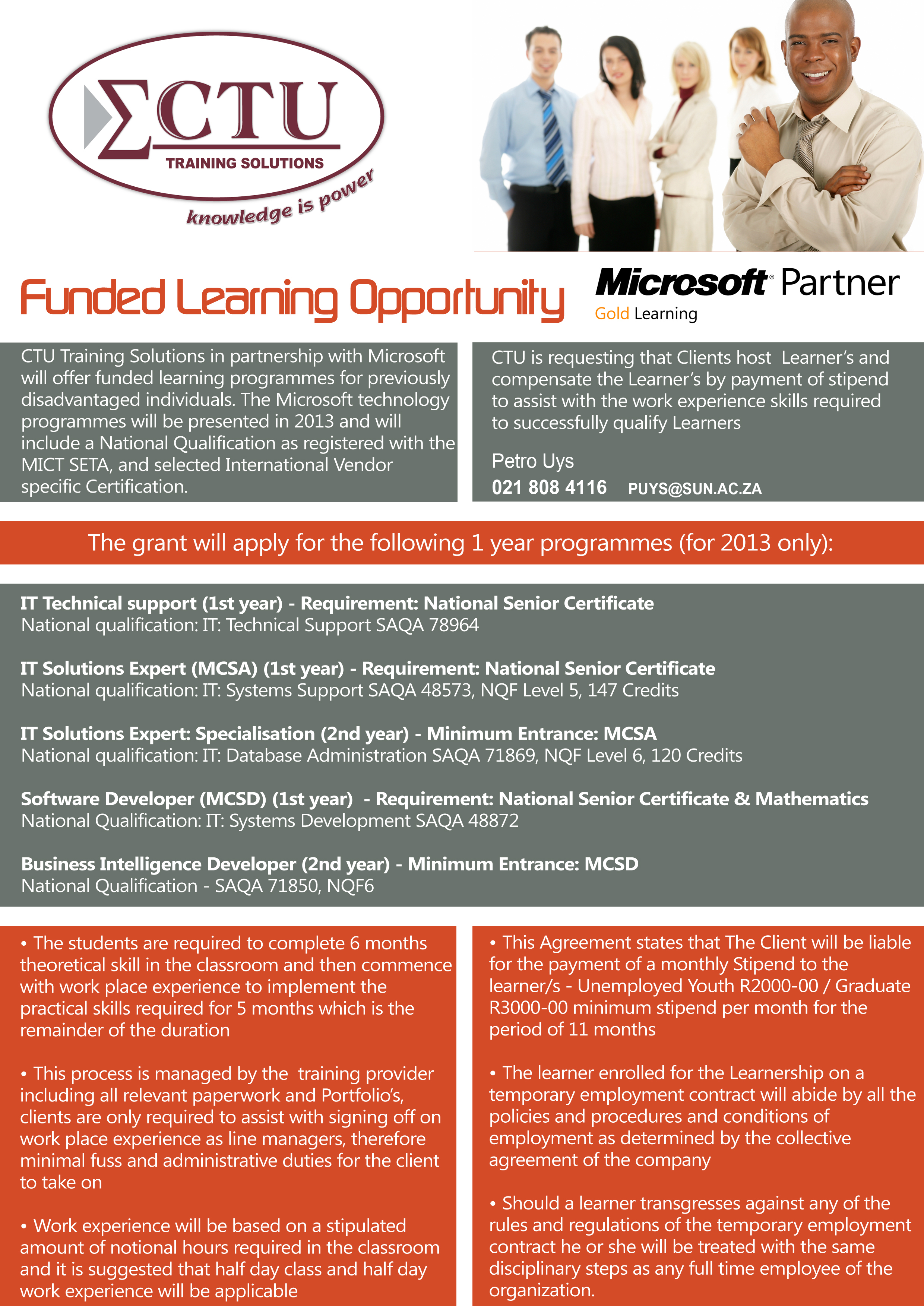
Microsoft recently announced a training sponsorship for SU staff and their children. CTU Training Solutions, the company currently responsible for training staff, approached Stellenbosch University as one of their three biggest clients, with this offer.

Applicants will have to be able to attend classes every morning for the first year or after hours. Someone from a non-IT environment will still be able to do the course, but have to occupy an IT position in the second year where the information learnt in the first year will be applied on a practical level. During the second year, Microsoft will review the student’s performance.

Children of SU staff are also eligible to complete these courses. Please take note that certain conditions apply. The offer is particularly applicable to staff whose children completed their matric, but do not have the financial means to study further. Disadvantaged and disabled applicants, as well as applicants from households with a single income or single parent will be given preference. Applicants may also be required to submit a written motivation as to why they would qualify for the funding.

The only two requirements are that either the parents or company pay R2000-00 per month for the child’s travel and living expenses and he/she completes and internship during the second year. CTU will assist the student with the placement of interns at an appropriate company.

These courses generally run at a cost of R40 000, which makes this sponsorship a wonderful opportunity for any aspiring IT experts.

Please direct your applications for funded learning to:

Petro Uys by sending an email to:            puys@sun.ac.za

We shall inform applicants of the outcome of their respective application on Friday 11 January 2012.

More information ….

Microsoft het onlangs aangekondig dat die maatskappy van plan is om `n aantal kursusse vir US-personeel en hulle kinders te borg. CTU Training Solutions, die maatskappy wat tans IT-kursusse aan personeel bied, het Universiteit Stellenbosch, as een van hulle 3 grootste kliënte, genader met hierdie unieke Microsoft-aanbod.

Aansoekers moetvir die 1ste jaar elke oggend kan klas bywoon, of die klasse na ure kan bywoon. Iemand uit ‘n nie-IT verwante omgewing kan die kursus doen in die 1ste jaar, maar word verplig om die 2de jaar ‘n IT pos te beklee en die kennis wat geleer is op `n praktiese vlak toe te pas. Gedurende hierdie tweede jaar sal Microsoft dan ook die persoon se werkverrigting nagaan en beoordeel.

Kinders van US-personeel kan ook aansoek doen om hierdie kursusse te loop. Neem asseblief kennis dat sekere voorwaardes geld. Dit is veral van toepassing op personeellede (byvoorbeeld enkelouers) wie se kind sy/haar skoolopleiding voltooi het maar nie oor die finansiële middele beskik om verder te studeer nie. Voorheen benadeelde en gestremde aansoekers, sowel as aansoekers van huishoudings met `n enkel-inkomste of enkelouer, sal voorkeur geniet. Aansoekers mag ook versoek word om `n geskrewe motivering voor te lê waarin hulle uiteenset waarom hulle kwalifiseer vir die befondsing.

Die enigste twee voorwaardes is dat die ouers of maatskappy bereid moet wees om maandeliks R2000 te gee vir die kind se reis en verblyf en die kind moet ook in die 2de jaar van studie ‘n internskap doen. CTU sal wel help met die plasing van interns by maatskappye

Aangesien hierdie die kursusse gewoonlik R40 000 beloop en met hierdie geleentheis gratis verskaf word, is dit `n wonderlike geleentheid vir aspirant IT-deskundiges.

Stuur asseblief aansoeke vir befondsing aan Petro Uys,  puys@sun.ac.za. Aansoekers sal op Vrydag, 11 Januarie in kennis gestel word of hulle aansoeke suksesvol was.

Meer inligting ….