SEARCH
  • [:en]Recent Posts[:af]Onlangse bydraes

  • [:en]Categories[:af]Kategorieë

  • [:en]Archives[:af]Argiewe

malware

Tax season = cyber scamsBelastingseisoen = kubermisdaad

Friday, July 24th, 2015

Only people with an unusual desire for pain and discomfort look forward to a trip to the dentist. The same goes for tax.

Criminals know this and prey on our vulnerability. Every year at this time, e-mails like the one below end up in SU staff inboxes. It informs you that the taxman owes you money and all you have to do to receive it, is to click on a link.

This is a scam, and you should never respond or go to the site or open up the attached file, as this could compromise your banking security.

  1. SARS has your banking details on record and keeps it in secure and encrypted form. They do not need you to confirm or enter your banking details.
  2. SARS will always either SMS or send you a registered letter in the post to inform you of tax returns. They will never contact you by unsecured e-mail.
  3. They also have enough data to address the mail to you PERSONALLY and not via some vague “Dear Taxpayer” or “Good Day” salutation.
  4. There is no EFiling@sars.gov.za address.
  5. The attached file is usually a html (webpage) file and will connect you to a server controlled by the criminals. This server downloads a Trojan virus to your computer that will install software, malware and do all sorts of nasty things to your computer and data. Another tactic is to present you with a “login page” where you enter your banking account details, your PIN code etc.
  6. Unless you have added your university e-mail address as the primary contact address on the SARS system, you should never receive mail on your university account.

This phishing scam will allow the criminals to log into and take control of your bank account via the internet.

They can create themselves as beneficiaries, transfer your money to their account, and then delete the evidence pointing to their account.

These scam e-mails will never stop. It is always difficult to block them too because scammers change their addresses, details and methods on a daily basis. So it is always best to dump these mails in the junk mail folder, blacklist the sending domain and delete the mail immediately.

Why do these criminals continue to send their mail? Because they catch people regularly. In 2012 R14+ million was stolen from South Africans alone using phishing tactics such as this one.

Also read more on this on the mybroadband website.

EXAMPLE OF E-MAIL:

From: SARS eFiling [mailto:eFiling@sars.gov.za]
Sent: Saturday, 27 June 2015 10:14
Subject: Your account has been credited with R3,167.14
efiling

Your account has been credited with R3,167.14

Please click below to accept and verify payment.

Accept Payment

During this process, there will be verifications. If you don’t receive codes on time, come back to finish verification when received

SARS eFiling

[ARTICLE BY DAVID WILES]

Net iemand met `n ongewone voorliefde vir pyn en ongemak sien uit na `n uitstappie na die tandarts. Dieselfde geld vir belasting.

Kuberkriminele buit ons SARS-vrese uit en misbruik belastingseisoen om e-posgebruikers uit te vang.  

Elke jaar rondom Julie maak e-posse (soos die een heel onder) hul opwagting in US-personeel se posbusse. Op die oog af lyk dit soos `n SARS e-pos wat jou in kennis stel dat Jan Taks geld aan jou wil betaal. Om dit te kry, moet jy net op `n skakel te kliek.

Natuurlik is dit `n slenter. Moet nooit hierop reageer, op die skakel kliek, na die webwerf gaan, of die aangehegte dokument oopmaak nie. Jy sal bloot jou bankrekening in gevaar stel. 

  1. SARS het reeds jou bankbesonderhede en dit word veilig gestoor in enkripteerde formaat. Hulle het nie nodig om te vra dat jy dit weer bevestig nie. 
  2. SARS sal jou SMS of `n geregistreerde brief per pos stuur om jou in kennis te stel van belastinguitbetalings. Hulle sal jou nie met onsekure e-pos kontak nie.
  3. SARS het jou inligting en sal jou persoonlik aanspreek –  nie as “Dear Taxpayer” of met `n vae “Good Day” nie.
  4. Daar bestaan nie `n EFiling@sars.gov.za adres nie.
  5. Die aangehegte leêr is gewoonlik `n html (webblad) leêr en sal jou verbind aan `n bediener wat deur kriminele beheer word.  Hierdie bediener laai `n Trojan-virus wat sagteware en malware installeer op jou rekenaar en verskeie onreëlmatighede met jou data wil uitvoer. `n Alternatiewe metode herlei jou na `n aantekenblad waar jy jou bankrekeningdetails, PIN-kode, ens. invul.
  6. Behalwe as jy jou universiteit e-posadres as die hoofkontakadres op die SARS-stelsel ingevul het, sal jy nooit kommunikasie van SARS op jou sun e-pos kry nie.

Bogenoemde phishing-poging sal kuberkrakers toelaat om aan te teken en beheer te kry  oor jou bankrekening via die internet. Hulle kan hulself as begunstigdes byvoeg, geld oorplaas na hul rekeninge en daarna bewyse van die transaksies verwyder.

Dit bly moeilik om hierdie e-posse te blok aangesien adresse, details en metodes op `n daaglikse basis verander word. Die enigste oplossing is om dit dadelik in die gemorspos (junk mail) vouer te gooi, die domein waarvandaan dit gestuur word te swartlys, en die e-pos onmiddellik uit te vee.

Hoekom word hierdie e-posse steeds gestuur? Omdat dit suksesvol is. In 2012 is meer as R14 miljoen rand van Suid-Afrikaners gesteel alleenlik met phishing pogings.

Lees ook meer hieroor op mybroadband se webwerf. 

VOORBEELD VAN E-POS: 

From: SARS eFiling [mailto:eFiling@sars.gov.za]
Sent: Saturday, 27 June 2015 10:14
Subject: Your account has been credited with R3,167.14
efiling

Your account has been credited with R3,167.14

Please click below to accept and verify payment.

Accept Payment

During this process, there will be verifications. If you don’t receive codes on time, come back to finish verification when received

SARS eFiling

[ARTIKEL DEUR DAVID WILES]

How to detect malware symptomsIs daar “malware” op my rekenaar?

Friday, September 26th, 2014

If your computer starts to behave strangely, you might be experiencing spyware symptoms or have other unwanted software installed on your computer.

Wikipedia defines malware as follows:

“Malware, short for malicious software, is any software used to disrupt computer operation, gather sensitive information, or gain access to private computer systems. It can appear in the form of executable code, scripts, active content, and other software.’Malware’ is a general term used to refer to a variety of forms of hostile or intrusive software.” [www.wikipedia.org]

Here are a few tips on how to detect malicious software:

  • I see pop-up advertisements all the time.
    Some unwanted software will bombard you with pop-up ads that aren’t related to a particular website you’re visiting. These ads are often for adult or other websites you may find objectionable. If you see pop-up ads as soon as you turn on your computer or when you’re not even browsing the web, you might have spyware or other unwanted software on your computer.
  • My settings have changed and I can’t change them back to the way they were.
    Some unwanted software can change your home page or search page settings. Even if you adjust these settings, you might find that they revert back every time you restart your computer.
  • My web browser contains additional components that I don’t remember downloading.
    Spyware and other unwanted software can add toolbars to your web browser that you don’t want or need. Even if you remove these toolbars, they might return each time you restart your computer.
  • My computer seems sluggish.
    Spyware and other unwanted software are not designed to be efficient. The resources these programs use to track your activities and deliver advertisements can slow down your computer and errors in the software can make your computer crash. If you notice a sudden increase in the number of times a certain program crashes, or if your computer is slower than normal at performing routine tasks, you may have spyware or other unwanted software on your machine.

If you suspect your PC has been infected with malware, contact our service desk at x4367 or log a call on the HEAT CALL LOGGING SYSTEM

[Source: http://www.microsoft.com/security/pc-security/malware-symptoms.aspx]

As jou rekenaar skielik snaaks begin optree, is dit moontlik dat dit simptome van `n loerprogram of ander ongewensde sagteware kan wees.

Wikpedia definieer “malware” as volg:

“Malware”, die verkorting van “malicious software”, is enige sagteware wat gebruik word om die werking van `n rekenaar te belemmer, sensitiewe informasie probeer insamel of om toegang tot privaatrekenaars te kry. Dit kan die vorm aanneem van uitvoerbare kode, skripte, aktiewe inhoud of ander sagteware, aanneem. “Malware” is `n algemene term om te verwys na `n verskeie vorme van sleggesinde of indringende sagteware.  [www.wikipedia.org]

Hier is `n paar simptome waarvoor jy kan uitkyk:

  • Ek sien gereeld opwip-advertensies.
    Sommige ongewensde sagteware sal jou toegooi met opwip-advertensies wat niks te doen het met die spesifieke webwerf wat jy besoek nie. Hierdie advertensies is dikwels vir volwasse of twyfelagtige webwerwe.
    Indien jy dadelik opwip-advertensies sien as jy jou rekenaar aansit of wanneer jy nie op die internet is nie, het jy waarskynlik `n loerprogram of ander ongewensde sagteware op jou rekenaar.
  • My verstellings het verander en ek kan dit nie terugverander nie.
    Sommige ongewensde sagteware kan jou blaaier tuisblad of jou soekblad se verstellings verander. Selfs al verander jy dit terug, sal dit elke keer as jy jou rekenaar aansit, weer teruggaan na die verkeerde verstellings.
  • My webblaaier bevat ekstra komponente wat ek nie afgelaai het nie.
    Loerprogramme en ander ongewensde sagteware kan nutsbalke wat jy nie nodig het of wil hê nie, installeer in jou webblaaier. Selfs al verwyder jy dit, sal dit weer verskyn as jy jou rekenaar af- en weer aansit.
  • My rekenaar is traag.
    Loerware is nie ontwerp om effektief te wees nie. Die hulpmiddele wat hulle gebruik om jou aktiwiteite te volg en advertensies op jou rekenaar te laat loop, kan jou rekenar stadig maak en foute in hul sagteware kan veroorsaak dat jou rekenaar uitbom. As jy `n skielike toename in die hoeveelheid kere wat `n sekere program vries of ophou werk, of as jou rekenaar stadiger is as gewoonlik, is dit moontlik dat jy loerware of ander ongewensde sagteware op jou rekenaar het.

As jy vermoed dat jou rekenaar besmet is met “malware”, kontak die IT diensttoonbank by x4367 of meld `n fout aan op die HEAT FOUTRAPPORTERINGSTELSEL

[BRON: http://www.microsoft.com/security/pc-security/malware-symptoms.aspx]

Attack of the trojans, bots & zombiesDie trojane, bots & zombies val in

Friday, August 30th, 2013

Once of the most common questions we are asked by users is: How do these spammers get my e-mail address? Previously we looked at Rumpelstiltskin attacks and this week we will focus on the second of the methods –  by using Trojan Horses, Bots and Zombies. Now, thet may sound like something from a movie, but they do pose quite a serious threat to you as e-mail user.

Let us use a familiar example. You regularly exchange emails with your elderly mother who has a computer. Your mother uses Outlook or Thunderbird and has dozens of emails from you in her inbox. She even added you to her address book. She also has lots of emails from a distant family member – cousin Johan from Australia. You haven’t stayed in touch with Johan that closely over the years, but you definitely know who he is.

Last year, just before the Christmas, Johan downloaded and installed this really pretty Christmas screensaver that showed tranquil tree and candle scenes when he wasn’t using the computer. What he didn’t know was that the screen saver had a sinister hidden payload. While the candles flickered peacefully on his screen, the software went to work combing through his emails and address book, his browser’s cache of past webmail sessions and other files, storing every email address it would find in a separate list.

Then it sent the entire list to a server in Russia, where a criminal combined it with other such submissions to build the ultimate monster spam list that can be sold and resold over and over again.

But as if that wasn’t enough, when the “screensaver” sent the address list to Russia, it received some content in return – messages to be sent to all of Johan’s contacts. Then, unbeknownst to John, his computer started creating hundreds of emails randomly using the harvested email addresses in the To: and From: field along with the content from the Russian server and sent them out using Johan’s Internet connection. One of them used your mother’s email address as sender and yours as recipient.

Now you received some spam from your mother asking you to buy fake watches and you’re ready to speak to her telling her to stop. Well, don’t. Your mother has obviously nothing to do with the whole thing and you’ll never find out that it was actually Johan’s computer.

You just had a look into the really nasty underworld of the Internet where botmasters (the guy in Russia) control botnets (infected computers that all report to the same server) of remote-controlled zombies (Johan’s computer) that were compromised using trojan horses (the screensaver) or similar malware.

And it doesn’t even end there. The botmaster typically doesn’t spam for his own account but hires out his botnet to whoever pays the most. The equally shady factory in China wanting to sell more fake Rolexes can now hire the botmaster to blast their offers all over the internet. The guy in Russia doesn’t even care if you open or click on that email from your mother, he gets paid either way. And when he’s done with the watches, he’ll inform his entire mailing list that they all won the lottery and can pick up the prize if only they pay a small “transfer fee” up front. And after that, he’ll mail a Paypal phish for yet another “client”. And for good measure, he’ll sell his entire email address database, incl. yours, to a friend who is in the same line of “business”.

In other words, once your email address got picked up by a botnet, Pandora’s Box is wide open. The whole scheme is particularly wicked because now you have to depend on others to keep your address safe. Unfortunately, there is little you can do:

  • First of all, do your own share: NEVER open email attachments that you didn’t ask for, even if they appear to come from good friends like Johan. If you’re still curious, ask Johan or your mother first if they really sent it.
  • NEVER download anything where you can’t in­de­pend­ent­ly verify it’s safe. With“independently verify” I mean you can read about it in forums, blogs, news sites, your local “computer geek” etc. Facebook fan pages, even with 1000s of “fans”, do NOT count, they are way too easy to manipulate and are usually full of misinformation!
  • NEVER get fooled by fake “security scans” (they’re quite the opposite!) or“video codec updates” to see that funny kitten clip. If you think you need a new Flash player, type in flash.com by hand and update from there. If afterwards the site still says you need an “update” get out of there as fast as you can.
  • Then educate your friends and family about the same. Explain how trojans work. Send them a link to this blog page!
  • You can try having multiple private email addresses. Keep a super-private one, only for family and very few of your closest friends.  Use your university address for everyone you work with and don’t use this for private mail – EVER!  Get a semi-private one for your wider social circle. The latter two do get some spam, although it’s still manageable. GMail has a very good “spam filter”, and blacklisting spammers is very easy!


[ARTICLE BY DAVID WILES & MATERIAL BY BustSpammers.com]

Een van die algemeenste navrae wat ons by gebruikers kry, is – “Hoe kry gemorsposversenders my e-posadres?!”. By `n vorige geleentheid het ons gekyk na Repelsteeltjie-aanvalle en die keer kyk ons na `n tweede metode, die gebruik van Trojaanse perde, robotte en zombies. Dit klink nou wel soos iets uit `n fliek, maar ten spyte van hul belaglike name, hou al drie `n gevaar in vir jou as e-posgebruiker.

Kom ons gebruik `n bekende voorbeeld. Jy stuur gereeld e-posse aan jou ma wat onlangs `n rekenaar gekry het. Sy gebruik Outlook of Thunderbird en het dosyne e-posse van jou in haar posbus. Sy’t jou selfs bygevoeg as `n kontak in haar adresboek. Sy kry ook gereeld e-pos van `n verlangse familielid – neef Johan van Australië. Jy en Johan het nie regtig kontak nie, maar jy weet definitief wie hy is.

Verlede jaar, net voor Kersfees, het Johan ‘n baie oulike Kersfees skermskut (“screensaver”) afgelaai wat `n feestelike boom en flikkerende kersies wys as hy weg is van sy rekenaar. Wat Johan egter nie geweet het nie, is dat, terwyl die kersies vrolik geflikker het, die skermskut op die agtergrond besig was met ander aktiwiteite. Die sagteware wat Johan installeer het, het stelselmatig deur sy e-posse, adresboek, webblaaier se kasgeheue en ander leêrs gesoek en elke e-pos adres wat dit kon opspoor, gebêre op `n lys.

Die program het daarna die saamgestelde lys na `n bediener in Rusland versend waar `n kuberkrimineel dit kombineer het met soortgelyke lyste om `n super-lys saam te stel wat oor en oor verkoop kan word. Asof dit nie genoeg was nie, het die program ook boodskappe aan al Johan se kontakte gestuur. Sonder dat Johan bewus was, het sy rekenaar honderde e-posse geskep deur middel van die ge-oeste adresse, saam met die inhoud van die Russiese bediener en dit uitgestuur via Johan se adres en internetkonneksie. Een hiervan het jou ma se e-posadres as versender en joune as ontvanger gebruik.

Ewe skielik kry jy nou e-pos van jou ma oor nagemaakte horlosies en verskeie ander gemorspos. Natuurlik het sy het niks daarmee te doen nie en jy sal waarskynlik nooit uitvind dat Johan se rekenaar eintlik die skuldige party is nie.

Dit was `n kykie in die nare onderwêreld van die Internet waar “botmasters” (die ou in Rusland) “botnets” (besmette rekenaars wat almal aan dieselfde rekenaar rapporteer) beheer of afstandbeheerde zombies (Johan se rekenaar) wat blootgestel is d.m.v. trojaanse perde (die skermskut) of soortgelyke “malware”.

En daar hou dit nie op nie. Die “botmaster” huur gewoonlik net die “botnet” uit aan wie ookal die meeste betaal. Die ewe verdagte fabriek in China wat nog meer nagemaakte Rolex-horlosies wil verkoop kan dit, onder andere, huur om hul e-posse te versprei. Daarna verkoop hy die lys ten duurste aan ander suspisieuse besighede, jou adres ingesluit. 

Met ander woorde, as jou adres opgetel word deur `n “botnet” is die deure wawyd oop. Ongelukkig is daar nie baie wat jy kan doen om dit te voorkom nie, maar jy kan op die volgende let:

  • Moet nooit e-pos aanhangsels oopmaak waarvoor jy nie gevra het nie – selfs al is dit van iemand wat jy ken. As jy wel nuuskierig is, vra vir die persoon of hulle dit gestuur het.  
  • Moet nooit iets aflaai as jy nie self kan verifieer dat dit veilig is nie. Lees eers op daaroor op forums, blogs, webwerwe of vind uit by kenners.
  • Moenie val vir sekuriteitswaarskuwings of video-opdaterings om daai oulike katprentjie te sien nie. As jy dink jy het `n Flash-speler nodig, laai dit af van die webwerf self.
  • Deel hierdie inligting met jou vriende en familie. 
  • Om veilig te speel kan jy meer as een e-posadres gebruik. Kry `n privaat adres vir jou naaste vriende, `n tweede een vir kennisse en gebruik jou sun-adres net vir jou kollegas, nie vir privaat aangeleenthede nie. GMail het byvoorbeeld `n baie goeie gemorsposfilter en dis maklik om ontslae te raak van ongewenste e-posse. 

[BRON: BustSpammers.com & David Wiles]


Nuwe e-pos “malware” veroorsaak verwarring op kampus

Tuesday, January 15th, 2013

Sommige gebruikers ontvang sedert gister `n e-pos wat aandui dat jou e-pos posbus sy limiet bereik het en waarsku dat jou toegang tot sy e-pos afgesny gaan word indien dit nie onmiddellik geaktiveer word deur op `n skakel te kliek nie. Soos met alle ander weergawes van hierdie tipe “malware” e-posse, moet onder geen omstandighede op die skakel kliek nie. As jy met die muis oor die skakel beweeg, sal dit `n onbekende adres wys wat nie verband hou met die e-pos se onderwerp nie. In sommige gevalle sal dit voorkom of die e-pos deur iemand gestuur is wat jy ken, maar onthou dat die “malware” `n gebruiker se posbus infiltreer en aan sy kontakte gestuur kan word. Onder is `n voorbeeld van so `n e-pos.


From: Abrahams, B, Mnr <…..@sun.ac.za> Sent: 14 January 2013 19:51 Subject: Your Mailbox Has It Storage Limit Your Mailbox Has Exceeded It Storage Limit As Set By Your Administrator, And You Will Not Be Able To Receive New Mails Until You Re-Validate It. To Re-Validate – >Click Here: Thanks, System Administrator.

New malware warning

Tuesday, December 4th, 2012

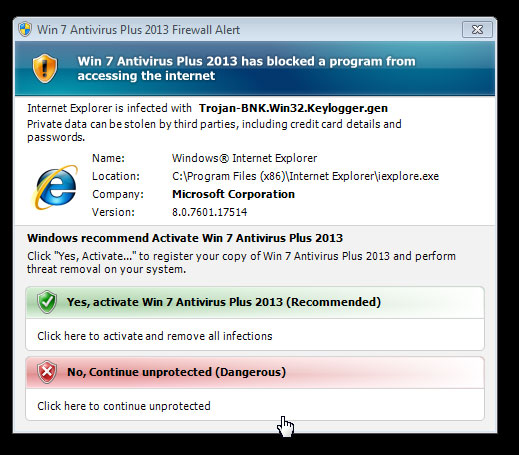
Please take note that a new malware threat has emerged on campus. Some users have reported the following:

A pop up will appear on your screen (see below) prompting you to update your Antivirus package due to a threat (in this case a trojan). However, this notification in itself is a malware application. If you click on the option to update, it will install itself on your pc. Under no circumstances should you click on the button.

Close the pop up screen immediately and if you’re worried that your pc is infected, contact the IT helpdesk. Read more on http://www.hoax-slayer.com/fake-fedex-invoice-malware.shtml