SEARCH
  • [:en]Recent Posts[:af]Onlangse bydraes

  • [:en]Categories[:af]Kategorieë

  • [:en]Archives[:af]Argiewe

phishing

SARS e-mail may fool usersSARS e-pos mag gebruikers bedrieg

Tuesday, October 15th, 2013

For some lucky people, it is time for the tax returns from SARS. The criminals know it too and every year at this time, users will get emails allegedly from SARS promising tax returns and asking you to click on a link, log in and provide your bank account details and password so they can pay you money!

This is a scam, and you should never respond or go to the site or open up the attached file, as this could compromise your banking security.

  1. SARS has your banking details on record and these are stored in secure and encrypted form. They do not need you to confirm or enter your banking details.
  2. SARS would always either SMS or send you a registered letter in the post to inform you of tax returns, etc. They would never contact you via unsecured e-mail, and furthermore they have enough of your data to address the mail to you PERSONALLY and not via some vague “Dear Taxpayer” salutation.
  3. There is no returnfund@sars.co.za address
  4. The attached file is usually a html (webpage) file that gives you a forged webpage sitting on the criminals server somewhere overseas.
  5. The amount that they promise to pay you is always something like R9,250.75
  6. Unless you have added your university e-mail address as the primary contact address on the SARS system you should never get mail on your university account.

If you do go to this site and you do enter in your banking account details, credit card details, passwords etc, this will allow the criminals to log into your bank account via the internet, and take control over your bank account. They will create themselves as beneficiaries and then transfer all your money to their account, and then delete all the evidence pointing to their account.

These scam e-mails will never stop. It is always difficult to block them too because scammers change their addresses, details and methods on a daily basis. So it is always best to dump these mails in the junk mail folder, blacklist the sending domain and delete the mail immediately.

Why do these criminals continue to send their mail? Because they catch people regularly. In 2012 South Africa was the 5th most phished country in the world behind India, Canada, the USA and the UK, with estimated figures of R14 million being stolen from South Africans last year alone.


[ARTICLE BY DAVID WILES]

Vir die gelukkiges onder ons, is dit weer tyd vir SARS se belastingopgawes. Ongelukkig weet die kriminele elemente dit ook en telkens die tyd van die jaar, ontvang gebruikers e-posse wat klaarblyklik deur SARS gestuur word en `n belasting terugbetaling belowe. Al wat jy moet doen is om op `n skakel te kliek, aan te teken, jou bankrekeningdetails en wagwoord te gee en jy kry jou geld!

Natuurlik is dit `n klassieke geval van “phishing”. Moenie eers reageer, na die webwerf gaan of die aangehegte leêr oopmaak nie, aangesien dit jou banksekuriteit sal blootstel. Hier is `n voor-die-hand-liggende redes hoekom jy dit as `n swendelary moet herken:

1. SARS het jou bankdetails op rekord en dit word op `n sekure bediener en in geënkodeerde formaat gestoor. Hulle het nie nodig om jou weer te vra om jou bankdetails te bevestig of te verskaf nie.

2. SARS sal jou altyd SMS of aan jou `n geregistreerde brief  deur middel van pos stuur om jou in kennis te stel van enige betalings. Hulle sal jou nie kontak d.m.v. `n onsekure medium soos e-pos nie. Buitendien het hulle ook genoeg inligting om jou persoonlik aan te spreek en nie met `n vae  “Dear Taxpayer” nie. 

3. Daar bestaan nie `n returnfund@sars.co.za adres nie.

4. Die aangehegde leêr is gewoonlik `n html (webblad) leêr wat lei na `n vervalste webwerf op `n onwettige bediener erens oorsee.

5. Die bedrag is altyd in die omgewing van R9 250.75

6. SARS sal jou nie op jou universiteitsadres kontak tensy jy dit gegee het as jou primêre adres nie.

Indien jy wel na die webwerf gaan, moenie jou bankrekening-details, kredietkaart-details of wagwoord invoer nie – dit sal aan skelms die kans gee om op jou bankrekening aan te teken deur die internet en beheer te neem oor jou bankrekening. Hulle kan dan hulself as begunstigdes byvoeg, al jou geld in hul rekeninge oorplaas en die bewyse wat hulle impliseer uitvee.

Hierdie tipe e-posse sal nooit ophou nie en dis bykans onmoontlik om dit te blok, omdat die kriminele hulle adresse, details en metodes op `n daaglikse basis aanpas. Die beste verweer is om hierdie e-posse in die junk mail leêr te sit, die domain waarvan dit gestuur word op die swartlys te sit en die e-pos dadelik uit te vee. 

Hoekom hou hierdie kuberskelms aan om hulle e-posse te stuur? Want mense val telkens daarvoor. In 2012 was Suid-Afrika die 5de hoogste land wat “phising” betref, net na Indië, Kanada, Amerika en Brittanje en `n beraamde  R14 miljoen is verlede jaar van Suid-Afrikaners gesteel.


[ARTICLE BY DAVID WILES]

ABSA eStatement phishingABSA eStaat phishing

Sunday, September 22nd, 2013

The only thing that must be more annoying than us constantly warning you of e-mail scams, is the persistence that is shown by the criminals and scam artists to attempt to con you, and steal your personal data and money.

The problem is they will continue to send phishing mails because they continue to catch people, even within an academic institution like the University.

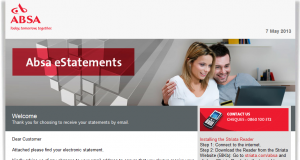
Recently another ABSA eStatement landed in our e-mail box, this time a little more sophisticated, but armed with a few basic tips you will be able to spot the scam quickly.
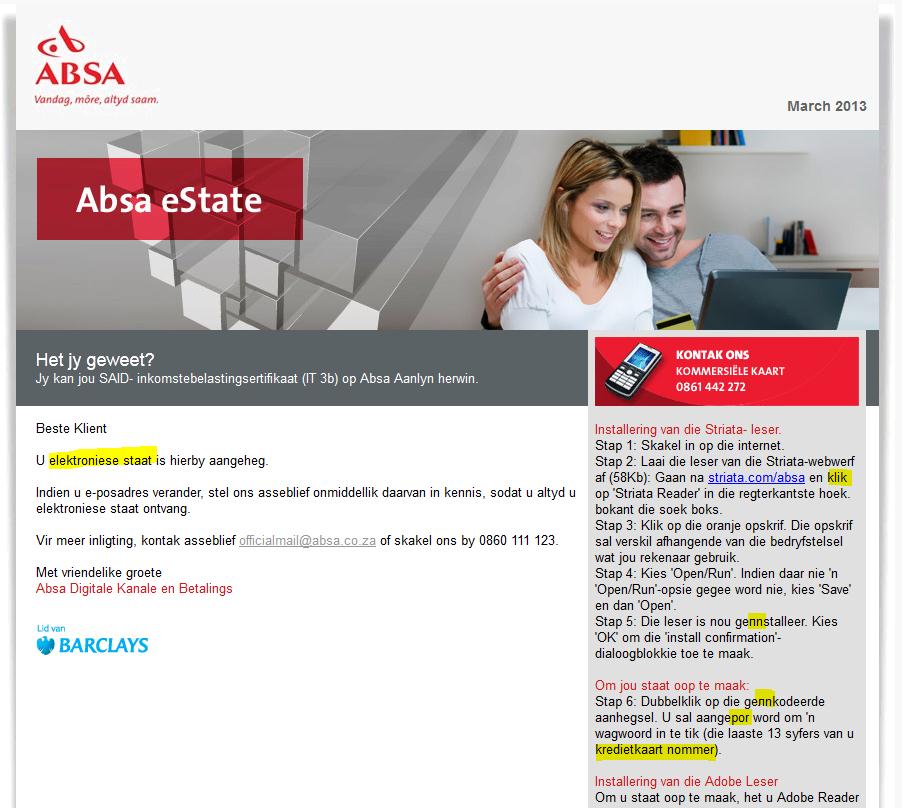
Keep an eye out for these mails in your mailbox and delete then or add then to your Junk-Mail filters to block them in future.

Here’s how you spot can them:

1. Did you give your @sun.ac.za work address as your primary contact for Internet Banking?

2. Do you bank with (in this case) ABSA?

3. Is the salutation addressed to you personally, or is it just “Dear Customer”?

4. Is there a .pdf or an .html file attached? (phishers almost always use .html – a forged web-page)

5. Is the Subject of the e-mail “important” sounding? (In this case “Absa Cheque Account Statement”)

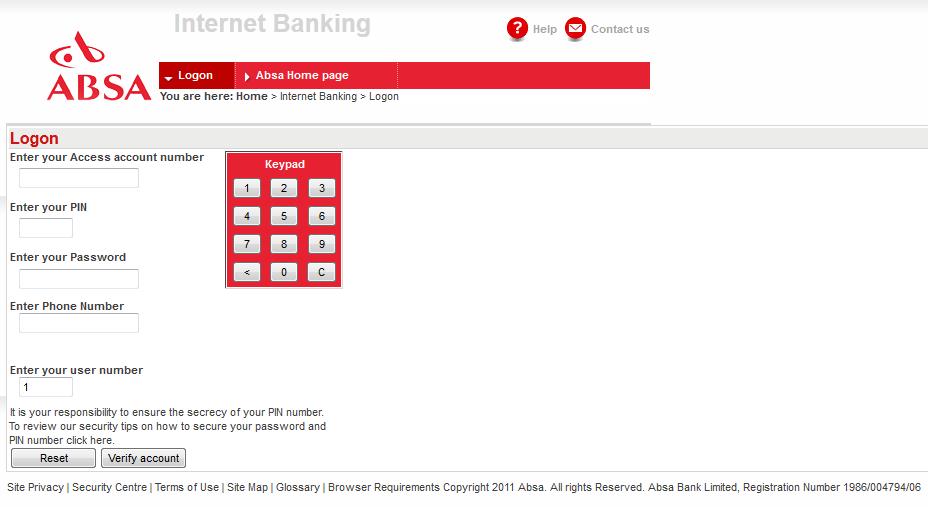
6. If you click on (or open by mistake) the attachment, does the web page look like the bank’s normal login page but does it LACK the https:// text at the front of the address and is the normal http://?

Answering these questions, it will be easy to establish whether an e-mail is clearly a phishing scam and can be deleted. Be vigilant and alert. Anyone can be caught out – even you.

[ARTICLE BY DAVID WILES]


Die enigste ding meer irriterend as ons wat jou voortdurend waarsku teen e-pos skelmstreke, is die deursettingsvemoë van kriminele en kuberswendelaars om jou te probeer uitvang en jou data en geld te steel.

Ongelukkig sal die probleem nie verdwyn solank as wat hierdie metodes telkens suksesvol is nie –  selfs binne `n akademiese instelling soos die Universiteit.

Onlangs het nog `n ABSA eStaat in ons posbusse beland, hierdie keer `n bietjie meer gesofistikeerd, maar gewapen met `n paar wenke, kan jy dit baie maklik herken. 

Kyk uit vir hierdie e-posse, vee hulle uit of skuif dit na jou Junk-Mail filters sodat dit volgende keer geblok word.

Hier is hoe jy dit kan uitken:

1. Het jy jou @sun.ac.za werkadres as primêre kontakadres vir jou internetbankdiens gegee? 

2. Doen jy jou banksake by ABSA?

3. Is die aanhef aan jou persoonlik gerig of is dit net `n vae “Dear Customer”? 

4. Is daar `n .pdf of ‘n .html leêr aangeheg? (kuberkrakers gebruik graag .html omdat dit jou herlei na `n vervalsde webblad) 

5. Klink die onderwerp van die e-pos “belangrik” of amptelik? (In die geval “Absa Cheque Account Statement”)

6. As jy kliek op die aanhangsel of dit per ongeluk oopmaak, lyk die webblad soos die bank se normale aantekenblad, maar sonder die https:// teks vooraan die adres? (https:// dui op `n veilige bediener, terwyl http:// `n oop webblad is)

Na aanleiding van bogenoeme vrae kan jy duidelik vasstel of `n  e-pos `n phishing-poging is en bloot uitgevee kan word. Wees waaksaam en op jou hoede. Enigiemand kan uitgevang word.

[ARTIKEL DEUR DAVID WILES]


SARS wants to give you money?SARS wil vir JOU geld gee?

Friday, August 2nd, 2013

 It’s that time of the year when our mailboxes are infiltrated by messages from SARS and we start making sums and filling out forms. Unfortunately elusive cyber criminals also know that this is the perfect time to prey on our gullibility.

So it’s most likely that you will be receiving (if you haven’t already) a so-called e-mail from SARS asking you either to verify your information or to let you know that a much-welcomed amount has been paid into your account. (see example below) Don’t get excited – it’s not really SARS.

Clicking on the hyperlink in the email takes you to a fake “e-filing” site that has hyperlinks for the four big South African banks and instructions to log on to your Internet banking site for “confirmation of your details”.  When you follow the Nedbank link (as an example), you are taken to a copy of the Nedbank internet banking site that asks for profile, pin and password.  Supplying these takes you to a second page that asks you for your mobile number.  Submitting information on this page takes you to a page that requests the reference number sent to your cellphone.

Do not authorise any cellphone message that comes through if you end up in the above situation.  Furthermore, do not click on any hyperlinks in emails or divulge your account or mobile number details to anyone over the phone or via email.  Banks will never ask you to access internet banking through a link in an email, neither will banks ever ask for your mobile number when you access internet banking.

Look out for the following tell-tale signs:

–  when you move with your pc’s mouse over the link, it won’t be the official, correct web address
–  the e-mail isn’t addressed to you personally – your name isn’t mentioned anywhere
–  the address it was sent from is a generic one that doesn’t exist
–  there is no reference or account number
–  no contact person is mentioned

If you’re unsure, rather go directly to the SARS e-filing web site (type in http://www.sarsefiling.co.za/) and see if there were any payments made to your account.

———————————————————————————————–

From: Sars Efiling <message@sars.co.za>
Date: 30 July 2013 19:37:38 EDT
To: <fakeaddress@sun.ac.za>
Subject: You have a new transaction message

We have filed your return and made a deposit of R3,650.80 into your account.

Confirm your filing

This is an automated email, replies sent to this address will not be received.

Sars eFiling


Dis weer die gevreedse tyd van die jaar wanneer ons posbusse geinfiltreer word deur boodskappe van SARS en ons paniekerig begin sommetjies maak en vorms invul. Ongelukkig besef die bedrieglike kuberkriminele ook dat dit die perfekte tyd is om misbruik te maak van mense se goedgelowigheid.

Die kans is dus goed dat jy binnekort (indien jy nie reeds het nie) `n sogenaamde e-pos van SARS sal ontvang wat jou vra om jou inligting te verifieer of om jou te laat weet dat daar vir jou `n gawe bedraggie in jou rekening inbetaal is. (sien voorbeeld onder) Moenie opgewonde raak nie – dis nie SARS nie. 

As jy kliek op die skakel, neem die e-pos jou waarskynlik na `n vals “e-filing” webwerf wat skakels het na vier groot Suid-Afrikaanse banke en instruksies om aan te teken op deur middel van internet bankdienste om jou details te “bevestig”.

As jy (byvoorbeeld) die Nedbank-skakel volg, word jy geneem na `n kopie van nie Nedbank internetdienste webwerf wat vra vir jou profiel, pin en wagwoord.  As jy hierdie inligting verskaf, word jy geneem na `n tweede blad waar daar vir jou selnommer gevra word. Deur die inligting te verskaf, word jy weereens na `n volgende blad geneem wat versoek dat die verwysingsnommer na jou selfoon gestuur word.   

Moet onder geen omstandighede enige magtiging gee per selfoonboodskap as jy in bogenoemde situasie beland nie. Moet ook nie kliek op enige skakels in e-posse of rekeningbesonderhede of selfoonnommer-details aan enigiemand verskaf per e-pos of telefonies nie.

Kyk uit vir die volgende:

–  as jy met jou rekenaar se muis oor die skakel beweeg en dis nie die amptelike adres nie.
– die e-pos is nie aan jou geaddresseer nie – maw jou naam word nerens in die e-pos genoem nie.
– die adres waarvan dit gestuur het, is `n generiese adres wat nie bestaan nie.
– daar is geen verwysings- of rekeningnommer nie.
–  geen kontakpersoon word genoem nie.

Indien jy twyfel, gaan eerder na SARS se eie e-filing webwerf (tik http://www.sarsefiling.co.za/ in) en gaan kyk of daar inderdaad vir jou ‘n inbetaling is. 

———————————————————————————————–

From: Sars Efiling < message@sars.co.za>
Date: 30 July 2013 19:37:38 EDT
To: @sun.ac.za>
Subject: You have a new transaction message

We have filed your return and made a deposit of R3,650.80 into your account.

Confirm your filing

This is an automated email, replies sent to this address will not be received.

Sars eFiling


ABSA phishing now also in Afrikaans!

Tuesday, March 19th, 2013

Just because an e-mail from a “bank” is sent to you and it is in perfect Afrikaans, don’t be fooled into thinking it is legitimate.

The following e-mail was sent to a number of South African addresses and is a very clever and convincing attempt to obtain users banking details and PIN codes. What is frightening about this mail is that it is written in near-perfect Afrikaans and would fool most people including myself – if I weren’t so paranoid.

Take a look at the following mail message. It looks very convincing but some spelling mistakes give it away but are not easily seen!

Subject: Absa Kredietkaart Rekening Staat -Fooi Afgetrek

absa-afrikaanse phishing

There is an attached .html file (a web page) which immediately should tell you that something is wrong.

Here is what the web page looks like:

absa-afrikaanse phishing2

On closer inspection of the webpage coding reveals that this is a phishing scam run by a syndicate whose servers are currently in Italy.

  • If you use this page to type in your Account number, PIN code and password, you will have given the criminals free and open access to your bank account (if you were with ABSA)
  • ABSA, or any bank, would never send you e-mail containing links and ask you to click on that link to verify ANY personal information, especially account numbers or PIN codes.
  • Embedded html pages would never be included because they can be easily compromised (like this one)
  • Don’t be fooled by alarming subjects like “Fooi Afgetrek”, “Security Upgrade”, “Illegal Access to your account” or if the mail is in Afrikaans!

(INFORMATION SUPPLIED BY DAVID WILES)

Beware of SIM card swap fraudOppas vir SIM-kaart omruilbedrog

Friday, February 22nd, 2013


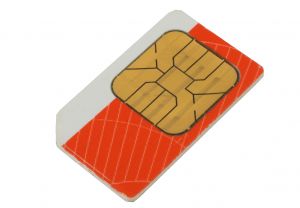
Although it is a known scam, when it hits one of your colleagues, it makes you aware that there are very real dangers out there. A SIM card swap fraud occurs when criminals obtain and utilise a replacement SIM card to acquire security messages and one-time passwords (OTP) sent to you by the bank. Using the OTP, criminals are able to change, add beneficiaries and transfer money out of your account using your personal information that they would have obtained through phishing. One of our colleagues lost R20 000 over the holidays and asked us to warn other staff as well:

How does a SIM swap scam work?

  • The SIM swap takes place after the fraudsters have received a your bank logon details as a result of the you responding to, for example, a Phishing e-mail. (this is why phishing e-mails are so dangerous and you should never ever respond or click on links contained in these phishing e-mails.)
  • Once the fraudsters have the your cell phone number and other personal information, the fraudster can pose as you, requesting a new SIM card from a cellular service provider.
  • The cellular service provider transfers the your SIM card identity to the new SIM card, cancelling your old SIM card in the process.
  • The result is that there is no signal on the old SIM card, which means the you cannot receive / make phone calls or send SMS messages. (This ought to be the first sign of something wrong, so if you get  “SIMCARD INVALID” error on your cell phone)
  • The SMS authorisation reference number, which is normally sent to the client, reaches the fraudster instead of you, the legitimate owner, and the fraudster is able to make once-off payments and create beneficiaries fraudulently

What should I do if I suspect an unlawful SIM swap?

  • If you fall prey to an unlawful SIM swap, or suspect that you have, contact your cellular service provider for assistance.
  • Also contact the internet banking helpdesk to request that your internet banking access be suspended with immediate effect. This will prevent fraudsters from gaining access and transacting on your accounts.

What can I do to prevent SIM swap fraud?

  • Protect your information – all your information.
  • Do not disclose your ID number on websites unless you have verified the legitimacy of the site. The bank already knows your ID number and will not require you to give it to us again.
  • Do not disclose your cell number on websites unless you have verified the legitimacy of the site. Phishing sites often request for information such as ID Number, email address and email address password, physical address, etc.
  • Always make sure that your contact details on Internet banking are valid and correct. You know when your details have changed, so when you are ready, you can update the information on Internet banking or at a local bank branch.

[INFORMATION SUPPLIED BY DAVID WILES]


Dis `n bekende kuberstrik, maar as dit met een van jou kollegas gebeur, word dit skielik `n realiteit en groter moontlikheid dat dit ook met jou kan gebeur. SIM-kaart bedrog vind plaas as kuberkriminele `n SIM-kaart ruiling gebruik om jou sekuriteitsboodkappe en eenmalige wagwoorde, gestuur deur jou bank, te bekom. Deur die eenmalige wagwoord te gebruik, kan begunstigdes se detail verander word, nuwes byvoeg en fondse uit jou rekening oorgedra deur jou persoonlike inligting te gebruik. 

Gedurende die afgelope vakansie het een van ons Tygerberg-kollegas R20 000 op hierdie wyse verloor en versoek dat ons ander personeel ook  waarsku.

Hoe werk `n SIM-kaart omruiling?

  • `n SIM-kaart omruiling vind plaas nadat kuberskelm jou bank aantekeninligting geoes het, omdat jy op `n “phishing” e-pos reageer het. (Hierdie is een van die redes hoekom “phishing” e-posse so gevaarlik is en jy nooit daarop moet reageer of op die skakels in dié e-posse moet kliek nie.)  
  • Sodra die persoon jou selfoonnommer en ander persoonlike inligting in die hande gekry het, kan hy jou identiteit aanneem en `n nuwe SIM-kaart versoek van jou selfoonverskaffer. 
  • Die selfoonverskaffer dra jou SIM-kaart identiteit oor na die nuwe SIM-kaart en kanselleer die ou kaart. 
  • Geen sein word vanaf die ou SIM-kaart ontvang nie en geen SMS’e kan gestuur of oproepe kan gemaak word nie.  Hierdie is die eerste teken dat daar fout is, ook as jy die boodskap “SIMCARD INVALID” kry.
  • Die SMS-magtiging verwysingsnommer, wat normaalweg aan die klient gestuur word, bereik die kuberkraker ipv jou, die geldige eienaar, en hy kan eenmalige betalings maak en begunstigdes skep. 

Wat moet ek doen as ek `n onwettige SIM-omruiling vermoed? 

  • Indien jy die slagoffer is van `n onwettige SIM-omruiling of vermoed dat jy moontlik is, skakel dadelik jou selfoonverskaffer vir hulp.
  • Kontak jou internetbankdienste hulplyn en versoek dat internetdienstetoegang onmiddellik beëindig word. Dit sal voorkom dat die skuldiges toegang tot jou rekeninge verkry. 

Wat kan jy doen om SIM-kaartbedog te voorkom?

  • Beskerm jou informasie – al jou informasie.
  • Moet nooit jou ID-nommer verskaf tensy jy doodseker is van die geldigheid van `n webwerf nie. Die bank het reeds jou ID-nommer en sal dit nie weer vra nie. 
  • Moenie jou selfoonnommer verskaf op webwerwe tensy jy die egtheid van die webwerf geverifieer het nie. “Phishing” webwerwe versoek gewoonlik inligting soos `n ID-nommer, e-posadres en e-pos adres wagwoord.
  • Maak altyd seker dat jou kontakdetails op internetbankdienste geldig en korrek is. Wanneer jou inligting verander, dateer dit op by op internet bankdienste of by jou plaaslike bank.  

[INLIGTING VERSKAF DEUR DAVID WILES]