SEARCH
  • [:en]Recent Posts[:af]Onlangse bydraes

  • [:en]Categories[:af]Kategorieë

  • [:en]Archives[:af]Argiewe

phishing

[:en]Phishing scam sent from compromised GOV.ZA account[:]

Wednesday, July 17th, 2019

[:en]

Please be aware of the following phishing e-mail which is now starting to be sent to university accounts and might be thought to be legitimate especially if the department has dealings with the Gauteng Government.

The Subject of the mail is “Payment Notification” and asks its victims to click on a link to “VIEW PROOF OF PAYMENT”.

Firstly the link is not a gov.za website and government departments do not usually send out  e-mails asking you to click on unverified links.


The suspicious mail takes you to a site that asks you to download a file. This file has a encoded script (malware) that looks like an ordinary web page that asks you to enter your username,password and your cell number to “confirm” your details and “allow” you to view the encrypted PDF file. Of course this malware, now sitting on your PC sends your login details and password to another server overseas controlled by the scammers, which they will
then use to break into your account at the university in order to do all sorts of nasty things.

So please be very careful, especially in the light of the compromised university accounts that were used earlier this week to launch a phishing attack from within the university.

The university is now a very popular target for phishers because they can easily gain access to personnel and student accounts as the users are not often aware of the dangers of phishing and are not informed about how to spot them.


 You can report phishing scams and spam in two ways:​


1. By reporting it on the ICT Partner Portal.​​

2. By sending an email.​​

  • Start up a new mail addressed to csirt@sun.ac.za.​​
  • Use the Title “SPAM” (without quotes) in the Subject.​​
  • With this New Mail window open, drag the suspicious spam/phishing mail from your Inbox into the New Mail Window. It will attach the mail as an enclosure and a small icon with a light yellow envelope will appear in the attachments section of the – New Mail.​​
  • Send the mail.​​ ​​

If you have accidentally clicked on the link and already given any personal details to the phishers it is vitally important that you immediately go to the USERADM page (either
http://www.sun.ac.za/password or www.sun.ac.za/useradm and change your password immediately.) Make sure the new password is completely different, and is a strong password that will not be easily guessed, as well as changing the passwords on your social media and private e-mail accounts, especially if you use the same passwords on these accounts. Contact the IT Service Desk if you are still unsure.


[:]

[:en]Phishing attempt from sun accounts[:af]Phishing vanaf ’n sun e-posrekening[:]

Tuesday, July 16th, 2019

[:en]

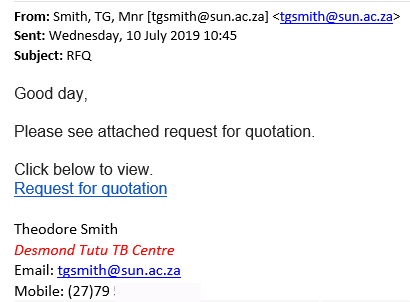
Staff and students are still falling for this phishing scam, so please be alert when receiving ANY emails from a sun account regarding the request for a quote.

An email with the subject “RFQ” which appears to be from a sun email address was sent to staff and students. The email asks you to click on a link to view a request for a quotation. (also see image below)

This is not a legitimate email, but a phishing attempt from a compromised staff account.

Never provide any personal information by means of email. By clicking on links and providing your information, you give criminals access to your personal information and your accounts.

If you clicked on the link in this phishing email, immediately change your password on www.sun.ac.za/password. For enquiries contact the IT Service Desk by logging a request or calling 808 4367. More information on phishing is available on our blog and Twitter.

[:af]

Personeel en studente is steeds slagoffers van die RFQ strikroof-aanval. Wees asseblief bedag wanneer jy ENIGE e-pos vanaf ’n sun-rekening ontvang oor ’n kwotasieversoek.

​’n E-pos met die onderwerp “RFQ” is Woensdag aan sommige studente en personeel gestuur vanaf, wat lyk soos, ’n sun e-pos adres. Die e-pos versoek dat jy op ’n skakel kliek om ’n kwotasieversoek te sien.  

​Hierdie e-pos is nie ’n geldige e-pos van die persoon nie, maar ’n gekompromiteerde sun personeelrekening. Sedert Woendag is verskeie sun e-posadresse op hierdie wyse blootgestel. Dit het gebeur omdat meer van ons personeel geval het vir die phishing e-pos, op die skakel gekliek het en hulle persoonlike inligting verskaf het. 

Wees asb. versigtig wanneer jy ENIGE e-posse van sun e-posadresse ontvang wat ’n kwotasie versoek. Kontak eerder die persoon direk om seker te maak dis geldig. Indien jy nie die persoon ken nie, is dit waarskynlik nie veilig nie, selfs al is dit vanaf ’n sun-adres gestuur.

Moet nooit persoonlike inligting deur middel van e-pos verskaf nie. Indien jy op skakels kliek en jou inligting gee, gee jy toegang aan krininele tot jou persoonlike inligting en jou rekeninge. 

Indien jy gekliek het op die skakel in ’n phishing e-pos, verander onmiddellik jou wagwoord by www.sun.ac.za/password. Vir navrae, kontak die IT Dienstoonbank deur ’n  versoek aan te teken of bel 808 4367. Meer inligting oor kubersekuriteit is beskikbaar op ons blog en deurlopende nuus word geplaas op  Twitter.


[:]

[:en]How to avoid phishing scams[:af]Hoe om phishing-pogings te fnuik[:]

Friday, May 24th, 2019

[:en]

We are often asked by staff and students what they can do to stop phishing scams, and what software they should install to prevent them from becoming victims. In some cases students have asked us to fix their computers and to install software to block phishing scams.

Of course that request is impossible to fulfil. Phishing scams are like the common cold. Just like you cannot prevent the common cold, you can only adopt a lifestyle, and take precautionary measures to reduce your risk of infection. They will always be there and will always adapt and change. As long as there are people who are uninformed or careless who fall for these scams, phishing attacks will continue.

The best way to reduce your risk is to report all suspected phishing scams on ICT Partner Portal. (Full details at the end of this post). Here are some basic rules to help you to identify phishing scams:

  • Use common sense
    Never click on links, download files or open attachments in email or social media, even if it appears to be from a known, trusted source.
  • Watch out for shortened links
    Pay particularly close attention to shortened links. Always place your mouse over a web link in an email (known as “hovering”) to see if you’re being sent to the right website.
  • Does the email look suspicious?
    Read it again. Many phishing emails are obvious and will have implausible and generally suspicious content.
  • Be wary of threats and urgent deadlines
    Threats and urgency, especially coming from what claims to be a legitimate company, are a giveaway sign of phishing. Ignore the scare tactics and rather contact the company via phone.
  • Browse securely with HTTPS
    Always, where possible, use a secure website, indicated by https:// and a security “lock” icon in the browser’s address bar, to browse.
  • Never use public, unsecured Wi-Fi, including Maties Wi-Fi, for banking, shopping or entering personal information online
    Convenience should never be more important than safety.

If you do receive a phishing e-mail, please report it as soon as possible. Once you have reported the spam or phishing mail, you can delete it immediately.

You can report this on IT’s request logging system, the ICT Partner Portal.

  • Go to the ICT Partner Portal.
  • Fill in your information and add the email as an attachment. Your request will automatically be logged on the system and the appropriate measures will be taken by the system administrators to protect the rest of campus.

[ARTICLE BY DAVID WILES]

[:af]

Ons word dikwels deur personeel en studente gevra wat hulle kan doen om phishing-aanvalle te stop en watter sagteware hulle kan installeer om te voorkom dat hulle slagoffers daarvan word. In sommige gevalle het studente selfs versoek dat hulle rekenaars reggemaak moet word en sagteware installeer moet word om phishing-aanvalle te blok.

Ongelukkig is dit ʼn onmoontlike versoek. Net soos jy ʼn gewone verkoue nie kan voorkom nie, maar eerder ʼn spesifieke lewensstyl  en voorkomende maatreëls kan toepas om die risiko vir besmetting te voorkom, geld dieselfde vir phishing-aanvalle. En net soos verkoues, gaan kubersekuriteitsrisiko’s altyd daar wees en sal hulle aanpas en verander. Solank daar mense is wat oningelig of nalatig is, sal phishing-aanvalle voortduur.

Die beste manier om jou risiko te verminder is om alle agterdogtige phishing-pogings aan te meld op die ICT Partner Portal. (Meer volledige inligting aan die einde van hierdie artikel) Intussen is hier `n paar basiese reëls wat jou kan help om phishing uit te ken:

  • Gebruik logika
    Moet nooit op skakels kliek, lêers aflaai or aanhangsels oopmaak in e-pos of sosiale media nie, selfs al lyk dit of dit van ʼn bekende, betroubare bron kom. 
  • Oppas vir kort skakels
    Kyk veral krities na kort skakels. Hou altyd die muis oor `n webskakel in ʼn e-pos (bekend as “hovering”) om te kyk of jy na die regte webwerf herlei word. 
  • Lyk die e-pos verdag?
    Lees dit weer. Baie phishing e-posse is voor-die-hand-liggend en sal onoortuigende en algemeen verdagte inhoud bevat.
  • Wees versigtig vir dreigemente en dringende spertye
    Dreigemente en dringendheid, veral komende van ʼn skynbaar egte maatskappye, gee gou die phishing-poging weg. Ignoreer die bangmaaktruuks en kontak eerder die maatskappy telefonies. 
  • Navigeer eerder veilig met HTTPS
    Gebruik altyd, waar moontlik `n veilige webwerf, aangedui deur https:// en `n “slot” ikoon in die blaaier se adresstaaf.
  • Moet nooit publieke, onsekure Wi-Fi vir banksake, aankope of invoer van persoonlike inligting gebruik nie – dit sluit Maties Wi-Fi in
    Gerief behoort nooit meer belangrik as veiligheid te wees nie. 

Wanneer jy ʼn phishing e-pos ontvang, rapporteer dit so gou as moontlik. Daarna kan jy dit dadelik uitvee. 

Jy kan dit rapporteer op die IT se versoekaantekenstelsel, die ICT Partner Portal.

  • Gaan na die ICT Partner Portal.
  • Vul jou inligting in en heg die e-pos as ʼn aanhangsel aan. Jou versoek sal outomaties aangeteken word en die nodige maatreëls sal getref word deur ons stelseladministrateurs om die res van die kampus te beskerm.

[ARTIKEL DEUR DAVID WILES]

[:]

[:en]Increase in phishing attacks[:af]Toename in strikroofaanvalle[:]

Wednesday, April 3rd, 2019

[:en]

Phishing attacks are on the increase due to staff and students replying to phishing emails or entering their usernames and passwords on suspicious websites.

This not only poses a security risk for the user, but also for their colleagues and more importantly, for the safety of our entire university network.

Please do not reply to any email requesting your username and password, even if it’s seemingly from someone you know. This information is used by phishing attackers to target our students and staff. By supplying your private information you are making it much easier for them to access accounts and the network.

If you think your account has been compromised or notice suspicious activity:

  • Immediately change your password on www.sun.ac.za/password.
  • Contact the IT Service Desk by logging a request or calling 808 4367.
  • More information on phishing is available on our blog and Twitter.

[:af]

Strikroofaanvalle is besig om skerp toe te neem weens personeel en studente wat steeds reageer op strikroof e-posse en hulle gebruikersname en wagwoorde op verdagte webwerwe intik.

Hierdie optrede is nie net ʼn sekuriteitsrisiko vir die betrokke gebruiker nie, maar ook vir sy/haar kollegas en meer belangrik, vir die veiligheid van die universiteit se netwerk.

Moet asseblief onder geen omstandighede reageer op enige e-posse wat versoek dat jy jou wagwoord en gebruikersnaam intik nie, selfs al lyk dit op die oog af soos iemand wat jy ken. Hierdie inligting word gebruik deur kuberaanvallers om ons personeel en studente te teiken. Deur jou inligting te gee maak jy dit aansienlik makliker vir hulle om toegang tot ons rekeninge en netwerk te kry.

Indien jy vermoed dat jou rekening gekompromitteer is of jy agterdogtige aktiwiteite oplet:

  • Verander dadelik jou wagwoord by www.sun.ac.za/password.
  • Kontak die IT Dienstoonbank deur ʼn versoek aan te meld of 808 4367 te skakel.
  • Meer inligting oor strikroofaanvalle is beskikbaar op ons blog en Twitter.

[:]

[:en]Protecting yourself from spearphishing attacks[:]

Tuesday, March 12th, 2019

[:en]

For a large enterprise like Stellenbosch University phishing attacks are the most common cybercrime.

In the late 1990s and early 2000s, we were all inundated with spam emails, selling everything from fake pharmaceuticals to cheap perfumes. With spam, cybercriminals use a blanket approach sending emails to as many people as possible, hoping a few gullible customers will be funding further spam emails.

General “shotgun” phishing is still a problem today, but the past 18 months have seen a rise in a more sinister form of cyberattack,  spearphishing, which is much more targeted to an individual or an enterprise’s email system.

Spearphishing is similar to phishing, it’s also a vector for identity theft where cybercriminals try to get users to hand over personal and sensitive information without their knowledge.

Cybercriminals view phishing attacks as a profitable and an easy way to gain access to an enterprise enabling them to launch more sophisticated attacks, for example, spearphishing attacks. Humans are, after all,  the weakest link and thus the most effective target for criminals looking to infiltrate a network like the university.

Even though spearphishing is more focused than its less-sophisticated relative phishing, everyone can apply the following principles to protect yourself and the university against cybercriminal activity:

Use common sense when it comes to phishing attacks
Be sensible and smart while browsing online and checking your emails. Never click on links, download files or open attachments in email or social media, even if it appears to be from a known, trusted source. You should never click on links in an email to a website unless you are absolutely sure it’s authentic. If you have any doubt, open a new browser window and type the address into the address bar. Always be wary of emails asking for confidential information – especially if it asks for personal details or banking information. The university and your bank will never request sensitive information via email. They do not need it. They have it all already.

Watch out for shortened links
Pay particularly close attention to shortened links, especially on social media. Cybercriminals often use Bit.ly, Tinyurl.com, Goo.gl or Tr.im to trick you into thinking you are clicking a legitimate link when in fact, you are being inadvertently directed to a fake site. Always place your mouse over a web link in an email (known as “hovering”) to see if you’re being sent to the right website.

Does the email look suspicious? Read it again
Many phishing emails are obvious. They will be filled with plenty of spelling mistakes, CAPITALISATION and exclamation marks. They will also have impersonal salutations – e.g. ‘Dear Valued Customer’ or ‘Dear Sir/Madam’ salutations – and will have implausible and generally suspicious content. Cybercriminals will often intentionally make mistakes in their emails bypass spam filters and improve responses. 

Be wary of threats and urgent deadlines
Sometimes the university does need you to do something urgently, however, this is an exception rather the rule. For example, you all have been getting reminders to reactivate your network account by the end of March. Threats and urgency, especially coming from what claims to be a legitimate company, are a giveaway sign of phishing. Some of these threats may include notices of a fine or advising you to take action to stop your account from being closed. Ignore the scare tactics and rather contact the company via phone.

Browse securely with HTTPS
You should always, where possible, use a secure website, indicated by https:// and a security “lock” icon in the browser’s address bar, to browse. This is particularly important when submitting sensitive information online, such as credit card details.

Never use public, unsecured Wi-Fi, including MatiesWiFi, for banking, shopping or entering personal information online. Convenience should never be more important than safety. When in doubt, use your mobile’s 3/4G or LTE connection.

[ARTICLE by David Wiles]

[:]