SEARCH
  • [:en]Recent Posts[:af]Onlangse bydraes

  • [:en]Categories[:af]Kategorieë

  • [:en]Archives[:af]Argiewe

Apps

[:en]What is Microsoft Office 365?[:af]Wat is Microsoft Office 365?[:]

Monday, June 5th, 2017

[:en]

What is the cloud?

Cloud services is a broad description for IT services provided over the internet. Your services aren’t hosted on your system at work or home, but it’s located and managed remotely. Many services today use the Cloud, for example some e-mail services (e.g. Gmail), data storage (e.g. Dropbox) or photo storage (e.g. Flickr) Because it is is located online or ‘in the cloud’, you can access it from virtually anywhere on any device as long as you have an Internet connection. More articles on the cloud.

What is Microsoft Office 365?

Office 365 is an online, cloud-based application of the Microsoft Office products, which includes Word, Excel, PowerPoint, OneNote, Outlook, Publisher and Access (Publisher and Access are available on PC only) available to staff and students with an active role. 

https://www.youtube.com/watch?v=4WIbqcmSB_E

What do I get?

  • Five downloadable versions of Office365 for personal devices, for example, laptops, tablets and smartphones. This does NOT include asset number devices. 
    IMPORTANT: For the versions to stay active you must be an active staff member or student of the university. Licenses of the downloadable versions have to be refreshed on a monthly basis, otherwise it will stop working.
  • Mail: 50 GB mailbox in the cloud
  • Access to Microsoft Office365 online apps from any computer connected to the internet.
  • Calendar: online calendar
  • Word: online to access from any computer
  • Excel:  online to access from any computer
  • PowerPoint: online to access from any computer
  • People: online contacts
  • Planner: organise tasks and teamwork
  • OneDrive: 5TB online storage
  • Teams: collaboration
  • OneNote: digital notebook
  • Class Notebook: OneNote for classrooms
  • Sway: Create and share interactive reports, presentations, personal stories, and more.
  • Forms: build survey forms and easily share them with students, parents, and colleagues.
  • Tasks: schedule tasks
  • Video: scalable, easy-to-use portal for uploading and sharing your corporate videos.
  • SharePoint: online storage and sharing of files
  • Yammer: collaboration tool that helps you and your teams stay on top of it all. Start conversations, work together on files, and organise around projects.

What is the difference between the cloud and your PC?

After moving to the cloud you will have both data locally on your PC, on the network (G and H: drives), but you will also have data on the cloud. The same goes for your applications. You will be able to have some applications locally on your PC, while others will be cloud-based. Data on the cloud will be the primary source, while the copies on your PC and network drives are synced versions.

The same applies to your Office365 applications. For this reason, it’s important that you keep track of where you save your data. 

IMPORTANT: SU copyright agreements do not extend to storing and sharing of documents protected under the copyright law on OneDrive for business, SharePoint online or any other public store spaces.

What are the advantages of cloud services? 

  • More storage space available, up to 5TB on OneDrive and 50GB on Outlook.
  • Your data is available from anywhere, anytime, on any device. You’ll always have access to your data if you have an internet connection.
  • Your information is also safely stored, even if you lose one of your devices.  

What are the disadvantages of cloud services?  

  • Familiarise yourself with copyright regulations. Make sure you know what you are allowed to store and share online.  SU copyright agreements do not extend to storing of documents protected under the copyright law on OneDrive for business or any other public store space.
  • You are entirely responsible for your own information. Be careful who you give rights and access to, as it will compromise your information if it’s visible to other people.
  • You are responsible for synchronisation between online and local data. Synchronisation between online and local information needs to be set up correctly and done on a regular basis.
  • Keep in mind that access to cloud services when on campus will not incur any costs, but if you work from home your own data will be utilised.
  • It is very important that you keep your private usernames, passwords and information separate from your official work, to prevent your data from getting mixed up.
  • Having access to the cloud from any computer makes your digital identification vulnerable, do not use computers you do not trust to access your cloud services.

What if I have been using OneDrive personal, Dropbox and other cloud storage options? 

You can keep on using them, but it is very important that you only use these storage options for your personal data.

OneDrive for business and SharePoint online is available under of the US MS Licence agreement for storage and sharing of institutional data. The storage and sharing of institutional data are not allowed on Dropbox, OneDrive personal or any other cloud storage. IMPORTANT: SU copyright agreements do not extend to storing and sharing of documents protected under the copyright law on OneDrive for business, SharePoint online or any other public store spaces.

What is the difference between the storage options?  


ONEDRIVE

ONEDRIVE FOR BUSINESS

SHAREPOINT ONLINE

DROPBOX

GOOGLE DRIVE


PURPOSE

Personal

Business

Business

Personal

Personal


MANAGED BY

You (private)

You (business)

Teamsite owner, moderator (business)

You (private)

You (private)


WHAT DATA SHOULD I STORE HERE?

Personal files
(photos of your pet, last holiday, etc.)

Work files
(e.g. Word or Excel docs, PDF’s, etc.)

Your teams’ collabrative files, big data files, etc.

Personal files
(
photos of your pet, last holiday etc.)

Personal files (photos of your pet, last holiday etc.)


HOW MUCH STORAGE SPACE?

5GB (more if you created an account before Feb’16)

5TB

Limited by your imagination or work needs.

First 5GB free, then pay as you need.

First 15GB free, then pay as you need.


FILE SHARING?

Yes, similar to Google Drive or DropBox.

Yes. You manage the share (security) of file/folder. Simple versioning.

Yes, team collab space; managed by moderators. Most granular and secure.

Yes, very simple.

Yes, very simple.


Do I still have to back up my data if it’s stored in the cloud?

Yes, it’s always beneficial to have more than one backup of your data, preferably in different locations.

https://www.youtube.com/watch?v=9tRqs368GgA


[:af]

Wat is die wolk?

Wolkdienste is ʼn wye beskrywing vir IT-dienste wat oor die internet verskaf word. Jou dienste word nie gehuisves op jou stelsel by die huis of werk nie, maar word elders gestoor en bestuur. Vandag gebruik baie dienste die wolk, soos e-posdienste (byvoorbeeld Gmail), datastoring (byvoorbeeld Dropbox) of fotostoring (byvoorbeeld Flickr). Omdat alles aanlyn of “in die wolk” lê, het jy feitlik vanaf enige plek op jou toestel toegang – solank jy ʼn internetverbinding het.  Nog artikels oor die wolk. 

Wat is Microsoft Office 365?

Office 365 is ʼn aanlyn, wolkgebaseerde toepassing van die Microsoft Office produkte. Dit sluit Word, Excel, PowerPoint, OneNote, Outlook, Publisher en Access (Publisher en Access is slegs beskikbaar vir PC) vir alle personeel en studente met aktiewe rolle, in.    

https://www.youtube.com/watch?v=4WIbqcmSB_E

Wat kry ek?


  • Vyf aflaaibare weergawes van Office365 vir persoonlike toestelle, byvoorbeeld skootrekenaars, tablette en slimfone. Hierdie weergawes sluit NIE toestelle met batenommers in nie. 
    NB: Om die weergawes aktiveer te hou, moet jy ʼn personeellid of student wees met ʼn aktiewe rol. Aflaaibare weergawes se lisensies moet ook op ʼn maandelikse basis hernieu word, anders sal dit ophou werk.
  • E-pos: 50 GB posbus in die wolk.
  • Toegang tot die Microsoft Office365 aanlyntoepassings vanaf enige toestel verbind aan die internet.
  • Calendar: aanlyn kalender
  • Word: aanlyn toegang vanaf enige toestel
  • Excel: aanlyn toegang vanaf enige toestel
  • PowerPoint: aanlyn toegang vanaf enige toestel
  • People: aanlyn-kontakte
  • Planner: organiseer take en spanwerk
  • OneDrive: 5TB aanlyn stoorspasie
  • Teams: samewerking
  • OneNote: digitale notaboek
  • Class Notebook: OneNote vir klaskamers
  • Sway: Skep en deel interaktiewe verslae, aanbiedings, ens.
  • Forms: bou vorms vir opnames en deel dit sonder moeite met studente, ouers en kollegas.
  • Tasks: skeduleer take
  • Video: aanpasbare, maklik bruikbare portaal vir die oplaai en deel van jou korporatiewe video’s. 
  • SharePoint: aanlyn stoorspasie en deel van lêers.
  • Yammer: help om samewerking tussen jou en jou spanne te bewerkstellig. Voer gesprekke, werk saam en reël projekte. 

Wat is die verskil tussen die wolk en jou PC?

Nadat die skuif na die wolk, sal jy plaaslike data op jou rekenaar en op die netwerk (G en H: skywe) hê, maar jy sal ook data op die wolk hê. Dieselfde geld vir toepassings. Sommige toepassings sal plaaslik op jou rekenaar wees, terwyl ander wolkgebaseerd is. Die data op die wolk sal jou primêre bron wees, terwyl die kopieë op jou rekenaar en netwerkdrywe sinkroniseerde weergawes is.

Dieselfde geld vir jou Office365-toepassings. Om hierdie rede is dit belangrik dat jy tred hou met waar jy jou data stoor. 

Wat is die voordele van wolkdienste?

  • Meer stoorspasie beskikbaar – tot 5TB op OneDrive en 50GB op Outlook.
  • Jou data is beskikbaar vanaf enige plek, enige tyd en op enige toestel. Jy sal altyd toegang tot jou data hê as jy `ʼn internetverbinding het. 
  • Jou inligting word veilig gestoor, selfs al verloor jy een van jou toestelle. 

Wat is die nadele van wolkdienste? 

  • Raak vertroud met kopiereg-regulasies. Maak seker jy weet wat jy aanlyn mag stoor en deel. US kopiereg-ooreenkomste sluit nie die stoor en deel van dokumente wat beskerm word onder kopiereg op OneDrive for businessSharePoint online of enige ander publieke stoorspasies in nie.
  • Jy is volledig verantwoordelik vir jou eie inligting.  Wees versigtig vir wie jy regte en toegang gee, aangesien dit jou inligting in gevaar mag stel as dit sigbaar is vir ander mense. 
  • Jy is verantwoordelik vir die sinkronisasie tussen aanlyn en plaaslike data. Sinkronisasie tussen aanlyn en plaaslike data moet korrek opgestel word en op `ʼn gereelde basis uitgevoer word. 
  • Hou in gedagte dat die gebruik van wolkdienste terwyl jy op kampus is, nie enigiets sal kos nie, maar as jy tuis werk sal jou eie datakostes gehef word. 
  • Dit is baie belangrik dat jy jou privaat gebruikersname, wagwoorde en inligting apart hou van jou amptelike werk om te voorkom dat jou data deurmekaar raak. 
  • Digitale identifikasie is kwesbaar as jy toegang tot die wolk het vanaf enige rekenaar. Moenie rekenaars of toestelle wat jy nie vertrou nie, toelaat om jou wolkdienste te gebruik nie. 

Wat as ek OneDrive personal, Dropbox of ander wolkopsies gebruik? 

Jy kan aanhou om dit te gebruik, maar dis baie belangrik dat jy hierdie opsies slegs vir persoonlike data gebruik.

OneDrive for business en SharePoint online is beskikbaar onder die US MS lisensieooreenkoms vir stoor en deel van institusionele data. Stoor en deel van institusionele data word nie toegelaat op Dropbox, OneDrive personal of enige ander wolkstoorspasie nie. US kopiereg-ooreenkomste sluit nie die stoor en deel van dokumente wat beskerm word onder kopiereg op OneDrive for businessSharePoint online of enige ander publieke stoorspasies in nie.

Wat is die verskil tusse die verskeie stooropsies?  


ONEDRIVE

ONEDRIVE FOR BUSINESS

SHAREPOINT
ONLINE

DROPBOX

GOOGLE DRIVE

DOEL

Persoonlik

Besigheid

Besigheid

Persoonlik

Persoonlik

BESTUUR DEUR

Jou

Jou

Teamsite eienaar, moderator 

Jou

Jou

WATTER DATA MOET EK HIER STOOR?

Persoonlike lêers 

Werklêers
bv. Word of Excel dokumente, PDFs.

Lêers vir spanne om saam aan te werk.
Groot data lêers, ens.

Persoonlike lêers

Persoonlike lêers

HOEVEEL STOOR-
SPASIE?

5GB
(meer as die rekening voor Feb’16 geskep is)

5TB

Beperk tot jou werksbehoeftes.

Eerste 5GB gratis, betaal vir meer.

Eerste 15GB gratis, betaal vir meer.

DEEL VAN LêERS?

Ja, soortgelyk as Google Drive of DropBox.

Ja.
Jy bestuur die deelspasie en sekuriteit of lêer.
Eenvoudige weergawes.

Ja, `n area vir spanne om saam te werk; bestuur deur moderators.
Mees eenvoudige struktuur.

Ja, baie eenvoudig.

Ja, baie eenvoudig.

Moet ek nogsteeds my data rugsteun as dit in die wolk gestoor word?

Ja, dis altyd voordelig om meer as een weergawe van jou data te hê, verkieslik ook op verskillende plekke. .

https://www.youtube.com/watch?v=9tRqs368GgA


[:]

[:en]New SUNLearn mobile app available for download[:af]SUNLearn mobiele toepassing nou beskikbaar[:]

Wednesday, April 26th, 2017

[:en]

Information Technology has developed a new SUNLearn mobile app which is now available for download. The app can be downloaded for Android, as well as iOS devices. It can also be downloaded by scanning the QR code to the right.  

SUNLearn is Stellenbosch University’s blended-learning platform. It is an open source, powerful, flexible and mobile-ready blended learning platform for learning and teaching. The system is easy to learn and use for both staff and students and an extensive user guide is also available. 

The SUNLearn mobile app can be used to:

– browse the content of your courses, even when offline,
– receive instant notifications of messages and other events,
– quickly find and contact other people in your courses,
– upload images, audio, videos and other files from your mobile device,
– view your course grades, etc.

Full features can be seen here.

Students who are new to the system can go to the Student training link where they will find various resources, videos and self-help guides. Keep in mind that when you use the SUNLearn mobile app on campus via Maties WiFi or the network, you will not be charged for any data and you will not need Inetkey for access.

The SUNLearn support team can be reached at learn@sun.ac.za or 021-808 2222.

[:af]

Informasietegnologie het sopas `n nuwe SUNLearn mobiele toepassing ontwikkel en dit kan nou afgelaai word. Die toepassing is beskikbaar vir Android-, sowel as iOS-toestelle. Jy kan dit ook aflaai deur die QR-kode aan die regterkant te skandeer met jou foon.  

SUNLearn is Universiteit Stellenbosch se kragtige, oopbron platform vir gemengde leer en onderrig.  Die stelsel is maklik om te leer en kan deur beide personeel en studente gebruik word. `n Volledige gebruikersgids is ook beskikbaar. 

Die SUNLearn mobiele toepassing kan gebruik word om:

– die inhoud van jou kursusse na te gaan, selfs wanneer jy nie aanlyn is nie, 
– intydse kennisgewings van boodskappe of gebeure te ontvang,
– vinnig ander persone in jou kursusgroep op te spoor en te kontak,
– grafika, oudio, video en ander leêrs op te laai vanaf jou mobiele toestel,
– jou kursuspunte te sien, ens.

Volledige funksies kan hier gesien word.

Studente wat die stelsel vir die eerste keer gebruik, sal by die Student training skakel verskeie hulpbronne, videos en selfhelpgidse vind. Onthou dat die SUNLearn mobiele toepassing jou nie enige data gaan kos as jy op kampus d.m.v. Maties WiFi of die netwerk daarop aanteken nie. Jy het dus ook nie nodig om Inetkey oop te maak nie. 

Die SUNLearn ondersteuningspan kan bereik word by learn@sun.ac.za of 021-808 2222.

[:]

[:en]Calling all reluctant designers[:af]Aandag alle teësinnige ontwerpers[:]

Monday, April 24th, 2017

[:en]

Whether you are a professional, aspiring or reluctant designer, occasionally you have to rustle up a poster, flyer, ad or some form of graphic representation.
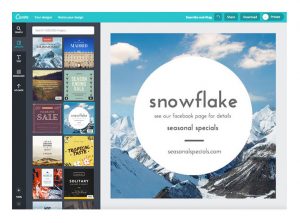

Canva an Australian company, was founded in 2012 to easily create graphic designs for whatever purpose.

The web site rapidly became popular, with more than 750,000 users in its first year. It currently has over 10 million users across 179 countries. It’s also considered to be one of the easiest graphic design platforms available at the moment. 

Canva is considered to be one of the easiest (according to some THE easiest) graphic design platforms currently available. One of the biggest challenges with graphic design is learning to use software like Adobe Photoshop, a fairly complicated programme. Canva eliminates this learning process and doesn’t expect you to be an expert designer to use it. How is this possible?

One way with which Canva simplifies the design process is by using an easy, intuitive drag and drop system which makes adding, removing, and editing elements extremely easy. You can choose between 11 available templates or customise your document from scratch. It also provides over 8,000 free and paid layouts.

Additionally, it offers a free photo editing tool, colour palette generator, and font combination tool, along with a database of over a million photographs, graphics and fonts. Many of the images are for the Premium package, which will cost you $1 per image, but you can easily upload and use your own images.

All these tools can be used for both web and print media design and graphics. Canva is free for individuals, but also offers a ‘Team’ tier at $12.45/month,

SOURCES:
www.wikipedia.org
http://www.pcworld.com
https://www.cnet.com
http://socialconceptsconsulting.com
http://sociallysorted.com.au
https://beautifulpixels.com
http://createyourlaptoplife.com
http://executivesecretary.com/canva-a-design-tool-for-the-non-designer/

[:af]

Of jy ʼn aspirerende, teësinnige of professionele ontwerper is, soms moet jy `n pamflet, plakkaat, advertensie of vorm van grafika saamflans.

Canva ʼn Australiese maatskappy, is in 2012 begin om gebruikers in staat te stel om maklik grafika te ontwerp, vir watter doel ookal. 

Die gewildheid van die webwerf het vinnig toegeneem en binne die eerste jaar is 750,000 gebruikers registreer. Op die oomblik het Canva meer as 10 miljoen gebruikers in 179 lande en word dit geag as een van die maklikste grafiese ontwerpplatforms tans beskikbaar.

Die grootste uitdaging met grafiese ontwerp, is om die sagteware onder die knie te kry — gewoonlik ʼn tydrowende proses. Sagteware soos Adobe Photoshop is duur en  ingewikkeld. Canva skakel die leerproses uit en verwag nie dat jy ʼn kundige ontwerper moet wees om dit te kan gebruik nie. Hoe kry hulle dit reg?

Eerstens vereenvoudig Canva die ontwerpproses deur ʼn intuïtiewe sleep-en-los proses te gebruik wat dit maklik maak om elemente by te voeg, verwyder of redigeer. Verder is daar 11 template beskikbaar of jy kan jou dokument van nuuts af ontwerp. Dit bied ook 8000 gratis en betaal-uitlegopsies.

Laastens is daar ʼn gratis funksie vir fotoredigering, ʼn kleurpalet-genereerder en ʼn databasis met meer as `n miljoen foto’s, grafika en lettertipes. Van die grafika is slegs beskikbaar in die Premium-pakket en kos $1 per foto, maar jy kan ook maklik jou eie grafika oplaai en gebruik.

Al hierdie bronne kan gebruik word vir beide web- en printmedia ontwerp en grafika. Canva is gratis vir individue, maar bied ook ʼn ‘Team’ opsie teen $12.45/maand.

BRONNE:
www.wikipedia.org
http://www.pcworld.com
https://www.cnet.com
http://socialconceptsconsulting.com
http://sociallysorted.com.au
https://beautifulpixels.com
http://createyourlaptoplife.com
http://executivesecretary.com/canva-a-design-tool-for-the-non-designer/

[:]

[:en]Good news for MATLAB fans[:af]Goeie nuus vir MATLAB-aanhangers[:]

Monday, April 24th, 2017

[:en]

MATLAB and Simulink are fundamental computational tools used at educational institutions worldwide. More than 500 universities have instituted a Total Academic Headcount (TAH) site license, including one-third of the top 300 universities worldwide and 23 of the top 25 universities.

Today, MATLAB and Simulink are an integral part of the curriculum at the SUN. The tools are used for teaching and research across several academic disciplines such as Geography, Agriculture, Economics, Biology, Informatics, Psychology, Math, Statistics and Physics, in addition to the engineering disciplines. The university provides lab room access via 8 different classroom licenses servers to be used by students on university owned machines. Researcher access is provided by a number of installs: 6 network servers provide 35 concurrent users, 8 group licenses with 79 users and 35 individual licenses.

Students who use MATLAB and Simulink establish a foundation for learning that serves them through their university years and prepares them for careers in engineering but also in areas such as biology, science, finance, and math. Faculty employ MATLAB and Simulink to engage students in coursework and research by providing a flexible environment for teaching, applying algorithms and models, and exploring data. Students can apply theory to real-world problems within a broad range of student- oriented research much in line with the big trends towards active learning i.e. PBL and CDIO.

Stellenbosch University has a Total Academic Headcount (TAH) license for MATLAB, Simulink, and add-on products. Faculty, researchers, and students may use these products for teaching, research, and learning. The license allows individuals to install the products on university-owned equipment, as well as personally owned computers.

To obtain an individual license for laptops and home PC’s:

Option 1 – On campus download – Click here for instructions.
Option 2 – Off campus download from Mathworks Website. Click here for instructions.

Learn About Capabilities and Using the Software

Use the TAH Resource Kit to find tutorials, webinars, teaching materials, books, and more to help you use MATLAB and Simulink. When you access these resources from the resource kit, you bypass registration forms.

Note that your MathWorks account gives you access to FREE online training with theMATLAB Onramp, as well as access to online assignments through Cody Coursework.

Empower Yourself With MathWorks tools

Visit the MathWorks for Education website at mathworks.com/academia
Visit the MathWorks Academy site for FREE online course at matlabacademy.mathworks.com

MATLAB Mobile

Connect to MATLAB from your iPhone, iPad, or Android device.mathworks.com/products/matlab-mobile.html

Need Assistance?
E-mail: ithub@sun.ac.za

[Information supplied by Kirsten Smith, Application Engineering Manager at MATLAB]

[:af]

MATLAB en Simulink is fundamentele berekeningshulpmiddele wat wêreldwyd by opvoedkundige instellings gebruik word. Meer as 500 universiteite het reeds die TAH (Total Academic Headcount) webwerflisensie aangekoop en dit sluit een derde van die top 300 universiteite en 23 van die top 25 universiteite ter wêreld in.

MATLAB en Simulink is deesdae ʼn integrale deel van Universiteit Stellenbosch se kurrikulum. Die sagteware word gebruik in verskeie akademiese omgewings, byvoorbeeld Geografie, Agriwetenskap, Ekonomie, Biologie, Informatika, Sielkunde, Wiskunde, Statistiek en Fisika, sowel as die verskeie ingenieursvakrigtings. Die universiteit verskaf werksareas (labs) met 8 verskillende gelisensieerde klaskamerbedieners wat deur studente gebruik word op universiteitsrekenaars. Toegang vir navorsers word verskaf deur ʼn aantal installasies: 6 netwerkbedieners verskaf gelyktydig toegang aan 35 gebruikers, 8 groeplisensies aan 79 gebruikers en 35 individuele lisensies.  

Studente wat MATLAB en Simulink gebruik, vestig ʼn kennisgrondslag wat hulle deur die res van hulle universiteitsjare kan gebruik en dit berei hulle voor op loopbane in ingenieurswese, sowel as biologie, wetenskap, finansies en wiskunde. Fakulteite gebruik MATLAB en Simulink om studente te betrek by kursusmateriaal en navorsing deur ʼn buigbare omgewing te bied vir onderrig, toepassing van algoritmes en modelle en data-ondersoekings. Studente kan teorie toepas op probleme in die regte wêreld binne ʼn wye omvang van student-georienteerde navorsing – in lyn met die groter neiging na aktiewe leer, byvoorbeeld PBL en CDIO.

Universiteit Stellenbosch het ʼn Total Academic Headcount (TAH) lisensie vir MATLAB, Simulink en addisionele produkte. Fakulteite, navorsers en studente kan hierdie produkte gebruik vir onderrig, navorsing en leer. Met hierdie lisensie kan individue produkte op universiteitstoerusting, sowel as persoonlike toerusting, installeer. 

Om ʼn individuele lisensie vir skootrekenaars en tuisrekenaars te bekom:

Opsie 1 – Op kampus aflaaibare lêer. Kliek hier vir instruksies.
Opsie 2 – Weg-van-kampus aflaaibare lêer op die Mathworks webwerf. Kliek hier vir instruksies.

Leer meer oor die vermoëns en gebruik van die sagteware

Gebruik die TAH Hulpbronne vir tutoriale, webseminare, leermateriaal, boeke en veel meer om jou te help met die gebruik van MATLAB en Simulink. Wanneer jy die bronne op so ʼn manier raadpleeg, hoef jy nie registrasievorms in te vul nie.  

Neem kennis dat jou MathWorks-rekening jou ook gratis toegang gee tot aanlyn opleiding met MATLAB Onramp, sowel as toegang tot aanlyn werkstukke met behulp van Cody Coursework.

Bemagtig jouself met MathWorks hulpbronne

Besoek die MathWorks for Education webwerf by mathworks.com/academia
Besoek die MathWorks Academy webwerf vir gratis aanlynkursusse by matlabacademy.mathworks.com

MATLAB vir mobiele toestelle

Verbind aan MATLAB vanaf jou iPhone, iPad, of Android-toestel: mathworks.com/products/matlab-mobile.html

Hulp nodig?
E-pos: ithub@sun.ac.za

[Inligting verskaf deur Kirsten Smith, Bestuurder: Toepassingsingenieurswese by MATLAB]

[:]

[:en]Whatsapp scams[:af]Whatsapp-verblindery[:]

Wednesday, November 23rd, 2016

[:en]

WhatsApp is a popular communication tool, used by students and personnel every day. On the downside, it provides cyber criminals with another way to convince you to part with your well-earned money and unfortunately it’s usually quite convincing.

WhatsApp scams come in many different forms and are often very convincing. Just make sure that you stay vigilant and don’t fall for anything that seems too good or too worrying to be true. Just because a friend or a family member sends you something, it doesn’t mean that it is safe.

Voucher scams

A message arrives in your WhatsApp from someone who looks like your friend, recommending a deal they’ve found. The messages usually come with a link that actually takes you to another website and tricks you into giving your personal information. Don’t ever click a link you’re not sure of and certainly don’t ever hand over personal information to a website you haven’t checked.

WhatsApp shutting down

There are many fake messages claiming that WhatsApp is going to end unless enough people share a certain message. The messages often look convincing, claiming to come from the CEO or another official. They’re written using the right words and phrases and look like an official statement. Any official statement wouldn’t need users to send it to everyone like a round robin. You would either see it in the news or it’ll come up as a proper notification in the app from the actual WhatsApp team.

WhatsApp threatening to shut down your account

This is very similar to the previous scam. It looks like an official message that claims that people’s WhatsApp accounts are being shut down for being inactive. Sending the message on will prove that it’s actually being used and often instructs people to pass it along.

WhatsApp forcing you to pay

Similar to the previous scam, with the only difference being that the message supposedly exempts you from having to pay for your account – if you send it on to other people.

WhatsApp Gold or WhatsApp Premium

The claim suggests that people pay for or download a special version of WhatsApp, usually called Gold or Premium. It offers a range of exciting-sounding features, like the ability to send more pictures, use new emoji or add extra security features. The problem is that it is far from secure. Downloading the app infects people’s phones with malware that use the phone to send more fake messages at the cost of the original victim.

Emails from WhatsApp

Spam e-mails are bad enough. E-mails plus WhatsApp is even worse. There’s a range of scams out there that send people e-mails that look like they’ve come from WhatsApp, usually looking like a notification for a missed voice call or voicemail. But when you click through, you will end up getting tricked into giving over your information, passphrases etc. Don’t ever click on an e-mail from a questionable sender. WhatsApp doesn’t send you e-mails including information about missed calls or voicemails.

Fake WhatsApp spying apps

Currently, it is not possible to let people spy on other’s conversations on WhatsApp, because it has end-to-end encryption enabled, which ensures that messages can only be read by the phones that send and receive them. These scam apps encourage people to download something that isn’t actually real and force people to pay money for malware, or actually read your chats once they’ve got onto your phone.

Lastly – 

Hopefully, you have  already blocked sharing your WhatsApp details with Facebook (telephone number, name etc. and allowing Facebook to suggest phone contacts as friends) and Facebook will not be able to  make your WhatsApp account accessible to the 13 million South African Facebook users.

There are some details about this controversial policy change by WhatsApp on the following page: http://www.mirror.co.uk/tech/you-can-stop-whatsapp-sharing-8893949


[ARTICLE BY DAVID WILES]


[:af]

WhatsApp word deur studente en personeel gebruik as belangrike kommunikasiemiddel. Ongelukkig bied dit aan kuberdiewe nog ʼn platform om hul aktiwiteite op uit te oefen. 

WhatsApp kuberstreke kom in verskeie formate voor en is dikwels besonder oortuigend.  Maak seker jy bly oplettend en word nie geflous deur iets wat te goed of te problematies om waar te wees lyk nie. Net omdat ʼn familielid of vriend vir jou iets aanstuur, beteken nie dis veilig nie.

Koepon-truuks

Jy kry ʼn boodskap via Whatsapp van (wat lyk soos) een van jou vriende en hy beveel ʼn aanbod waarop hy afgekom het, aan. Gewoonlik is daar ʼn skakel in die boodskap wat jou na ʼn ander webwerf neem en waar jy jou persoonlike inligting invul. Moet nooit op ʼn skakel kliek waaroor jy nie seker is nie en moet definitief nooit persoonlike inligting gee op ʼn webwerf wat jy nie ken nie. 

WhatsApp maak toe

Daar is heelwat vals boodskappe wat beweer dat Whatsapp gaan toemaak indien genoeg mense nie ʼn spesifieke boodskap deel nie. Die boodskappe lyk dikwels heel oortuigend en gebruik die regte woorde en frases vir die konteks, asof dit deur ʼn direkteur van ʼn maatskappy of iemand amptelik gestuur is. 

ʼn Amptelike verslag sal egter nie van kliënte verwag om dit heen en weer te stuur nie. Dit sou deur middel van normale nuuskanale verkondig word of as ʼn kennisgewing in die toepassing self deur die Whatsapp-span.

WhatsApp dreig om jou rekening te sluit

Hierdie voorbeeld is soortgelyk aan die vorige een. Dit lyk soos ʼn amptelike boodskap wat beweer dat jou Whatsapp-rekening gesluit gaan word omdat dit nie aktief gebruik word nie. Dit versoek dat jy die boodskap aanstuur om te bewys dat dit wel gebruik word.

WhatsApp dwing jou om te betaal

Ook soortgelyk aan die vorige kuberdiefstalpoging. Die enigste verskil is dat jy blykbaar vrygeskeld word van betaling indien jy die boodskap aanstuur na ander persone.

WhatsApp Gold of WhatsApp Premium

Dié boodskap stel voor dat jy ʼn spesiale weergawe van Whatsapp, gewoonlik genoem Gold of Premium, koop of aflaai. Blykbaar bied hierdie nuwe weergawes opwindende ekstra kenmerke, soos die vermoeë om meer fotos te stuur, nuwe emojis te gebruik of ekstra sekuriteitsopsies. Ongelukkig is hierdie verbeterde weergawes glad nie veilig nie. Wanneer die toepassing aflaai word, word die foon besmet met malware, wat opsigself meer vals boodskappe genereer op jou onkoste.

Whatsapp e-posse 

Gemorspos e-posse is erg genoeg, maar saam met Whatsapp raak dit onbeheerbaar. Daar is ʼn verskeidenheid kuberdiefstalpogings daar buite wat e-posse uitstuur wat soos Whatsapp-kennisgewings lyk – gewoonlik ʼn kennisgewing van ʼn verlore oproep of stempos. Maar wanneer jy daarop kliek, word jy oortuig dat jou inligting, wagwoord, ens. moet verklap.

Moet nooit op ʼn e-pos van ʼn twyfelagtige sender kliek nie. Whatsapp stuur nie e-posse oor verlore oproepe of stempos nie. 

Onegte WhatsApp afloer-toepassings

Whatsapp gebruik end-to-end enkripsie en gevolglik is dit nie moontlik om iemand anders se boodskappe te lees nie. Boodskappe kan slegs gelees word deur die fone wat dit stuur en ontvang.

Hierdie pogings moedig jou aan om iets af te laai wat nie bestaan of moontlik is nie. Jy betaal eintlik vir malware wat jou eie boodskappe lees wanneer jy dit op jou foon laai.

Laastens –

Hopelik het jy reeds die verstelling verander wat jou Whatsapp-details (telefoonnommer, naam, ens.) met Facebook deel en sal Facebook nie jou Whatsapp-rekening toeganklik maar vir 13 miljoen Facebook-gebruikers nie. 

Meer inligting oor dié kontroversiële beleidsverandering deur Whatsapp kan op die volgende bladsy gelees word:  http://www.mirror.co.uk/tech/you-can-stop-whatsapp-sharing-8893949

[ARTICLE DEUR DAVID WILES]

[:]