
SEARCH
  • [:en]Recent Posts[:af]Onlangse bydraes

  • [:en]Categories[:af]Kategorieë

  • [:en]Archives[:af]Argiewe

Apps

[:en]Maties app launched [:af]Maties toepassing bekendgestel

Friday, August 26th, 2016

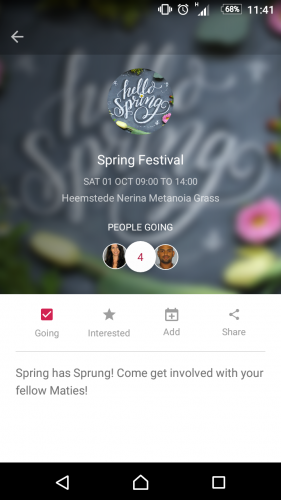
[:en]screenshot1The brand new Maties App was launched in the Neelsie last Wednesday. But before you experience serious FOMO, we have all the inside info for you.

The Maties app is a collaboration between Information Technology and Maties Sport after they envisioned a single place for staff and students to engage with hosted activities on campus. 

Among the benefits are the promotion of an active lifestyle and getting students and staff involved with competition-based leaderboards. Users of the application will be able to follow their favourite Maties sports team to see the latest results, fixtures and news. Students will be able to keep track of their cluster or residence’s placing on campus-wide competitions.

The goal was to provide a mobile application that can serve as the initial base for further development together with stakeholders and at the same time offer immediate value to the user and university alike. In the long term you will see a larger variety of events as they get listed on the Maties App. Users will be able to get a personalised list of events they are attending and interested in – just add it to a phone’s calendar or share it with friends. 

As with other social media platforms, you will be able to see how many people are also attending your event or activity. You will be able to check in at events by means of a QR code. No need for a paper ticket, just check-in at events using your app.

On the other side of the user spectrum, event organisers can disseminate important events and get students involved and active. At the same time, organisers will get an idea of how many people are interested and who have indicated that they will attend an event. No complicated form is needed since the user is already logged in and we know who is attending the event.

Additionally, users of the app will receive notifications of event information and changes, as well as campus-wide communique. Any message can be sent directly to users’ phones via the app and it can be targeted to a specific event, or to demographic (e.g. staff, students, or everyone) This function will be especially helpful during emergency situations when it is necessary to notify staff and students of important information and updates. 

Curious to see what it looks like? Watch the video here or read the article on the SU homepage.

The Maties App can be downloaded for free from the Google Play store. Please let us know what you think and how we can make it better?

[:af]Die blinknuwe screenshot1Maties App is verlede Woensdag in die Neelsie bekendgestel, maar moenie FOMO ontwikkel omdat jy dit misgeloop het nie. Hier is alles wat jy moet weet.

Die Maties App is ʼn gesamentlike poging tussen Informasietegnologie en Maties Sport. Dit het ontstaan met die idee om ʼn enkele platform te skep waar personeel en studente interaksies kan hê oor verskeie aktiwiteite wat op kampus gebied word.

Die toepassing poog om ʼn aktiewe lewenstyl te bevorder en personeel en studente betrokke te kry by kompetisie-gebaseerde leierborde. Gebruikers kan hulle gunsteling Maties sportspanne volg en ook die nuutste resultate, nuus en speelbeurte sien. Studente kan weer tred hou met hul groepe (clusters) of koshuis se plasing in kampuswye kompetisies.

Die doel was om ʼn mobiele toepassing daar te stel wat kan dien as ʼn aanvanklike basis vir verdere ontwikkeling saam met belanghebbendes. Terselfdertyd moes dit dadelik ewe veel waarde bied aan die gebruiker en die universiteit. 

ʼn Groter verskeidenheid aktiwiteite en geleenthede sal mettertyd op die Maties App gelys word. Tans kan gebruikers reeds ʼn verpersoonlikte lys van gebeure waarin hulle belangstel en gaan bywoon, sien. Dit kan dan bygevoeg word op jou foon se kalender en met vriende gedeel word.

Soos met ander sosiale media platforms, kan jy sien hoeveel mense ʼn geleentheid of aktiwiteit bywoon. Jy kan selfs aanmeld (check-in) by geleenthede sonder ʼn papierkaartjie deur ʼn QR-kode te laat skandeer.

Aan die ander kant van die spektrum kan organiseerders van geleenthede maklik inligting oor belangrike geleenthede versprei en vinniger en meer effektief studente aktief en betrokke kry. Organiseerders kan ʼn idee kry van die hoeveel geïnteresseerdes en wie aangedui het dat hulle die geleentheid wil bywoon. Dis nie nodig om ʼn ingewikkelde vorm te gebruik nie. Die gebruiker is reeds aangeteken en sy details is sigbaar.

ʼn Ekstra voordeel van die Maties App is dat gebruikers maklik nuwe, opgedateerde inligting oor gebeure, sowel as kampuswye kommunikasie, kan ontvang. Enige boodskap kan direk na gebruikers se fone gestuur word en dit kan geteiken word tot ʼn spesifieke geleentheid of demografiese groep (byvoorbeeld studente, personeel of almal) Hierdie funksie is besonder handig gedurende noodsituasies wanneer inligting vinnig by studente en personeel moet uitkom. 

Is jy nuuskierig om te sien hoe dit lyk? Kyk gerus die video hier of lees die artikel op die US-tuisblad.

Die Maties App kan gratis afgelaai word by die Google Play store. Laat weet ons wat jy daarvan dink en wat ons kan doen om dit te verbeter?


[:af]Leer = kinderspeletjies: Toepassings vir kinders[:en]Play and learn: apps for children

Friday, July 22nd, 2016

[:en]kids-appsAfter watching Barney, the dinosaur, or Lollos, the unidentifiable creature with the big ears, sing the same song for the twenty-seventh time this week, most parents would be desperate to find something else. Even if it’s only to preserve their own sanity. 
Gone are the days when television and videos were the only available options for frustrated parents. Today technology provides another platform for distraction and one which also has the ability to educate. Phones and tablets can conveniently be loaded with apps, games, and movies. 

The biggest challenge for parents is choosing the best, most appropriate, safest and most educational apps, which will also hold their child’s attention for as long as possible.

PC Advisor, one of the United Kingdom’s leading technology and media companies, attempted to make this choice easier. With the help of a group of parents, they compiled and published a list of 46 apps on their website. The apps are divided into sections for babies, toddlers, primary school scholars and teenagers. Don’t feel left out, there’s also a section for kids of all ages. That means you can also play along.

Do you have any suggestions for fun and educational apps? Let us know at bits.bytes@sun.ac.za and we’ll add your suggestions to our next article. 

[:af]kids-appsNadat Barney, die dinosourus, of Lollos, die onidentifiseerbare kreatuurtjie met die groot ore, vir die sewe-en-twintigste keer dié week dieselfde liedjie gesing het, mag menige ouer benoud begin soek na iets anders –  al is dit net ter wille van hul geestesgesondheid. 

Videos en televisie is lankal nie meer die enigste beskikbare opsies vir ʼn gefrustreerde ouer nie. Vandag verskaf tegnologie nog ʼn handige platform wat kinders besig kan hou, waar hulle vaardighede kan aanleer en kennis insamel. Slimfone en tablette kan maklik propvol speletjies, toepassings en flieks gelaai word.

Daar is wel nog éen uitdaging – hoe maak jy, as ouer, goeie, veilige en opvoedkundige keuses, wat ook jou kind se aandag vir so lank as moontlik kan behou?

PC Advisor, een van die Verenigde Koninkryk se vooraanstaande tegnologie- en mediamaatskappye, het die dinkwerk vir ouers gaan doen. In samewerking met ʼn groep ouers, het hulle ʼn lys van 46 toepassings saamgestel en op hul webwerf publiseer.

Die keuses is onderverdeel in die beste toepassings vir babas, vir kleuters, vir primêre skool leerders en tieners. Moenie afgeskeep voel nie, daar is ook ʼn afdeling vir kinders van alle ouderdomme, dis nou jy.

Het jy enige voorstelle vir toepassings wat beide pret en opvoedkundig is? Laat weet ons gerus by bits.bytes@sun.ac.za en ons kan jou gunstelinge by die volgende artikel insluit.

[:en]Winter is movie time[:af]Winter is fliektyd

Friday, June 24th, 2016

[:en]The past week’s icy weather is enough of an excuse to spend more time than usual on the couch.

But we don’t judge. Neither does Popflake, an app that attempts to improve your screen time experience. 

Nowadays good movies are few and far in between. Most of us struggle to find or think of something worthwhile to watch when you have the opportunity to relax in front of the screen. 

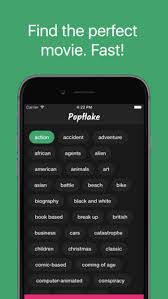
popflakeThis is exactly what motivated a few students to create Popflake, an app which suggests movies based on keywords.

All you have to do, is select the keywords that represent what you are looking for in a movie, for example, horror, teenagers, woods – not the best example, but you get the concept? Keywords are meant to describe multiple aspects of the movie.

What differentiates Popflake from Wikipedia or IMDB, is that it doesn’t reveal the storyline and spoils your movie before you’ve even watched it.

All the movies are tagged by hand. So far the beta user group has tagged 820 movies and they need your help to expand their database. Just write them a message on their  Facebook page, they’ll assign you access and you could be part of developing the app. 

Popflake will also show the film’s rating, based on ratings from Rotten Tomatoes, IMDB, and Metacritic.

At the moment the app is only available for iPhone, but a version for Android is being developed.


[:af]Die afgelope week se koue weer is genoeg om enigiemand te dryf na die naaste bank.

Ons blameer jou nie. Inteendeel, Popflake is `n toepassing wat jou kan help om jou tyd voor die skerm optimaal te benut.

Deesdae is ʼn goeie fliek so skaars soos hoendertande. Wanneer die geleentheid vir ʼn tydjie voor die skerm opduik, sukkel die meeste van ons om aan iets te dink wat die moeite werd is om te kyk.

popflakeDit is juis hierdie dilemma wat ʼn groep studente motiveer het om Popflake, ʼn toepassing wat flieks opspoor met behulp van sleutelwoorde, te ontwikkel.

Al wat jy moet doen, is om die sleutelwoorde te kies wat opsom wat jy in ʼn fliek soek. Byvoorbeeld, “horror”, “teenagers”, “woods” –  nie die beste voorbeeld nie, maar julle verstaan die beginsel? Die sleutelwoorde is veronderstel om verskeie aspekte van die fliek te beskryf.

Wat Popflake onderskei van Wikipedia of IMDB, is dat dit probeer om nie die storielyn weg te gee nie. Anders as wanneer jy Wikipedia raadpleeg en voor jy jou oë uitvee, weet jy hoe die fliek eindig.

Al die flieks word met die hand etiketteer. So ver het die beta gebruikersgroep 820 flieks klassifiseer. Hulle het egter ook jou hulp nodig om die databasis uit te brei. Om deel te wees van die proses, los net vir hulle ʼn boodskap op hul Facebook-blad en jy sal toegang kry tot die databasis.

Popflake wys ook die fliek se telling, soos aangedui op Rotten Tomatoes, IMDB, en Metacritic.

Die toepassing is tans slegs beskikbaar vir iPhone, maar ʼn Android-weergawe word wel ontwikkel. 


[:en]Are you an aspiring scientist?[:af]Is jy `n aspirant wetenskaplike?

Wednesday, May 25th, 2016

sciencejournal[:en]Google just released an app which might appeal to budding scientists.  It’s called Science Journal, and measures and records data in real-time by using the sensors embedded in Android phones. 

The Science Journal app allows you to gather data from the world around you. By using the phone’s sensors, it measures elements in your environment, like light and sound, so you can graph data, record experiments, and organise questions and ideas.

If your main aim is to take over the world, instead of conducting small experiments for your own amusement, this might not be your cup of tea. Its main objective is to get children involved and interested in science, but it can still be fun for the adult who still wants to play.

The app is part of a larger Google initiative called The Making & Science Initiative which believes anyone can be a scientist by observing your everyday life, figuring out how things work and creating projects to improve the world.

Science Journal also allows you to make notes about your experiments and keep a digital journal – just in case you make that breakthrough discovery and forgot how it happened.

It is available as a free download from the Google Play Store and needs a smartphone running on Android 4.4 KitKat to install the 14MB app. 

Read more on Google’s latest projects, including a modular cellphone and an attempt at smart clothes.

[:af]

sciencejournalGoogle het onlangs ʼn toepassing vrygestel wat jou innerlike wetenskaplike sal aanwakker. Science Journal meet en neem intyds data op deur middel ingeboude sensors in Android-fone.

Met die Science Journal-toepassing kan jy data insamel vanuit jou omgewing. Die toepassing gebruik die foonsensors om lig en klank, te meet, sodat jy die data grafies kan voorstel, eksperimente kan opneem en vrae en idees kan opneem.

As jou doel is om die wêreld oor te neem soos ʼn wafferse, bose wetenskaplike, is hierdie dalk nie heeltemal vir jou nie. Dis wel gepas vir in plaas van klein eksperimentjies vir jou eie vermaak.

Die hoofdoel van Google se nuwe projek is om kinders opgewonde oor en betrokke by wetenskap te kry. Moet egter nie dink volwassenes kan dit nie geniet nie; hulle kan net so lekker weteskaplike speel. 

Science Journal is deel van Google se groter inisiatief, The Making & Science Initiative. Dit glo dat enigiemand ʼn wetenskaplike kan wees as hy net die alledaagse dophou, probeer verstaan hoe dit werk en projekte skep wat dalk ʼn impak op die wêreld kan maak.

Met Science Journal kan jy ook ʼn digitale joernaal hou en notas maak van jou eksperimente – net vir ingeval jy `n wetenskaplike deurbraak maak en vergeet het wat jy gedoen het.

Die toepassing is gratis beskikbaar op die Google Play-winkel en jy het ʼn slimfoon met Android 4.4 KitKat nodig om die 14MB toepassing te installeer.

Lees ook meer oor Google se ander projekte, onder andere ʼn modulêre selfoon en slim klere.


[:en]How safe is information on your device?[:af]Hoe veilig is inligting op jou toestel?

Wednesday, May 25th, 2016

[:en]

Smartphones frequently act as the control centres where we schedule meetings, send e-mails and socialise. To satisfy these needs, they require personal information.

Our lives are documented and stored in e-mails, social networks and the apps we install on our phones. All this information syncs seamlessly with your work PC or your tablet. And after initial  set up, it might not even prompt you for a password again. Wonderful news if you are terrible at remembering passwords. Also, wonderful news if you are the thief who steals a smartphone.

What information would a clever criminal get his hands on if you lose your smartphone now? Banking information? A copy of your ID or passport saved somewhere in your e-mail? All your holiday photos on Dropbox? 

Here are a few tips to ensure he won’t be able to get to it:

  1. Always enable the password option on your phone to lock your screen. Most phones have various options – typing in a password, a pin code or even swiping a sequence of dots. This is your first line of defence.
  2.  Don’t select “remember password” on any of your apps or your e-mail applications. Yes, it is a nuisance to type in your password, but do you really want someone else to read your e-mails? 
  3. Turn off cookies and autofill. This prevents your device from remembering your username and possibly even your password at websites you regularly visit.
  4. If you need to access sensitive information, e.g. banking, rather go to the website, via a web browser, than using an app.
  5. Set up your phone to be tracked if you do lose it. (Read our previous instructions on locating lost or stolen devices here.) A device can also be wiped remotely in some cases, which at least ensures that your information doesn’t end up being used, even though your actual device is.

Remember that you also need to remove ALL personal data (for example e-mails, SMS’s and telephone numbers) and anything which could connect you to the phone when you sell or dispose of it. 

[:af]

Slimfone is dikwels die beheersentrum waar vergaderings geskeduleer, e-posse gestuur en sosiale aktiwiteite beplan word. Om dié funksie te vervul, vereis dit ons persoonlike inligting.

Ons doen en late word dokumenteer en gebêre in e-posse, sosiale netwerke en toepassings. Al hierdie informasie word vervolgens ook soomloos integreer met jou werkrekenaar en tablet. Na die eerste opstelling, is dit, in sommige gevalle, nie eers nodig om `n wagwoord in te tik nie. Wonderlike nuus as jy hopeloos is met wagwoorde onthou. Ook wonderlike nuus as jy `n opportunistiese skelm is wat slimfone steel.

Watter inligting sal `n slim misdadiger tot sy beskikking hê as hy vandag jou slimfoon in die hande kry? Bankinligting? `n Kopie van jou ID of paspoort wat erens gestoor is op e-pos? Al jou vakansiefotos op Dropbox?

Hier is `n paar wenke om seker te maak hy kry dit nie in die hande nie:

  1. Aktiveer altyd die wagwoord opsie om jou foon te skerm te sluit. Die meeste fone het verskeie opsies, byvoorbeeld om `n wagwoord in te tik, `n PIN-kode of selfs om in `n spesifieke volgorde `n patroon te vee. Hierdie is jou eerste en belangrikste afskrikmiddel.
  2. Moenie remember password op jou e-pos of ander toepassings kies nie. Ja, dit is irriterend om elke keer `n wagwoord in te tik, maar wil jy regtig hê iemand anders moet jou e-pos lees?
  3. Skakel cookies en autofill af. Dit keer dat jou toestel jou gebruikersnaam en wagwoord onthou en invul op webwerwe wat jy gereeld besoek.
  4. As jy toegang tot sensitiewe inligting moet kry, byvoorbeeld bankinligting, gaan eerder na die webwerf d.m.v. `n webblaaier in plaas van die installeerde toepassing.
  5. Stel jou foon op dat dit opgespoor kan word as jy dit verloor. (Lees ons vorige artikel oor die opsporing van verlore of gesteelde toestelle hier.) `n Toestel kan ook vanaf `n afstand skoongevee word om seker te maak jou inligting word nie misbruik nie, selfs al is jou toestel in die verkeerde hande.

Onthou dat jy ook, wanneer jy jou selfoon verkoop of daarvan ontslae raak, seker moet maak dat AL jou data daarvan verwyder is (bv. e-posse, foonnommers, SMSe, ens.) of enige inligting wat jou kan verbind tot die foon.