SEARCH
  • [:en]Recent Posts[:af]Onlangse bydraes

  • [:en]Categories[:af]Kategorieë

  • [:en]Archives[:af]Argiewe

Notices

[:en]Extra layer of security added to campus computers [:af]Ekstra vlak van sekuriteit vir rekenaars op kampus [:]

Monday, August 2nd, 2021

[:en]

Cyber crime is a constantly evolving field. Even though the majority of viruses were created as pranks, it’s essential to stay informed of the various risks that exist on the internet if you want to stay safe online. Here’s a breakdown of the basics: 

Malware, or malicious software, is a catch-all term for any type of malicious computer program. Malware is the most common type of online threat.

Ransomware is an emerging form of malware that locks the user out of their files or their device, then demands an anonymous online payment to restore access.

Adware is a form of malware that hides on your device and serves you advertisements. Some adware also monitors your behaviour online so it can target you with specific ads.

Spyware is a form of malware that hides on your device, monitors your activity, and steals sensitive information like bank details and passwords.

The world of cyber crime is very similar to that of technology. Every year, new trends, breakthroughs, and tools emerge.

You’ve probably noticed a Malwarebytes Threat Scan icon on your desktop or laptop (Figure 1). Don’t worry, this isn’t a brand-new type of malware. Stellenbosch University’s IT department has added an extra layer of security to campus computers.

Figure 1

Malwarebytes Incident Response is the trusted standard in automated endpoint remediation. Unfortunately, with the current environment, some malware will return after removal and Malwarebytes will prompt you to initiate a restart (Figure 2).

Figure 2
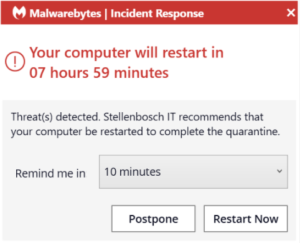
This is because the malware will sync to your browsers profile and will be synced back to your device after it has been removed.  If you are experiencing such daily prompts for restarts by Malwarebytes, we suggest that you log a request on the ICT Partner Portal for a technician to assist with further remediation.

[ARTICLE BY BRADLEY VAN DER VENTER]

[:af]

Kubermisdaad is ʼn veld wat voortdurend ontwikkel. Alhoewel die groter meerderheid virusse aanvanklik as poetse geskep is, is dit deesdae noodsaaklik om op hoogte te bly met die verskeie risiko’s op die internet as jy veilig aanlyn wil wees. Hier is ʼn kort opsomming van die basiese gevare: 

Malware, of malicious software, is ʼn oorkoepelende term vir enige kwaadwillige rekenaarprogram. Malware is die mees algemene vorm van aanlyn-bedreiging. 

Ransomware is ʼn nuwe vorm van malware wat gebruikers se toegang tot dokumente of toestelle sluit en dan anoniem ʼn aanlynbetaling eis om toegang te herstel. 

Adware is ʼn vorm van malware wat versteek is op jou toestel en advertensies aan jou vertoon. Sommige adware monitor ook jou aanlyngedrag sodat dit pasgemaakte advertensies vir jou kan wys. 

Spyware is ʼn vorm van malware wat versteek is op jou toestel, jou aktiwiteite monitor en sensitiewe data soos bankinligting en wagwoorde steel. 

Die wêreld van kubermisdaad is soortgelyk aan die van tegnologie. Elke jaar is daar nuwe tendense, deurbrake en hulpmiddele. 

Jy het moontlik opgemerk dat daar onlangs ʼn Malwarebytes Threat Scan ikoon op jou skootrekenaar of tafelrekenaar se skerm verskyn het (Figuur 1). Moenie skrik nie, dis nie ʼn nuwe tipe malware nie! Universiteit Stellenbosch se IT-afdeling het ʼn ekstra vlak van sekuriteit op kampusrekenaars bygevoeg. 

Figuur 1

Malwarebytes Incident Response is vertroude standaard in outomatiese eindpunt remediasie. Ongelukkig, onder huidige omstandighede, beteken dit dat sommige malware kan terugkeer nadat dit verwyder is. Indien dit gebeur sal Malwarebytes jou aanpor om jou rekenaar af en aan te sit, soos aangedui in Figuur 2.

Figuur 2

Dit gebeur omdat die malware moet sinkroniseer met jou webblaaier se profiel. Dit sal weer terug sinkroniseer met jou toestel nadat dit verwyder is. Indien jy daagliks sulke versoeke van Malwarebytes kry om jou rekenaar af te sit, stel ons voor dat jy ʼn versoek aanteken op die ICT Partner Portal sodat ʼn tegnikus jou kan help. 

[ARTIKEL DEUR BRADLEY VAN DER VENTER]

[:]

[:en]The Protection of Personal Information Act (POPIA) is here[:af]Die Wet op Beskerming van Persoonlike Inligting (POPIA) is hier[:]

Sunday, July 4th, 2021

[:en]

The Protection of Personal Information Act (4 of 2013) (POPIA) is in full effect from 1 July 2021.  A brief summary of the POPIA Act is available here.

To support the University community’s readiness for POPIA, the Division for Information Governance has launched a series of guides and tools at www.sun.ac.za/privacy, including our institutional privacy regulations, an online privacy impact self-assessment, and channels for reporting incidents or breaches of personal information.

The Division for Information Governance also offers awareness sessions, facilitated privacy impact assessments, and internal advisory and consulting services by request. For more details, contact privacy@sun.ac.za

Also read POPIA: How valuable is personal information?

Everlytic, the digital messaging platform, also has various of helpful articles on its website, as well as a handy POPIA Powerpoint guide.

[:af]

Die Wet op Beskerming van Persoonlike Inligting (4 van 2013) (POPIA) het op 1 Julie 2021 ten volle in werking getree. `n Kort opsomming van die POPIA-wet is beskikbaar hier.

Ter ondersteuning van die Universiteit van Stellenbosch se voorbereiding om gereed te wees vir POPIA, het die Afdeling Inligtingsoorsigbestuur ʼn reeks gidse en gereedskap gepubliseer op www.sun.ac.za/privaatheid.  Dit sluit in die institusionele privaatheidsregulasies, ʼn aanlyn privaatheidsimpak assessering asook kanale om insidente en oortredings in die gebruik van persoonlike inligting aan te meld. 

Vir meer inligting volg asb. die skakel na www.sun.ac.za/privacy.  Sessies oor bewusmaking, gefasiliteerde impakstudies op privaatheid en interne advies- en konsultasiedienste is ook beskikbaar op versoek. Vir meer inligting, kontak privacy@sun.ac.za

Lees ook: POPIA: Hoe waardevol is jou inligting?

Everlytic, die digitale boodskap-platform, het ook `n verskeidenheid nuttige artikels op sy webwerf, sowel as `n handige POPIA Powerpoint-gids

[:]

[:en]IT HUB closed[:af]IT HUB gesluit[:]

Wednesday, June 9th, 2021

[:en]

The IT HUB has been closed this morning due to a positive COVID case of one of the staff members. 
For urgent issues students can go to their Computer User Areas (CUAs) for assistance or for less urgent problems, log a request on servicedesk.sun.ac.za.

IT HUB will be closed until Friday, but we will monitor the situation and keep you updated. 

[:af]

Die IT HUB is vanoggend gesluit nadat een van die personeellede met COVID diagnoseer is.

Vir dringende probleme kan studente na hulle Rekenaargebruiksareas (RGAs) gaan en vir minder kritiese probleme kan `n fout tapporteer word op servicedesk.sun.ac.za.

Die IT HUB sal gesluit wees tot Vrydag, maar ons monitor die situasie en sal studente op hoogte hou.

[:]

[:en]Dell Optiplex All-in-One PCs for sale[:af]Dell Optiplex All-in-One rekenaars te koop[:]

Monday, May 31st, 2021

[:en]

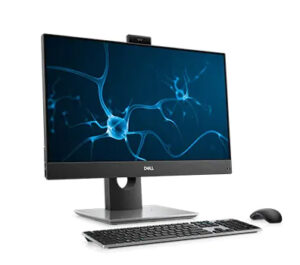
We currently have 20 Dell Optiplex All-in-One desktops in stock for sale. These PCs are available immediately.

The specifications are as follows:

Processor: i7-10700 (8 Cores/16MB/16T/2.9GHz to 4.8GHz/65W)
Hard drive: M.2 512GB SSD
Memory: 16GB, 1x16GB
Monitor: AIO 23.8″ FHD 1920×1080 IPS Touch

More information is also available on Dell’s website.

Price: R18,170.00  (VAT inclusive)

These desktops are only for sale to SU departments. Unfortunately no private sales are allowed. 

If you department is interested in purchasing one of these desktops, please log a request on servicedesk.sun.ac.za with the description: “AIO available”.


[:af]

Ons het tans 20 splinternuwe Dell Optiplex All-in-One rekenaars te koop. Hierdie rekenaars is onmiddellik beskikbaar.

Die spesifikasies is as volg:

Verwerker: i7-10700 (8 Cores/16MB/16T/2.9GHz to 4.8GHz/65W)
Hardeskyf: M.2 512GB SSD
Geheue: 16GB, 1x16GB
Monitor: AIO 23.8″ FHD 1920×1080 IPS Touch

Meer inligting is ook beskikbaar op Dell se webwerf.

Prys: R18,170.00  (BTW ingesluit)

Hierdie tafelrekenaars is slegs beskibaar vir US-departmente. Ongelukkig kan ons nie aan privaat persone verkoop nie. 

Indien jou department belangstel om een van die rekenaars te koop, meld asb. `n versoek aan op servicedesk.sun.ac.za met die beskrywing: “AIO available”.

[:]

[:en]External emails not delivered[:af]Eksterne e-posse onafgelewer[:]

Thursday, May 6th, 2021

[:en]

Since Friday, 30 April, many external emails have not been delivered to SU staff and student mailboxes. These messages have been placed under quarantine by Microsoft for security reasons.

The issue was reported to Microsoft earlier this week and is receiving urgent attention from both Microsoft’s engineers as well as our own system engineers. 

We realise that important messages might have been queued and therefore we will release all pending messages tomorrow ((Friday, 7 May) afternoon at 16:00 as a temporary solution to the problem.

Please take note that messages could include spam or phishing emails and you need to be extra careful when dealing with these particular messages.

We apologise for the inconvenience and hope that the situation will be resolved soon. 
Any enquiries regarding this can be logged on the ICT Partner Portal.

[:af]

Sedert verlede Vrydag, 30 April, was daar gevalle waar eksterne e-pos boodskappe nie in US personeel en studente se posbusse afgelewer is nie.  Hierdie boodskappe word deur Microsoft onder kwarantyn geplaas om sekuriteitsredes. Die probleem is aangemeld by Microsoft en ontvang dringende aandag van die Microsoft-ingenieurs, sowel as ons eie stelseladminstrateurs. 

Ons besef dat daar waardevolle boodskappe in die tou lê en sal daarom, as `n tydelike oplossing, hierdie boodskappe vanaf môremiddag (Vrydag, 7 Mei) 16:00 vrystel sodat dit in plaaslike posbusse afgelewer kan word.

Neem kennis dat daar ook spam en phishing tussen die boodskappe mag wees. Wees dus asseblief uiters versigtig wanneer hierdie boodskappe hanteer word.

Ons vra om verskoning vir enige ongerief en hoop dat die probleem so gou moontlik opgelos sal word.
Enige navrae in hierdie verband kan aangeteken word op die ICT Partner Portal.

[:]