SEARCH
  • [:en]Recent Posts[:af]Onlangse bydraes

  • [:en]Categories[:af]Kategorieë

  • [:en]Archives[:af]Argiewe

Apps

An app for sleepyheads`n Toepassing vir slaapkouse

Friday, November 6th, 2015

turboalarm2I’m not a morning person. Brain and muscle functions kick in around nine. And only thanks to strong coffee. But there’s an app to help with this predicament.

Needless to say, alarm clocks are not my favoured method of waking up. No tone, song or nature sound effect, whether it be shrieking seagulls, waterfalls, waves or wind chimes, can ease me into a new day painlessly.

Turbo Alarm, a seemingly popular and efficient app, promises to take the torture out of your standard smartphone alarm.

First off – it’s free and promises not to inundate your screen with ads. It also promises to be “ultra customizable with tons of options and configurations”.

Sure, it has all the usual options: adjusting volume, different alarm tones, but it can also wake you up with a different song every morning. No longer will you be startled awake by Bohemian Rhapsody for every day of the year. Now you can throw in a few other Queen hits to start your day with a bang.

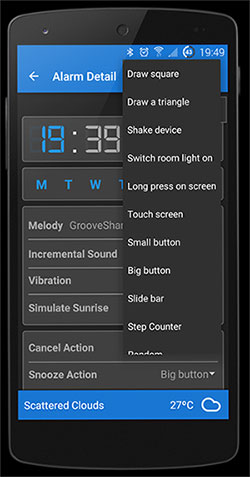
So far, so good, but the proof is in the pudding. The deciding factor for me would be the snooze, mute and disable function. Turbo Alarm gives you more options than most. The coolest of these, especially during notorious Western Cape winter months, is turning if off by switching on the light. Easier ways to silence your dream interrupter are shaking the phone and drawing various shape combinations on your phone.

Other features include:

★ Choose a folder with songs or your playlist as a tone and a different song will be played each day.
★ When you set the alarm Turbo Alarm shows the weather forecast for the time when the alarm rings.
★ Mini game to stop alarm definitely.
★ Security Alarm which rings again if you still are at home.
★ Do you want to wake up little by little? Then, select incremental volume and the time to reach the maximum.
★ Select the way the device vibrate when the alarm rings: relaxed, normal, rapidly or none.
★ You can choose the way to finish or snooze the alarm: switching the room light on, shaking the device, drawing a square or triangle, sliding a bar, long press, short press or just a big or a small button.
★ Simulate the sunrise in your bedroom with your favourite colour.
★ Decremented snooze interval.
★ Widget with list of active alarms.
★ You can limit max snooze times.
★ Anti-sleepyhead mode to wake you up even those days you are really tired.
★ Customizable background image.

THE VERDICT:

If customisability is important to you, Turbo Alarm will make you a happy, perky riser. To some extent the multitude of options almost seems to be its drawback and you have to ask yourself if they’re really necessary to fulfil the basic task of getting you out of bed in the morning.

Turbo Alarm is available for free on Android.


turboalarm2Ek is nie `n oggendmens nie. Brein- en spierfunksie skop eers nege-uur in. Met die hulp van sterk koffie natuurlik. Maar daar is `n toepassing om te help.

Jy kan jou in dink hoe groot my liefde vir wekkers is. Dit maak nie saak watter toon, liedjie of byklank uit die natuur, of dit nou krysende meeue, watervalle, branders of wind chimes is, niks kan my pynloos die nuwe dag inlei nie.

Turbo Alarm, blykbaar ʼn populêre en effektiewe toepassing, beloof om die jou standaard selfoon alarm se vermoëns te oortref. 

Eerstens is dit gratis en bevat dit geen advertensies wat op jou reeds teer nerwe te werk nie. Dit beloof ook om super aanpasbaar met opsies en konfigurasies te wees. 

Ja, dit het al die standaard opsies: volume wat aanpas hoe langer jy neem om te reageer, verskillende alarm tone, ens. Maar dit kan jou ook elke oggend wakker maak met ʼn nuwe liedjie. Dink net, jy hoef nie meer vir 200+ oggende van die jaar wakker te skrik met Bohemian Rhapsody nie, maar jy kan elke oggend met `n ander Queen-treffer wakkerword.

Vir my is die bepalende faktor egter die snooze, mute en disable funksies. En dis hier waar Turbo Alarm aanloklik begin lyk. Die toepassing gee vir jou meer opsies as die meeste ander wekker-toepassins. Jy kan byvoorbeeld jou alarm stel sodat dit net reageer as jy die lig aanskakel – ʼn besondere handige opsie in ons Wes-Kaap wintermaande. Makliker maniere om jou rus en vrede te verleng, is deur die foon te skud, verskeie patrone daarop te teken of ʼn kombinasie van nommers of kolle te druk op jou foonskerm.

Addisionele funksies sluit in:

★ Kies ʼn lêer met liedjies of jou speellys as jou alarmtoon en jy sal elke oggend met ʼn ander liedjie wakkergemaak word. 
★ Wanneer jy jou alarm instel, sal dit ook die weervoorspelling wys vir die tyd wanneer die alarm sal afgaan. 
★ Mini-speletjie om die alarm tydelik te stop.  
★ Sekuriteitsalarm wat lui as jy nogsteeds by die huis is.
★ Wil jy eerder geleidelik wakkerword? Kies dan die geleidelike volume en die tydperk wanneer dit op sy maksimum moet wees.  
★ Kies die manier waarop die toestel vibreer: rustig, normaal, vinnig of geen. 
★ Jy kan kies op watter wyse jy die alarm wil stilmaak: deur die kamerlig aan te skakel, die toestel te skud, ʼn vierkant of driehoek op die skerm te tik, ʼn dwarsbalk te sleep, lank of kort te druk of ʼn klein of groot knoppie te druk.
★ Simuleer die sonskyn in jou kamer met jou gunsteling kleur. 
★ Verminderende sluimer-intervalle. 
Widget met ʼn lys van aktiewe alarms.
★ Beperk die kere wat jy mag sluimer. 
Anti-sleepyhead modus om seker te maak jy word wakker op daai dae wanneer jy ekstra moeg is.
★ Aanpasbare agtergrond

DIE UITSLAG

Indien aanpasbaarheid vir jou belangrik is, sal Turbo Alarm jou oggendroetine ietwat meer prettig maak. Dit voel egter of die verskeidenheid funksionaliteit ook tot die toepassing se nadeel kan strek. Is dit alles werklik nodig is om die eenvoudige taak, om jou uit die bed uit te kry in die oggend, te verrig?

Turbo Alarm is gratis beskikbaar op Android


Peeple – an app for the people?Peeple – `n toepassing vir almal?

Friday, October 9th, 2015

peepleIt’s 6:08 in the morning. Seconds ago you were fast asleep and oblivious to the rest of the world. Until your cell phone alerted you of a new message.

Someone, who claims to know you, has given you a one star rating on an online app. Additionally she’s also reviewed your personal and romantic life and the outcome is not exactly favourable.

Sounds like a clip from a sci-fi movie, doesn’t it? Only it’s not. In less than a week, this could be a reality when Nicole McCullough and Julia Cordray unleash their controversial app, Peeple, on the world.

A cloud of inauspiciousness hovers above Peeple since the announcement early in October.

Initially you would be notified if any negative comments were listed on the app. You then have the opportunity to convince your critic that he or she is wrong – you have 48 hours to accomplish this prickly task. If your negotiation skills prove unsuccessful, you can still defend yourself on the platform. Negative comments will not be removed: in short, you have little say.

After overwhelming criticism in the media – particularly the breeding ground Peeple will create for bullying and harassment – the app’s quickly changed it’s approach.

A prominent article in the Washington Post even led to the prompt removal of Peeple‘s website, Facebook page and Twitter accounts.

At the moment it is marketed as an app encouraging positive feedback – a “positive revolution”, as the website so optimistically states.

Recently Cordray stated on LinkedIn that no person will be listed without their consent. The 48 waiting period for removing negative comments is no longer applicable. If you do not approve a comment, it will not be posted.

Whether Peeple changes it’s procedures or approach, the real impact of an app that intrudes on human rights, will only truly be felt once it’s in operation.

Clearly there is already enormous opposition. A petition to ban Peeple accumulated more than 7000 signatures last week. Two parodies already exist: “Sheeple,” and “Meet Peeple”. Even satirist John Oliver commented in his unique, outspoken, rant-like style.

Peeple in the media: http://www.theguardian.com | http://www.latimes.com | http://www.forbes.com | http://arstechnica.com | http://www.mybroadband.co.za


peepleDis 6:08 in die oggend. Sekondes gelede het jy heerlik geslaap; onbewus van die res van die wêreld se bedrywighede. Jou selfoon het ander planne. `n Boodskap. 

Iemand het vir jou een ster gegee op `n aanlyn-toepassing. Jou persoonlike en romantiese vermoëns is beoordeel en dit lyk nie goed nie.

`n Toneel uit `n wetenskapfiksie fliek? Nee. Teen die einde van volgende week sal dié scenario `n realiteit wees wanneer Nicole McCullough en Julia Cordray hulle kontroversiële toepassing, Peeple, op die wêreld loslaat.

`n Wolk van ongunstigheid hang bo Peeple sedert die bekendstelling vroeg in Oktober. 

Aanvanklik sou negatiewe kommentaar verskyn, waarna jy, as beoordeelde,  in kennis gestel word. Jy kry 48 uur om jou beoordeler te oortuig dat hy/sy verkeerd is of jouself te verdedig op Peeple. Negatiewe kommentaar word nie verwyder nie en in kort: jy het nie veel sê nie. 

Na oorweldigende kritiek in die media  – spesifiek oor die gunstige platform wat Peeple skep vir teistering en afknouery – het die toepassing se benadering vinnig verander. ‘n Prominente artikel in die Washington Post het gelei daartoe dat Peeple se webwerf, Facebook-bladsy en Twitterrekening spoedig verwyder is.

Dit word nou eerder bemark as `n toepassing wat gemik is op positiewe terugvoer – `n “positive revolution”, soos die webwerf tans aandui. 

Cordray skryf op LinkedIn dat geen persoon gelys sal word sonder hul toestemming nie. Die 48-uur wagperiode om negatiewe kommentaar te verwyder is nie meer van toepassing nie. Indien jy nie `n kommentaar goedkeur nie, sal dit nie geplaas word nie.   

Of Peeple sy prosedures en aanslag verander of nie, die werklike effek van `n toepassing wat soveel inbreuk maak op menseregte, sal eers gevoel word as dit in werking is.

Dat daar geweldig baie opposisie teen Peeple is, is duidelik. `n Petisie om die toepassing te verban het vroeër die week meer as 7000 handtekeninge versamel. Twee parodieë is reeds geskep: “Sheeple,” en “Meet Peeple”. Selfs die uitgesproke satirikus John Oliver  het, op sy eiesoortige manier, kommentaar gelewer.

Peeple in die media: http://www.theguardian.com | http://www.latimes.com | http://www.forbes.com | http://arstechnica.com | http://www.mybroadband.co.za


Tell your story with SwayVertel jou storie met Sway

Tuesday, September 22nd, 2015

Are you tired of predictable PowerPoint presentations seeping into meetings? Especially those with added sound and image effects. Save your office from boredom and convince your colleagues to start using Microsoft’s Sway.

Office Sway is a presentation program and part of the Microsoft Office family of products.  Microsoft markets it as a “digital storytelling app”. On a practical level the software can be utilised to create presentations, reports, newsletters, etc.

Apart from adding your static content, Sway allows you to add interactive content such as videos and charts. You also don’t have to worry about formatting or design – Sway does it for you. Users can pull content locally from the device in use, or from internet sources such as Bing, OneDrive, YouTube, and Facebook. Additionally it suggests relevant images, videos and tweets you might want to add to your presentation.

Sway is available as a downloadable app for Windows 10, iPhone and iPad or as part of the Office online package. Keep in mind that Windows 10 is not yet used on campus PCs, but you can install it on your home PC.

 [SOURCES: www.wikpedia.org, www.gizmag.com, www.techradar.com]

Is jy moeg vir voorspelbare PowerPoint-aanbiedings wat steeds in vergaderings insypel? Veral dié met klank en grafiese effekte. Red jou kantoor van verveling en oortuig jou kollegas om Microsoft Sway te gebruik. 

Office Sway is `n program vir die saamstel van aanbiedings en deel van die Microsoft Office familie. Microsoft bemark dit as `n toepassing om digitaal stories mee te vertel. Op `n basiese vlak is dit sagteware wat gebruik kan word vir die skep van aanbiedings, verslae, nuusbriewe, ens. 

Buiten statiese inhoud, laat Sway jou toe om interaktiewe inhoud soos videos en tabelle te inkorporeer. Jy hoef nie bekommerd te wees oor jou formaterings- of ontwerpvaardighede nie – Sway doen dit vir jou. Gebruikers kan inhoud byvoeg vanaf hul eie toestel of  internetbronne soos Bing, OneDrive, YouTube en Facebook. Dit gee ook voorstelle vir relevante twiets, grafika en videos wat jy dalk by jou aanbieding sou sou kon byvoeg.

Sway is beskikbaar as `n aflaaibare toepassing vir Windows 10, iPhone en iPad of as deel van die Office aanlyn pakket. Hou in gedagte dat Windows 10 nog nie op kampusrekenaars gebruik word nie, maar dat jy dit wel op jou tuisrekenaar kan installeer.

 [BRONNE: www.wikpedia.org, www.gizmag.com]

You say Tomato, I say ZomatoJy sê Tomato, ek sê Zomato

Friday, September 4th, 2015

Some of us eat to live, others live to eat. However, deciding where to get a quick bite to eat, can lead to an unnecessary 20 minute discussion. Help is at hand with Zomato.

Zomato isn’t a distant exotic cousin of the humble tomato. No, it is in fact, an app which will make your life much, much easier. Over the past weekend we tried and tested Zomato and here’s what we found.

Zomato-2

Zomato originates from India and was launched in 2008. The web and mobile device based application can best be described as a “global restaurant search and discovery app”, but also, as Gearburn so aptly put it, as the “Facebook of food”. Because Zomato isn’t merely a search engine, it’s also a social network for food lovers.

It has, to date, 1.4 million restaurants listed in 22 countries, with 90 million visits per month.

The app uses your phones GPS to establish your location and suggests restaurants nearest to you. But, you can also search according to any other criteria, such as type of food (Indian, Chinese, Moroccan, etc.), type of meal (lunch, dinner, quick bite, take-away, etc.)

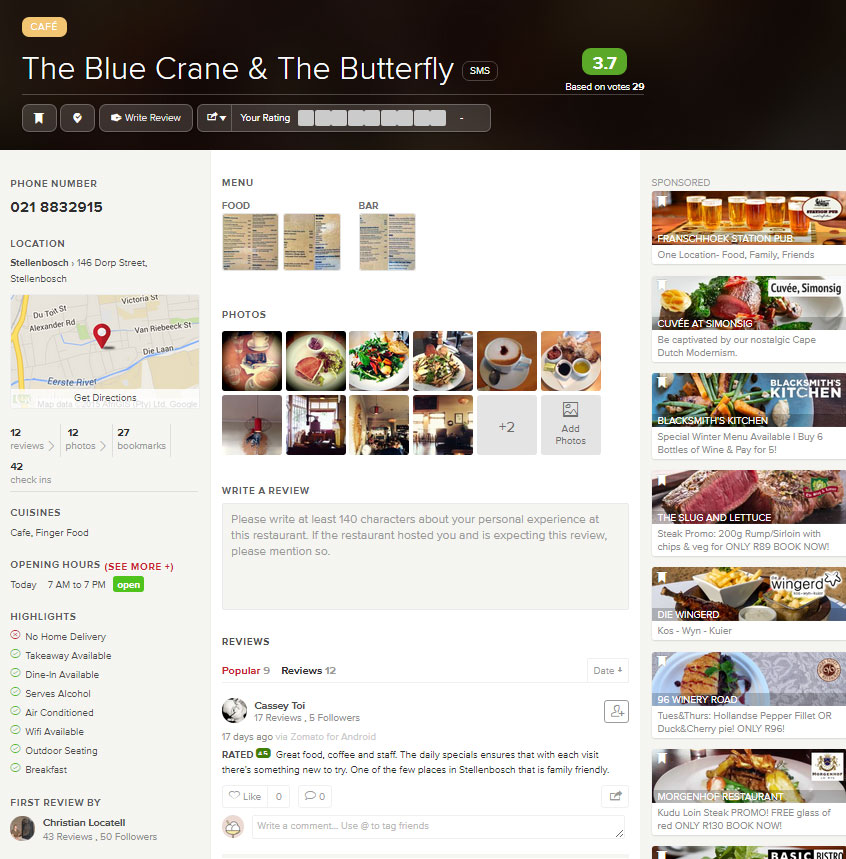
Included in results you will find the restaurant’s menu, photos of food and the venue, reviews and ratings. Most importantly it shows you the location on Google maps, as well as contact details. The phone app additionally has a call function built in, so you can just tap the button to make your booking.

The average price for a meal is also included – a handy criteria to ensure you don’t get a surprise when you arrive at the restaurant. Keep in mind that establishments on Zomato include anything from Steers to Overture – from take-away shops to seriously upmarket restaurants. There’s something for everyone, which makes it all the more fun.

Zomato is working on even more functionality, which will include online bookings and payment, as well as collaborating with Uber.

If you have a competitive streak, you can even become an expert in your own neighbourhood by reviewing at least 10 restaurants and posting 50 photos. There are various levels ruled by a point system, such as foodie, big foodie, super foodie and connoisseur.

zomatoTHE VERDICT

We used Zomato over the weekend to plan our eat-out expeditions and it worked quite well. All the information was accurate, maps were quite handy as we tried out a new restaurant in Bellville. Even ratings and reviews are easy to do and existing reviews give you a good idea of what to expect. I’m not an app-junkie, but Zomato is simple, yet effective, so I can recommend it.

Download Zomato for Android
Download Zomato for iOS 
Download Zomato for Windows

Eet jy net om aan die lewe te bly of is eet jou lewe? Wat ookal die geval, net om te besluit waar om te eet, kan vinnig ontaard in `n onnodige 20-minute gesprek. Gelukkig is daar Zomato.

Zomato is nie die veraf, eksotiese nefie van die eenvoudige tamatie nie. Dis ʼn toepassing wat jou besluite sommer baie makliker gaan maak. Oor die afgelope naweek het ons Zomato gebruik en beproef en hier is ons opinie.

Zomato-2

Zomato kom oorspronklik van Indië en is in 2008 gestig. Die web en mobiele toestel toepassing kan beskryf word as ʼn globale restaurant soek-en-ontdek hulpmiddel, of soos Gearburn dit so beskrywend stel, “Facebook vir kos”. Zomato is inderdaad meer as net ʼn soekenjin, dis ʼn sosiale netwerk vir kosliefhebbers.

Tot op datum is daar reeds 1.4 miljoen restaurante in 22 lande gelys op die databasis en word dit 90 miljoen keer per maand besoek.

Die toepassing gebruik jou foon se GPS om jou ligging te bepaal en restaurante in jou nabye omgewing voor te stel. Maar, jy kan ook volgens verskeie ander kriteria soek, byvoorbeeld die tipe kos (Indies, Chinees of Marokkaans, ens.) of tipe maaltyd (middagete, aandete, wegneemetes, ens.)

Jy sal ook spyskaarte, fotos, resensies en graderings vir restaurante te siene kan kry. Die belangrikste is egter dat die toepassing die ligging aandui op Google maps, sowel as kontakinligting. Die foontoepassing het ʼn addisionele funksie ingebou waarmee jy direk uit die toepassing die restaurant kan skakel om te bespreek.

Die gemiddelde prys per ete word ook ingesluit – baie handig as jy nie hou van onwelkome verrassings nie. Hou in gedagte dat Zomato enigiets van Steers tot Overture insluit – van wegneemete-plekke tot eksklusiewe restaurante. Daar is iets vir almal, watookal jou begroting of smaak.

Zomato ontwikkel ook meer funksionaliteit en sal binnekort aanlyn besprekings en betalings by hul toepassing insluit. ʼn Projek saam met Uber was ook al ter sprake.

As jy ʼn kompeterende streep het, kan jy probeer om ʼn ekspert in jou buurt te word deur ten minste 10 restaurante te resenseer en 50 fotos op te laai. Daar is verskeie vlakke wat bepaal word deur die hoeveelheid punte wat jy insamel. Jy kan ʼn foodie, big foodie, super foodie en connoisseur word as jy ʼn toegewyde Zomato-gebruiker is.

zomatoDIE GEVOLGTREKKING

Ons het Zomato oor ʼn naweek beproef om ons uiteet-ekskursies te beplan en dit het baie goed gewerk. Inligting was deurlopend akkuraat en die kaarte het handig te pas gekom toe ons ʼn nuwe restaurant in Bellville wou uitprobeer.

Selfs gradering en resensies is maklik om te doen en die reeds bestaande resensies gee vir jou ʼn goeie idee van wat om te verwag. Ek is nie ʼn toepassing-fanatikus nie, maar Zomato is eenvoudig, tog effektief, dus beveel ek dit aan.

Laai Zomato vir Android af 
Laai Zomato vir iOS af 
Laai Zomato vir Windows af 

Travel apps for your holidayToepassings vir jou vakansie

Friday, June 26th, 2015

Whether you’re escaping the cold and going on holiday somewhere warmer or have to wait till December, planning a holiday is no small feat.

However, you’re in luck, because as we know, there’s an app for everything. Even a few to ensure your trip to Addo this July goes according to plan.

1. Tourism Radio’s City Guides 

This app is available both locally and internationally, so you can also use it when traveling overseas. The guides include information for more than 1500 sights, whether historical, cultural, geographical or which activities you can take part it. It covers 24 international cities.

When you approach one of the listed sights, audio will be activated automatically and text will be displayed. The app utilises your phone’s GPS to provide this information.

The best feature is the ability to use guides offline and therefore save on data usage. Install the app and run an update before you travel.

The Tourism Radio’s City Guides app is available for free on Android and iOS.

2. Africa: Live  

If you like stalking wild animals with you binoculars, the Africa: Live app is the ideal investment for your smart phone.

This live animal watching map will show you which wild animals are close to you at that particular moment. It also provides a platform for you to share your observations with other safari goers.

Additional detailed maps of most of the major parks in South Africa can also be bought. Perfect for your next family trip to the Kruger.

You can download Africa: Live here for your Apple or Android device.
3. Road Tripper
Do you dream of being a great explorer and seeing new places? With Road Tripper you can plan routes across South Africa to your heart’s content and see what other travellers are up to. You can also share your experiences and tips with fellow travellers. Road Tripper also tracks your route as you drive through South Africa.

The Facebook app was developed by Europcar SA and you’ll find more information on it on their Facebook page.

4. Petrol@ZA and FillApp

Unfortunately, if you want to travel long distances, you need fuel to do so. And with more than 3000 filling stations listed on Petrol@ZA, you won’t be left stranded in the middle of nowhere.

This very simple app indicates where the closest filling station is, how far away it is, as well as its precise location – handy information for remote, lesser known areas.

Download free on the iTunes or Android stores.

FillApp keeps you up to date on the change in petrol price so you can save a few cents next time you fill up. Also available for Apple and Android.

5. South African Airways

Maybe you prefer flying rather than spending hours in a car. It’s less convenient spending hours making travel arrangements and keep up to date with flight changes.

The SAA app allows you to check your booking and even track you checked in luggage.

Other nice extras include an early check-option, flight information, currency rates, weather information and special flight tariffs.

Download for free from iTunes, Android of Blackberry app stores.

6. Mango

The Mango app has, since its inception in 2015, dealt with 30 000 enquiries. Book and search for flights. You can also receive notifications on flight changes.

The app is free and available from Android and Blackberry stores.


 [SOURCES: www.travelground.com, www.htxt.co.za, www.news24.com, www.southafrica.net]


Of jy dié wintervakansie die koue ontduik en erens warmer gaan skuil en of jy moet uithou tot Desember, om `n vakansie te beplan is nie vir sissies nie.

Met `n toepassing en webwerf vir alles onder die son, is dit nie verbasend dat daar ook verskeie is om jou trippie Addo toe sonder enige insidente te laat verloop nie.

 1. Tourism Radio’s City Guides 

Hierdie toepassing is beskikbaar internasionaal en plaaslik en kan dus gebruik word as jy oorsee ook reis. Die gidse sluit inligting in vir meer as 1500 besienswaardighede, onder andere oor geskiedenis, kultuur, geografie, aktiwiteite en dek 24 internasionale stede.

Sodra jy naby een van hierdie besienswaardighede kom, sal oudio outomaties begin speel en teks sal gewys word. Dit maak gebruik van GPS om hierdie inligting aan jou te bied, maar een van die grootste voordele daarvan is dat jy nie aanlyn hoef te wees en gevolglik data hoef te gebruik nie. Installeer die toepassing bloot en dateer dit op net voordat jy op reis gaan.

 Die Tourism Radio’s City Guides toepassing is gratis beskikbaar op Android en iOS.

 2. Africa: Live  

As jy hou van wilde diere afloer met jou verkyker, is die Africa: Live app die ideale belegging vir jou slimfoon.

Hierdie lewendige dierekyk kaart wys vir jou watter wilde diere op enige gegewe oomblik in jou nabye omgewing is. Dit gee jou ook die geleentheid om jou waarnemings te deel met ander safari-gangers.
Addisioneel tot die standaard-toepassing kan jy ook gedetaileerde kaarte bykoop van die meeste van die groot parke in Suid-Afrika. Ideaal vir jou volgende ekskursie Kruger wildtuin toe.
 
Jy kan Africa: Live hier aflaai vir jou Apple of Android toestel.

3. Road Tripper

Droom jy daarvan om `n groot ontdekker te wees en nuwe plekke te sien? Met Road Tripper kan jy na hartelus roetes regoor Suid-Afrika beplan en ook kyk waar ander padreisigers hulle bevind. Reisigers kan hulle ondervindinge met mekaar deel en wenke uitruil. Dit dui natuurlik ook jou roete aan soos jy reis.

Dis ontwikkel deur Europcar SA as `n Facebook-toepassing en jy kan ook op hulle Facebook-bladsy meer inligting daaroor kry.

4. Petrol@ZA en FillApp

As jy die hele land wil deurkruis het jy ongelukkig petrol nodig en met meer as 3000 vulstasies gelys op Petrol@ZA se hulp sal jy ten minste nie in die middel van nerens gaan staan nie. 

Dié baie eenvoudige toepassing dui aan waar die naaste vulstasie is, gee die afstand tot daar en presiese ligging – handige inligting in afgeleë, minder bekende areas. 

Laai dit gratis af op die iTunes of Android winkels.

FillApp hou jou op hoogte van die gereelde verandering in petrolpryse sodat jy `n paar sente kan spaar as jy ingooi. Ook gratis beskikbaar vir Apple en Android.

5. South African Airways

Jy verkies dalk eerder om te vlieg as om ure in `n kar te spandeer. Dis minder plesierig om reëlings vir vlugte te tref en by te hou by veranderende skedules. Die  SAA-toepassing laat jou toe om jou besprekings na te gaan en selfs tred te hou met jou ingeboekte bagasie.

Ander lekker ekstras sluit in: vroeë inboek-fasiliteite, vluginligting, geldkoerse, weerinligting en spesiale vlugtariewe.

Laai dit gratis af by die iTunes, Android of Blackberry winkels.

6. Mango

Mango lugredery se toepassing het sedert sy begin in 2012 reeds 30 000 navrae hanteer. Bespreek en soek jou vlugte daarmee en kry ook enige kennisgewings oor vlugveranderings daarmee. 

Die toepassing is gratis en beskikbaar by die Android en Blackberry winkels.

Laat weet ons watter interessante reistoepassings jy al op afgekom het.

 [BRONNE: www.travelground.com, www.htxt.co.za, www.news24.com, www.southafrica.net]