SEARCH
  • [:en]Recent Posts[:af]Onlangse bydraes

  • [:en]Categories[:af]Kategorieë

  • [:en]Archives[:af]Argiewe

Tips

[:en]How to recognise a phishing e-mail [:af]Hoe om `n phishing e-pos uit te ken[:]

Tuesday, October 5th, 2021

[:en]

We can’t warn you against every phishing e-mail– there’s a new variation every day. You are the only person who can protect yourself from phishing scams and identity theft. The only way to do this is to learn to recognise a harmful e-mail by paying attention and keeping an eye out for a few tell-tale signs.
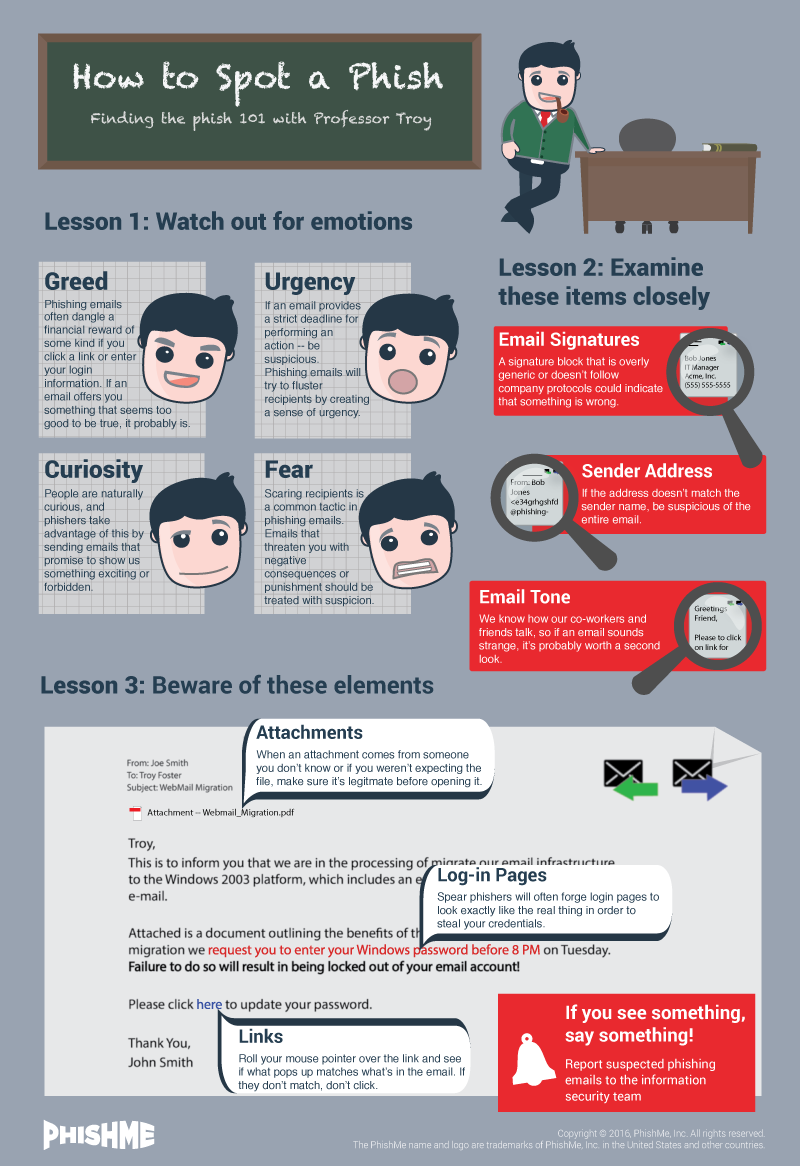
phishme_how_to_spot_a_phishTypical characteristics

1. Well-known companies used as bait
These e-mails are sent out to thousands of different e-mail addresses and often the person sending them has no idea who you are. If you have no affiliation with the company the e-mail address is supposedly coming from, it’s fake. For example, if the e-mail is sent by ABSA, but you are a Standard Bank client. Also, see a list of types of companies generally used in phishing e-mails below.

2. Spelling and grammar
Improper spelling and grammar is a dead giveaway. Look for obvious errors. 

3. Lack of client information
Phishers use a generic greeting. For example, the e-mail greets you as “ABSA customer” or “Dear user”, etc. If the company was sending you information regarding your faulty account, they would mention your account details or name in the e-mail.  A company would go through the trouble to address a client by name and won’t ask you for your information. Banks have your information on their system.

4. Deadlines/Sense of urgency
Phishing e-mails demand an immediate response or stipulate a specific deadline, creating a sense of urgency and prompting you to respond before you’ve looked at the e-mail properly. For example,  demanding that you log in and change your account information within 24 hours or your account will be closed.

5. Malicious links
Although many phishing e-mails are getting better at hiding the true URL you are visiting, often these e-mails will show a URL that is unrelated to the company. Move your mouse over the link and look at the display address. Is this the website address of the company who seems to be sending the e-mail? If not, it’s clearly a phishing e-mail.

6. Attachments
Phishing e-mails occasionally include an attachment which contains malware. When opened, it will run and install a small programme on your PC, which hackers use to gain access to your PC and information. 

Typical phishing topics

• Account issues, such as accounts or passwords expiring, accounts being hacked, out-of-date accounts, or account information has to be changed.
• Credit cards expiring or being stolen, a duplicate credit card, credit card transactions, etc. 
• Confirming orders, requesting that you log in to confirm recent orders or transactions before a delivery can be made.
• Winning a prize or getting something for free. Both Woolworths and Pick ‘n Pay’s have been used in fake campaigns to lure people into providing personal details.

Company names phishers generally use

• Any major bank. ABSA and Standard Bank are both popular choices in South Africa.
• Insurance companies, for example, Outsurance.
• Internet service providers
Apple or Microsoft claiming your account has been suspended.
• E-mail providers, e.g. Gmail or Yahoo
• SARS. Especially at this time of year. (We’ve had a few of these.)
DHL or any delivery company claiming they have a package for you.
• Your company’s medical aid, for example, Discovery
• Your company’s IT department
• Casinos and lotteries
• Online dating websites
• Popular websites such as Amazon, Facebook, MySpace, PayPal, eBay, Microsoft, Apple, Hotmail, YouTube, etc.

A few tips to keep you safe

Never follow links in an e-mail you’re uncertain of. Rather visit the page by typing the address of the company in your browser. For example,  instead of clicking on the “ABSA URL” in the e-mail, type http://www.absa.co.za in your web browser and log in at their official website.
Never send personal information by e-mail. If a company is asking for your personal account information or claiming your account is invalid, visit the website and log in to the account as you normally would. If everything seems in order and there aren’t any urgent notifications from your bank, you should be fine.
• If you are still not sure about the status of your account or are concerned about your personal information, contact the company directly, either through an e-mail address provided on their website, over the phone or visit your local branch.
• Delete the e-mail and don’t click on links or fill in any information.
• If you’ve already divulged your information, immediately change your password or PIN and contact the institution to inform them of the breach.
• To report spam or phishing e-mails send an e-mail to sysadm@sun.ac.za with the subject SPAM with the suspect e-mail attached. IT system administrators will then be able to block the e-mail to protect other users.

[SOURCE: www.computerhope.com]


[:af]

Ons kan jou nie teen elke phishing e-pos waarsku nie – daar is bykans elke dag ʼn nuwe variasie. Die enigste persoon wat jou kan beskerm teen phishing-pogings en identiteitsdiefstal, is jyself. Maar, ʼn goeie begin is om te leer om ʼn gevaarlike e-pos uit te ken deur meer oplettend te wees. Kyk uit vir tipiese kenmerke en jou kans om ʼn slagoffer te wees, sal verminder.

phishme_how_to_spot_a_phishTipiese kenmerke

1. Bekende maatskappye as lokaas
Phishing e-posse word gelyktydig uitgestuur na duisende e-posse en dikwels weet die persoon wat dit stuur nie eers wie jy is nie.  Indien jy geen verbintenis het met die maatskappy waarvandaan die e-pos kom nie, is dit waarskynlik vervals.  Byvoorbeeld, as die e-pos deur ABSA gestuur is en jy is ʼn Standard Bank kliënt. Sien ook ons lys van maatskappye wat tipies gebruik word vir phishing onder.

2. Spelling en taalgebruik
Onvanpaste spelling en taalgebruik is gewoonlik ʼn duidelike aanduiding. Kyk uit vir voor-die-hand-liggende spelfoute. 

3. Gebrek aan kliënte-inligting
Phishing e-posse se aanhef is altyd generies. Byvoorbeeld, die e-pos spreek jou aan as “ABSA customer” of “Dear user”, ens. Indien die maatskappy jou werklik wou inlig oor jou foutiewe rekening, sou hulle na jou rekening-inligting of naam in die e-pos verwys het. ʼn Maatskappy sou die moeite doen om hulle kliënt aan te spreek op sy naam en sou hom ook nie vra vir sy inligting nie. Hulle het reeds al jou data. 

4. Spertye/Dringendheid
Phishing e-posse dring daarop aan dat jy dadelik reageer of gee vir jou ʼn kort spertyd. As gevolg van hierdie dringendheid, word jy onder druk geplaas om te reageer voordat jy behoorlik kans gehad het om die e-pos te bestudeer. By voorbeeld, dit dring aan dat jy binne 24 uur aanteken om jou bankdetails te bevestig of jou rekening word gesluit. 

5. Vyandig-gesinde skakels
Deesdae is kuberkriminele al slimmer en steek hulle die werklike URL waarheen skakels gaan beter weg. Maar soms sal jy sien dat die URL wys na ʼn adres wat glad nie verwant is of lyk soos die maatskappy s’n nie. Beweeg jou muis oor die skakel en kyk na die adres wat gewys word. Is dit die maatskappy se regte webwerfadres? Indien nie, is dit ʼn phishing e-pos.

6. Aanhegsels
Phishing e-posse het soms ook aanhegsels wat malware bevat. Indien jy dit oopmaak, installeer dit ʼn klein programmetjie op jou rekenaar waarmee kuberkrakers toegang tot jou rekenaar en inligting verkry. 

Tipiese phishing onderwerpe

• Probleme met rekeninge, byvoorbeeld ʼn rekening of wagwoord wat verval, gekraak is of inligting wat skielik verander het. 
• Kredietkaarte wat verval, gesteel word, ʼn duplikaat kredietkaart of kredietkaarttranssaksies. 
• Bevestiging van bestellings. Byvoorbeeld ʼn versoek om aan te teken en onlangse bestellings of transaksies te bevestig voordat dit afgelewer kan word. 
• Kompetisies waar jy ʼn prys gewen het of iets gratis kry. Beide Woolworths en Pick ‘n Pay is al gebruik in phishing e-posse om hul kliënte te lok om persoonlike inligting te gee. 

Maatskappye wat gebruik word vir phishing

• Enige bekende bank. ABSA en Standard Bank is beide populêre keuses in Suid-Afrika
• Versekeringsmaatskappye, byvoorbeeld Outsurance.
• Internet diensverskaffers
Apple of Microsoft (wat beweer dat jou rekening opgeskort is)
• E-pos verskaffers, byvoorbeeld Gmail of Yahoo
• SARS. (Veral dié tyd van die jaar
DHL of enige afleweringsmaatskappy wat beweer hulle het ʼn pakkie vir jou.
• Mediese fondse, byvoorbeeld, Discovery.
• Jou maatskappy se IT-afdeling
• Casino’s en loterye
• Aanlyn-afspraak webwerwe
• Gewilde webwerwe soos Facebook, MySpace, PayPal, eBay, Microsoft, Apple, Hotmail, YouTube, ens.

ʼn Paar wenke om jou veilig te hou

Moenie  op ʼn skakel kliek as jy onseker is nie. Gaan eerder na die webwerf deur die maatskappy se webadres in te tik. Byvoorbeeld, tik http://www.absa.co.za in jou webblaaier en teken aan op die amptelike webwerf, in plaas van om te kliek op “ABSA URL” in die e-pos.
Moet nooit persoonlike inligting per e-pos stuur nie. Indien ʼn maatskappy jou persoonlike inligting vra, gaan direk na hul webwerf en teken aan op jou rekening soos altyd. As daar ʼn probleem is, behoort daar ʼn kennisgewing van jou bank te wees. 
• As jy nogsteeds onseker is oor die status van jou rekening of bekommerd is oor jou persoonlike inligting, kontak die maatskappy direk d.m.v. die e-posadres op hul webwerf, telefonies of besoek jou plaaslike tak. 
• Vee die e-pos uit, moenie op die skakels kliek nie en moenie inligting invul nie.
Indien jy reeds jou inligting ingevul het, verander dadelik jou wagwoord of PIN en kontak die instelling om hulle in kennis te stel.
•  Om gemorspos of phishing e-pos aan te meld, 
stuur ʼn e-pos aan sysadm@sun.ac.za met SPAM as onderwerp met die e-pos aangeheg. IT stelseladministrateurs kan dan die e-pos blok en sodoende ook ander personeel daarteen beskerm.

[BRON: www.computerhope.com]

[:]

[:en]How do I report phishing?[:]

Tuesday, October 5th, 2021

[:en]

You’ve received a suspicious email, what should you do with it? Firstly, don’t click on any links. But just as important, send it to us so we can prevent more staff and students falling prey to the scam. We encourage our customers to submit potential phishing examples for review. Using these submissions, the Cyber Security Incident Response Team (CSIRT) can learn from the analysis of these messages. This collectively helps to improve the level of virus and spam detection.

What is phishing?

Phishing attacks are designed to steal a person’s login and password details so that the cyber criminal can assume control of the victim’s social network, email, and online bank accounts. Seventy percent of internet users choose the same password for almost every web service they use. This is why phishing is so effective, as the criminal, by using the same login details, can access multiple private accounts and manipulate them for their own good. 

More on how to recognise a phishing email. 

Report phishing

On the ICT Partner Portal:

*Spam or phishing examples must be sent in either.EML or .MSG format as an attachment and must not be forwarded. This ensures the original email can be analysed with its full Internet message headers intact. Alternatively, use the mail application to save the email (usually located under File | Save As) as an .EML or .MSG format to a folder location, and attach the saved file to a new email.

[:]

[:en]To meet or not to meet …[:af]Is dit regtig nodig om te vergader?[:]

Monday, October 4th, 2021

[:en]

Due to the current working-from-home situation we are likely to spend more time either in a teams meeting or on a Zoom call. Those working from home might have experienced a sharp increase in the number of virtual meeting invites since lock down started last year.

 We are either bouncing from one meeting to the other or struggling to schedule meetings, trying to establish who’s available and who’s not. This might be a short-term overreaction to the lack of other communication channels and social contact, but it could get in the way of productivity and efficiency.

Productive meetings are ones where you need to share expertise and the topics discussed require synchronous collaboration – where people need to be live at the same time, if not the same place. It is also helpful if you are dealing with conflict or need to build closer relationships.

On the other hand, if there’s no clear outcome, the topics are irrelevant, the outcome could be delivered without a meeting or you have no active role except to listen, then you may want to decline the meeting invitation. Typically, if we look at meeting content 40% of meetings are not necessary at all.

If you accept meeting invitations by default, particularly those without an agenda, you are saying that what the other person wants to talk about is a better use of your time than your own work.

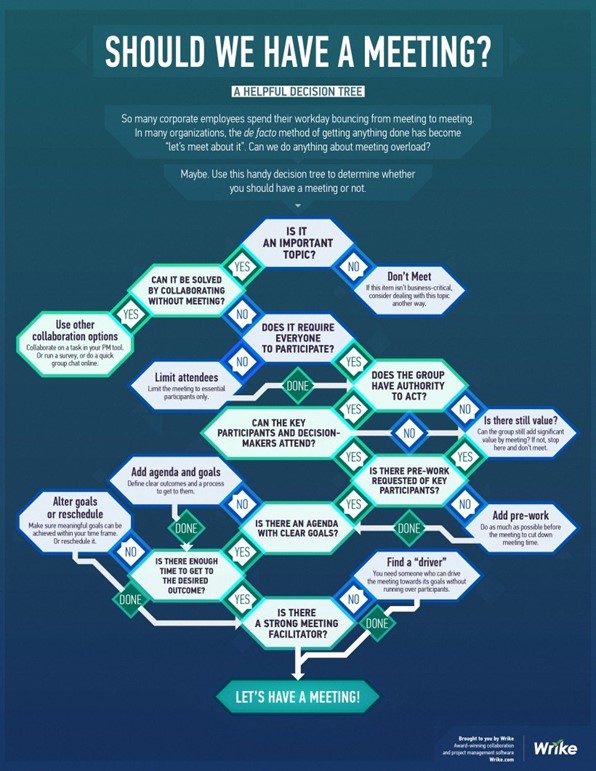
Declining meetings can be a challenge to existing meeting agendas and fixed ways of working, but discuss the necessity of a meeting with your meeting leader. This could open up a discussion in your team about which topics you need to discuss and which are not important. Below is an infographic decision tree which might help you or your colleagues reconsider scheduling a meeting.

Take this opportunity to improve your meetings, save yourself time and improve on working towards a productive environment.

SOURCE: https://www.wrike.com/blog/meeting-infographic-decision-tree/

[ARTICLE BY MANDY WANZA]


[:af]

Gegewe die huidige werk-van-die-huis situasie is ons meer geneig om ons werksure te spandeer in `n teams-vergadering of op `n Zoom-oproep. Diegene wat van die huis af werk sal moontlik `n skerp toename opgemerk in die hoeveelheid virtuele vergaderings waarheen hulle uitgenooi word sedert grendeltyd afgeskop het verlede jaar.

Die meeste van ons spring van een vergadering na die ander of probeer vergaderings skeduleer wat almal se reeds vol skedules pas. Hierdie optrede mag `n korttermyn oorreaksie wees weens die gebrek aan ander kommunikasievorme en sosiale kontak, maar dit kan produktiwiteit en effektiwitit beinvloed.

`n Produktiewe vergadering is een waar dit kennis gedeel moet word en die bespreekte onderwerpe gemeenskaplike samewerking benodig – waar mense terselfdertyd aanlyn moet wees, verkieslik op dieselfde plek. Dit is ook nuttig as konflik hanteer moet word of beter verhoudings gebou moet word. 

As `n vergadering egter geen duidelike uitset toon, die onderwerpe irrelevant is, die uitkoms bepaal kon word sonder `n vergadering of jy slegs teenwoordig is om te luister en nie insette  te gee nie, kan jy dit oorweeg om die uitnodiging van die hand te wys. Oor die algemeen is 40% van vergaderings nie werklik nodig nie.

Indien jy by verstek bloot uitnodigings na vergaderings aanvaar, veral dié sonder `n agenda, bevestig jy dat dit waaroor die ander persoon wil praat `n beter benutting is van jou tyd as jou eie werk.

Om vergaderinguitnodigings van die hand te wys kan `n uitdaging wees, veral met reeds geskeduleerde vergaderings. Dit kan egter die geleentheid bied om `n gesprek te begin met jou span oor watter onderwerpe nodig is om te bespreek en watter minder belangrik is. Onder is `n grafiese voorstelling wat jou en jou kollegas kan help om te besluit of `n vergadering nodig is. 

Gebruik hierdie geleentheid om jou vergaderings to verbeter, tyd te spaar en `n verbeterde, produktiewe werksongewing te skep. 

BRON: https://www.wrike.com/blog/meeting-infographic-decision-tree/

[ARTIKEL DEUR MANDY WANZA]


[:]

[:en]New e-waste bins at IT[:af]Nuwe houers vir e-afval by IT[:]

Monday, October 4th, 2021

[:en]

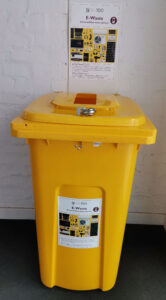
 As part of the campus “Going Green” project Facilities Management will be placing e-waste bins at selected spots on campus. We encourage staff and students to use these bins for any non-asset e-waste.

Two of these yellow bins (see example right) will also be located at IT. A bin will be placed at the IT HUB by the entrance and a second one will be placed at the IT Main building in Hammanshand Rd at the service entrance (facing IT the door on your right) Both bins will be just inside the buildings by the doors. 

WHAT IS E-WASTE?

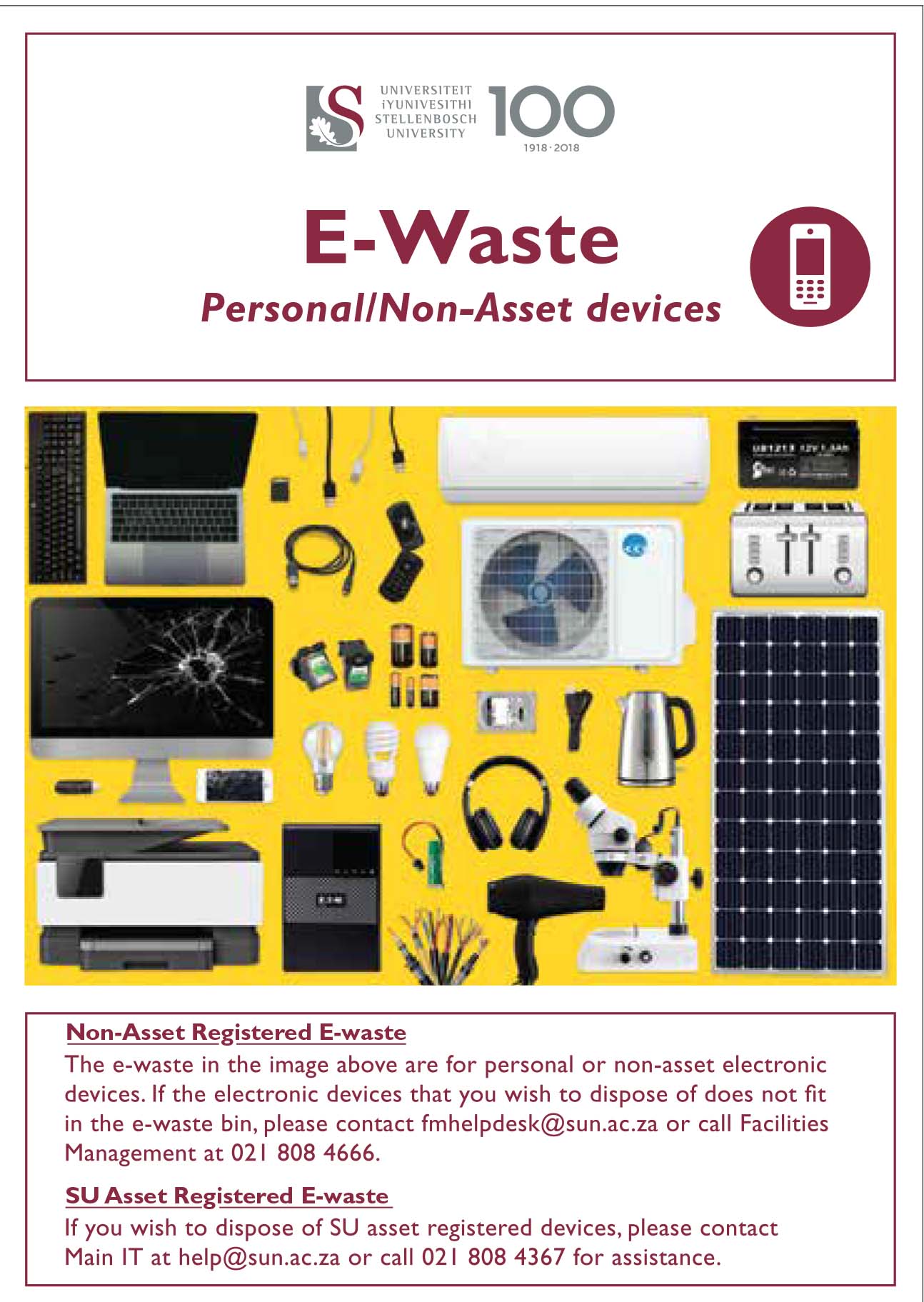
Electronic waste (e-waste) or Waste Electrical and Electronic Equipment (WEEE) are the terms used to describe old, end-of-life or discarded appliances using electricity. It includes computers, consumer electronics, batteries etc. which have been disposed of by their original users.  More on e-waste.

We encourage all staff and students to use these bins for any non-asset e-waste. Bins will be serviced by Wasteplan and weekly inspections will be made by the university’s Wasteplan site supervisor to assess when a collection is needed.

For assistance and enquiries please email fmhelpdesk@sun.ac.za.


[:af]

 As deel van die “Going Green”-projek sal Fasiliteitsbestuur e-afval houers op uitgesoekte plekke op kampus uitplaas. Ons moedig personeel en studente aan om hierdie houers te gebruik vir enige e-afval wat nie US-bates is nie.

Twee van hierdie geel houers (sien voorbeeld regs) sal ook voortaan by IT wees. Een houer word geplaas by die IT HUB-ingang en die tweede sal geplaas word by die diensingang (die deur aan jou regterkant as jy voor IT staan) van die IT-hoofgebou in Hammanshandstraat. Beide houers sal binne die gebou geplaas word by die ingang. 

WAT IS E-AFVAL?

Elektroniese afval (e-afval) is die term wat gebruik word om verouderde of weggooi-toerusting wat met elektrisiteit werk, te beskryf. Dit sluit rekenaars, enige elektroniese toerusting, batterye, ens. in wat uit die weggeruim is deur die oorspronklike eienaars. Meer oor e-afval.

Houers sal onderhou word deur Wasteplan en die universiteit se Wasteplan terreinopsigter sal bepaal wanneer die houers leeggemaak moet word.

Vir enige navrae oor die e-afval projek, stuur gerus `n e-pos aan fmhelpdesk@sun.ac.za.


[:]

[:en]Remember to check your Junk Email folder[:af]Onthou om in jou Junk Email vouer te kyk[:]

Monday, August 30th, 2021

[:en]

To ensure that staff and students aren’t exposed to malicious phishing or spam emails our system administrators and security team had to enable a stricter spam filter earlier this year as added protection.

A spam filter assigns every message, received and sent, a spam confidence level based on the likelihood that the message is spam. Depending on its level an inbound message may be relayed directly to the user’s Junk Email folder. The filter looks at certain criteria contained in the email it rates, for example too many hyperlinks or a suspicious file attached. Tweaking the filter can be tricky – we don’t want you to miss important emails, but at the same time it’s our responsibility to protect you and all our staff from harmful attacks. 

For this reason, it’s important that you regularly look in your Junk Email folder in case the spam filter might have relayed it there. 

The main purpose of Microsoft Outlook’s Junk Email Filter helps is to reduce unwanted email messages in your Inbox. Junk email, also known as spam, is moved by the filter away to the Junk Email folder. This is done at an institutional level by Microsoft (as mentioned above), but you can also flag or “un”flag messages from a person or company as Junk email.

How to change your spam filter’s preferences.
How to tag an email as junk mail.
How to report spam or junk email to Microsoft. (downloadable PDF-document) 

If you have any questions, please log a request on the ICT Partner Portal.

[:af]

Om te verseker dat personeel en studente nie blootgestel word aan gevaarlike strikroof of gemorspos nie het ons stelseladministrateurs en sekuriteitspan vroeër die jaar `n addisionele vlak van sekuriteit implementeer deur die gemorsposfilter strenger te maak. 

Maar hoe werk `n gemorsposfilter? Aan elke boodskap wat ontvang of gestuur word, word`n sekerheidsvlak toegeken op grond van die waarskynlikheid dat dit gemorspos is. Afhangende van dié vlak sal die inkomende boodskap direk na die gebruiker se Junk Email vouer gestuur word, of nie. Die filter kyk na sekere kriteria in die e-pos, soos byvoorbeeld meer as `n sekere hoeveelheid skakels of potensieël gevaarlike aanhangsels. Om die perfekte balans te tref is moeilik – ons wil nie hê jy moet belangrike e-posse mis nie, maar terselfdertyd is dit ons verantwoordelikheid om jou en al ons gebruikers te beskerm van kwaadwillige aanvalle.

Om hierdie rede is dit belangrik dat jy gereeld in jou Junk E-mail vouer kyk om seker te maak dat daar nie belangrike e-posse lê en wag nie. 

Die hoofdoel van Microsoft Outlook se gemorsposfilter is om onwelkome e-posboodskappe weg te hou uit jou Inbox deur dit in die Junk Email vouer te plaas. Hierdie proses word op `n institusionele vlak deur Microsoft toegepas (soos hierbo genoem word), maar jy kan self ook boodskappe van `n persoon of maatskappy merk as gemorspos of nie.

Hoe om jou gemorsposfilter aan te pas.
Hoe om `n e-pos as gemorspos te merk.
Hoe om gemorspos en strikroof by Microsoft aan te meld. (aflaaibare PDF-dokument) 

Vir verdere navrae teken asseblief `n versoek aan op die ICT Partner Portal.


[:]