During a workshop held at the 2016 ARMA conference, a Kudos team led a workshop to consider what researchers can do to increase the visibility of their research. Some great ideas emerged from this workshop. Below a visual version of the key points which came out of the discussion. Read more about it on this Kudos blog post.
Page 20 of 24
The Library recently launched a Research Data Management Adventure Game. It is a text-based role-playing interactive serious game based on an academic research project’s data management challenges. The game takes the form of an online choose-your-own-adventure format in which game players take a simulated research project through the processes below whilst encountering data management challenges along the way.
The game focus on the following learning outcomes:
- Data management planning
- Designing participant information sheets and consent forms
- Choosing appropriate equipment for research projects
- Acquiring suitable third-party research data
- Organising research data
- Storing research data appropriately
- Analysing and documenting research data
- Preparing research data for archiving
- Publishing research data
The game was developed as part of a collaboration between the University of Bath Library and Stellenbosch University’s Library and Information Service.
Try it out here and let us know what you think! See also more about the game on the SUNScholarData library guide.
Contact Samuel Simango if you need any assistance with Research Data Management.

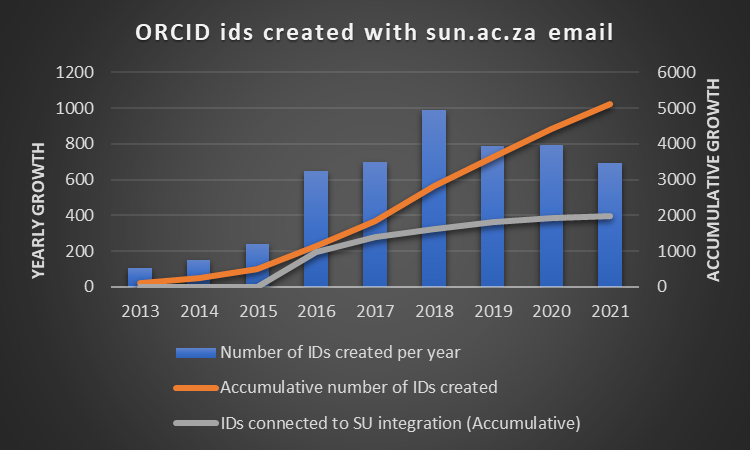
You have created your ORCID iD, but now what ? Which steps do you need to follow to keep your record up to date?
The following two videos might assist and guide you through this process. (See also the specific timings for each step below):
Contents of this video (2:10 minutes)
- What is ORCID?
- Who are integrating with ORCID? (00:15)
- Examples of integrations (0:27)
- Benefits of using an ORCID iD (00:39)
- Where to use your iD (00:52)
- How to create and connect your iD to SU identity (01:05)
- Demonstration (01:18)
- How to populate your record (01:44)
- Help (01:59)
Contents of this video (about 13 minutes):
- Add a biography (00:23)
- Add your employment (00:53)
- Add your education (01:29)
- Add invited positions and distinctions (01:49)
- Add membership and service (02:42)
- Add funding (3:46)
- How to add your works (publications and other works) (06:08)
- Add works via Google Scholar (10:11)
- How to add aliases, keywords, websites, social media links (12:05)
More help

International Open Access Week is an annual event aimed at promoting the Open Access movement’s principles and practices of free and easily accessible research outputs. This year’s theme is Open with purpose: Taking action to build structural equity and inclusion and it is being held this week (19-25 October) worldwide. It is an opportunity for the wider community to coordinate and take action to make openness the default for research:
“We need to examine who these spaces and systems are designed for, who is missing, who is excluded by the business models we use, and whose interests are prioritized. As we work together to rebuild these structures, we need to commit to moving from conversations to concrete commitments and to hold one another accountable for making real progress.” – Nick Shockey
In line with this theme, Stellenbosch University Library and Information Service has chosen to focus on Open Data (a sub-component within the broader context of Open Research) and to also showcase SUNScholarData. SUNScholarData is SU’s digital repository for research data and it was developed in line with the recognition that research data should be open, transparent and easily accessible.
For more information on Open Access initiatives at Stellenbosch University, you can view the video below:
Research Square has partnered with Dimensions to provide early citation data on preprints. It lets you share your work early, gain feedback from the community, and start making changes to your manuscript prior to peer review in a journal.
About Research Square
Research Square is a division of the Research Square Company, and exists to make research communication faster, fairer, and more useful. The preprint platform, launched in 2018, is a large, author-centric preprint server that brings transparency to the peer review process. Through the journal-integrated In Review service, innovative author dashboard, manuscript assessments, and research promotion services, they enable researchers to share their research with the broader community,and receive useful feedback much earlier in the publication process.
https://www.researchsquare.com/researchers/preprints
https://www.researchsquare.com/journals (See the list of participating journals)
Also read this blogpost and view the short recording of a webinar on “the role of preprints in elevating trust in peer review”.
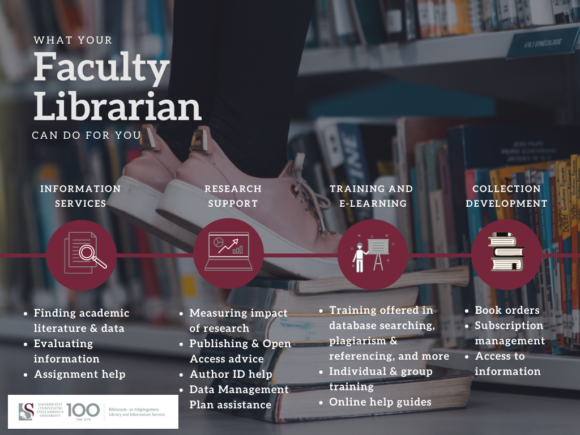
See below all about the Library’s bibliometrics services and contact your Faculty Librarian if you need any assistance.
Do you know about the SU Policy on Mandatory Self-archiving of Research Output, which was approved in December 2014?
The policy requires that full-text copies of published journal articles or conference proceedings of SU research output be hosted in the institutional repository, SUNScholar .
The following versions of your articles may be submitted to the repository (all in compliance with the policy of the publisher):
- Publisher’s version
- Post-print (final peer-reviewed manuscript with the incorporation of revisions)
- PDF of peer-reviewed conference paper
You may contact your Faculty Librarian who will be able to submit on your behalf, or submit your research output yourself by sending an e-mail to scholar@sun.ac.za, requesting to register as a submitter. The steps are also set out on our help page. One individual may also submit on behalf of a department after they have been registered and have all the necessary information to complete the citation.
Did you know that one tab of the Research Process library guide is dedicated to tools and applications for research? This page takes through the research process and highlights useful tools and applications which you may find helpful while going through the different steps of doing your research. It includes planning tools, conceptualisation tools, note taking, surveys, links to other library guides and tools for data analysis. Just to mention a few.
Explore the guide on your own here.
You are welcome to contact us if you need assistance with any of the tools listed here.
Useful link: Also see Nicole Hennig’s Best apps for academics
A new platform for discovering and evaluating scientific articles via Smart Citations, scite, has seen the light.
Their deep learning model classifies each citation context automatically. The numbers show how sure it is of a classification and categorise it in three different contexts, Supporting, Mentioning, Contradicting.
Josh Nicholson writes about how to use scite (see an extract below):
… in order to truly identify what research is reliable or not, we need to access every scientific article ever written. Fortunately, leading academic publishers like Wiley, The British Medical Journal, Karger, Rockefeller University Press, and others have started to share these with scite. Some have even started to display scite information directly on their articles.
We’re excited about the possibilities of bibliometrics to help scientists and non-scientists understand science better and would like to invite researchers to use our data (for free) to perform their own studies.
Download the Chrome extension and see this information popping up automatically while browsing scientific articles.
It is interesting to see that Eugene Garfield predicted this kind of service in 1964, in an article titled Can citation indexing be automated?