Page 22 of 24
International Open Access week is celebrated every year globally during the last week of October. The theme this year is “Open for Whom? Equity in Open Knowledge”.
In celebration of Open Access week the Academy Science of South Africa in partnership with the Library and Information Service will be hosting a dialogue on Open Access publishing lead by Prof Jonathan Jansen. More information on the event is available here.
During Open Access week the Library also uses the opportunity to draw attention to our own Open Access initiatives, which are the following:
- SUNScholar institutional repository
- Launched in 2008
- Provides access to over 55 800 research outputs of SU (including theses, dissertations and articles)
- Approximately 600 000 visits and 250 000 downloads per annum
- SUNJournals open access journal hosting platform
- Launched in 2011
- Currently hosts 25 journals affiliated with SU
- Over the last three years these journals collectively hosted more than 300 research outputs contributed by Stellenbosch University researchers
- SUNDigital Collections digital heritage repository
- Launched in 2013
- Showcases library Special Collections
- 12 917 items in 30 collections
- Approximately 14 000 visits and 10 000 downloads per annum
- SUNScholarData research data repository
- Launched in 2019
- A repository for SU researchers to share and disseminate their research data in accordance with good research data management practices
- Facilitates the findability, accessibility and reusability of the university’s research data
Article by : Mimi Seyffert-Wirth
This week was Peer Review Week, with the theme “Quality in Peer Review”. Herewith important information about how to get help on improving your peer review skills.
Prof Christopher Jackson explains in this video what quality peer review looks like.
The Peer Review Week channel on YouTube features short videos by researchers, editors, publishers, and others on the theme of quality in peer review.
With Publons you can track more of your research impact all in one place, your publications, citation metrics, peer reviews and journal editing work. It is a product of Clarivate Analytics and therefore integrated with Web of Science citation metrics. It is also fully integrated with ORCID.
A very useful feature is the Publons Academy, a practical peer review training course developed together with expert reviewers and editors in order to give you the core competencies and skills needed of a peer reviewer. Please have a look at this if you are new at peer reviewing. It is a free online course which you can complete in your own time.
For more information or any assistance please contact your Faculty Librarian, Research Impact Services or Research Commons staff.
SUNScholarData is an institutional research data repository which can be used for the registration, archival storage, sharing and dissemination of research data produced or collected in relation to research conducted under the auspices of Stellenbosch University. An institutional research data repository is defined in this sense as a database with a set of services to capture, store, index, preserve and redistribute a university’s research data in digital formats.
There are two purposes for relying on SUNScholarData:
- It creates a medium through which our university’s research data can be made findable and accessible.
- It facilitates the interoperability and re-usability of the university’s research data.
SUNScholarData has a public interface which can be used for finding content as well as a private user accounts which can be used by Stellenbosch University users in order to upload, share or publish their research data. In addition to this Stellenbosch University researchers can also use SUNScholarData in order to collaborate with researchers from other institutions whilst working on their research projects.
SUNScholarData is powered by Figshare which is a web-based interface designed for research data management and research data dissemination. The repository provides the following functionality:
- Research Data Management:
Private, controlled storage and collaborative spaces for every user within the agency.
- Research Data Dissemination:
A customisable public portal with all digital files made public at an institutional, departmental and group level.
- Administrative Workflow Management:
A portal where administrators can manage curation of files to be made public, storage space allocation and user rights.
- Reporting dashboard:
Impact and usage reporting.
Author: Samuel Simango
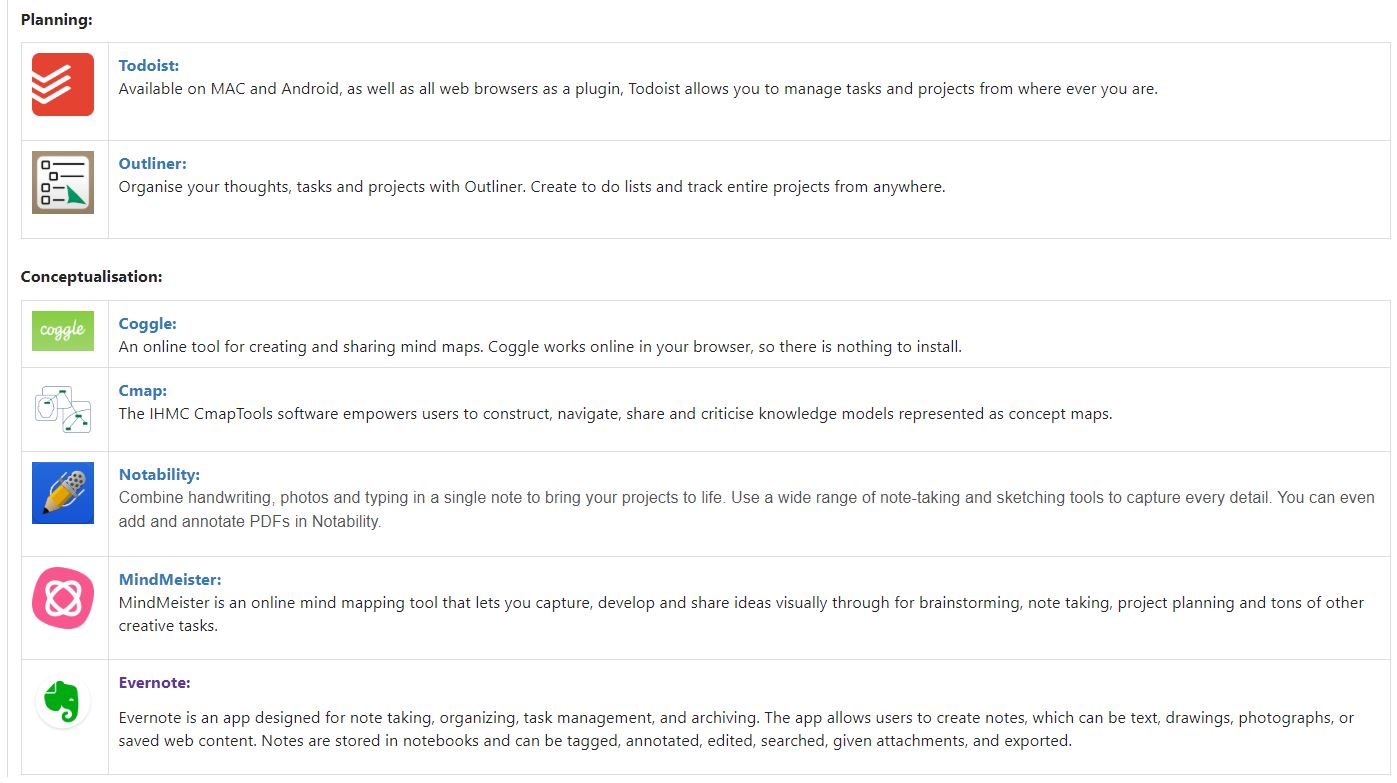
Wanting to take the pain out of collaboration? Here are some useful tools that will help you – with some basics about them:

Megan Bruwer from the Stellenbosch Smart Mobility Lab will talk on how big data and its visualisation is being used to alleviate traffic problems in Stellenbosch. Please attend this very interesting session at Library Research Week! (Thursday, 16 May, 12:30-13:30)
Often we get so busy that we don’t always have the energy or time to look up what’s happening in the world of research and news. To help you with that problem, here are some great online research based sites that you can sign up to their newsletters or just view their sites:
- ArsTechnica
- a science and technology based news site that covers news relating to those topics as well as policy news
- The Conversation
- an academic newspaper, with articles written by academics, on all topics. Choose the ones that interest you or browse all!
- Plagiarism Today
- a blog that focuses on copyright issues within today’s perspective – answering questions such as “Is Disney really recreating their movies just to extend copyright?”
- ScienceDaily
- a research news site that, despite it’s name, covers a wide range of topics including the social sciences and news regarding current research
- Arts and Letters Daily
- A humanities and social sciences site that focuses on debates, ideas, and books
- Times Higher Education
- Higher education news, including news of the day regarding politics, and higher education research
- The Chronicle of Higher Education
- Higher education news, including a deeper look at what is happening on campuses with regards to issues such as, for example, student success
- Constitutionally Speaking
- Constitutional Law expert Pierre de Vos’s blogs in which he analyses recent news and events in light of the SA Constitution
There are plenty more sites out there of course – if you are into literature you also have the New York Review of Books, the Paris Review, the Los Angeles Review of Books and the London Review of Books. Other thought provoking discussion and news sites include Aeon (tagline: a world of ideas) and Nautilus (tagline: Science Connected), while for news you have the option of a wide variety, with staples such as BBC, CNN, IOL, EWN, the Guardian and other ones perhaps new to you such as the Atlantic, The New Statesman (both UK and American), the New Republic.
My last honourary mention goes to Reddit – a forum for practically anything (tagline: the front page of the internet), letting you search for topics related to your interest. For example, the Reddit feed of Higher Education includes a number of articles from almost all the sites mentioned above, as it scrapes the internet daily to combine a news feed relating to higher education. It also includes user posts relating to higher education – such as advice for Masters students.
With all the above – we really have so much information available to keep us informed – the only thing left to do is to make sure that we don’t believe everything on the internet 🙂 Keep in mind to check for credibility (see below how), but you will see quickly the sites above pass the test.

Evaluating resources – the CRAAP test. From: https://libguides.spokanefalls.edu/c.php?g=288859&p=2711625
Library Research Week will take place during the week of 13-17 May. The theme this year is “Be a smart researcher” and you can look forward to presentations on Be prepared, Be open, Be inspired and Be supported.
For the full programme and to register for the sessions, please see the Research Week webpage.
Herewith a preview of what to expect on the first day of Library Research Week:
Note: this post is part of a three part series on writing a literature review. For the first two parts see Slaying the (literature review) beast: Part 1 and Slaying the (literature review) beast: Part 2.
So now we come to the last post on literature reviews, looking towards revealing some tips and tricks that will make the process much faster and easier.
To start with, let’s recap the process:

In our last post, we covered the first three steps – selecting a topic, searching the literature and developing an argument.
In this post, we will cover managing your literature – helping you survey and critique it through making the management process less painful.
Surveying and Critiquing the literature
Using a reference manager to manage the literature
Keeping all your documents in one place sometimes becomes quite tricky, between working on different computers, even using different browsers changes where files are downloaded to. Using a reference manager – which is a computer program – allows you to keep the references of all your literature in one place and, depending on the program, allows you to attach the full text PDF to the reference.
There are a number of different reference managers: Mendeley, EndNote, Zotero, Refworks. The library runs workshops for introducing you to using Mendeley, including how to import references and manage them.
Using a reference manager has the added bonus of allowing automatic citation using the Mendeley Cite-O-Matic.
So how does it work? It is based on a desktop program that syncs back and forth to the cloud. A word plugin allows you to insert a formatted citation from your references while writing your document. For an overview of Mendeley, have a look at the video below:
http://https://www.youtube.com/watch?v=zxrDj0ayND4&t=1s
Mapping your core ideas
This may seem to be sending you back to your days of primary school, but a mind map of your concepts is genuinely a great way to plot out your literature review. This will let you plot out concepts related to your topic, and see quickly how the literature fits into it:

You can simply draw it out as well, but a fantastic tool to use is CMAP tool, which lets you easily create concepts and link them to each other. An example of a CMAP is below:

Literature Synthesis Table
A great handy tool is that of the literature synthesis table – this allows you to manage your literature by creating a table that summarises it. Initially this table can start to be filled out when gathering literature, and then further filled out when surveying and critiquing your literature.
An example is as follows:
Literature gathering has started, and through skim reading (see Slaying the (literature review) beast: Part 2 for tips) certain information can be extracted already, such as the reference (author, year, title), the purpose of the study, methodology used, the sample and findings of the study:

Later, once you have collected all literature that you feel is relevant and you begin to read your articles thoroughly, you can then fill in the remaining columns – linking it to specific themes in your study, similar studies you have found, and the uniqueness of each article. The data quality links to the credibility of the study, so it is important to note, especially in this day of predatory journals where not all articles found are credible.

This table may seem like a lot of extra work, but it saves you a lot of time with regards to writing – you can immediately see which articles need to be grouped and why the different articles are important. A summary can easily be made in this way and transformed into a well-flowing, logical literature review.
That is to be said that this is simply a tool – it can only help as far as you let it – and it is there to be a guide. You can do the above without creating a specific table, through annotating PDFs, or through creating different folders with notes. It is all dependent on what works best for you.
Writing the review
The last step is to start writing – with all the tools above, you should now have plenty to get started with. The writing process is a long one, because not only are you writing to understand your topic, you are writing to be understood as well. You will find yourself writing and rewriting as you evaluate what you have written:

Some golden rules of writing are as follows:

Keep in mind the following:
- The ‘golden thread’ – this is your overall argument, the idea running through your thesis or research paper. It holds the entire thing together.
- Sign posts – just as you would like to look at headings to get an overall idea of a paper, make sure your headings and subheadings are clear and give an overall indication of what your paper / thesis is about.
- Authority – show that you have good engagement with the literature. The bibliography is often first looked at to see how the author engaged with the literature, and subject experts can quickly see if you have missed someone’s work. In this way, the bibliography is the window to the author and the paper.
Avoid the following:
- Long quotations! If you are using long quotations, you may as well be copying and pasting other works (which is plagiarism, so don’t do it!) – use your paraphrasing skills here instead of quoting entire passages. You can always break up a quote as well – extracting only what is necessary.
- Sloppy presentation – you can have the best work, but if the formatting is done badly, there are spelling and grammatical errors, your referencing is not correct, the focus will be on those rather than on your work. Make sure that you let your work put its best foot forward (metaphorically) by making it look its best.
Further writing tips are contained in the following:
There are many great resources out there, but another one I would take the time to mention is PhD Proofreaders . It is a great website that is FULL of tips and tricks for writing, including a PhD thesis-at-a-glance template and a checklist, helping you make sure you haven’t missed a thing.
There are plenty of other useful tools that you can have a look at to assist you during your thesis, and a great summary is contained in our Postgraduate and Researcher guide.
Remember that the library is there to help at any point! From our workshops to the writing lab availability in the Research Commons, to your subject librarian – we are all here to assist you to get through your studies with minimal frustrations 🙂
This video might be helpful in developing your digital research profile. It’s been published by the Open Science MOOC.
Think of this as a way of creating an online CV for showcasing your research. It teaches four tools:
1. ORCID – A persistent identifier for you and your research.
2. ImpactStory – A place to document how your research has been shared and re-used online.
3. Publons – A place to document your peer review activities.
4. Open Science Framework – A place to openly collaborate on your research.
The Library can also assist with this and a few other tools to develop your digital online presence. Attend the workshop Increase your online research visibility on 8 May to find out more or contact the librarians at the Research Commons.